Credit Card Checker
- 122
- 4.4
- Installs
- 50.00K
- Price
- Free
Screenshots
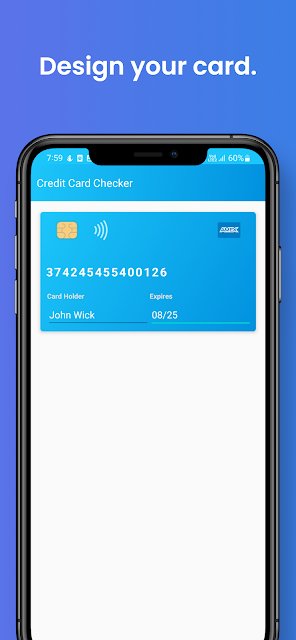
Analysis by Reviewed APKs
Credit Card Checker is a small utility for checking whether a card number passes the Luhn formula and looking up basic information from a card’s first six digits. I can see it being useful when I’m checking a number for a form or trying to identify a card type, rather than managing money or tracking purchases. Its job is narrow, and that focus is both its appeal and its main limitation.
A quick number check
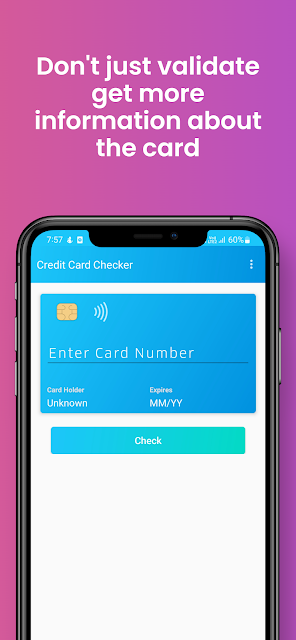
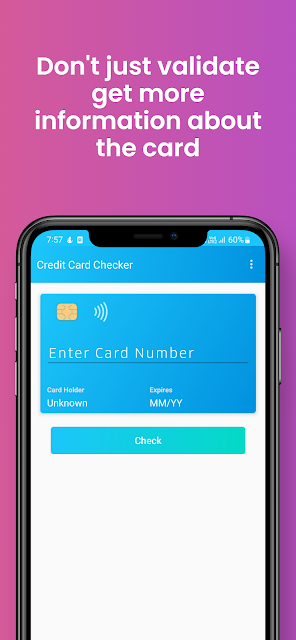
Imagine I’m helping someone fill out a payment form and they want to know whether a card number looks valid before submitting it. Credit Card Checker is built for that kind of quick check: enter a number and the app uses the Luhn formula to validate it. It can check credit, debit, and virtual card numbers, so the basic task does not depend on the card being a traditional credit card.
The other everyday use is identifying a card from its opening digits. If I have the first six digits, the BIN checker can return information such as the issuing bank, country, card type, and card level. That makes the app more of a reference tool than a payment companion. I would use it to answer a specific question, then close it, rather than leave it running as part of a daily finance routine.
A checker, not a wallet
Compared with a banking app or a card issuer’s app, Credit Card Checker does much less. It is not described as a place to see balances, review transactions, manage bills, or monitor spending. Its focus is number validation and BIN information. That narrower role may be handy when I want a quick technical check without opening a full banking app, but it cannot replace the account tools those apps provide.
It also differs from a payment processor: a number passing the Luhn check does not tell me whether a card is active, has funds available, or will be accepted for a purchase. The app describes its BIN results as public information based on the opening digits. I would treat those results as a basic reference, not as a full card or transaction verification service.
Make checks deliberate
A useful habit is to decide what I need before opening the app. For a format check, I use the card-number validation feature; for issuer details, I use the first six digits with the BIN checker. Keeping those two questions separate makes the result easier to interpret and helps me avoid expecting a bank lookup to answer whether a payment will succeed.
I would also keep the task brief and enter only what the feature needs. The description says BIN checks use the first six digits and says the app does not store or access private card data. Still, I would avoid treating a lightweight lookup as a reason to share more card information than necessary. For sensitive account questions, the card issuer remains the more appropriate source.
More From Our News Desk

Zoom Meetings, Google Meet, or Teams: Which Is Easiest to Join?

How I Build a Free Streaming Lineup With Tubi

Why Crunchyroll Is the Default Anime App for So Many Fans

YouTube TV: A Practical Guide to Cutting Cable

Rummikub and the Small Comfort of Phone Games

TeamViewer Remote Control or AnyDesk for Helping Family?
Who may find it useful
I’d recommend Credit Card Checker to someone who occasionally needs to check whether a card number is structurally valid or identify a card’s issuer details from its BIN. It is particularly suited to quick, one-off questions, rather than people looking for a broad personal-finance tool. The supported card types include Visa, Mastercard, Amex, Discover, JCB, Dankort, Switch, and Solo, among others.
It may not suit anyone who expects to manage accounts, track spending, receive transaction alerts, or confirm that a card can actually make a payment. Those jobs are outside the described feature set. I’d also be cautious about relying on a BIN result as a definitive answer about a particular account, since the app presents public information tied to the opening digits, not a complete account status.
Credit Card Checker is developed by Johnson Jeyaraj and is listed in the Finance category on Google Play. The app has over 50,000 installs and a 4.4-star rating from 122 ratings. Its content rating is Everyone. The current version shown in the provided app details is 9.1, and the stated release date is June 15, 2020.
The app is free to download, contains ads, and does not offer in-app purchases according to the provided details. Its last update is dated February 23, 2026. The minimum Android version is worth checking on Google Play, since that requirement can vary with app updates and device compatibility.
A Closer Look at Card Checks
Opening the app
When I first opened Credit Card Checker, the purpose was immediately easy to understand: it is for checking card numbers and looking up BIN details. That clarity is welcome in a utility app. There is no need to learn a larger money-management system before getting to the main task, and the described features stay focused on validation and card identification.
The setup story is simple in the available information: the app is an Android utility, and its main checks are based on a number or the first six digits. I would go in expecting a practical reference tool, not a guided financial service. Google Play shows version 9.1, while the Android version requirement is something to check against the device before installing.
The everyday experience
The core experience is a direct question-and-answer loop. I enter a card number when I want to test whether it passes the Luhn formula, or use the opening six digits when I want BIN information. That split gives the app a clear day-to-day role: it can help with a quick check without asking me to sort through account balances or transaction history.
The distinction matters because a valid number is not the same thing as an approved transaction. I would use the result as a basic number check, not as a prediction about whether a merchant will accept a card. For a payment that is failing, the issuer or payment provider is still the place to investigate account-specific issues.
Two useful checks
The standout feature is the combination of Luhn validation and BIN lookup in one app. The validator covers credit, debit, and virtual cards, while the BIN checker is designed to identify details such as bank, country, card type, and card level. That pairing covers two related but different questions without turning the app into a full account-management product.
The app description names major networks including Visa, Mastercard, Amex, Discover, and JCB, along with Dankort and Switch or Solo. It also describes access to BIN and bank-record information. I would view those details as useful context, while remembering that the BIN lookup is based on public information and the first six digits.
A quick desk routine
For a small business or anyone who handles forms, I can imagine keeping the app as an occasional reference. When a number looks mistyped, the Luhn check can answer a narrow formatting question. When I only need to identify the broad card type or issuing details, the BIN checker gives me a separate route that does not require treating every lookup as a payment attempt.
I would make the routine intentional: check only what I need, read the result as a technical clue, and use the issuer’s own channels for account questions. That keeps the app in its proper lane. It can help with a quick validation task, but it is not a replacement for a bank’s support, a spending record, or a transaction-security service.
Keep expectations modest
The main limitation is the narrow meaning of its results. Luhn validation checks whether a number fits a standard pattern; it does not establish that the card is open, belongs to the person using it, or has funds available. Likewise, a BIN lookup gives information associated with the opening digits rather than a complete view of an individual account.
The app contains ads, which is worth keeping in mind for a tool I might open only briefly. Its description says it does not store or access private card data, but I would still use sensible care with sensitive information and avoid entering details beyond what a particular check requires. Anyone seeking spending insights or fraud alerts will need a different kind of app.
Credit Card Checker has a straightforward purpose: validate card-number formatting and look up basic BIN details. I like that the two jobs are clearly related and that the app does not pretend, in its described features, to be a complete finance manager. Its usefulness depends on wanting those specific answers.
I’d try it for occasional number checks or basic card identification, while keeping issuer and payment questions with the bank or provider. If you want budgets, transaction history, or account monitoring, this is not the right fit. For a focused checker, though, the feature set is easy to understand.
Credit Card Checker Frequently Asked Questions
What is Credit Card Checker used for?
Credit Card Checker is used to check whether a credit, debit, or virtual card number passes the Luhn formula and to look up BIN details from the first six digits. The lookup can provide information such as issuing bank, country, card type, and card level. It does not serve as a spending tracker or account-management app.
Which devices can run Credit Card Checker?
Credit Card Checker is an Android app distributed through Google Play. The minimum Android version is worth checking on the store page, since compatibility requirements can vary by release and device. The provided app details do not describe an iOS or desktop version, so I would check Google Play for current Android availability.
Is Credit Card Checker free?
The app is free to download and its provided details say it contains ads, with no in-app purchases. Store information can change, so it is sensible to check the current Google Play page before installing. The app’s described purpose is number validation and BIN lookup rather than paid financial services.
Does Credit Card Checker verify that a payment will work?
No. Its number check uses the Luhn formula, which can indicate whether a number follows that validation pattern. A successful check does not establish that an account is active, has available funds, or will be accepted by a merchant. For account-specific or payment problems, contact the card issuer or payment provider.
Who is Credit Card Checker best suited to?
It may suit people who occasionally need a quick card-number validation or basic issuer information from a BIN. It is less suitable for anyone looking for budgets, transaction records, account balances, or fraud alerts. The described features are intentionally narrower than a banking or personal-finance app.
Pros
- Combines Luhn-based number validation with a separate BIN lookup.
- Checks credit, debit, and virtual card numbers.
- Provides basic bank, country, type, and card-level information.
- Free to download, with no in-app purchases.
Cons
- A valid number does not confirm account status or payment acceptance.
- Contains ads, which may interrupt occasional quick checks.
- Does not provide spending tools or transaction monitoring.
- Category
- Finance
- Version
- 9.1











