ConnectNetwork by GTL
- 12.60K
- 3.3
- Installs
- 1.00M
- Price
- Free
Screenshots
Analysis by Reviewed APKs
ConnectNetwork by GTL is for people who need to manage practical services and keep in touch with someone in a participating correctional facility. It brings account management, deposits and messaging together, including photo and video attachments. After looking through what it offers, I see a focused utility rather than an all-purpose messaging app: useful when the facility supports its services, but dependent on that facility’s options.
A Family Check-In Routine
Imagine setting aside a few minutes after work to send a note to a loved one in a facility. In ConnectNetwork, you can open your account, compose a message, save it as a draft if you are not ready to send, and attach a photo or video. That puts a few useful parts of staying in touch in one place, instead of treating a message and its attachment as separate tasks.
The same routine may include taking care of a deposit. Depending on the facility and the account involved, ConnectNetwork supports payments for phone services, trust funds, PIN debit and tablet services. I like that the app presents these as related responsibilities, since family communication can involve both a conversation and keeping a service funded. The important first step is adding the person to your account so you can see which features apply.
A Focused Alternative
ConnectNetwork is best compared with a service portal for participating facilities, not with a standard chat app or a general money-transfer tool. Its messaging and deposit options are tied to services for incarcerated people, and availability depends on the facility. That narrower purpose is the point: if you need one of the supported services, the app can bring account tasks and communication together.
It is not a general social network, and the description does not present it as a place for video calls or video visits. The supported communication feature is messaging, with options for photos and videos attached to a message. Nor should you assume every deposit type or messaging option will be available for every person. If your main need is unrelated to a participating facility, this app is unlikely to fit your routine.
Make the App Easier
A little organization helps when you use the app for more than one kind of task. I would start by creating or signing into an account, adding the person I need to reach, and checking which services are available before trying to make a payment or compose a message. That avoids planning around a feature the facility does not offer and gives you a clearer sense of which account or service a deposit is meant for.
For messaging, it can help to draft a note before sending, especially if you want to include an attachment or need to check what you want to say. ConnectNetwork supports saved drafts, inbox viewing and purchasing message credits with a credit or debit card. Depending on the facility, credits may also be sent so the recipient can reply. Treat that as a facility-dependent option, not a universal part of every exchange.
More From Our News Desk

Zoom Meetings, Google Meet, or Teams: Which Is Easiest to Join?

How I Build a Free Streaming Lineup With Tubi

Why Crunchyroll Is the Default Anime App for So Many Fans

YouTube TV: A Practical Guide to Cutting Cable

Rummikub and the Small Comfort of Phone Games

TeamViewer Remote Control or AnyDesk for Helping Family?
Who May Find It Useful
I would recommend ConnectNetwork to family members and friends who need to manage supported facility services from an Android phone. It is especially relevant if your routine includes sending messages, sharing a photo or video, or making deposits for phone, trust-fund, PIN-debit or tablet services. Having account access and several related tasks in the same app can be more convenient than handling each one as an entirely separate process.
It may not suit someone whose loved one’s facility does not support the features they need, or anyone expecting ordinary chat, video calls or a universal deposit service. The app’s usefulness depends on facility availability, so it is worth checking the options for the person you want to add before relying on a particular workflow. People who rarely need these services may also find a dedicated facility app less useful than a general communication tool.
ConnectNetwork by GTL is developed by GTL ES. On Google Play, it has more than 1 million installs and a 3.3-star rating from about 12,600 ratings. The app is free to download. The supplied store facts say it contains no ads and offers no in-app purchases; some services described in the app involve payments or message credits, so those service costs are separate considerations.
The listed content rating is Everyone. The current version in the supplied facts is 4.4.2, with a release date of January 27, 2015, and a last update date of June 4, 2026. The Android minimum version is not included in the supplied store facts, so check Google Play for device compatibility before installing.
A Closer Look at Staying Connected
Getting Started
My first impression is that ConnectNetwork is built around a clear, practical job: get into your account and reach the services that matter for a particular facility. The app description covers account creation and account information, then groups messaging and deposits among its main uses. That scope makes sense for a tool people may open to complete a specific task rather than browse for entertainment.
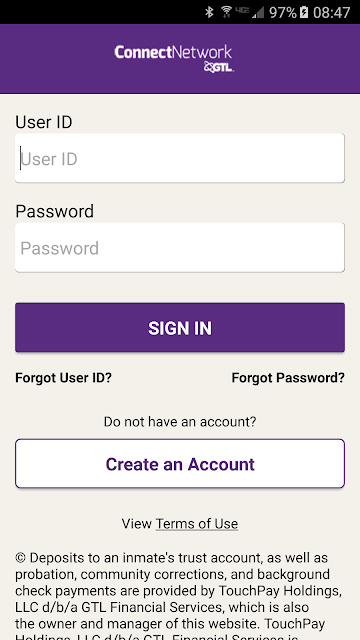
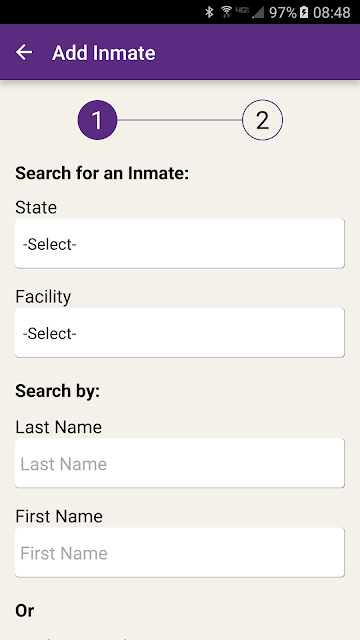
I would begin by creating or managing an account and adding the person I want to contact. The app says feature availability is based on the facility, and adding someone is how you find out which options are available to them. That makes setup more than a formality: it determines whether the messaging or payment service you came for is actually part of your situation.
Messages and Deposits
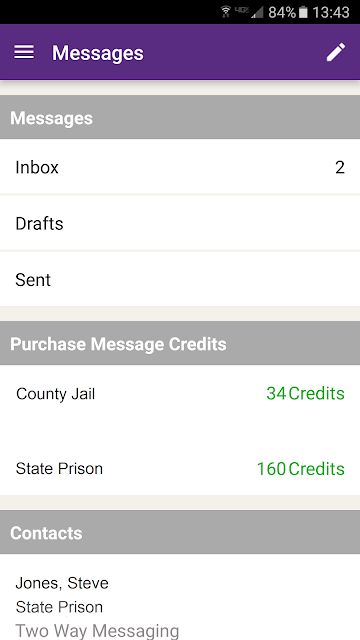
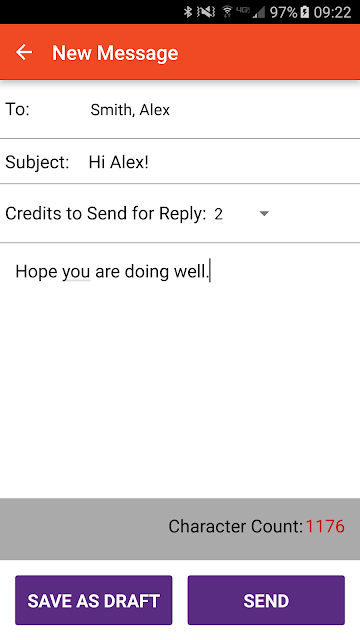
The everyday experience described here combines two kinds of upkeep: communication and account funding. In the messaging area, users can view an inbox, compose and send messages, save drafts, and add a photo or video. Message credits can be purchased with a credit or debit card. Depending on the facility, users may also send credits that allow the recipient to reply.
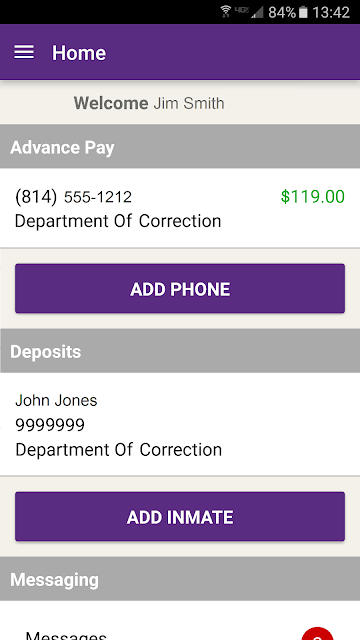
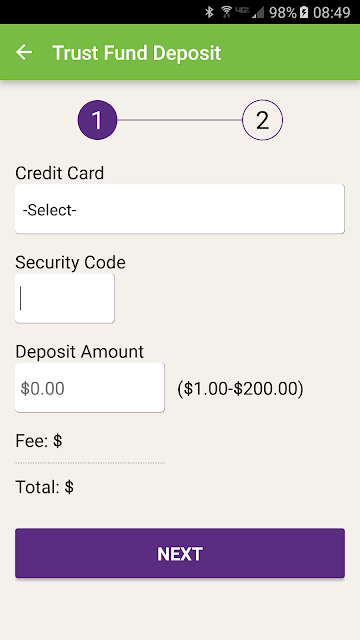
Deposits cover several different service accounts rather than one generic balance. The listed options include AdvancePay phone service, a trust fund, PIN debit for phone use, and Debit Link for tablet services. ConnectNetwork also describes a walk-in retail cash payment option. Keeping the intended service in mind matters, since these choices serve different purposes and availability varies by facility.
Options That Stand Out
The combination of message attachments and drafts is useful for people whose communication is not always a quick text. You can save a message to return to later, and the app supports adding a photo or video to a message. I would still think of these as messaging tools, not as proof that the app offers live video calls; the described feature is sending media attachments.
The cash-payment option is another notable detail. Walk-in retail is presented as an alternative to using a credit card, which may matter to someone who prefers or needs a cash route for a payment. Alongside it, the app lists several facility-related deposits and message credits. The range is helpful, but it does not mean each choice will be available for every account.
A Practical Weekly Routine
For a simple weekly routine, I would first check the inbox and handle any messages that need a reply. If I wanted to send something more considered, I could compose a draft, revisit it, then add a photo or video before sending. This keeps the communication task in one place and gives a little breathing room rather than turning every message into an immediate decision.
I would then review any deposit needs and select the relevant service account, rather than treating all payments as interchangeable. Phone, trust-fund, PIN-debit and tablet-service deposits are distinct options in ConnectNetwork. If a payment method or communication feature is unavailable, the facility may not support it. Checking those options as part of the routine helps avoid assuming that a past setup applies everywhere.
Keep Expectations Grounded
The main limitation is also the app’s defining condition: features depend on the facility. Someone may have access to messaging but not every deposit type, or may find that a particular service is not offered for the person they added. That makes ConnectNetwork less predictable as a one-size-fits-all app than its long feature list might initially suggest.
It is also worth keeping the purpose narrow. The supplied description covers account management, deposits and messaging with attachments, but it does not describe general social features or video calling. The Google Play rating is 3.3 stars, which is useful context but not a substitute for checking whether the app supports the specific facility and service you need. Confirm the relevant options before making it central to your routine.
ConnectNetwork by GTL gathers several useful tasks for families and friends of people in participating facilities: messages, attachments, drafts and deposits for different services. Its strongest advantage is having those practical jobs in one account. Its biggest caveat is that the facility determines what is actually available, so the app’s breadth will not be the same for everyone.
I would try it if you need one of its listed services and can confirm that the relevant facility supports it. It is a purposeful tool, not a replacement for ordinary messaging or a universal payment app. Start by adding the person you want to reach, check the available features, and then build your routine around those options.
ConnectNetwork by GTL Frequently Asked Questions
What is ConnectNetwork by GTL used for?
ConnectNetwork is used to manage an account, make certain facility-related deposits, and message incarcerated loved ones. Its messaging supports drafts and photo or video attachments, and users can view an inbox. Available services depend on the facility, so add the person to your account to see which options apply.
Which phones and devices support ConnectNetwork by GTL?
ConnectNetwork by GTL is listed as an Android app on Google Play. The supplied facts do not give a minimum Android version, so check the Google Play page for current device requirements and compatibility before installing. Feature availability also depends on the facility connected to the person in your account.
Does ConnectNetwork by GTL cost money?
The app is free to download, and the supplied facts say it has no ads or in-app purchases. However, its services include deposits and purchasing message credits, which are payment-related activities. Check the relevant service and Google Play information for applicable costs before using a payment option.
What Android version does ConnectNetwork by GTL require?
The minimum Android version is not provided in the supplied facts. Requirements can vary as the app is updated and by device, so check the Google Play page for the current compatibility details. The listed app version is 4.4.2, but that does not specify the Android version your phone needs.
Is ConnectNetwork by GTL right for everyone?
It is most relevant to people who need supported messaging or deposit services for someone in a participating facility. It may not suit someone seeking ordinary social messaging, video calls or a general payment app. Because features vary by facility, check the available services for the person you want to add.
Pros
- Combines messaging, drafts and media attachments with several facility-related deposit options.
- Supports account management and inbox access alongside payment and communication tasks.
- Offers walk-in retail cash payments as an alternative to credit-card use.
- Free to download, with no ads or in-app purchases listed in the supplied facts.
Cons
- Available features depend on the facility and may differ from one person to another.
- Messaging is not described as including video calls or general social features.
- The supplied facts give the app a 3.3-star Google Play rating.
- Category
- Finance
- Version
- 4.4.2











