ConnectEBT
- 19.52K
- 4.5
- Installs
- 1.00M
- Price
- Free

Screenshots
Analysis by Reviewed APKs
ConnectEBT gives EBT cardholders a place to check SNAP or cash balances, see deposits and transaction activity, and choose or change a card PIN. I see it as a practical companion for people in the states and territory it supports, especially when they want to check their account before shopping. Its purpose is focused rather than broad, and that simplicity is a plus as long as your program is covered.
A quick check before shopping
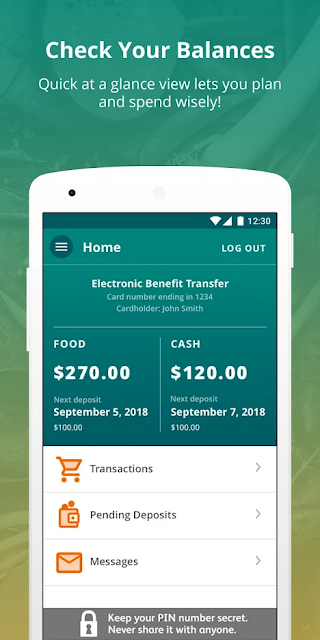
When I picture using ConnectEBT in an ordinary week, the useful moment is just before heading into a grocery store. I can open the app and check the available SNAP balance, then compare it with what I expect to spend. That small check can make a shopping trip feel more planned, rather than leaving me to rely on memory or discover the remaining amount at checkout.
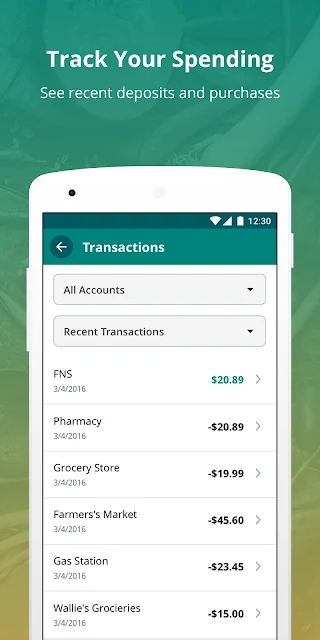
The same idea applies after a deposit or a purchase. I can look at deposit information and transaction history to understand what has changed since my last check. ConnectEBT does not replace the EBT card or make purchases for me; it gives me account details to consult. For someone who wants a straightforward view of balances and activity, that is a useful job for a phone app.
A focused account companion
Compared with keeping track of a balance mentally or checking account information through the ConnectEBT website, the mobile app puts those details on a phone. It covers the basics named in its description: available SNAP or cash balance, deposits, transaction activity, and PIN selection or changes. That makes it a focused account companion, rather than a general budgeting tool or a broad shopping and benefits directory.
The important limitation is geographic: ConnectEBT currently supports specified EBT programs, including Alabama, Georgia, Illinois, New Jersey, Pennsylvania, and several others. It is not a universal EBT app, so the first question is whether your state or territory is supported. I also would not look to it for features such as nearby store searches, spending calculators, or low-balance alerts; those are not part of the described app.
Small habits that help
I would make a quick balance check part of my routine before a grocery run, especially if I have not checked since a recent deposit or several purchases. Looking at the deposit information and transaction history together can help me make sense of the current balance. It is a modest habit, but it makes the app more useful than opening it only when I am already at the register.
Another sensible workflow is to set up access before I need the information in a hurry. ConnectEBT supports registration with EBT card information, and existing users can sign in with their ConnectEBT user ID and password. The app also offers biometric login and card scanning for registration. I would keep my sign-in method convenient and check the account when a deposit or transaction is on my mind.
More From Our News Desk

Zoom Meetings, Google Meet, or Teams: Which Is Easiest to Join?

How I Build a Free Streaming Lineup With Tubi

Why Crunchyroll Is the Default Anime App for So Many Fans

YouTube TV: A Practical Guide to Cutting Cable

Rummikub and the Small Comfort of Phone Games

TeamViewer Remote Control or AnyDesk for Helping Family?
Who may find it useful
I would recommend ConnectEBT to people who use a supported EBT program and want a direct way to check available SNAP or cash funds from a phone. It is also useful for anyone who wants to review deposits or recent account activity without relying on memory. The PIN options give it another practical account-management task, beyond simply displaying a balance.
It may not suit people whose state or territory is outside the supported list, or anyone looking for a full household budget, retailer finder, or extra spending tools. The app stays close to card information rather than trying to manage every part of a shopping routine. If your program is supported and those account basics are what you need, its narrow scope is likely a better fit than a larger app packed with unrelated features.
ConnectEBT is a finance app from Conduent Incorporated. On Google Play, it has over one million installs and a 4.5-star rating from around 19,500 ratings. The app is free to use, with no in-app purchases and no ads. Its content rating is Everyone. The description notes that message and data rates may apply, so using the app may still use your mobile plan.
The Google Play version is 2.4.1(20261005). ConnectEBT was released on April 19, 2017, and its most recent update shown here is October 28, 2026. The available details do not include a minimum Android version, so check the Google Play page on your device for compatibility information before installing.
Making EBT Details Easier to Check
Getting started
My first impression is that ConnectEBT has a clear, limited purpose: it is for checking EBT account information, not for browsing a collection of financial tools. To register, the app asks users to enter EBT card information. People who already have a ConnectEBT user ID and password can use those existing credentials in the mobile app, which gives returning users a direct route in.
The app describes biometric login and card scanning as options for login and registration. Those are useful ways to reduce friction when setting up access or returning to an account, though I would still take care to enter the correct card information. Before making this the app I reach for, I would confirm that my EBT program is among those currently supported.
Checking in day to day
The main day-to-day task is checking an available SNAP or cash balance. I can imagine opening the app while planning a grocery trip, or after getting home and wanting to understand how a recent purchase fits into the account picture. That is more convenient than trying to remember the balance from a previous visit, particularly when deposits and spending have both occurred since then.
Transaction history adds context to the number on the balance screen, while deposit information helps explain incoming funds. I like that these pieces belong together: the balance tells me where things stand, and the activity gives me a way to review what has happened. The app's value is less about doing something elaborate and more about making these checks available when they are useful.
Useful account controls
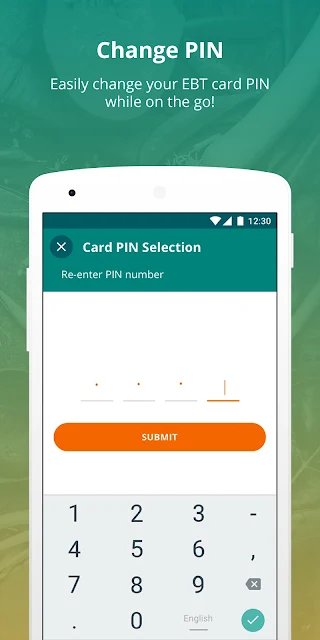
Beyond balances and activity, ConnectEBT lets users select a card PIN or change it. That gives the app a concrete account-management role, rather than making it only a read-only place to check funds. I would treat this as an occasional task rather than something I need every time I open the app, but it is useful to have it within the same account experience.
Registration can use card scanning, and the app supports biometric login. Those options address two common points of friction: entering card details during setup and signing in during later checks. I would not assume every phone or account will use those options in exactly the same way, but their presence makes the basic routine less dependent on repeatedly typing everything.
A simple weekly routine
A practical routine could start with checking the balance before shopping and glancing at deposits if the total looks different from what I expected. After a trip, I could review transaction activity to see the account changes. I would keep the routine brief: open the app when there is a specific reason, check the relevant information, and close it rather than treating it as a full budgeting session.
If I had a question about a balance, I would use both the current amount and the transaction history instead of relying on one screen alone. That approach makes the app's separate account details more useful together. It does not require a complicated system or daily logging; the benefit is simply having a convenient place to check account information when planning or reviewing spending.
Keep the scope in mind
The biggest limit is program availability. ConnectEBT currently supports Alabama, Arkansas, American Samoa, Delaware, Georgia, Illinois, Iowa, Maine, Montana, New Jersey, Ohio, Oklahoma, Pennsylvania, South Carolina, Utah, and Virginia. If your EBT program is elsewhere, this app may not serve your account. Checking that list first can save time before registration.
The app also stays deliberately narrow. Its described tools cover balances, deposits, transactions, PIN selection or changes, and login or registration options. I would not expect it to function as a complete budget planner or offer shopping discovery features. And while the app itself has no charge, the description says message and data rates may apply, so mobile connectivity can still have a cost under a phone plan.
ConnectEBT is a practical, focused option for checking EBT balances and account activity, with PIN management and convenient login or registration options alongside the core information. I like that it keeps the main jobs together without pretending to be a full finance suite. Its usefulness depends first on whether it supports your EBT program.
I would try it if I use a supported card and want a simple way to check balances, deposits, and transactions from my phone. I would look elsewhere if I needed broader budgeting or shopping tools. For the right user, ConnectEBT's modest scope is its strength: it helps answer a few everyday account questions without adding much ceremony.
ConnectEBT Frequently Asked Questions
What is ConnectEBT used for?
ConnectEBT lets users check available SNAP or cash balances, review deposit information and transaction activity, and select or change a card PIN. It also supports registration using EBT card information and offers biometric login and card scanning. Its main role is account access and checking, rather than broader budgeting or shopping features.
What devices and programs work with ConnectEBT?
ConnectEBT is an Android app available through Google Play. It currently supports EBT programs in Alabama, Arkansas, American Samoa, Delaware, Georgia, Illinois, Iowa, Maine, Montana, New Jersey, Ohio, Oklahoma, Pennsylvania, South Carolina, Utah, and Virginia. The supported list can change, so check the Google Play description to see whether your program is covered.
What Android version does ConnectEBT require?
The Android version requirement can vary by release and device. Check the ConnectEBT page in Google Play from your phone for the current compatibility details. The app's description says registration requires EBT card information, while users who already have a ConnectEBT user ID and password can sign in with those credentials.
Does ConnectEBT cost money?
ConnectEBT is free to use on Google Play, and it has no in-app purchases or ads. Its description notes that message and data rates may apply, so mobile usage may count toward charges from your phone plan. Check the store page for current app details and your mobile plan for any applicable data costs.
Is ConnectEBT a good fit for every EBT user?
It can be a good fit if you use a supported EBT program and want to check balances, deposits, transactions, or PIN options from a phone. It may not help if your program is outside its supported locations, and it is not a general budgeting or retailer-finding app. Check the current supported list in Google Play before registering.
Pros
- Combines balance checks, deposit details, and transaction history in one focused app.
- Includes PIN selection or changes alongside everyday account information.
- Offers biometric login and card scanning for supported setup and access flows.
- Free to use, with no ads or in-app purchases.
Cons
- Currently supports only a specified set of state and territory EBT programs.
- Does not aim to provide broad budgeting or shopping discovery tools.
- Mobile message and data rates may apply under your phone plan.
- Category
- Finance
- Version
- 2.4.1(20261005)