CIBC Mobile Banking®
- 54.38K
- 3.8
- Installs
- 5.00M
- Price
- Free

Screenshots
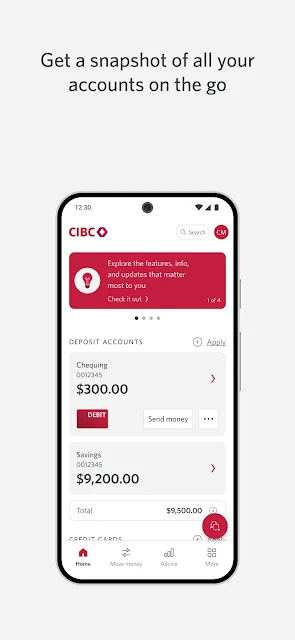
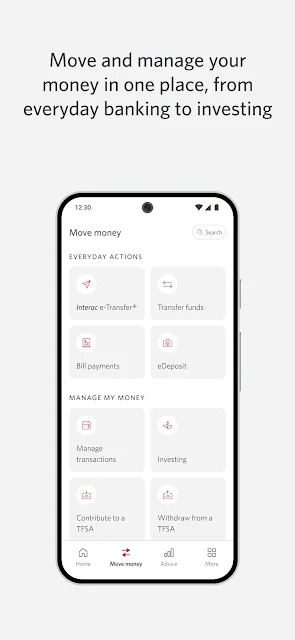
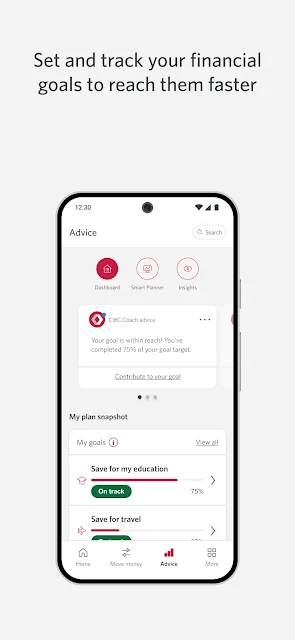
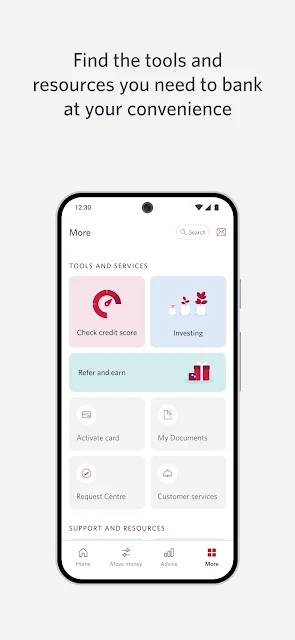
Analysis by Reviewed APKs
CIBC Mobile Banking® is for handling everyday banking from an Android phone, from checking an account snapshot to depositing a cheque or sending an Interac e-Transfer. I see its main appeal in bringing several practical tasks together rather than making banking feel like a separate project. It looks especially useful for CIBC customers who want quick access while out and about, though it is not a replacement for every conversation with a bank.
A banking errand, handled
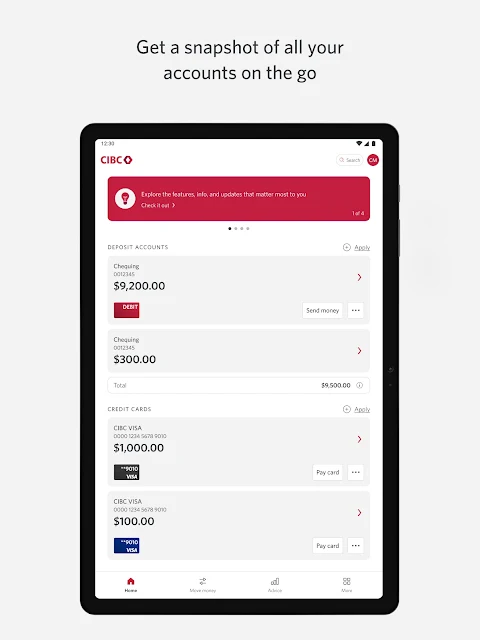
Picture me checking my accounts while waiting for a coffee: the app’s account snapshot is designed to put the overview in one place, so I can take stock without making a trip to a branch. Later, if a cheque arrives, I can use the phone camera to deposit it. That kind of everyday sequence is the app’s core job: bring routine banking actions within reach when I have a few spare minutes.
The same convenience applies when a friend needs their share of dinner money. CIBC describes instant Interac e-Transfers, along with instant, post-dated and recurring payments. I can see the value in setting up a payment when I remember it, rather than hoping I’ll recall it on the due date. Those functions make the app useful in small, scattered moments, not just during a dedicated monthly review.
A bank app, not a budget coach
Compared with visiting a banking centre or making a phone call for ordinary transactions, this app puts account access and several common tasks on a phone. It also includes branch and ATM search, application status, a credit score and a virtual assistant. That is a broad toolkit for CIBC customers who prefer self-service, especially when the task is simple enough to do without a longer conversation.
I would not treat it as a general-purpose finance planner or a way to manage accounts at every bank. Its described functions center on CIBC banking, payments and related services. If I need personalized help beyond the assistant’s everyday banking support, a phone call or banking centre may still make more sense. The app can streamline routine access, but it does not turn every banking question into a quick tap.
Make small tasks easier
I’d get more from the app by using it as a quick check-in rather than waiting until a problem needs attention. A glance at the account snapshot can help me stay oriented, while setting up a recurring payment can take a repeated task off my mental list. For a bill that should wait until a particular date, the post-dated option offers a more deliberate alternative to paying immediately.
Other features fit naturally into specific moments. I could look up nearby banking hours before heading out, use the currency converter while planning a trip, or check the TransUnion credit score from within the app. The virtual assistant is described as available around the clock and able to handle everyday transactions. I’d keep those tools in mind as useful shortcuts, rather than opening the app only when I need to move money.
More From Our News Desk

Zoom Meetings, Google Meet, or Teams: Which Is Easiest to Join?

How I Build a Free Streaming Lineup With Tubi

Why Crunchyroll Is the Default Anime App for So Many Fans

YouTube TV: A Practical Guide to Cutting Cable

Rummikub and the Small Comfort of Phone Games

TeamViewer Remote Control or AnyDesk for Helping Family?
Who may find it useful
I’d recommend CIBC Mobile Banking to CIBC customers who want account access and common banking tasks close at hand. The combination of account snapshots, cheque deposits, scheduled payments, Interac e-Transfers and branch search covers a varied set of everyday needs. It may be particularly convenient for someone who handles banking in brief pauses during the day and appreciates having several services together in one app.
It may be less useful to someone who does not bank with CIBC, or to anyone looking for a broad budgeting system rather than access to banking services. People who prefer to discuss transactions with a person may also continue to rely on telephone banking or a banking centre. I’d view the app as a practical digital route for routine tasks, with other support options still relevant when a situation calls for them.
CIBC Mobile Banking® is developed by CIBC and is available on Google Play for Android. It has more than 5 million installs and a 3.8-star rating from about 54,000 ratings. The app is free to download, with no in-app purchases or ads. Its content rating is Everyone. The Android version requirement can vary with the device, so I’d check the Google Play details for compatibility before installing.
The app’s version varies with device. Google Play records its release date as June 14, 2011, and its most recent update as October 19, 2026. It supports English and French. These details help set expectations for the basic download, but device compatibility and the version offered can differ, so the store’s current information is the best place to check before getting started.
How CIBC Banking Fits a Busy Day
A clear starting point
When I first opened an app like this, what I would want is a fast path to the essentials: a view of my accounts and a clear route to common tasks. CIBC says its app provides an account snapshot, and that feels like a sensible starting point for a mobile banking session. I can imagine checking the overview before deciding whether I need to make a payment or simply close the app.
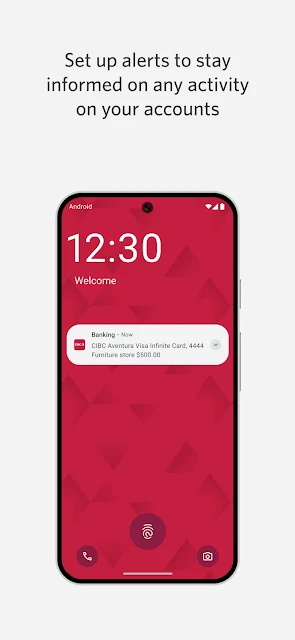
The sign-in options described include fingerprint, face ID or password. The app also supports secure delivery of one-time verification codes and push notifications. Those features speak to access and account communication, rather than just convenience. Since the app handles banking, I’d still take a moment to understand the sign-in and notification choices that suit my own device and routine.
Everyday banking in reach
The day-to-day experience is built around practical actions. I can deposit a cheque by taking a picture, send or receive money through Interac e-Transfer, and set up payments for now or a later date. Instead of reserving these errands for a branch visit, I can handle the app-supported ones when they come up. That is a useful shift for routine banking, provided I am already comfortable managing those tasks digitally.
I also like that the described toolkit is not limited to moving money. The app can help locate branches, banking hours, ATMs and mortgage advisors. If I’m away from home and need to find a nearby banking machine, a search in the same app is more convenient than switching between separate sources. These extras make it feel like a mobile companion to the bank, not only a transaction screen.
Useful extras beyond transfers
A few features stand out because they address situations that happen less often than checking a balance. The app includes a TransUnion credit score that CIBC describes as free and says will not affect the score. It also offers travel tools with a currency converter, tips and emergency numbers. I’d be more likely to open those sections when a specific need arises, but having them alongside everyday banking is a welcome convenience.
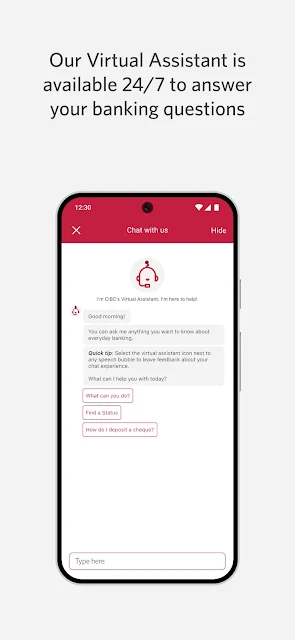
The virtual assistant is another notable addition. CIBC says it is available 24/7, can answer banking questions and can perform everyday transactions on the customer’s behalf. That gives the app a route to help without requiring me to call for every routine question. I would think of it as an option for straightforward needs, not assume it can resolve every account issue or replace direct support.
A simple weekly rhythm
A practical routine might start with a quick account check at the beginning of the week. If I see a payment I need to make, I can set it up then, choosing an immediate, post-dated or recurring schedule as appropriate. When a cheque comes in, I can use the camera deposit feature rather than keep it on my errands list. The point is to use the app in short, purposeful visits.
For a trip, I could check the currency converter and travel tips before leaving, then keep the branch and ATM search in mind if I need banking services away from home. If I have a question during an ordinary banking task, the virtual assistant is described as available at any hour. These features make most sense when I remember they exist and reach for them at the moment they are relevant.
Keep expectations grounded
A mobile app is only useful when it fits the way I already bank. This one is focused on CIBC services, so it is not the right hub for someone seeking to bring unrelated banks together. Its feature set is broad, but the description does not make it a full financial planning or budgeting product. I’d choose it for account access and banking actions, not expect it to take on every money-management job.
There is also a reasonable boundary between self-service and human help. The virtual assistant is positioned for questions and everyday transactions, while CIBC provides telephone banking and banking centres for other needs. I would keep those options available rather than assuming every issue can be settled in the app. And because Android compatibility varies by device, checking the current store requirements before installing is a sensible final step.
CIBC Mobile Banking® brings a useful range of everyday banking tasks into one Android app. Account snapshots, cheque deposits, scheduled payments, Interac e-Transfers and branch search give it clear practical value, while the travel tools and virtual assistant broaden its usefulness in specific situations. Its strongest case is convenience for existing CIBC customers, not a claim to replace every kind of financial service.
I’d recommend giving it a try if you bank with CIBC and want to handle routine tasks from your phone. If you prefer in-person help or need a cross-bank budgeting tool, it may not be enough on its own. For everyone else, the fit is straightforward: it is a capable mobile route to CIBC banking, with a useful collection of extras.
CIBC Mobile Banking Frequently Asked Questions
What is CIBC Mobile Banking® used for?
CIBC Mobile Banking® lets customers access account snapshots and handle tasks such as cheque deposits, payments and Interac e-Transfers. It also includes branch and ATM search, a TransUnion credit score, travel tools and a virtual assistant. The described features focus on CIBC banking, so it is best understood as a mobile companion for CIBC customers.
Which devices can run CIBC Mobile Banking®?
CIBC Mobile Banking® is available on Android through Google Play. The required Android version can vary by device, so check the current Google Play information for compatibility before installing. The app version also varies with device. Its description supports English and French.
Does CIBC Mobile Banking® cost anything?
The app is free to download on Google Play, and the provided store details show no in-app purchases or ads. That covers the app itself; it does not describe fees that may apply to banking services or transactions. For current service terms, check CIBC’s information in the app or through its usual banking channels.
Can CIBC Mobile Banking® deposit cheques?
Yes. CIBC describes a cheque deposit feature that uses a picture taken with the phone. The app also supports Interac e-Transfers and instant, post-dated or recurring payments. These are practical options for routine tasks, while more involved questions may still call for telephone banking or a visit to a banking centre.
Who should use CIBC Mobile Banking®?
It is aimed at people who bank with CIBC and want convenient access to accounts and everyday banking tools on an Android device. It may be less suited to people looking for a general budgeting app or a way to manage accounts across different banks. Anyone who prefers face-to-face support can continue to use a CIBC banking centre.
Pros
- Combines account snapshots, cheque deposits, payments and Interac e-Transfers in one app.
- Includes branch and ATM search for banking needs away from home.
- Travel tools and a 24/7 virtual assistant add useful options beyond transactions.
- Supports fingerprint, face ID or password sign-in.
Cons
- Its banking features are centered on CIBC rather than multiple banks.
- Android compatibility varies by device, so checking requirements is important.
- The virtual assistant may not replace human support for every banking question.
- Category
- Finance