CFC Mobile Access
- 17.11K
- 4
- Installs
- 500.00K
- Price
- Free

Screenshots
Analysis by Reviewed APKs
CFC Mobile Access is a phone and tablet app for managing eligible Continental Finance credit card accounts. It suits cardholders who want to check a balance, review recent transactions, or make a payment without reaching for a computer. After looking through its stated tools, my take is that it has a useful, focused job: it brings everyday account tasks together, though it is only relevant if you have one of the supported cards.
A quick account check
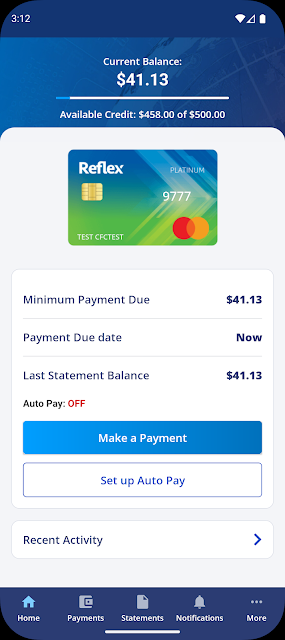
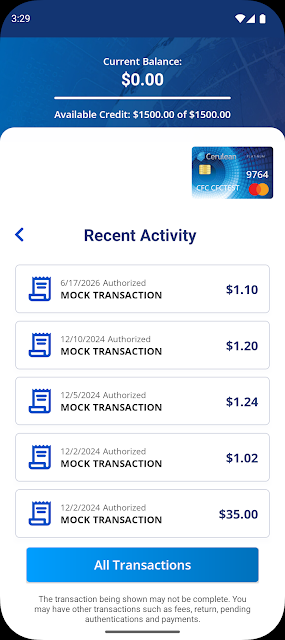
Picture getting ready to leave for work and wanting to check whether a recent card purchase has posted. CFC Mobile Access is built for that sort of small, practical task: cardholders can check their balance and recent transactions from a smartphone or tablet. I like the idea of having those basics together, since a quick look at account activity can fit more easily into a busy day than sitting down at a computer.
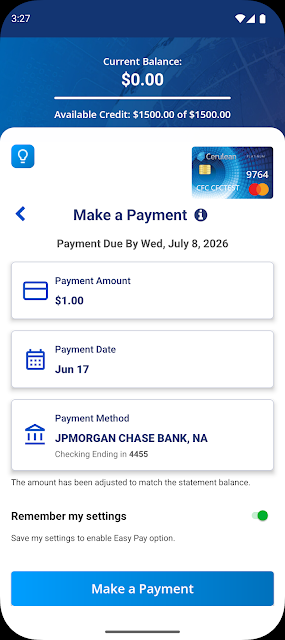
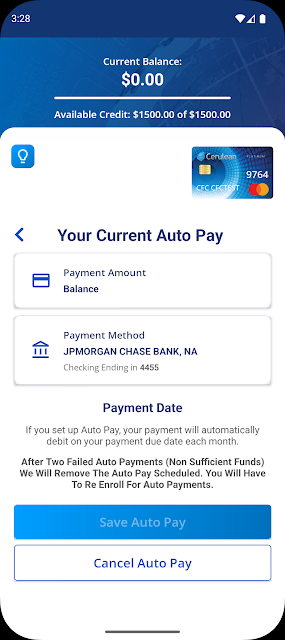
The app also covers the next step if that check turns into an action. You can make a payment, pay bills, and schedule payments, so there is a path from reviewing the account to handling a routine payment. If a card goes missing, the app also lets you report it lost or stolen. Those are specific account-management jobs, rather than a broad set of general-purpose money tools.
A card account companion
I would think of CFC Mobile Access as a companion to an eligible card account, not as a replacement for a full banking or budgeting app. Its focus is checking account information and handling card-related tasks. That narrower scope can be a plus if all you want is a direct way to manage a supported Continental Finance card, without extra features that are beside the point.
The important limitation is eligibility: the service is for cardholders of the Verve, Reflex, Surge, FIT, Matrix, Cerulean, Build, Revel, and Today Mastercards. It is not a general account dashboard for cards from any issuer, nor is it presented as a tool for tracking spending across multiple providers. If your card is outside that group, this app is unlikely to fit your routine.
Make it part of a routine
A useful habit would be to check recent transactions when you are already reviewing your card balance, rather than opening the app only when something feels urgent. That gives the account check a clear purpose and may help you spot a payment or purchase you want to follow up on. The app’s core tools are simple enough to think of as occasional maintenance, not something that demands constant attention.
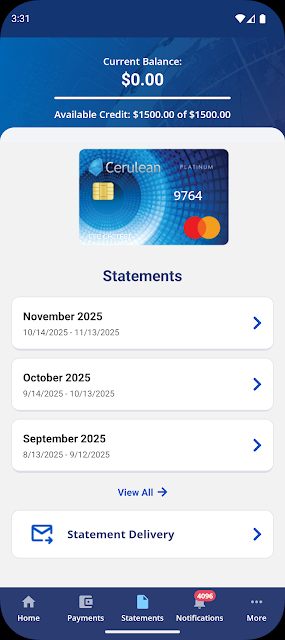
You can also use it around a payment routine: look over the account, then make or schedule a payment as needed. Monthly statements are available up to five days earlier through the app, which could be handy if you prefer to review a statement as soon as it is accessible. Cardholders can also reach their Cardholder Agreement and add an authorized user, so it may be worth remembering those options when account details change.
More From Our News Desk

Zoom Meetings, Google Meet, or Teams: Which Is Easiest to Join?

How I Build a Free Streaming Lineup With Tubi

Why Crunchyroll Is the Default Anime App for So Many Fans

YouTube TV: A Practical Guide to Cutting Cable

Rummikub and the Small Comfort of Phone Games

TeamViewer Remote Control or AnyDesk for Helping Family?
Who may find it useful
I would recommend CFC Mobile Access to someone who already holds one of the supported Continental Finance cards and wants basic account tasks within reach on a phone or tablet. Checking a balance, looking at recent transactions, and making or scheduling payments are clear reasons to keep a dedicated card app available. Access to statements and the Cardholder Agreement adds some practical value beyond the most frequent checks.
It may not suit someone looking for a broad budgeting system, multi-bank overview, or card management for an unrelated issuer. The app’s purpose is tied to a particular set of cards, so that restriction matters more than any general preference about mobile apps. If you do not have an eligible account, there is little reason to install it; if you do, it offers a straightforward set of cardholder tasks.
CFC Mobile Access is developed by Continental Finance Company and is a free Android app. Google Play shows over 500,000 installs and a 4.0-star rating from around 17,000 ratings. The app is rated Everyone. Its stated release date is June 22, 2017, and the supplied current version is 2.1.56.
The app has no in-app purchases and contains no ads. The supplied last-update date is November 3, 2026. A minimum Android version was not included in the available app details, so check Google Play for the requirement that applies to your device. These figures describe the app, while account access and card eligibility depend on having a supported card.
Everyday Card Tasks, Kept Close
A focused first impression
When I first considered what CFC Mobile Access is for, the scope stood out: it is meant for cardholders, not for someone browsing general finance tools. The useful starting point is having an eligible account. From there, the app’s stated purpose is to let you reach account information and handle common card tasks from a phone or tablet.
I would approach getting started with the practical question of whether my card is supported. The listed options include Verve, Reflex, Surge, FIT, Matrix, Cerulean, Build, Revel, and Today Mastercards. That list makes the intended audience clear, although it also means the app is not a universal card wallet. Once that eligibility fits, the feature set is easy to understand.
The everyday account loop
The day-to-day experience described here follows a simple loop: check the balance, review recent transactions, and decide whether a payment needs attention. I find that kind of focused sequence easier to understand than an app that tries to cover every aspect of personal finance. It is especially relevant when a quick account check is all you need between other errands.
Payments are part of that same routine. CFC Mobile Access lets cardholders make payments, pay bills, and schedule payments. That gives it a role beyond simply displaying an account snapshot. I would still describe it as a card-management tool rather than a place to plan a household budget, since its stated functions center on the supported account.
Useful account details
A few features add value beyond the basic balance check. The app provides access to monthly statements up to five days earlier, along with the Cardholder Agreement. I can see those being useful when someone wants to review account information without waiting to open a paper document or searching for the agreement separately.
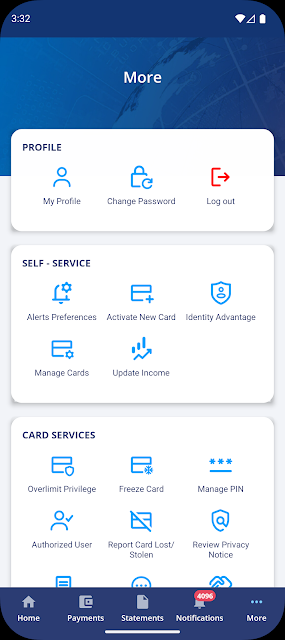
The option to add an authorized user is another account-specific task that may not come up often, but can matter when circumstances change. There is also a way to report a card as lost or stolen. These features keep the app’s emphasis on managing the card relationship, rather than adding unrelated tools for broader financial planning.
A practical payment routine
A realistic routine might be to open the app when you have a few minutes, check the balance and recent transactions, and then handle a payment if one is due for your own schedule. The ability to schedule payments can help make that task fit into a planned routine. I would keep the habit simple: review the account, take the action you need, and close the app.
Statement access gives a second, less frequent reason to check in. Since monthly statements can be available up to five days earlier, you might use the app when you want to look over the month’s account information. I would not assume that checking the app alone replaces any other account communication you rely on; its stated role is access to card account tools and documents.
Keep the scope in mind
The main limitation is the supported-card list. CFC Mobile Access is not described as an app for every Mastercard or every credit card, so a cardholder should confirm that their particular account belongs to one of the named programs. That eligibility requirement defines the app more than the feature list does.
Its focused purpose also sets expectations. The described features cover balances, transactions, payments, bills, statements, the agreement, authorized users, and lost-or-stolen reporting. If you want a general-purpose money manager or tools for accounts from different providers, this is not presented as that kind of product. It is most useful when your goal is straightforward management of an eligible card.
CFC Mobile Access has a practical, clearly bounded role: it gives eligible cardholders a mobile route to account checks, payments, statements, and a few important card tasks. I like that the use case is easy to grasp. The trade-off is equally clear: the app is relevant only to people with one of the supported Continental Finance cards.
If that describes you and you want those account basics on a phone or tablet, CFC Mobile Access is worth considering. If you are looking for broader budgeting or management across unrelated cards, I would look elsewhere. Its value rests on whether its specific card tools match the routine you already have.
CFC Mobile Access Frequently Asked Questions
What is CFC Mobile Access used for?
CFC Mobile Access is for managing eligible Continental Finance card accounts. Cardholders can check a balance and recent transactions, make or schedule payments, pay bills, access monthly statements and the Cardholder Agreement, add an authorized user, or report a card lost or stolen. It is focused on card account tasks rather than general budgeting.
Which devices can run CFC Mobile Access?
CFC Mobile Access is an Android app intended for use on a smartphone or tablet. The minimum Android version can vary by app release and device, so check the Google Play store page for the requirement that applies to your device. It is designed for cardholders to manage their account on the go.
Does CFC Mobile Access cost money?
CFC Mobile Access is free to download and use as a service for eligible cardholders. The supplied app details show no in-app purchases and no ads. Card eligibility is separate from the app’s price: it is for holders of the named supported cards. Check Google Play for current store information.
Which cards work with CFC Mobile Access?
The app is for cardholders of the Verve, Reflex, Surge, FIT, Matrix, Cerulean, Build, Revel, and Today Mastercards. It is not described as a general tool for cards from other issuers. If you are unsure whether your account is eligible, check the app information in Google Play or consult your card materials.
Is CFC Mobile Access right for me?
It may suit you if you have a supported card and want mobile access to balances, transactions, payments, bills, and account documents. It may not suit you if you need a general budgeting app or want to manage cards from different providers in one place. Its usefulness depends on having an eligible account.
Pros
- Combines balance checks, recent transactions, and payment tasks for supported cardholders.
- Offers access to monthly statements up to five days earlier.
- Includes card-specific tools such as lost-or-stolen reporting and authorized-user additions.
- Free to use, with no in-app purchases or ads.
Cons
- Only applies to cardholders of the named Continental Finance card programs.
- Its stated tools focus on card management, not broad budgeting across providers.
- The minimum Android requirement is worth checking for your particular device.
- Category
- Finance
- Version
- 2.1.56











