Bible App by Olive Tree
- 132.23K
- 4.7
- Installs
- 1.00M
- Price
- Free

Screenshots
Analysis by Reviewed APKs
Bible App by Olive Tree is a reading and study app for people who want to keep Scripture, notes, and reference materials together on a phone. It suits both a quick daily reading habit and a slower, more research-focused session. I like that it works offline and includes several Bible translations, though the breadth of paid resources can make the experience feel bigger than a simple reading app.
A Reading Session Anywhere
When I first opened Bible App by Olive Tree, I pictured using it during the small gaps in a normal day: a few minutes before work, a quiet lunch break, or some reading while traveling without reliable Wi-Fi. The app is designed to keep Bible text and study resources available offline, so a connection does not have to determine whether I can read. That makes it practical for a routine built around short, flexible sessions.
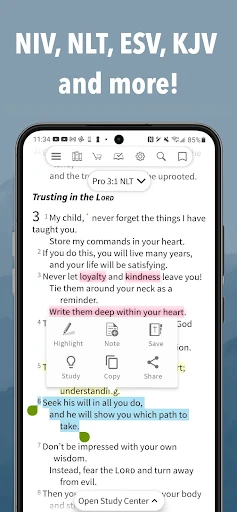
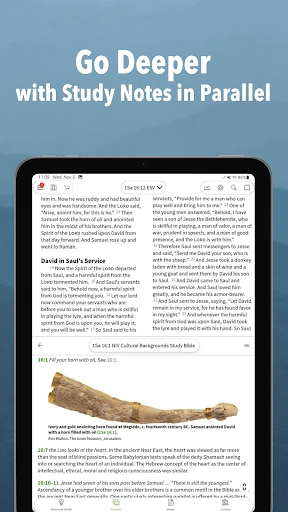
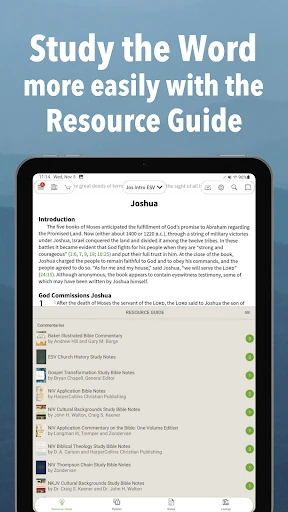
For a passage that raises questions, the app can bring study resources alongside the Bible rather than leaving me to jump between separate references. Its Study Center and Resource Guide are intended to help keep related material close to the text, with resources tracking verse by verse. I can also highlight a passage, save a note, or mark my place. That combination gives a quick reading session room to become a more considered study.
More Than a Reading App
A straightforward Bible reader is usually the better fit when all I want is to open a translation and read without considering extra material. Olive Tree is broader: it combines Bible texts with reading plans, devotionals, audio Bibles, maps, study Bibles, commentaries, and other reference resources. Some are free and some are paid. I see that depth as useful for readers who like to explore context, rather than as a requirement for every visit.
It is not a general-purpose ebook reader or a substitute for a focused reference book collection. Its materials are centered on Bible reading and study, with options such as Greek and Hebrew tools and commentaries. That makes it more specialized than a basic reading app, but also means the number of choices can feel like extra work if I only want a clean page of text. Casual readers can stick to the Bible itself.
Small Habits That Help
I get more value from the app when I leave a trail for my next session. A highlight can mark a passage worth revisiting; a note can capture a question or a thought while it is fresh; and a book ribbon can make it easier to return to a reading spot. Tags offer another way to organize saved material. These tools are modest, but they help turn a series of brief visits into a more continuous personal study.
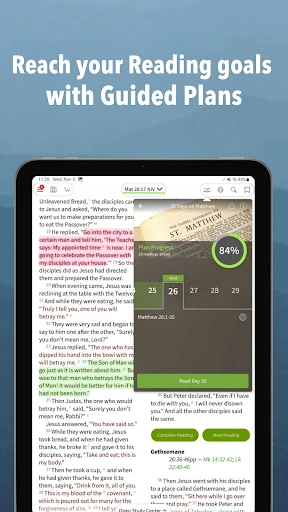
Reading plans and devotionals can give a session a little structure when choosing a passage feels like one decision too many. The app also offers a daily Bible verse option. For longer study, I can bring in a commentary, study Bible, or other resource when it fits the question at hand. Highlights, notes, and resources sync between devices, which is useful when I move from reading on one device to another.
More From Our News Desk

Zoom Meetings, Google Meet, or Teams: Which Is Easiest to Join?

How I Build a Free Streaming Lineup With Tubi

Why Crunchyroll Is the Default Anime App for So Many Fans

YouTube TV: A Practical Guide to Cutting Cable

Rummikub and the Small Comfort of Phone Games

TeamViewer Remote Control or AnyDesk for Helping Family?
Who Will Get the Most From It
I would recommend Olive Tree to readers who want more than a digital copy of a Bible, especially people who like to compare translations, save observations, or consult references while reading. Its offline access is a real convenience for travel and places with patchy connections. The mix of included and paid resources also lets readers begin with the core app and explore additional material if their study habits call for it.
It may be less appealing to someone who wants the simplest possible reading screen and has no interest in notes, plans, audio, or study references. The catalog of resources creates choice, but that choice can be a distraction if the goal is only to read a few verses and close the app. I would start with the included translations and free materials, then decide whether any paid tools actually suit my routine.
Bible App by Olive Tree is developed by Gospel Technologies and is listed in Google Play under Books & Reference. It is free to install, has more than one million installs, and holds a 4.7-star rating from about 132,000 ratings. The app is rated Everyone, and Google Play indicates that it contains no ads.
The app offers in-app purchases, with listed products ranging from $0.99 to $399.99 per item. The description also gives subscription options for Bible Study Packs: $5.99 monthly, $29.99 every six months, or $59.99 yearly, each with a 14-day free trial. The current version is 8.1.4.0.2943, and the last update shown is October 19, 2026.
A Study Desk That Travels With You
Opening the App
My first impression is of an app meant to serve both quick reading and deeper study, rather than one narrow task. The included translations named in the description include NIV, ESV, KJV, and NKJV, with more available. I can begin with a familiar text and explore other material later. That is a sensible starting point, although the wider resource catalog makes the app feel more like a toolkit than a bare-bones reader.
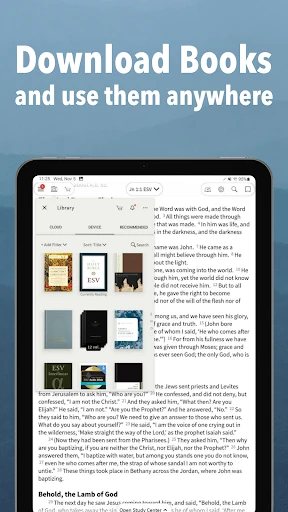
Getting started does not require committing to a paid library. The app describes hundreds of free resources alongside paid options, so I can try the reading experience before deciding whether I want more. Offline access is another practical part of the setup: the description says Bible text, audio Bible, and other study tools can be used without Wi-Fi. For trips or commutes, that promise makes the app easier to fit into everyday life.
Reading Day to Day
The core job is still reading Scripture, and the extra tools make most sense when they support that job rather than compete with it. I can return to a passage, save a place with a book ribbon, or highlight and annotate as I go. Those actions are useful during an unhurried evening session, but they also work for brief visits when I have only a few minutes to read.
The ability to keep study material close to the text is the part that changes the feel of a session. Rather than treating a commentary or study resource as a separate destination, Olive Tree describes its Study Center and Resource Guide as ways to use material alongside the Bible and track verse by verse. I would use that when a passage prompts a question, not necessarily for every reading.
Tools Beyond the Text
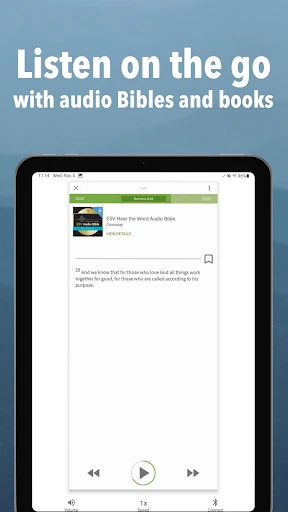
The range of resources is the app’s defining feature. Alongside reading plans and devotionals, the catalog includes audio Bibles, Bible maps, study Bibles, commentaries, ebooks, audiobooks, and Greek and Hebrew tools. That breadth can support different kinds of reading, from listening to a Bible to checking a word or consulting a reference. The description also mentions resources in several languages, including Spanish, Portuguese, Chinese, and French.
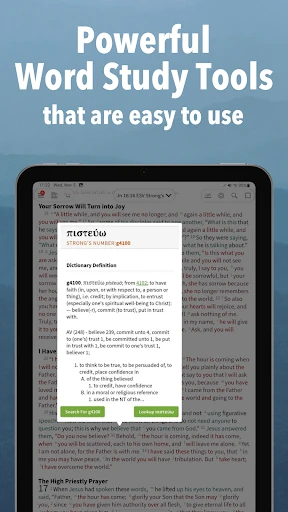
Some tools are available as purchases, and the description names examples such as study Bibles, audio editions, interlinear Bibles, and original-language texts. It also describes word-study Bibles with Strong’s numbers, where a tap can bring up definitions of words in the original languages. Those options are helpful for readers who want to dig further, but I would treat them as optional additions rather than assume every resource is included.
A Routine That Sticks
A practical way to use Olive Tree is to give each session a simple shape: follow a reading plan or choose a passage, read without rushing, and save only the passages or questions I expect to revisit. That avoids turning note-taking into a task of its own. If I want more context, I can bring in a relevant study resource alongside the text, then leave a note that helps me pick up the thread next time.
For a session away from home, offline availability can make the routine less dependent on a connection. At home, device syncing can help carry highlights, notes, and resources between devices, according to the description. I would keep a few consistent habits—marking a place, tagging useful notes, and checking a plan when I need structure—rather than trying to explore every catalog category at once.
Keep the Scope in View
The app’s biggest strength can also be its main limitation: there is a lot to browse. Free resources and paid materials sit within a wider collection, and the description gives a broad range of possible study tools. If I only want a lightweight reader, that depth may feel unnecessary. Starting with a translation and a few basic reading tools keeps the experience focused while leaving room to add resources later.
It is also worth separating the free app from the cost of a larger study library. The app is free, but in-app purchases are available, and Bible Study Pack subscriptions are described as auto-renewing, with monthly, six-month, and yearly options. The 14-day trial and subscription terms are part of that offer. I would check the current Google Play purchase details before choosing a paid option, since app-store terms can change.
Bible App by Olive Tree is a capable choice for readers who want Scripture and study tools in one place. Its offline access, notes, highlights, plans, and verse-linked resources make it useful for both quick reading and longer study. I especially like that I can begin with included material and build a more involved setup only if I need one.
I recommend it to people who enjoy exploring context and keeping personal study notes, as well as readers who value offline access. If all you want is the least complicated way to read a passage, a simpler app may suit you better. Olive Tree’s appeal is its flexibility, and the experience is best when I use that flexibility selectively.
Bible App by Olive Tree Frequently Asked Questions
What is Bible App by Olive Tree used for?
Bible App by Olive Tree is for reading the Bible and exploring related study material. It includes Bible translations and offers tools such as reading plans, devotionals, audio Bibles, maps, study Bibles, commentaries, and language resources. Readers can highlight passages, make notes, add tags, and save their place. Some resources are free, while others are available as in-app purchases.
Which devices can run Bible App by Olive Tree?
The app is available for Android through Google Play. The description also says that highlights, notes, and resources can sync between devices. For the current device and software requirements, check the Google Play store page, since compatibility details may vary by device and app update.
What Android version does Bible App by Olive Tree require?
The Android version requirement can vary with the current app release and device. Check the Google Play store page for the requirement that applies to your phone or tablet before installing. The app’s description says that Bible text, audio Bible, and other study tools can be accessed offline, but setup and resource availability may depend on what you use.
Does Bible App by Olive Tree cost money?
The app is free to install and offers in-app purchases. Google Play lists in-app products from $0.99 to $399.99 per item. The description gives Bible Study Pack subscriptions at $5.99 per month, $29.99 every six months, or $59.99 per year, with a 14-day free trial. Check Google Play for current prices and purchase terms.
Is Bible App by Olive Tree good for beginners?
It can suit beginners who want to start with a Bible translation and gradually explore reading plans or study resources. It may feel like more than necessary for someone who wants only a minimal reading app, because the catalog includes many kinds of material. Starting with the included Bible texts and free resources is a practical way to see whether the extra tools help.
Pros
- Bible text and study resources are designed to remain accessible offline.
- Highlights, notes, tags, and bookmarks support a personal study routine.
- Study materials can sit alongside Bible text and track verse by verse.
- Includes several translations and offers a broad range of additional resources.
Cons
- The wide resource catalog may feel overwhelming for simple daily reading.
- Some translations and study tools require in-app purchases.
- Subscription choices add another cost decision for readers seeking guided resources.
- Category
- Books & Reference
- Version
- 8.1.4.0.2943











