Arlo Secure: Home Security
- 238.79K
- 4.1
- Installs
- 5.00M
- Price
- Free
Screenshots
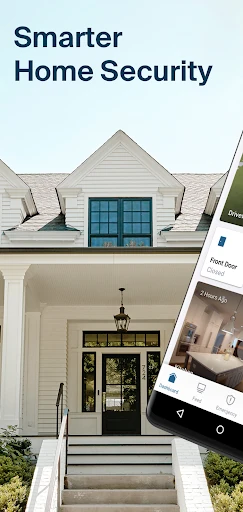
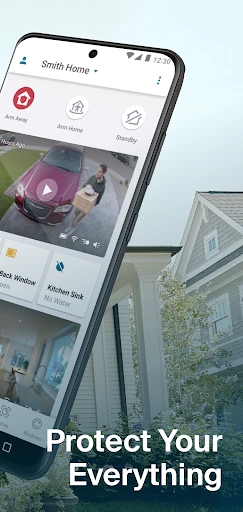
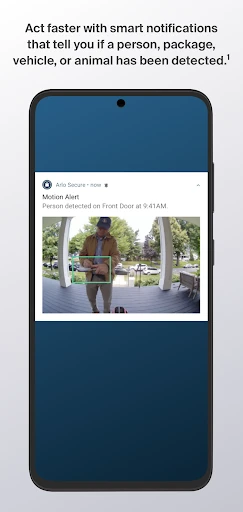
Analysis by Reviewed APKs
Arlo Secure: Home Security is a companion app for managing Arlo cameras, doorbells, floodlight cameras and other security features from a phone. I see it suiting people who want a single place to check activity, adjust how their system is armed and review recorded events. Its appeal is practical rather than flashy: it brings several useful controls together, though some features depend on a paid plan and compatible devices.
A quick check from anywhere
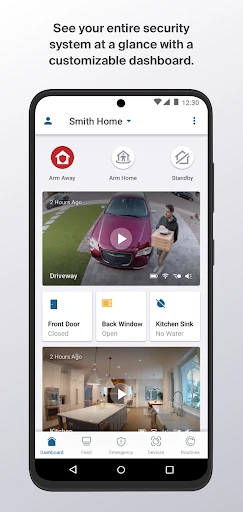
Imagine leaving home in the morning and wondering whether a delivery arrived while you were out. With an Arlo camera or doorbell connected, the app gives you a place to check the system’s status and view video from recorded events. The customizable Dashboard is meant to put key controls and information together, so a quick look at your phone can replace opening separate controls for each part of the setup.
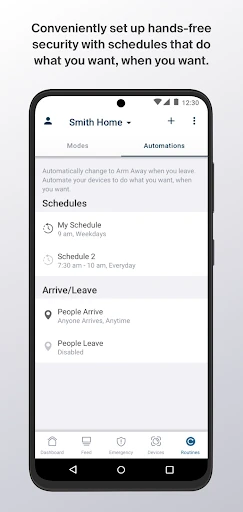
I can see the value most clearly in small, ordinary moments: checking activity between errands, making sure the system is armed before bed, or looking back at a missed event after a busy afternoon. Modes let you arm or disarm with one tap, while schedules can handle those changes automatically. The practical benefit is less about watching a screen constantly and more about having a straightforward way to check in when something prompts you.
A hub, not a camera
Arlo Secure is best understood as the control center for an Arlo home security setup, rather than a standalone camera app or a general smart-home manager. It brings camera, doorbell and floodlight controls into one place and can manage multiple locations. If you already use Arlo devices, that unified approach is the main reason to consider it; without compatible equipment, much of its purpose falls away.
It also is not simply a live video viewer. The app covers arming modes, schedules, activity zones and, with a paid plan and compatible hardware, video history and event details. That broader set of controls may suit someone who wants to manage security from a phone. It is less suited to someone seeking a one-off recording tool or a complete home-security service without Arlo equipment.
Make the settings work
A useful first habit is to set up modes that match the way you actually use the home, then use schedules for predictable times. The app supports quick manual arming and disarming as well, so a routine can combine automation with a tap when plans change. This avoids treating every alert as a reason to open the app and adjust the whole system from scratch.
Activity zones can help tailor what triggers notifications, depending on the camera model and plan. I’d think about those settings when alerts feel too broad, rather than changing everything at once. Checking the Dashboard and reviewing Feeds when you have a reason to do so can also make the app feel like a practical check-in tool, not another screen demanding constant attention.
Reads About Arlo Secure
More From Our News Desk

Zoom Meetings, Google Meet, or Teams: Which Is Easiest to Join?

How I Build a Free Streaming Lineup With Tubi

Why Crunchyroll Is the Default Anime App for So Many Fans

YouTube TV: A Practical Guide to Cutting Cable

Rummikub and the Small Comfort of Phone Games

TeamViewer Remote Control or AnyDesk for Helping Family?
Who may find it useful
I’d recommend Arlo Secure to people who already have Arlo cameras, a video doorbell or a floodlight camera and want to manage them from one app. It should be especially appealing if you have more than one location, rely on schedules, or like having a central view of system status and recorded activity. The mix of quick controls and optional plan features gives different households room to choose how much they use.
It may not suit someone who has no Arlo hardware, wants a security app that works independently of cameras, or prefers not to pay for optional services. Some of the more involved features, including video history and object detection, require a paid plan after a trial period. Activity zones also depend on the camera model and plan. I’d check compatibility and plan details before building a routine around those features.
Arlo Secure: Home Security is a free Lifestyle app from Arlo Technologies, Inc. On Google Play it has over 5 million installs and a 4.1-star rating from about 239,000 ratings. The app contains ads and offers in-app purchases. Those figures give a useful snapshot of its reach, while the free download lets users start with the app before considering any optional purchases.
Google Play lists the content rating as Everyone and the current version as 7.3.0. The app was released on September 4, 2019, and its last update is dated October 23, 2026. In-app items are priced from $9.99 to $299.99 each. The Android version requirement is worth checking on the Google Play page for the device you plan to use.
A closer look at Arlo’s daily controls
A focused starting point
When I first look at an app like this, I want to know whether it can answer the simplest question: what is happening with my security setup? Arlo Secure’s customizable Dashboard is designed to show system status and give access to recorded-event video, arming controls and Emergency Response. That makes the first impression about getting to useful information quickly rather than browsing a long catalogue of unrelated tools.
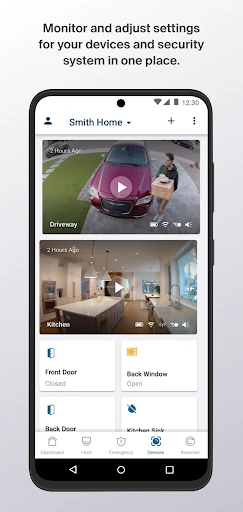
The app’s role becomes clearer when paired with Arlo cameras, a doorbell or a floodlight camera. It gathers those devices and controls in one place, including the option to manage multiple locations. I’d start by getting familiar with the Dashboard and the one-tap modes, then decide which notifications and schedules are useful. That’s a sensible way to make the app fit a routine instead of changing the routine around it.
The everyday control loop
Most day-to-day use seems likely to come down to a few actions: check status, arm or disarm, and look at an event when a notification catches your attention. Modes provide the quick toggle, while schedules can automate predictable changes. I like that those controls address ordinary use rather than assuming someone wants to spend the day monitoring a live feed.
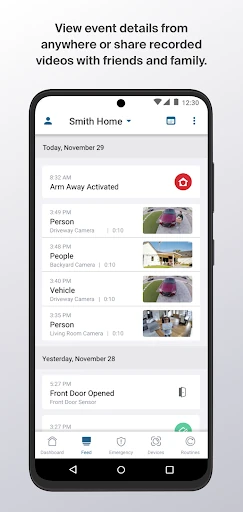
The Feeds feature is another part of that loop. It lets users review missed event details, and the app’s Dashboard can show video from recorded events. For a busy household, that can make it easier to catch up later instead of needing to respond to every alert in the moment. Access to video history and related features depends on an Arlo Secure plan and compatible equipment.
More than basic alerts
One feature that stands out is the ability to manage multiple locations from the same app. That can be handy for someone responsible for more than one property, or simply for keeping separate places in view without switching between different control tools. The Dashboard also brings together status, recorded-event video, arming controls and Emergency Response, giving the app a more complete role than a notifications inbox.
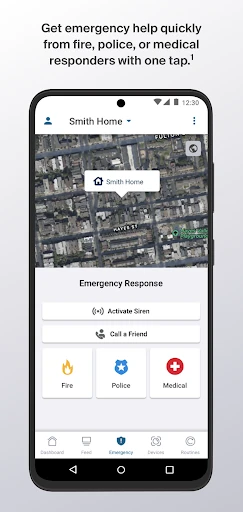
Arlo’s description also includes object detection for people, packages, vehicles and animals, along with 30 days of video history and missed-event details. These are plan-dependent features, and they require an Arlo camera, doorbell or floodlight camera for the video history. Emergency Response is available in the United States only and, like object detection and video history, requires a paid plan after the trial period.
A routine that stays simple
A practical way to use the app is to start with the moments that already happen every day. Set a schedule for the times when the home is usually occupied or empty, then use a one-tap mode when a day does not follow the normal pattern. That keeps automation useful without making it the only way to control the system.
After that, I’d use notifications as prompts rather than a running task list. If an event matters, open the app to review the details or recorded video; if alerts are too broad, consider activity zones where the camera and plan support them. This sort of gradual adjustment is more manageable than trying to personalize every option in one sitting.
Keep the limits in view
The biggest practical limitation is that the app’s core purpose depends on Arlo hardware. Its controls are most relevant with an Arlo camera, doorbell or floodlight camera, and some features require a paid Arlo Secure plan after a trial. That means the free app is only one part of the overall setup; it does not make every described feature available on its own.
Feature availability also has specific boundaries. Activity zones vary by camera model and require a paid plan after the trial, while Emergency Response is limited to the United States. Video history and object detection have plan requirements too. I’d check what applies to the devices and location involved before relying on a particular feature, especially if it is central to the way you want to use the system.
Arlo Secure brings useful everyday controls into one place: system status, modes, schedules, recorded events and options for managing multiple locations. Its strongest case is for people already using Arlo devices who want a practical phone-based companion, rather than for someone shopping for a standalone security app.
I’d give it a look if you have compatible Arlo hardware and want easier check-ins or more control over alerts. Just keep plan requirements, device compatibility and regional limits in mind. If those line up with your needs, the app’s central Dashboard and quick arming controls make a sensible starting point.
Arlo Secure Frequently Asked Questions
What is Arlo Secure: Home Security used for?
Arlo Secure is used to manage Arlo home security devices, including cameras, video doorbells and floodlight cameras. From the app, users can check system status, arm or disarm modes, set schedules, manage multiple locations and review event information. Some features, such as video history and object detection, require a paid Arlo Secure plan after a trial period.
Which phones and devices work with Arlo Secure?
Arlo Secure is an Android app available through Google Play and is designed to work with Arlo security devices such as cameras, doorbells and floodlight cameras. The Android version requirement can vary with the app and device, so check the Google Play page for the phone you plan to use. Some features also depend on the specific camera model.
Is Arlo Secure free, or does it have in-app purchases?
The app is free to download and offers in-app purchases. Google Play gives an in-app item price range of $9.99 to $299.99, while some described features require a paid Arlo Secure plan after a trial. Plan availability and pricing can vary, so check the Google Play page and Arlo’s current plan details before deciding.
What Android version does Arlo Secure require?
The Android version requirement is worth checking directly on the Google Play page, since it can vary with the current app release and device. The listed app version is 7.3.0. Also check whether your Arlo camera, doorbell or floodlight camera supports the particular features you want, as availability can vary by model.
Is Arlo Secure suitable if I do not own Arlo cameras?
Arlo Secure is primarily a companion for Arlo cameras, video doorbells and floodlight cameras, so it is most useful when you have compatible Arlo hardware. Without those devices, its central security controls have little to manage. It may suit households that want one app for Arlo equipment, but is less appropriate as a standalone security service.
Pros
- Combines Arlo device controls, system status and recorded-event access in one Dashboard.
- Supports one-tap arming, schedules and management of multiple locations.
- Activity zones can help tailor notifications on supported cameras and plans.
- Offers event history and object detection through eligible paid plan features.
Cons
- Many advanced features require a paid Arlo Secure plan after a trial.
- Activity zones vary by camera model, and Emergency Response is US-only.
- The app is most useful with compatible Arlo hardware.
- Category
- Lifestyle
- Version
- 7.3.0











