Zoho Mail - Email and Calendar
- 77.68K
- 4.5
- Installs
- 5.00M
- Price
- Free
Screenshots
Analysis by Reviewed APKs
Zoho Mail - Email and Calendar brings email, contacts and calendar tools together in one Android app. I found it best suited to people who already use Zoho Mail and want to keep up with work messages and appointments from a phone or tablet. Its practical strengths are the unified inbox, thread view and built-in calendar; it feels more like a focused work companion than an all-purpose communication hub.
A Busy Inbox, Made Manageable
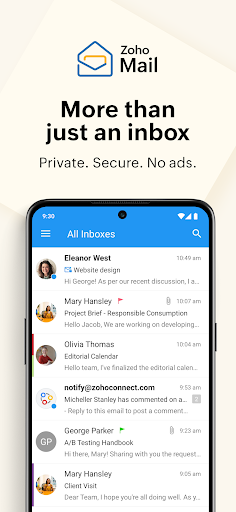
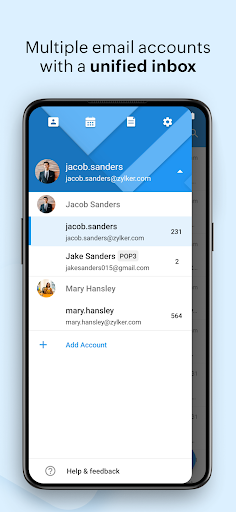
When I first opened Zoho Mail, I pictured the familiar weekday routine: check messages before leaving home, reply to a couple of quick questions between errands, then find the meeting invite buried in a thread. The app is built for that kind of on-the-go email work. Multiple Zoho accounts can be added, and a unified Inbox lets me look across them without repeatedly switching between separate accounts.
The conversation view keeps related messages together, which is useful when a short question turns into a long exchange. I can scan the thread for context rather than hunting through the inbox for each reply. Quick swipe actions can archive or delete a message, and those actions are customizable. It is a small convenience, but it suits the little gaps in a day when I only have a minute to tidy up.
Email First, With Useful Extras
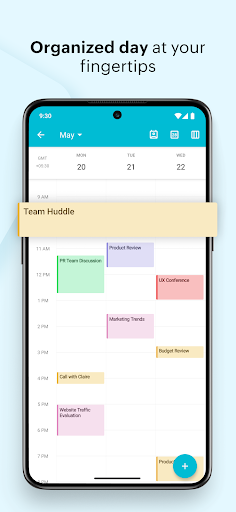
Compared with a basic webmail shortcut, Zoho Mail puts email, contacts and calendar functions in one app. That makes sense if Zoho Mail is already part of your routine and you want messages and appointments close together. I can view or schedule appointments and accept invitations from within the email app, rather than treating the inbox and calendar as wholly separate stops.
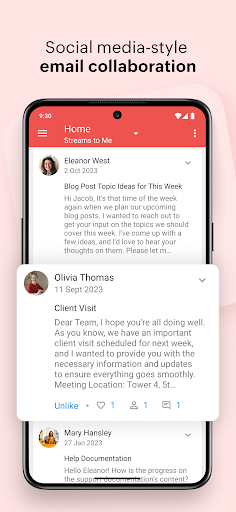
It is not a general-purpose chat app or a replacement for every team tool. The description presents Streams as a way to have productive conversations with less of the clutter of long email chains, but the core remains email and its related calendar and contacts. If your everyday communication is spread across services outside Zoho, this app’s appeal will depend on how much of your work already happens in its ecosystem.
Small Habits That Help
I get more from an email app when I make a few quick decisions as I go. Here, setting swipe actions to match my habits can make clearing obvious clutter feel almost automatic. For messages that deserve a proper reply, conversation view keeps earlier context nearby. Advanced search adds auto-suggestions and filters, so I can look for a specific message instead of scrolling through an increasingly crowded inbox.
The offline composing option is handy to keep in mind during a commute or in a spot with an unreliable connection. I can write a message while offline, and it will be sent when internet access returns. I would also make a habit of checking invitations in the app’s integrated calendar, especially when handling a thread that includes a meeting. These are modest routines, but they make the app’s combined tools feel more useful.
More From Our News Desk

Zoom Meetings, Google Meet, or Teams: Which Is Easiest to Join?

How I Build a Free Streaming Lineup With Tubi

Why Crunchyroll Is the Default Anime App for So Many Fans

YouTube TV: A Practical Guide to Cutting Cable

Rummikub and the Small Comfort of Phone Games

TeamViewer Remote Control or AnyDesk for Helping Family?
Who Will Get the Most From It
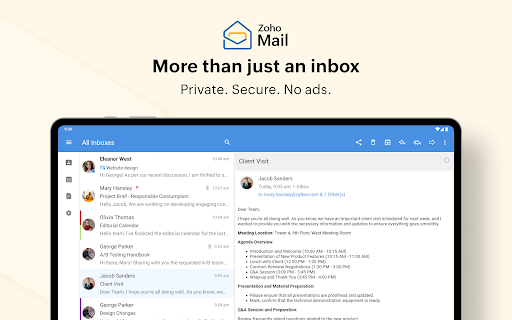
I’d recommend Zoho Mail to people who use Zoho email and want a practical mobile place to handle messages, contacts and appointments. It suits someone who checks work mail in short bursts, follows long threads, or needs to move between multiple Zoho accounts. Tablet users may also appreciate that the app is described as optimized for Android tablets across different form factors.
It may be less compelling if you only want a simple email viewer, rarely use a calendar, or do most of your communication in services outside Zoho. The built-in tools are useful, but they do not turn the app into a universal workspace. I’d also suggest checking the current store details for device requirements before installing, since the Android version requirement can vary.
Zoho Mail - Email and Calendar is developed by Zoho Corporation and is available on Google Play for Android. It has more than 5 million installs and a 4.5-star rating from around 77,700 ratings. The app is rated Everyone. Its Google Play version is 3.7.4, and the supplied release date is August 25, 2014.
The app is free to download, with no in-app purchases or ads indicated in the supplied store facts. The supplied last-updated date is October 26, 2026. The minimum Android version is worth checking on Google Play, since a requirement was not provided in the app details available for this review.
A Closer Look at Mobile Mail
Opening the App
My first impression is of an app organized around familiar email tasks rather than a complicated new way to communicate. The combination of mail, calendar and contacts is easy to understand: messages are the starting point, with appointments and people close by. Multiple Zoho accounts are supported, so someone who separates work and another Zoho mailbox can bring them into the same app.
The setup itself is not described in detail, so I won’t pretend there is a particular onboarding sequence or configuration wizard. What matters in daily use is the choice to see accounts separately or use a unified Inbox. That gives the app room to suit different habits, whether I prefer a clean boundary between mailboxes or one place to scan incoming messages.
The Daily Email Loop
The strongest part of the experience is how it handles the repeated, ordinary work of email. I can skim a conversation as a group, use a swipe to archive or delete, and search with suggestions and filters when a message is hard to find. These tools address real inbox friction: too many small decisions, too much thread hopping, and the familiar problem of remembering a subject but not where it landed.
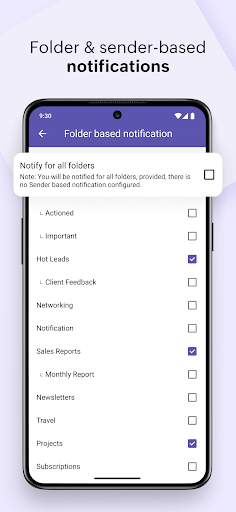
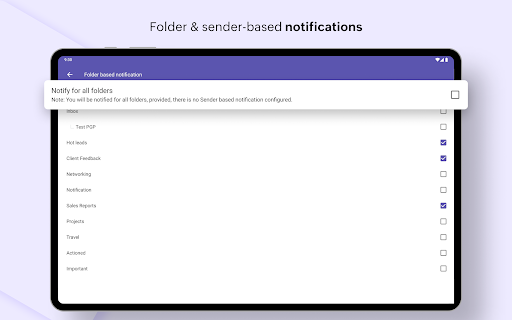
Push notifications are part of the multiple-account support, and the unified Inbox offers a quick way to see mail across accounts. I like that this can reduce the number of times I open and close separate mailboxes during a busy day. The app’s focus is still on reading and managing mail, though, so its value depends on whether Zoho is where the messages I need actually arrive.
Calendar and Streams
The integrated calendar is the feature that makes this more than a mail-only companion. I can view or schedule appointments and accept invitations from inside the email app. That is a sensible link: a meeting request often arrives as a message, and handling the invitation without leaving the app keeps the task close to its context.
Streams offers another way to communicate, aimed at collaboration and conversation without the clutter of long email chains. I see it as a useful option for teams that already work with Zoho Mail, rather than a reason to expect every chat or project function in one place. Contacts are also included, with options to filter email from contacts or reach them by email or call.
A Routine That Fits
A practical routine might start with a glance at the unified Inbox over breakfast. I can read the messages that need attention, follow a thread in conversation view, and clear an obvious announcement with a swipe. If a message includes an invitation, I can handle it through the integrated calendar. Later, advanced search and its filters can help me return to a message when I need a detail from it.
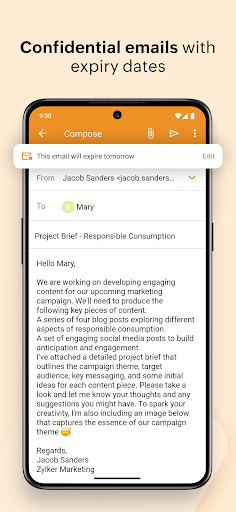
Offline composing can help on days when I’m drafting between places with uneven connectivity. I can prepare an email without a connection, then let it send when internet access becomes available. That doesn’t remove the need to check whether it has actually gone out, but it makes drafting less dependent on having a signal at the exact moment I have time to write.
Keep the Scope in Mind
The app’s strongest features are tied to Zoho email and its connected calendar and contacts. That is a clear focus, not necessarily a drawback, but it means people who divide their mail across many unrelated services may not get the same convenience from the unified Inbox. The description specifically highlights multiple Zoho accounts, so I would not assume every other email provider can be added.
There are also practical details to check before deciding whether it fits a particular phone. The supplied information does not give a minimum Android version, so compatibility should be checked in Google Play. The tablet optimization is a welcome point for larger screens, but the app’s basic appeal remains the same: managing Zoho messages and related appointments while away from a computer.
Zoho Mail - Email and Calendar makes a convincing case as a mobile companion for people already using Zoho. Unified mail, threaded conversations, customizable swipe actions, search, offline composing and an integrated calendar cover a lot of everyday email friction without changing the basic routine.
I’d try it if Zoho is central to your work and you want email, contacts and appointments in one Android app. If your accounts and conversations live elsewhere, its focused approach may not be enough to make it your main communication tool. Check Google Play for device compatibility before installing.
Zoho Mail Frequently Asked Questions
What is Zoho Mail - Email and Calendar used for?
It is an Android app for managing Zoho email, contacts and calendar tasks. It supports multiple Zoho accounts, a unified Inbox, conversation view, search, swipe actions and offline composing. Its integrated calendar lets users view or schedule appointments and accept invitations from within the email app.
Which devices can run Zoho Mail - Email and Calendar?
Zoho Mail - Email and Calendar is an Android app available through Google Play. It is described as optimized for Android tablets as well as phones. The minimum Android version can vary by device and app release, so check the current Google Play details to see whether your device is compatible.
What Android version does Zoho Mail - Email and Calendar require?
The minimum Android version can vary, and the supplied app details do not give a specific requirement. Check the current Google Play page from your Android device for compatibility information before installing. The app’s supplied version is 3.7.4, but that does not establish which Android versions it supports.
Does Zoho Mail - Email and Calendar cost money?
The app is free to download. The supplied store facts indicate no in-app purchases and no ads. App details and availability can change, so it is sensible to check Google Play for the current information before downloading.
Who should use Zoho Mail - Email and Calendar?
It is a good fit for people who use Zoho Mail and want to manage messages, contacts and appointments from a phone or tablet. Multiple accounts, conversation view and the integrated calendar suit a busy work routine. It may be less useful if your email and communication are mostly outside Zoho.
Pros
- Unified Inbox and multiple Zoho account support make checking mail less fragmented.
- Conversation view, search filters and customizable swipe actions help with inbox upkeep.
- Calendar, contacts and offline composing extend the app beyond reading email.
- Tablet optimization gives larger-screen Android users a dedicated option.
Cons
- The unified account support is specifically described for Zoho email accounts.
- People who mainly communicate outside Zoho may get less value from its combined tools.
- The minimum Android version should be checked in Google Play before installing.
- Category
- Communication
- Version
- 3.7.4











