Wyndham Hotels & Resorts
- 62.66K
- 4.6
- Installs
- 1.00M
- Price
- Free

Screenshots

Analysis by Reviewed APKs
Wyndham Hotels & Resorts is a travel app for finding and booking stays across Wyndham’s hotel brands, then managing parts of the trip and a Wyndham Rewards account from your phone. I’d recommend it most to people who already choose these hotels or travel often enough to compare nearby options. Its mix of booking tools and member features is useful, though its reach is naturally tied to Wyndham properties.
From Search to Check-In
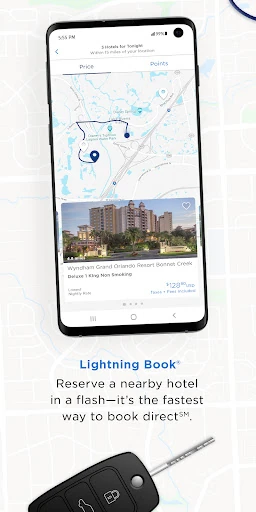
Imagine arriving in a town late, with a room still to find. I can use the app’s Lightning Book option to look for a same-night stay, then switch between a map and a list to compare locations. That is a practical setup for the moment when I care more about finding a workable hotel than building a detailed itinerary. The app focuses that urgent search on Wyndham’s hotel collection.
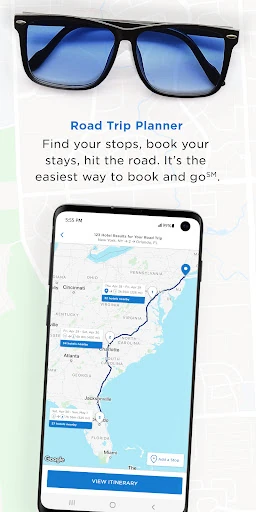
For a trip with more breathing room, I can save favorite hotels and booking preferences after signing in, then use the Road Trip Planner to arrange multiple hotel bookings. I like that these tools address two very different planning moods: the quick overnight stop and the route that takes several nights. The app also gives Rewards members a place to review points and activity, rather than making every visit begin from scratch.
A Wyndham-Focused Travel Tool
The clearest alternative is searching across a broad hotel-booking service, especially when I want to compare many unrelated chains at once. Wyndham’s app instead concentrates on its own participating properties and brands. That focus can be convenient if I already know I want a Wyndham stay, and the map and list views help compare its options. It is less suited to a traveler who wants one app to search the entire lodging market.
I also wouldn’t treat it as a general-purpose trip organizer. Its described strengths are finding and booking Wyndham hotels, managing Rewards details, and handling select in-stay interactions. It does not position itself as a broad destination guide or a place to book every part of a vacation. If my plans revolve around Wyndham, the concentrated approach makes sense; otherwise, I’d likely use it alongside other travel tools.
Small Planning Habits
A useful habit would be signing in before I start comparing stays. That gives me a chance to save favorite hotels and booking preferences, which may make repeat planning feel less repetitive. I’d also check both the map and list views instead of relying on one: the map helps me think about location, while a list makes it easier to scan the available hotel choices together.
For a drive with several overnight stops, I’d start the Road Trip Planner early enough to think through the route rather than booking each night in isolation. If I’m a Rewards member, I’d check points, stays, activity, and member offers while planning, not only after a reservation. These are modest steps, but they connect the app’s planning and account tools into one repeatable routine.
More From Our News Desk

Zoom Meetings, Google Meet, or Teams: Which Is Easiest to Join?

How I Build a Free Streaming Lineup With Tubi

Why Crunchyroll Is the Default Anime App for So Many Fans

YouTube TV: A Practical Guide to Cutting Cable

Rummikub and the Small Comfort of Phone Games

TeamViewer Remote Control or AnyDesk for Helping Family?
Who Will Get the Most From It
I’d recommend Wyndham Hotels & Resorts to people who regularly stay with Wyndham brands, want a direct way to compare those hotels, or like keeping their Rewards activity close to their bookings. Road travelers may also appreciate the option to plan and book several hotel stops. The app’s value grows when its focused hotel collection matches the way someone already travels, rather than when they are simply browsing every possible place to stay.
It may be a weaker fit for someone who prefers to compare hotels from many different companies in one search, or who needs a complete trip-planning app beyond lodging. Some in-stay tools, including phone check-in and front-desk messaging, are available only at select hotels, so I wouldn’t assume every property offers the same experience. Casual travelers can still use it, but the Rewards and repeat-booking features are more compelling with regular use.
On Google Play, Wyndham Hotels & Resorts is published by Wyndham Hotel Group and has more than 1 million installs. Its rating is 4.6 out of 5 from about 62,700 ratings. The app is free to download, and the supplied store information says it has no in-app purchases and contains no ads. Its content rating is Everyone.
The current version is 5.12.0, and the minimum requirement is Android 9. The app was released on December 12, 2013, and its latest update was January 20, 2026. That update notes minor enhancements and bug fixes. These details make it a long-running booking app with a recent maintenance release, rather than a newly launched service.
A Closer Look at Wyndham’s Travel App
A Focused First Impression
When I first consider the app, the most important thing to understand is its scope: it is for Wyndham stays, not every hotel brand under one roof. That focus keeps its main purpose easy to explain. Search and booking sit alongside Rewards account tools and a handful of in-stay options, so the app can follow a trip from choosing a hotel to checking on the stay.
Getting more value from the app starts with knowing whether I travel with participating Wyndham brands. The description says it covers a large collection of hotels across many countries, and gives members the option to join for free in the app. I’d sign in if I wanted saved preferences or account tracking; otherwise, I could approach it first as a way to search and compare hotel options.
Booking in Daily Use
The booking tools cover both quick decisions and trips that need more planning. Lightning Book is aimed at finding a room for tonight, while map and list views offer two ways to compare hotels. I appreciate that distinction because a late arrival and a carefully planned stopover do not call for quite the same pace. The app provides a route for each without making them sound like identical tasks.
When I’m planning several nights on the road, the Road Trip Planner is the feature I’d reach for first. It is described as a way to plan an itinerary and book multiple hotels at once. For a single stay, saved favorites and preferences may be more relevant. The tools are most useful when I pick the one that suits the trip, rather than trying to turn every booking into a full itinerary.
Rewards and Stay Extras
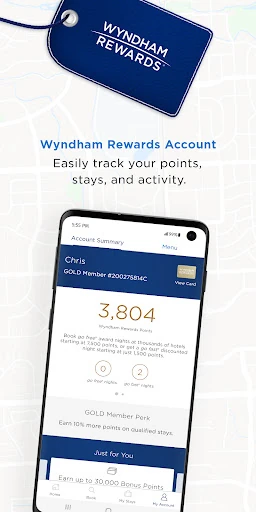
Wyndham Rewards gives the app a reason to remain useful between reservations. Members can track points, stays, and account activity, and see exclusive offers and discounts. The description says qualified stays earn 10 points per dollar or 1,000 points, whichever is greater, and describes three free or discounted night redemption tiers. Those details make the account side more than a simple place to store booking information.
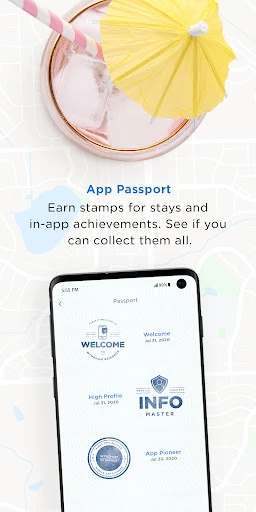
I also noticed the smaller extras: the app includes stay stamps and in-app achievements. They are not the main reason I’d choose a hotel, but they add a bit of progress tracking for people who enjoy collecting things as they travel. The broader practical point is that the app combines booking with a member account, so frequent Wyndham guests have less reason to separate those tasks.
A Routine for Road Trips
For a multi-stop drive, I’d begin by sketching the overnight stops, then use the Road Trip Planner to work through hotel bookings. I’d compare choices in map view when location matters and use list view when I want to scan options. If a hotel looks promising for a future trip, I’d save it after signing in. That small habit could spare me from repeating the same search later.
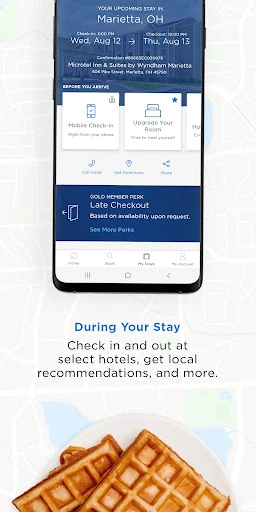
Before each stay, I’d check my Rewards activity and any member offers, then look at the property’s available in-stay features. At select hotels, the app supports phone check-in and checkout, front-desk texts for questions or special requests, and local activity recommendations. I’d treat these as useful possibilities to check for the particular stay, rather than assuming they are available everywhere.
Limits to Keep in Mind
The biggest limitation is also the app’s defining choice: its search is built around Wyndham’s participating hotels and brands. If I want to compare unrelated chains, independent hotels, or other kinds of lodging in the same search, this is not the all-market tool I’d use. The experience makes most sense when the Wyndham portfolio is already part of my plans.
The in-stay features also vary by property because phone check-in, checkout, and front-desk messaging are offered at select hotels. I’d check what applies to my chosen stay instead of planning around an option I have not verified. And while Rewards features can add value for members, they may matter much less to someone who books only occasionally or does not want a brand-specific account.
Wyndham Hotels & Resorts brings hotel search, booking, Rewards tracking, and selected in-stay features into one focused app. I like the contrast between Lightning Book for a quick room search and the Road Trip Planner for multi-stop travel. The best parts are most relevant when Wyndham hotels are already a natural choice, rather than when I’m searching across the whole lodging market.
I’d recommend giving it a try if you stay with Wyndham brands or want to keep bookings and Rewards activity together. Road trippers may find the planning tools especially useful. If you need broad hotel comparisons or expect every property to offer the same phone-based services, keep those limits in mind and check the details for the hotel you choose.
Wyndham Hotels & Resorts Frequently Asked Questions
What is Wyndham Hotels & Resorts used for?
Wyndham Hotels & Resorts is used to find and book stays at participating Wyndham hotels. It also offers a Road Trip Planner for arranging multiple hotel bookings, map and list comparisons, saved favorites and preferences, and Wyndham Rewards account tools. At select hotels, guests can use phone check-in or checkout and contact the front desk by text.
Which devices can run Wyndham Hotels & Resorts?
The app is available for Android, and the supplied requirement is Android 9 or later. Google Play is the relevant store for the Android version. Device compatibility can depend on the device and current store requirements, so it is worth checking the Google Play page on the phone you plan to use.
Does Wyndham Hotels & Resorts cost anything?
The app is free to download on Google Play. The supplied store details say it has no in-app purchases and contains no ads. Hotel reservations and any terms attached to a particular stay are separate from the app download, so check the booking details in the app before making travel plans.
Do I need Android 9 for Wyndham Hotels & Resorts?
The listed minimum Android requirement is Android 9. If your phone runs an older version, check the app’s Google Play page to see whether it is compatible with your device. Store availability and compatibility can vary by device, so the page shown on your own phone is the best place to confirm.
Who is Wyndham Hotels & Resorts best for?
It is a natural fit for travelers who book Wyndham properties, want to manage Wyndham Rewards, or need to plan several hotel stops on a road trip. Someone seeking one search across many unrelated hotel companies may prefer a broader travel service. Phone check-in and messaging are available only at select hotels.
Pros
- Combines Wyndham hotel booking with Rewards tracking and member offers.
- Map and list views make it easier to compare participating hotels.
- Road Trip Planner supports planning and booking multiple hotel stops.
- Selected hotels offer phone check-in, checkout, and front-desk messaging.
Cons
- Hotel searches focus on Wyndham properties rather than the whole lodging market.
- Some in-stay features are available only at select hotels.
- Rewards and saved-account tools may matter less to occasional guests.
- Category
- Travel & Local
- Version
- 5.12.0











