FlixBus: Book Bus Tickets
- 1.05M
- 4.7
- Installs
- 50.00M
- Price
- Free

Screenshots

Analysis by Reviewed APKs
FlixBus: Book Bus Tickets is for finding and booking long-distance bus trips, then keeping the ticket and travel updates close at hand. I’d recommend it to people who already consider the bus for city-to-city travel and want to compare routes and fares on a phone. Its appeal is practical: booking, mobile boarding passes and live bus tracking sit together, though the app is focused on bus travel rather than broader trip planning.
From Search to Boarding
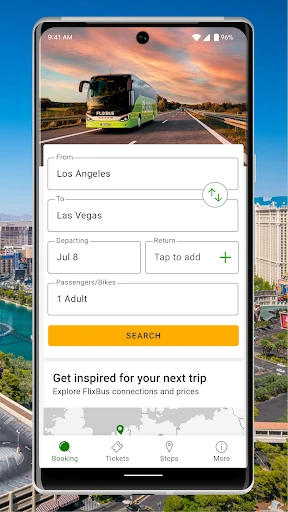
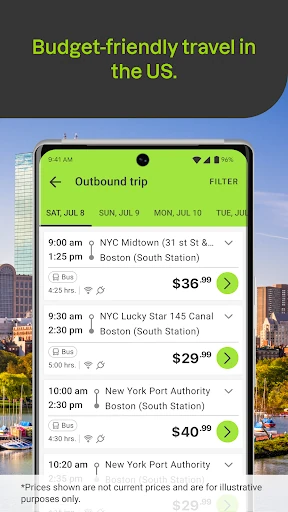
When I’m planning a weekend trip, the first useful step is entering where I’m leaving from, where I’m headed and the travel date. FlixBus then lets me compare available options and prices before choosing a bus and reserving a seat. That flow suits the moment when I want a straightforward answer to “Can I get there by bus, and what does it cost?” without starting with a long list of unrelated travel tools.
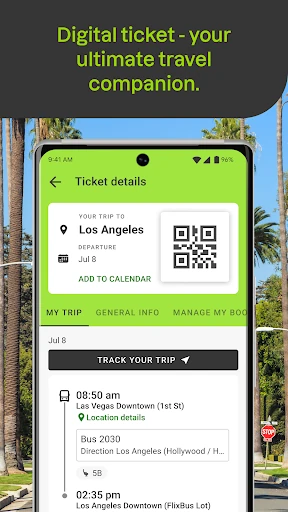
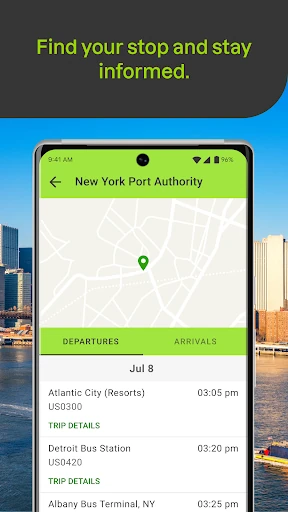
After booking, the ticket stays on my phone as a mobile pass with a QR code, which can be shown at boarding even offline. That is handy when I’m approaching a stop with a low battery signal or simply don’t want to search through email. The app also offers real-time bus tracking and push notifications, giving me a way to check for updates instead of relying only on a printed schedule.
A Bus-First Travel Tool
Compared with searching multiple bus operators separately, FlixBus brings FlixBus and Greyhound tickets into one app, and it can combine both on a single trip. It also covers routes across the US and offers routes in Europe through its wider network. That makes it more useful for comparing bus departures than a single operator’s booking page, especially when a trip has several possible connections.
It is still a bus-booking app, not an all-purpose travel planner. The material focuses on bus routes, fares, tickets and tracking, rather than comparing flights, trains, hotels or rental cars. I’d use it when I’ve decided a bus makes sense and want to manage that journey. If I’m still weighing every kind of transport or organizing an entire vacation, I’d expect to use other tools too.
Small Ways to Stay Ready
I’d make a habit of checking the route and date early, then comparing the available fares before settling on a departure. Seat selection is optional, while every booking includes a reserved seat. That distinction is useful when I care about choosing a particular spot but don’t want to assume the booking itself depends on paying extra for selection. The app also lets me save favorite routes, which can make repeated searches less of a chore.
On travel day, I’d keep the mobile ticket ready and check the live tracker and notifications as the departure approaches. The offline QR ticket is helpful if connectivity drops, while tracking and updates are useful beforehand. For a longer ride, the app describes coaches with WiFi, power outlets and extra legroom; I’d still treat those as features of the travel experience rather than a reason to skip checking the details for my own trip.
More From Our News Desk

Zoom Meetings, Google Meet, or Teams: Which Is Easiest to Join?

How I Build a Free Streaming Lineup With Tubi

Why Crunchyroll Is the Default Anime App for So Many Fans

YouTube TV: A Practical Guide to Cutting Cable

Rummikub and the Small Comfort of Phone Games

TeamViewer Remote Control or AnyDesk for Helping Family?
Who Should Give It a Try
I’d recommend FlixBus to budget-conscious travelers, students, weekend visitors and anyone who regularly makes intercity trips by bus. It keeps the basic trip steps together: find a route, compare prices, book a seat, access the ticket and follow bus updates. The ability to search FlixBus and Greyhound options in one place is especially appealing when I want to check more than one departure source before making a plan.
It may be less useful if I rarely travel by bus, need a full itinerary across several transport types, or expect a booking app to handle hotels and other vacation arrangements. The app’s job is narrower and clearer than that. I’d also keep route availability in mind: the service covers many cities, but the practical choice depends on whether it serves the places and dates I have in mind.
FlixBus: Book Bus Tickets is a free Android app from Flix SE in the Travel & Local category. Google Play shows more than 50 million installs and a 4.7-star rating from about 1.1 million ratings. The app is rated Everyone. Its listed release date is February 3, 2014, and the current version is 9.87.0.
The app has no in-app purchases and contains no ads. Its listed last update date is October 29, 2026. Google Pay and card are described as payment options for bus bookings, but the app itself is free to install. I’d check the Google Play store for current device compatibility and any changes to the app’s practical details.
A Closer Look at the Bus Trip
Getting Started
My first impression is that the app is built around a simple travel question: where do I want to go, and when? The booking steps described are easy to follow: enter an origin, destination and date, compare options, choose a bus and reserve a seat. That focus helps keep the experience understandable for someone who only needs to arrange a single trip rather than learn a complicated travel-planning system.
Payment can be made with Google Pay or a card, and mobile tickets are provided after booking. I like that the ticket is part of the same phone-based routine as the search and purchase. The app also describes secure checkout, though I’d keep my own payment choices and device settings in mind as I would with any purchase. Once booked, the QR code is ready to show when boarding.
The Trip-Day Experience
The day-to-day value becomes clearer after the booking is done. Instead of treating the app as a one-time checkout screen, I can use it to keep the ticket accessible and check real-time bus tracking. Push notifications can provide travel updates, so I have another way to follow the approach of my bus. That can be reassuring when I’m waiting at a stop and trying to time a short walk or a quick coffee run.
Offline access to the mobile ticket is a particularly practical detail. I wouldn’t need an active connection merely to display the boarding QR code, according to the app’s description. Tracking and live updates are different: they’re useful for current information, so I’d check them while connected when possible. Together, those tools cover two ordinary travel needs—getting on board and keeping an eye on what’s happening.
Features That Matter
Seat arrangements are clear in principle: each booking includes a reserved seat, and choosing a specific seat is optional. That gives travelers a basic place without making seat selection sound mandatory. For someone traveling with a preference about where to sit, the option is there; for someone who just wants a ticket, it needn’t become another decision before completing the booking.
The app also brings together route and fare comparisons, saved favorite routes, mobile tickets and bus tracking. I find that combination more useful than a list of headline features on its own, because each item belongs to a different part of the trip: planning, booking, boarding or waiting. The ability to book FlixBus and Greyhound tickets, including combined trips, adds another practical angle for US journeys.
The travel description mentions comfortable seats, extra legroom, free WiFi and power outlets on FlixBus coaches. Those details matter most on long rides, where having a way to charge a phone or stretch out can make the hours easier. They are part of the service described alongside the app, rather than digital features, but they help explain the kind of trip the booking tool is designed to support.
A Simple Travel Routine
For a weekend away, I’d start by searching the route and date far enough ahead to compare the options available. After picking a departure, I’d reserve the seat and pay by card or Google Pay. If it’s a route I might take again, saving it as a favorite could make a later search quicker. Once the booking is complete, I’d make sure the mobile ticket is easy to reach before leaving home.
As departure gets closer, I’d check the tracker and any push updates, then bring up the QR code when it’s time to board. On a longer ride, I’d think ahead about charging and staying comfortable, since the app describes power outlets, WiFi and extra legroom on its coaches. This isn’t a complicated ritual; it’s a few small checks that keep the booking and boarding details from becoming a last-minute scramble.
Limits to Keep in Mind
FlixBus is most useful when a bus route is a realistic option. It doesn’t aim to compare every way of getting somewhere, so I wouldn’t use it as my only tool for deciding between a bus, train and flight. Its coverage spans hundreds of US cities, with routes in Europe too, but a broad network still doesn’t mean every departure or destination will suit a particular itinerary.
A second limitation is that the app can make booking and tracking easier, but it can’t remove the ordinary trade-offs of bus travel. A route’s available schedule and fare are what matter for a specific date, and a longer ride still takes time. I’d compare the options shown for my journey and choose based on my plans, rather than assuming every trip will have the same convenient departure or price.
FlixBus does a focused job well: it helps me find bus options, book a reserved seat, keep the QR ticket on my phone and follow travel updates. I especially like the practical pairing of live tracking with offline ticket access. The app makes the most sense when bus travel is already on the table, not when I need a complete vacation planner.
I’d recommend it to people taking intercity bus trips who want booking and boarding information in one place, especially those comparing FlixBus and Greyhound options. If you mainly travel by other means or want one app for every part of a trip, it may feel limited. For a bus-first journey, though, its core tools are sensible and easy to understand.
FlixBus Frequently Asked Questions
What is FlixBus: Book Bus Tickets used for?
FlixBus: Book Bus Tickets is used to search bus routes, compare available options and fares, book a seat, and keep a mobile ticket on your phone. It also offers real-time bus tracking and travel updates. The app describes routes across the US and routes in Europe, and supports FlixBus and Greyhound tickets.
Which devices can run FlixBus: Book Bus Tickets?
FlixBus: Book Bus Tickets is an Android app available through Google Play. The minimum Android version can vary with the current release and device, so check the Google Play store page for the requirement that applies to your phone or tablet before installing.
Does FlixBus: Book Bus Tickets cost money?
The app is free to install and has no in-app purchases. It contains no ads. Bus tickets are purchased through the app, with Google Pay and card described as checkout options; fares depend on the route and travel date, so check the options shown for your trip.
Can I use FlixBus: Book Bus Tickets offline?
The app’s description says mobile tickets can be shown with a QR code even offline, which is useful at boarding. Real-time tracking and push updates concern current travel information, so I’d check those while connected when possible. For the latest details about offline access, consult the Google Play store information.
Who is FlixBus: Book Bus Tickets best for?
It is a good fit for people planning intercity bus trips who want to compare fares, reserve a seat and keep travel details on their phone. It may be less suitable for someone looking for a full travel planner that compares buses with flights, trains, hotels or other vacation services.
Pros
- Keeps booking, mobile tickets and travel updates together in one app.
- Offline QR tickets are useful when boarding without a connection.
- Combines FlixBus and Greyhound ticket options for US trips.
- Optional seat selection adds flexibility to a reserved-seat booking.
Cons
- Focused on bus travel rather than comparing every transport type.
- Route and departure choices depend on the destination and travel date.
- Live tracking and updates are most useful when connected.
- Category
- Travel & Local
- Version
- 9.87.0