Word of the Day: Vocab Builder
- 5.15K
- 4.2
- Installs
- 500.00K
- Price
- Free
Screenshots





Analysis by Reviewed APKs
Word of the Day: Vocab Builder is an education app for building vocabulary through a daily word, short quizzes, saved words, and language games. I like its small-session approach: it gives curious readers and writers something useful to do in a few minutes rather than asking for a big study commitment. The mix of examples, illustrations, and review tools makes it more engaging than a plain word-a-day feed, though ads and paid features are part of the experience.
A word in the daily routine
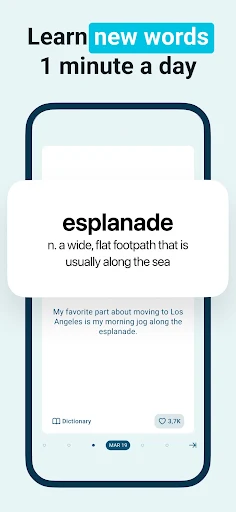
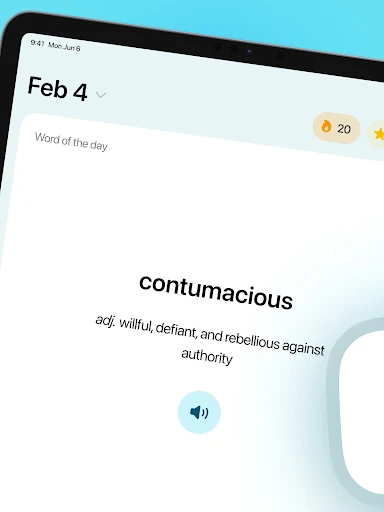
When I first opened Word of the Day, I pictured using it in the same spare moments when I check the weather or read a headline. The daily word gives that moment a clear focus, and its examples help show how the word works in a sentence rather than leaving me with a definition to memorize. The illustration adds another way to connect the word to an idea, which can make a quick visit feel less like flashcard homework.
A practical rhythm is to look at the word over breakfast, then try the short quiz later when there is a minute to spare. The app describes its daily quizzes as one-minute reviews and uses spaced repetition to bring new vocabulary back. I can also save words that catch my attention and revisit them. That makes the experience useful for someone who wants steady exposure without turning every commute or coffee break into a formal lesson.
More than a word list
The obvious alternative is a dictionary or a simple word-of-the-day feed. Those are better when I only need to check a meaning quickly, while this app puts the daily word alongside examples, illustrations, quizzes, saved-word review, and games. It also asks about learning goals and uses vocabulary questions to shape a personalized plan. I see that combination as the app’s main distinction: it tries to turn discovery into repeat practice, not just deliver a new entry each morning.
It is not a replacement for a full language course, a reference dictionary, or focused tutoring. The description positions it as a way to grow vocabulary in short sessions, including for people preparing for exams or trying to write and speak with more precision. I would treat it as a supplementary habit, not a complete study plan. If I need detailed instruction across grammar, reading, and conversation, a daily vocabulary app alone would not cover that broader job.
Make short reviews count
I would get the most from the app by treating the daily word as a starting point, not a one-time read. I can study the definition and examples, then make a point of noticing whether the word fits something I read or write that day. The app’s saved-word feature gives me a place to collect unfamiliar or especially useful terms, so I can return to them instead of relying on memory to bring them back.
A small routine can also include a quiz or a word game on days when I have extra time. Custom notifications are designed to help establish a regular habit, while streaks and progress tracking offer a way to see consistency over time. I would keep the routine light: a daily word, a quick review, and an occasional game. That feels more sustainable than trying to complete every activity each day.
More From Our News Desk

Zoom Meetings, Google Meet, or Teams: Which Is Easiest to Join?

How I Build a Free Streaming Lineup With Tubi

Why Crunchyroll Is the Default Anime App for So Many Fans

YouTube TV: A Practical Guide to Cutting Cable

Rummikub and the Small Comfort of Phone Games

TeamViewer Remote Control or AnyDesk for Helping Family?
Who will enjoy the habit
I would recommend Word of the Day to readers, students, and writers who enjoy learning a little at a time. It may also suit someone brushing up on vocabulary for exams or simply wanting more variety in everyday writing and conversation. The blend of daily words, examples, quizzes, and games gives different ways to revisit material, while saved words make it easier to build a personal review list.
It may be less appealing if you want a quiet, no-frills dictionary or prefer a structured course with lessons across several language skills. The app includes ads and offers paid in-app purchases, and some features are for Premium subscribers. Someone who dislikes reminders, streak-based motivation, or short interactive exercises may find the format distracting. I’d try it if a few minutes of regular practice sounds enjoyable, rather than treating it as a complete educational program.
Word of the Day: Vocab Builder is an Android education app from Vocabulous US. Google Play shows over 500,000 installs and a 4.2-star rating from about 5,100 ratings. It is free to download, contains ads, and offers in-app purchases. The listed in-app purchase prices range from $1.99 to $29.99 per item, so the cost of any optional purchase depends on what is selected.
The app has an Everyone content rating. Its current listed version is 4.1.10, and it was released on June 13, 2017, with its most recent update dated April 23, 2026. A minimum Android version is not included in the available app details, so check Google Play for device compatibility. The description says some features are available only to Premium subscribers.
How the Daily Word Habit Works
A focused first impression
The app’s premise is easy to understand: learn a word, see it in context, then come back to it. That focus appealed to me more than a busy dashboard of unrelated lessons would. The daily word gives each visit a natural starting point, and the examples and illustration are there to make the entry more memorable. The overall idea feels approachable for someone who wants to begin without planning a long study session.
Personalization is part of the setup described by the app. It starts with a vocabulary assessment and questions about learning goals, then uses the answers to shape a learning plan. I like that this offers a way to tailor the material instead of presenting every learner with an identical route. It also means the app is asking me to think about what I want from vocabulary practice before settling into the daily routine.
The everyday learning loop
Day to day, the simplest loop is to read the featured word and study the examples. The entry is meant to give enough context to understand how a word behaves in a real sentence, which is more useful than memorizing a definition in isolation. The daily format also keeps the task bounded. I can engage with one new item without needing to decide what to study next or assemble my own lesson.
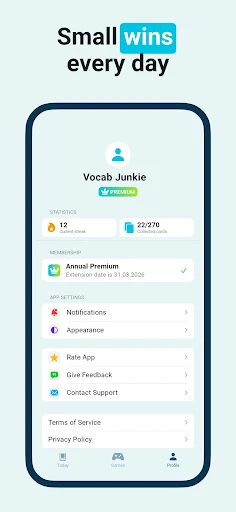
Quizzes add a second pass through the material. The app describes them as brief daily reviews that use spaced repetition, and it also lets me review words I have saved. That combination makes the experience feel more like practice than browsing. Progress tracking and streaks are intended to support consistency, although I would use them as gentle nudges rather than as a measure of how much vocabulary I truly understand.
Games and useful extras
The word games give the app some variety beyond reading and quiz questions. Hangman asks me to reveal a hidden word before losing all my hearts, while Word Relay links related words into a chain. Both are described as activities built around language and pattern recognition. I like having an alternative for a day when a conventional quiz feels repetitive, especially because the games still keep the focus on words.
The home-screen widget is another practical feature. It can show the daily word in one of three sizes, keeping it visible without requiring me to open the app first. Custom notifications offer another way to make vocabulary practice part of a schedule. I would choose a reminder time that fits an existing routine, so the prompt feels like a helpful cue instead of one more interruption during a busy day.
A realistic weekly rhythm
For a low-effort routine, I would read the daily entry when I have a quiet minute, then take the quiz later in the day. If a word seems especially useful, I would save it for review rather than trying to memorize everything immediately. The widget can keep that day’s word in view, while a notification can serve as a reminder if I tend to forget the app altogether.
At the end of a week, I would revisit saved words and spend a little time with a game. That gives the routine a mix of new material, recall, and play without demanding a long session every day. The app’s progress tools and streaks can help me notice whether the habit is holding, but I would keep the goal modest. A few consistent minutes are easier to maintain than an ambitious schedule I quickly abandon.
Keep expectations grounded
The app’s short-session design is also a limit. A daily word and a quick quiz can support vocabulary practice, but they do not amount to a full course in writing, grammar, reading, or speaking. Even though the description mentions exam preparation and communication goals, I would use the app alongside other study rather than expect it to cover every skill involved.
Another consideration is the free-to-download model: the app contains ads, offers paid in-app purchases, and reserves some features for Premium subscribers. That may affect how uninterrupted or complete the experience feels without paying. I would check the available purchase details before deciding whether an optional feature is worth the cost. The app’s daily format is appealing, but its best fit is someone comfortable with a focused vocabulary tool and its mix of free and paid access.
I would also avoid treating streaks or progress indicators as proof that a word has become part of my active vocabulary. They can help me keep a routine, but putting a word to use in reading or writing is a separate step. That is a useful distinction for any app built around quick practice: the tool can make review easier, while the learner still has to connect new vocabulary to everyday language.
Word of the Day: Vocab Builder offers a clear, practical way to make vocabulary practice part of an ordinary day. Daily entries, examples, quizzes, saved words, and games give me several ways to encounter and revisit new terms. I especially like that the sessions are designed to be brief, which makes the app easier to fit around work, school, or reading.
I’d recommend it to curious readers and learners who want a small, repeatable vocabulary habit, and to anyone who enjoys word games as part of study. I would not choose it as my only learning resource or as a substitute for a dictionary. Ads, paid purchases, and Premium-only features are worth keeping in mind, but the core idea is straightforward and approachable.
Word of the Day Frequently Asked Questions
What is Word of the Day: Vocab Builder used for?
Word of the Day: Vocab Builder is used to build vocabulary through daily word entries, examples, illustrations, quizzes, saved-word review, and word games. It also offers a personalized learning plan based on a vocabulary assessment and questions about learning goals. The activities are designed for short sessions, so it can work as a small daily habit rather than a full course.
Which devices support Word of the Day: Vocab Builder?
Word of the Day: Vocab Builder is an Android app available through Google Play. The app details describe a home-screen widget, daily words, quizzes, and games. The minimum Android version is worth checking on the Google Play page, since device compatibility can vary. The available information identifies the Android platform rather than describing an iOS or desktop version.
What Android version does Word of the Day: Vocab Builder require?
The minimum Android version for Word of the Day: Vocab Builder is not included in the available app details. Requirements can change with app updates and device compatibility, so check the app’s Google Play page before installing. Its listed current version is 4.1.10, but that version number by itself does not establish which Android releases a device needs.
Does Word of the Day: Vocab Builder cost money?
Word of the Day: Vocab Builder is free to download and contains ads. It offers in-app purchases priced from $1.99 to $29.99 per item, and the description says some features are available only to Premium subscribers. The exact purchase options and prices may vary, so it is worth checking Google Play for the current details before buying.
Is Word of the Day: Vocab Builder suitable for casual learners?
Word of the Day: Vocab Builder may suit casual learners who want a daily word and brief ways to review it. Examples, saved words, quizzes, and games offer several approaches to vocabulary practice. It may be less suitable for someone seeking a complete language course or a plain dictionary, since its focus is vocabulary growth through short, interactive sessions.
Pros
- Daily entries pair words with examples and illustrations for useful context.
- Quizzes, saved-word reviews, and games offer different ways to practice.
- A home-screen widget can keep the daily word visible.
- Short sessions make vocabulary practice easier to fit into a routine.
Cons
- Ads and paid in-app purchases are part of the experience.
- Some features require a Premium subscription.
- It focuses on vocabulary rather than broader language instruction.
- Category
- Education
- Version
- 4.1.10











