USPS MOBILE®
- 77.19K
- 4.7
- Installs
- 1.00M
- Price
- Free

Screenshots
Analysis by Reviewed APKs
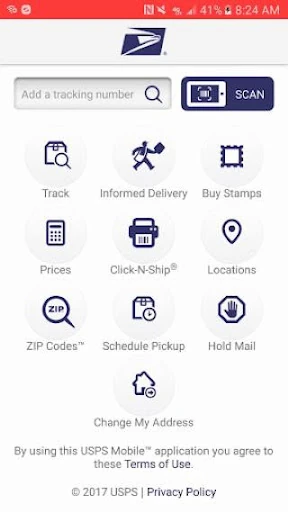
USPS MOBILE® brings several familiar USPS.com tools into one phone app, from checking package progress to finding a nearby Post Office or arranging a pickup. I see it as a practical companion for people who send or receive mail regularly, especially when plans change while they are out. After exploring its main tools, my impression is useful and focused: it handles common postal errands, though it is not a substitute for every USPS service.
A Postal Errand on the Go
When I first opened USPS MOBILE®, I pictured the kind of small logistics problem that usually interrupts a day: a package is on its way, I need to know whether it has arrived, and I also want to find a convenient place to mail something else. The app brings those tasks together. I can check eligible shipment status, look up a location, or estimate postage without first sitting down at a computer.
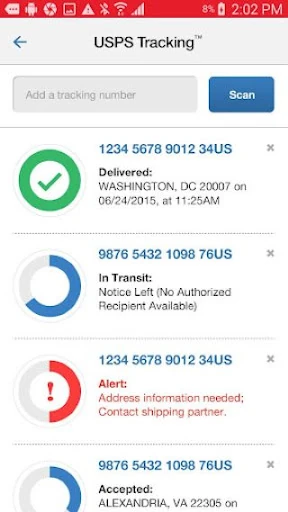
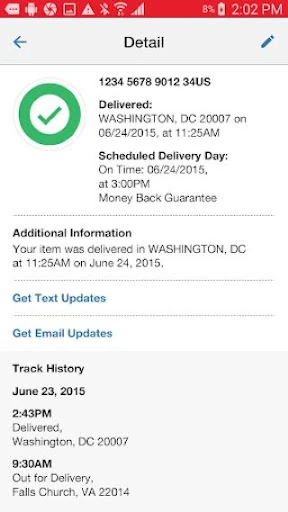
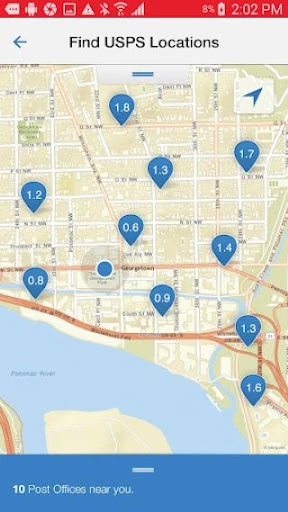
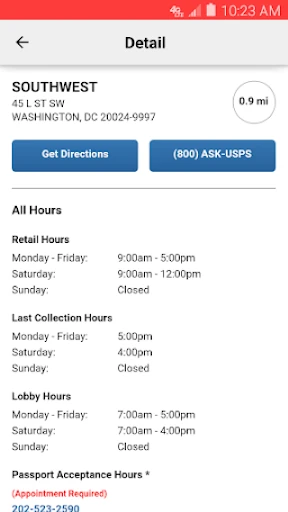
For example, if I am heading out with a parcel, I can use the location finder to see nearby Post Offices, self-service kiosks, or collection boxes. The map can show hours and last collection times, which helps me choose a stop that fits my route. If I am waiting for a delivery instead, I can save a shipment number, give it a nickname, and sign up for text or email status alerts.
A Postal Tool, Not a Store
The obvious alternative is visiting USPS.com in a browser, and the app is best understood as a pocket-sized route to several of that site’s popular tools. It is particularly handy when I want to check a delivery, search for a ZIP Code, compare postage, or find a nearby postal location while away from home. The app keeps these practical tasks close at hand rather than trying to be a general shopping or travel service.
It is not a universal parcel tracker for every carrier, and its shipment-status tools cover USPS services, including Priority Mail, Priority Mail Express, Certified Mail, and certain other delivery services. Nor is it a full substitute for handling every postal transaction in person or online. The price calculator has limitations, and the pickup option applies to specified USPS services. That distinction matters if I am planning around a particular shipment.
Small Habits That Help
I would get the most from the app by adding a shipment as soon as I have its label number, then giving it a memorable nickname. That makes a list of shipments easier to scan when I have more than one parcel in motion. Turning on text or email alerts is another sensible step if I do not want to keep reopening the app just to see whether the status has changed.
Before leaving home to mail something, I would check the locator’s hours and last collection time rather than relying only on distance. For a parcel I have not packed yet, the calculator can help me compare retail and online pricing and account for extra services. If I will be away, I can consider requesting Hold Mail ahead of time. These are modest habits, but they can make postal errands less last-minute.
More From Our News Desk

Zoom Meetings, Google Meet, or Teams: Which Is Easiest to Join?

How I Build a Free Streaming Lineup With Tubi

Why Crunchyroll Is the Default Anime App for So Many Fans

YouTube TV: A Practical Guide to Cutting Cable

Rummikub and the Small Comfort of Phone Games

TeamViewer Remote Control or AnyDesk for Helping Family?
Who Will Find It Useful
I would recommend USPS MOBILE® to anyone who regularly sends packages, waits for deliveries, or needs to make occasional trips to a Post Office. It is also a natural fit for people who want to check a ZIP Code, estimate postage, or arrange a next-day pickup for eligible shipments. The mix of location details and shipment tools is useful for everyday planning, not just for people who mail things every day.
It may be less appealing if most of your deliveries come through other carriers or if you only need a one-off postal detail and prefer using a browser. Some options have service limitations, so people with a specific mailing need should check that the relevant USPS service is supported. Informed Delivery also depends on access to that service. For a USPS-centered routine, though, having these tools together is a straightforward convenience.
USPS MOBILE® is published by the United States Postal Service®. On Google Play, it has more than 1 million installs and a 4.7-star rating from about 77,000 ratings. The app is free to download, and the provided store information says it has no in-app purchases or ads. Its content rating is Everyone.
The current version shown in the provided app information is 6.2.1. It was released on October 23, 2023, and last updated on February 24, 2025. The available details do not give a minimum Android version, so anyone checking device compatibility should consult Google Play before installing.
A Closer Look at Everyday USPS Tools
Getting Started
My first impression is that USPS MOBILE® is organized around errands rather than a single ongoing feed. Its purpose is immediately practical: reach familiar postal tools from a phone. I would start by deciding what I need that day, whether that is checking a shipment, estimating postage, or finding a location, instead of expecting one workflow to lead into another automatically.
The app description says the updated version was made to work with newer Android phones and includes bug fixes. For location searches, it uses the device’s GPS to show nearby options on a map. That makes the locator especially useful while out, although the relevant device permission is part of making location-based results work as described.
Checking Mail Day to Day
Shipment tracking is one of the app’s most useful everyday jobs. I can check the status of eligible USPS shipments, save label numbers, and give saved shipments nicknames. Text and email alerts can help keep me informed without repeatedly checking manually. The supported services include Priority Mail, Priority Mail Express, Certified Mail, and certain other delivery services, so it is worth considering the service used for each parcel.
The app also links to Informed Delivery, which can help users track packages and preview incoming household mail digitally. The description specifies grayscale images of the address side of letter-sized mailpieces. I like that this puts a useful preview beside parcel tools, but it is a separate service rather than a promise that every item will appear as an image.
Tools Beyond Tracking
The location finder covers more than Post Offices. It can show self-service kiosks and collection boxes, with filters to narrow results. Along with map results, it can display regular and special hours, last collection times, and directions for driving, walking, or transit. Those details are valuable when I am trying to fit a mailing stop into a commute or a day of errands.
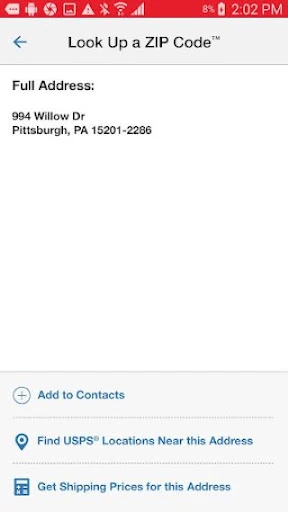
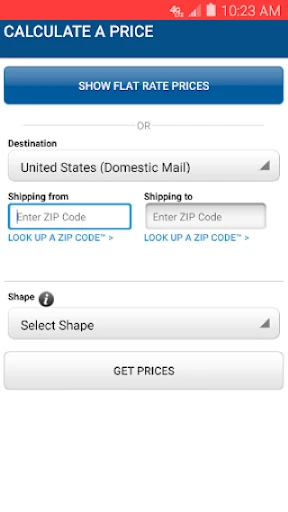
The postage calculator handles domestic and international price estimates for letters, cards, large envelopes, and packages, with retail or online pricing and optional extra services. There is also a ZIP Code lookup for U.S. or Canadian addresses. These are focused reference tools, not a substitute for checking the final requirements of a particular shipment, especially where the calculator’s stated limitations apply.
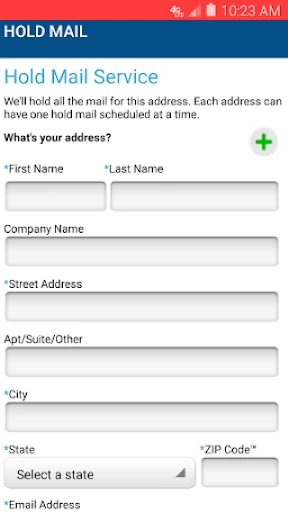
Two other features are useful when timing matters. Eligible shipments can be scheduled for a free next-day pickup at home or an office during regular mail delivery. Hold Mail lets users request that mail be kept at their local Post Office while they are away, for pickup or delivery after they return. Both address common planning headaches without requiring a trip just to make the request.
A Smoother Mailing Routine
For a routine mailing day, I would begin by checking the calculator if I am unsure about postage, then use the location finder to choose a nearby drop-off point. Looking at the last collection time can help me avoid arriving after that day’s mail has been collected. If I have a shipping label, scanning its barcode with the phone camera can identify the shipment and store its number for status checks.
For a week with several deliveries, I would keep saved shipments distinguishable with nicknames and use alerts for status changes. Before a trip, I would look into Hold Mail rather than waiting until the day I leave. These workflows do not require elaborate setup; the value comes from remembering that the app can handle small postal decisions before they turn into a rushed errand.
Limits to Keep in Mind
The app’s tools are tied to USPS services, and the description calls out limitations on price calculations and eligibility for pickup. Tracking is available for specified services and certain others, rather than being described as universal. I would check the service details for a particular parcel before relying on a tool for a time-sensitive plan. The app is most useful when the task clearly falls within the USPS options it covers.
Location results rely on GPS for nearby choices, and Informed Delivery is a linked service for viewing package information and mail previews. Those features are helpful, but they serve different purposes and may not apply to every situation. Overall, the app’s scope is deliberately practical: postal information and service requests on a phone, not a broad communication or parcel-management platform for every carrier.
USPS MOBILE® earns its place on my phone when I have a USPS package to follow, a mailing errand to plan, or a trip coming up. I especially appreciate the combination of shipment alerts, location details, and pickup or Hold Mail requests. It keeps several useful postal tasks within reach without trying to do everything.
I would recommend it to regular USPS customers and anyone who likes handling simple delivery and mailing checks while away from a computer. If your needs center on other carriers or a service the app does not cover, it will be less useful. For everyday USPS errands, it is a practical, focused companion.
USPS MOBILE® Frequently Asked Questions
What is USPS MOBILE® used for?
USPS MOBILE® provides phone access to postal tools such as checking eligible shipment status, finding USPS locations, looking up ZIP Codes, and estimating postage. It can also be used to request eligible next-day pickups, ask USPS to hold mail while away, scan shipping-label barcodes, and access Informed Delivery features for package tracking and incoming-mail previews.
Which phones and platforms support USPS MOBILE®?
The provided app information describes USPS MOBILE® as an Android app and identifies it on Google Play. It does not give a minimum Android version, so compatibility can depend on the device and may change over time. Check the Google Play page for current device requirements before installing, particularly if you are using an older phone.
What Android version does USPS MOBILE® require?
A minimum Android version is not included in the available app details. The description says the updated app was created to be compatible with newer Android phones, but it does not specify a version number. Check Google Play on your device for the current requirement, since compatibility information can vary as the app is updated.
Does USPS MOBILE® cost money or include purchases?
USPS MOBILE® is free to download, and the provided Google Play details show no in-app purchases or ads. Some services within the app have their own eligibility or limitations, such as price estimates and pickup requests. For the latest store information, it is worth checking Google Play before installing.
Who is USPS MOBILE® best suited for?
It is a good fit for people who send or receive USPS shipments and want quick access to tracking, postal locations, postage estimates, or mail-related requests. It may be less useful if you rarely use USPS or mainly need tools for other carriers. The app’s features apply to the services and shipment types it supports.
Pros
- Combines shipment status, location searches, postage estimates, and other USPS tools in one app.
- Location results include hours, last collection times, and directions for several travel modes.
- Barcode scanning can store a shipment number for convenient status checks.
- Pickup and Hold Mail requests help with common delivery-planning situations.
Cons
- Tracking and pickup tools apply to specified USPS services and eligible shipments.
- The postage calculator has limitations, so estimates may not cover every mailing situation.
- Nearby location results use device GPS, which may not suit every user or situation.
- Category
- Business
- Version
- 6.2.1











