Ultimate Guitar: Chords & Tabs
- 615.82K
- 4.3
- Installs
- 10.00M
- Price
- Free

Screenshots
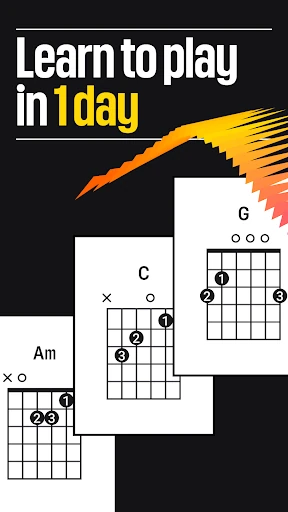
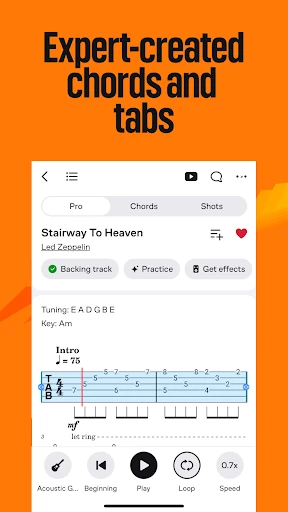


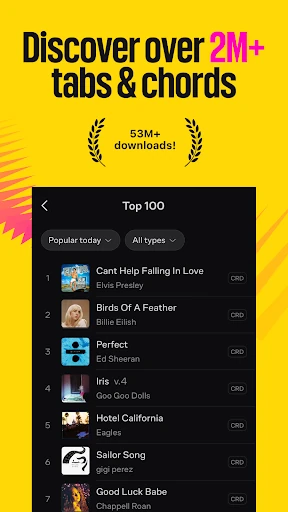
Analysis by Reviewed APKs
Ultimate Guitar: Chords & Tabs is a song-learning and reference app for people who want to play familiar music on guitar, bass, ukulele, piano, and other instruments. I found its appeal in the practical mix of searchable tabs, chords, and tools like a tuner and metronome. It suits players who like learning through songs, though the range of features can feel broad if you only want a quick chord lookup.
A song for tonight
When I want to work on a song rather than run through abstract exercises, Ultimate Guitar gives me a direct route from a title to playable material. I can search for a song, look through tabs or chords, and narrow results by things such as difficulty or tuning. That makes it useful for a real evening practice session: find something I like, choose a version that fits, and spend my time trying it instead of hunting around.
The app covers more than guitar. Its material includes bass tabs, ukulele chords, lyrics, and parts for instruments such as piano, violin, and drums. I like that breadth when friends bring different instruments to an informal jam, or when I want to see how a song is arranged beyond my own part. The central appeal remains learning recognizable songs, but the catalog can serve several kinds of players and musical interests.
More than a chord lookup
Compared with opening a general web search for a chord chart, Ultimate Guitar gives song material and practice tools a shared home. I can browse by song, collection, genre, difficulty, or tuning, then keep tabs available offline when I have saved the ones I want. The tuner, metronome, and playback options are useful companions to the written material, so I do not have to treat every practice session as a separate search-and-tool routine.
It is not a full substitute for learning with a teacher, nor is it simply a blank notebook for writing music. The app offers lessons through UG Courses and community features, but its recognizable center is finding and playing songs. If I need detailed personal instruction or want to compose entirely from scratch, I would look beyond a song-tab library. Here, the quickest payoff comes from bringing a song I already like into practice.
Small habits that help
I get more out of the app when I make a small shortlist instead of browsing endlessly. Saving favorite tabs for offline access means I can return to a few songs without repeating the search, while playlists and collections help group material by mood or skill level. When I am deciding what to tackle next, filtering by difficulty is a sensible way to avoid picking a version that is far beyond what I can comfortably play.
A few quick adjustments can make a tab easier to use during practice. I can change the font style and size, switch on dark mode in a dim room, and use left-handed mode if that fits how I play. The metronome helps me work with a steady tempo, and the tuner is handy before starting. These are modest conveniences, but together they make the app feel more suited to the instrument beside me.
More From Our News Desk

Zoom Meetings, Google Meet, or Teams: Which Is Easiest to Join?

How I Build a Free Streaming Lineup With Tubi

Why Crunchyroll Is the Default Anime App for So Many Fans

YouTube TV: A Practical Guide to Cutting Cable

Rummikub and the Small Comfort of Phone Games

TeamViewer Remote Control or AnyDesk for Helping Family?
Who will enjoy it
I would recommend Ultimate Guitar to casual and committed players who learn best by playing songs they know. It is especially appealing if you move between guitar, bass, and ukulele material, or if you like having lyrics, chords, and tabs close together. Beginners can browse by difficulty and explore lessons, while more experienced musicians may appreciate alternate tunings, personal tabs, and options for changing a song’s key.
It may be less satisfying for someone who wants a very focused course with a single teaching path, or a simple one-screen answer to a chord question. The breadth that makes the app useful also asks you to choose among many kinds of material and tools. Players who prefer learning entirely by ear may not need a tab-centered resource. I see it as a flexible practice companion, not a replacement for every way of learning music.
Ultimate Guitar: Chords & Tabs is made by Ultimate Guitar USA LLC and is available on Google Play for Android. The app has over 10 million installs and a 4.3-star rating from about 616,000 ratings. It is free to download, contains ads, and offers in-app purchases. Google Play gives its content rating as Teen.
The Android version listed is 7.2.8, and the minimum Android requirement is 7.1. The listed release date is October 13, 2010, with the latest update dated February 9, 2026. In-app products are priced from $0.99 to $109.99 per item. The app’s free download and optional purchases make it possible to try its basic song-finding experience before deciding whether additional access is worthwhile.
A practical song-first practice companion
Getting started
My first impression was that Ultimate Guitar is built around choices: instruments, songs, difficulty levels, and several ways to work with the material. That can be a lot to take in if I open it without a song in mind. It feels more approachable when I start with an artist or title I already know, then use the available filters to find a version that seems playable.
Once I have a tab or chord sheet open, the display options matter more than I expected. Being able to adjust text size and use dark mode can make a difference when I am looking between a screen and a guitar in a low-lit room. Left-handed mode is another considerate touch. These options do not change the music itself, but they help the reference material fit the way I actually practice.
The everyday experience
Day to day, the useful loop is straightforward: find a song, pick the relevant tab or chords, and work through it at a pace that suits me. Search and browsing by type, difficulty, tuning, or rating help me get closer to a usable version. I like being able to focus on the playing rather than treating every song as a fresh research project.
Some sessions are less about learning a complete arrangement and more about getting ready to play. I can check a guitar with the built-in tuner, then use the metronome to settle into a tempo. If I have saved tabs, offline access is handy when I am away from a reliable connection. These small steps keep the app relevant between the more ambitious sessions where I try to learn an entire song.
Tools beyond the page
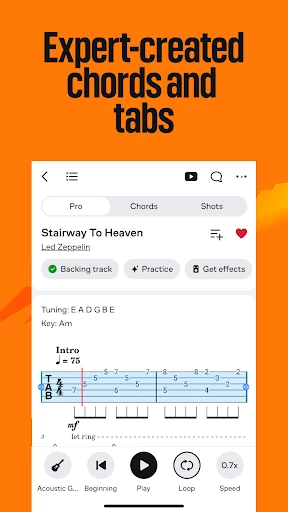
The standout features are the ones that make a static-looking song reference feel more adaptable. Video playback and backing tracks can support learning, while SmartScroll and Autoscroll are designed to keep material moving as I play. I can also edit personal tabs to change chords, lyrics, or tab details for my own approach. That flexibility is useful when the first version I find is not quite the one I want to practice.
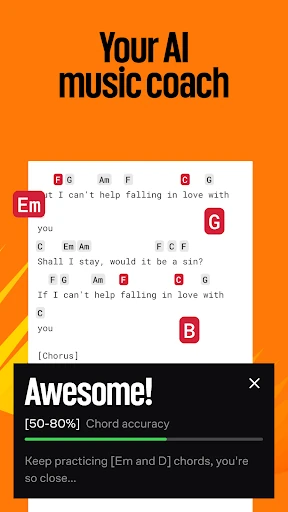
For songs that need adjustment, the app includes transposition and song simplification. Those options give me ways to change a key or make a part more approachable rather than abandoning a song because it does not fit my current needs. The extensive chord library adds another reference point. With Pro, the app also offers Official Tabs, Tonebridge presets, synchronized lyrics, backing tracks, and Practice Mode feedback.
There is a social side as well as a private practice side. I can create and upload tabs, browse community material, take part in forums, and share through Shots. UG Courses offers video lessons for several instruments, while UG Sing focuses on interactive songs and singing feedback. I would not use every part in every session, but it is notable how many routes the app offers into playing and learning.
A useful practice routine
A routine I can imagine sticking with starts before I pick up the instrument. I choose a song that sounds manageable, check its difficulty and tuning, and save the tab if I expect to need it offline. After tuning, I use the tab as a guide and set a steady pulse with the metronome. If the material feels awkward, I can look for a simpler version or use the song simplification and transposition options where available.
The next day, I can return to the saved song instead of starting the search again. For a longer practice, a backing track or video playback may help me hear how the part fits together. SmartScroll or Autoscroll can reduce the need to keep moving the page by hand. This is not a rigid lesson plan; it is a flexible pattern for turning a song I enjoy into repeated, focused practice.
Limits to keep in mind
The app’s range can be both its strength and its main drawback. A new user may need a little time to decide whether to browse songs, collections, lessons, community content, or practice tools. If all I need is one chord name, the surrounding options can feel like more than the task requires. Starting with a specific song or instrument helps keep the experience focused.
There is also a difference between the basic app and its paid features. Pro is described as the route to the full library and additional tools, including Official Tabs and Practice Mode. The app contains ads and offers in-app purchases, so I would check the current Google Play details before paying, especially if a particular feature is the reason I am considering it.
Finally, tabs and chords are guides, not a promise that every arrangement will match my preferred version or playing level. The app lets me search by several useful criteria and edit personal tabs, which helps, but choosing the right material remains part of the process. Players looking for a prescribed curriculum may find its song-centered approach less structured than a dedicated course.
Ultimate Guitar: Chords & Tabs works best for me as a song-first companion: it brings searchable music material, practical playing tools, and ways to adapt songs into one app. Its breadth is impressive, though it can take a little intent to navigate. I would start with a favorite song and see whether the available versions fit my playing.
I recommend it to musicians who want a large, flexible place to find material and practice familiar songs across several instruments. If you want a tightly guided course or only need occasional chord lookups, its wider feature set may be more than you need. Check the current Google Play details for purchase options before relying on a paid feature.
Ultimate Guitar Frequently Asked Questions
What is Ultimate Guitar: Chords & Tabs used for?
Ultimate Guitar: Chords & Tabs helps people find and play song tabs, chords, and lyrics across instruments including guitar, bass, and ukulele. It also includes tools such as a tuner and metronome, plus options for saving tabs offline and using playback features. UG Courses and UG Sing add lesson and singing-focused material.
Which devices can run Ultimate Guitar: Chords & Tabs?
The app is available for Android through Google Play, and the listed minimum requirement is Android 7.1. Its description covers music material for a range of instruments, but that does not mean each instrument needs a separate device or app. For current compatibility details on a particular phone or tablet, check the Google Play store page.
Does Ultimate Guitar: Chords & Tabs cost anything?
The app is free to download, but it contains ads and offers in-app purchases. Listed in-app products range from $0.99 to $109.99 per item, and Pro includes additional library access and tools. Prices and available purchase options may vary, so check the Google Play store page for the current details before buying.
What Android version does Ultimate Guitar: Chords & Tabs require?
The listed minimum is Android 7.1. The app’s listed version is 7.2.8, and its latest update date is February 9, 2026. Compatibility can depend on the device and current store requirements, so it is worth checking Google Play on the phone or tablet where you plan to install it.
Is Ultimate Guitar: Chords & Tabs good for beginners?
It can suit beginners who want to learn through songs, with ways to browse by difficulty, simplify songs, and explore video lessons through UG Courses. It also serves more experienced players with features such as transposition and personal tabs. If you prefer a tightly structured, step-by-step course, this broader song library may not be the best fit on its own.
Pros
- Search and filters make it easier to find song material by difficulty, tuning, and type.
- Useful extras include a tuner, metronome, offline tabs, and display adjustments.
- Supports material for multiple instruments, with options to adapt songs to your needs.
- Offers community features, video lessons, and additional Pro practice tools.
Cons
- The wide mix of songs, tools, lessons, and community features can feel busy at first.
- Ads and in-app purchases mean some features may require a purchase.
- A song-centered library may feel less structured than a dedicated teaching course.
- Category
- Music & Audio
- Version
- 7.2.8











