TUI: Holidays, Travel, Flights
- 104.88K
- 4
- Installs
- 5.00M
- Price
- Free

Screenshots






Analysis by Reviewed APKs
TUI: Holidays, Travel, Flights is a travel app for browsing and booking trips, then keeping useful holiday details together once plans are underway. It suits people considering a TUI holiday as well as travelers who want flight, hotel, transfer, and experience information in one place. My overall take is that its strongest appeal is the booking-to-trip-management mix; it is less compelling if you only need a simple flight tracker.
From Holiday Idea to Departure
When I start imagining a break, I usually have one fixed point—perhaps a beach or a week when I can travel—and a messy set of questions around it. TUI brings several of those decisions into one app: I can browse holidays, flights, hotels, cruises, and experiences, then save favourites or add a booking with its reference. That makes the app feel relevant before departure, not just something to open at the airport.
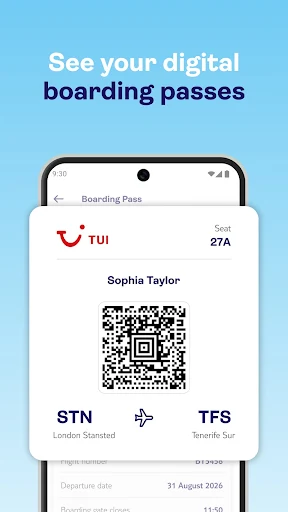
The practical value becomes clearer once a trip is booked. I can use the app to check holiday details, follow a countdown, look at flight status, and find information about transfers. For a TUI flight, digital boarding passes are available for most flights. I like that combination for the familiar last-minute routine of checking the journey, packing, and making sure I know how I am getting to the hotel.
A Travel Agency, Not Everything
Compared with juggling separate booking sites, airline information, and notes, TUI offers a broader trip-planning home for people arranging a holiday through its services. The app covers accommodation and travel bookings alongside extras such as experiences, airport parking, and seat selection. It also includes a chat feature for questions. That breadth is useful when I want to keep several parts of a holiday close together rather than search across unrelated apps.
But I would not treat it as a universal travel organizer. Its services are centered on TUI holidays and bookings, and the description specifically says Crystal Ski services are not currently available. If I only want a flight-tracking tool, a general destination guide, or a place to manage reservations from many unrelated providers, this is not necessarily the right fit. Its value is greatest when TUI is already part of my plans.
Small Habits That Help
I would start by adding a confirmed booking with its reference, rather than waiting until the day before departure. That gives me a place to check the holiday details and countdown as the trip gets closer. Saving a few favourites while comparing options can also make browsing feel less scattered; I can return to possibilities I actually considered instead of trying to remember which destination or accommodation caught my eye.
As departure approaches, I would use the travel checklist and transfer information alongside the flight details. If the trip includes a TUI flight, I would check whether a digital boarding pass is available, since the app supports them for most TUI flights. Seat selection, travel money, and parking are also available as extras. Checking the details early is a sensible habit, especially when plans involve more than one of those add-ons.
More From Our News Desk

Zoom Meetings, Google Meet, or Teams: Which Is Easiest to Join?

How I Build a Free Streaming Lineup With Tubi

Why Crunchyroll Is the Default Anime App for So Many Fans

YouTube TV: A Practical Guide to Cutting Cable

Rummikub and the Small Comfort of Phone Games

TeamViewer Remote Control or AnyDesk for Helping Family?
Who Will Find It Useful
I would recommend TUI to travelers who are researching or booking a holiday through the company and want to keep trip details handy afterward. It is particularly well suited to people who appreciate having flight status, a holiday countdown, transfer information, and available boarding passes in the same place as booking details. The range of extras may also be useful if I want to arrange a seat, parking, or an experience as part of the same holiday.
It may be less suited to someone who wants a neutral tool for every airline and hotel, or who only needs one narrow feature such as a flight tracker. The app’s usefulness depends on how much of the trip connects to TUI. I would also keep in mind that digital boarding passes are described as available for most, not all, TUI flights. Travelers planning Crystal Ski services will need another route for those arrangements.
TUI: Holidays, Travel, Flights is developed by TUI Group and is available on Google Play. It has over 5 million installs and a 4.0-star rating from about 105,000 ratings. The app is free to download, with no in-app purchases or ads. Its content rating is Everyone, making the store’s age category broad rather than restricted to older audiences.
The listed app version is 18.31.24. It was released on November 11, 2019, and its listed last update is October 23, 2026. The available facts do not give a minimum Android version, so check the Google Play entry on the device you plan to use. The app’s travel services include booking and managing holidays, flights, accommodation, cruises, and selected extras.
A Holiday Companion Beyond Booking
A Practical First Look
When I first opened TUI, the range of trip-related jobs stood out more than any single feature. This is not just a place to browse a beach break: the app also brings together bookings, flight information, accommodation, cruises, and holiday extras. That broad scope gives it a clear role for someone already considering TUI, though it can feel like more than needed if I have only one small travel task.
I would begin by browsing a destination or type of trip, then save options that catch my eye. Once a booking exists, the app can bring its details into view using a unique booking reference. That transition from browsing to managing a confirmed holiday is the part that makes the setup feel purposeful. I can keep the app in mind as plans develop rather than treating it as a one-time search tool.
Useful Between Booking and Boarding
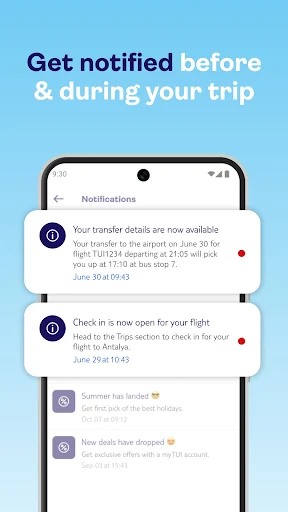
Day to day, the most useful role is keeping trip information within reach. A holiday countdown offers a simple reminder that departure is approaching, while flight status helps me check the journey. The app also provides transfer information, including details for the return transfer. Those are practical details I often want to revisit during the week before a trip, when small questions tend to surface at inconvenient moments.
The value depends on what kind of booking I have. Digital boarding passes are available for most TUI flights, and the app includes a travel checklist with packing tips and pre-flight recommendations. I would still check that the relevant details are available for my particular plans, but having these travel tasks represented alongside the holiday is more convenient than relying on memory alone.
More Than the Main Trip
The extras are a notable part of the package. TUI describes options to select a plane seat or upgrade to Premium Seating, order travel money, and book airport or hotel parking. These are not essential for every traveler, and I would not assume I need them. Still, it is handy to have them surfaced in the same app when I am already sorting out the main holiday.
Experiences add another layer to the planning side. The app supports browsing and booking TUI Experiences, with options such as guided tours and scenic outings, as well as holidays and cruises. Filters and saved favourites help with comparing possibilities. I like that the app can cover both the major booking and some activities around it, without promising that every destination or activity will suit every itinerary.
A Week-Before Checklist
A week before leaving, I would use TUI as a quick planning checkpoint. I could open the booking details, review the countdown, look at flight status, and check transfer information. Then I would work through the travel checklist and confirm whether a boarding pass is available for my TUI flight. That routine turns a scattered set of travel reminders into a short, repeatable check without making the app the only source I rely on.
If I still have arrangements to make, I could look at seat selection, parking, or experiences from the app. The built-in chat is another option for questions about flights, hotels, tickets, or holiday extras; TUI describes it as available around the clock. I would use that support feature when a question concerns a TUI arrangement, rather than expecting it to resolve unrelated travel bookings.
Keep Its Scope in Mind
The biggest limitation is also straightforward: TUI is most useful when my trip connects to TUI. It brings together many parts of that holiday experience, but it is not presented as a universal hub for every provider. If I routinely mix bookings from several companies, I may still need other apps or records to keep the full itinerary together. That distinction matters more than the number of features on offer.
Some extras have defined boundaries. Digital boarding passes are offered for most TUI flights, rather than every flight, and Crystal Ski services are not currently available in the app. The breadth can also be a little much for someone who only wants to check a flight. I would judge it by whether its booking and holiday-management tools match my plans, not by expecting every feature to be relevant.
TUI: Holidays, Travel, Flights makes the most sense as a companion to a TUI holiday, covering discovery, booking, and practical details that matter closer to departure. The countdown, transfer information, checklist, and available boarding passes give it a useful role after the initial purchase, while extras and experiences widen its reach.
I would try it if I am considering a TUI trip or already have a booking to manage. Travelers seeking a single organizer for every provider may find its scope too specific, and those wanting only one travel utility can likely do without the broader package.
TUI Holidays & Travel App Frequently Asked Questions
What is TUI: Holidays, Travel, Flights used for?
TUI is for browsing and booking holidays, flights, hotels, cruises, accommodation, and experiences, then managing related trip details. It includes a holiday countdown, flight status, transfer information, a travel checklist, and digital boarding passes for most TUI flights. The app also offers selected extras such as seat selection and airport parking.
Which devices can run TUI: Holidays, Travel, Flights?
The app is available on Android through Google Play. The available details do not specify a minimum Android version, so check the Google Play entry from the device you plan to use for current compatibility information. Device support can depend on the app’s current requirements.
Does TUI: Holidays, Travel, Flights cost anything?
The app is free to download on Google Play, and the available facts say it has no in-app purchases or ads. Holiday bookings and optional travel extras are separate from the app download; check the store and TUI’s booking information for current details that apply to a particular trip.
What Android version does TUI: Holidays, Travel, Flights require?
A minimum Android version is not provided in the available app details. Requirements can change as the app is updated, so I would check the Google Play entry before installing it. That is the best place to compare the current requirement with the Android version on a particular phone or tablet.
Is TUI: Holidays, Travel, Flights right for every traveler?
It is a good match for people booking or managing a TUI holiday who want flight and transfer details, a countdown, and relevant extras in one app. It may be less useful if your bookings are spread across unrelated providers or you only need a basic flight tracker. Crystal Ski services are not currently available in the app.
Pros
- Combines holiday browsing and booking with practical trip-management details.
- Includes a countdown, flight status, transfer information, and a travel checklist.
- Offers useful extras such as seat selection, parking, and bookable experiences.
- Free to download, with no in-app purchases or ads.
Cons
- Most useful when a trip is booked or managed through TUI.
- Digital boarding passes are available for most TUI flights, not necessarily all.
- Crystal Ski services are not currently available in the app.
- Category
- Travel & Local
- Version
- 18.31.24











