Truckstop Go
- 1.69K
- 4.1
- Installs
- 100.00K
- Price
- Free

Screenshots

Analysis by Reviewed APKs
Truckstop Go is a mobile load board for truckers who need to find freight, compare options and handle some booking and payment tasks while away from a desk. I see it as a practical companion for people already using Truckstop’s load board, rather than a general-purpose travel app. Its real-time listings and saved-load tools make sense for work on the move, though access depends on a Truckstop Load Board subscription.
Finding Freight Between Stops
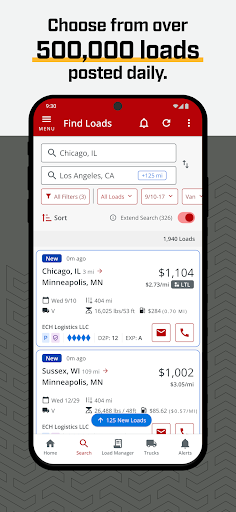
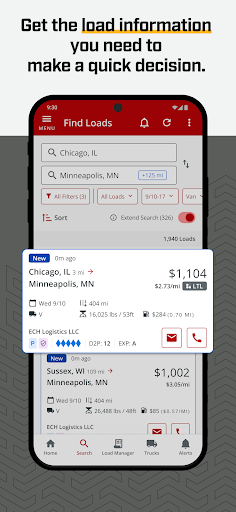
Imagine finishing a delivery and needing to find the next load before the day gets away from you. Truckstop Go is built for that in-between moment: check current listings, narrow them by equipment and preferences, and save promising options to revisit. The Live Loads feature is intended to surface new postings quickly, while alerts can notify you when relevant loads appear. That puts a focused freight search within reach without requiring a return to a computer.
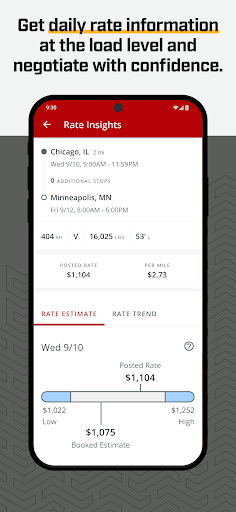
I like that the workflow described here acknowledges how many small decisions go into choosing a load. You can hide listings that are a poor fit, keep appealing ones in Load Manager, and use Rate Insights as a reference when discussing terms. If a broker is someone you trust, Book It Now is another route to a quicker booking. The aim is not to make every choice for you; it is to put useful information and actions in one place.
A Work Tool, Not a Road Atlas
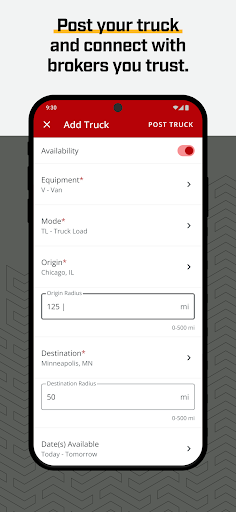
Truckstop Go is best compared with a desktop load board made portable, not with a navigation app or a directory of roadside services. Its job is to help users find and manage freight: search available loads, post a truck, communicate with brokers and, where appropriate, book or factor a load. That focus should appeal to people who already organize work through Truckstop and want access while away from their desk.
It is not presented as a route planner, fuel-price finder, truck-stop guide or community forum, so I would not choose it for those needs. Nor does a load board remove the judgment involved in deciding whether a job suits your operation. The app can help surface options and rate information, but it is still a business tool for comparing freight, not a promise that every listing will be right for you.
Make the Search Your Own
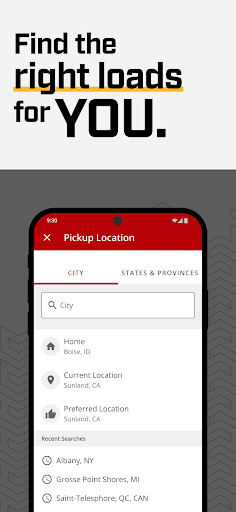
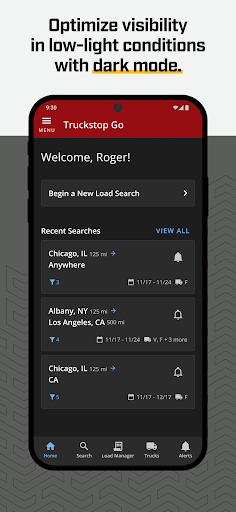
A little preference-setting can make repeated searches more manageable. Truckstop Go lets you filter and save by equipment type and other preferences, so it is worth taking the time to shape the results around the kind of work you are looking for. Load alerts can then bring new listings to your attention, while hiding unsuitable loads keeps them from crowding your view. These are modest tools, but together they can help turn a broad board into a more useful daily shortlist.
I would also treat Load Manager as a temporary workspace rather than a place to save everything indefinitely. Keep the loads you genuinely want to compare, review Rate Insights before a negotiation, and use click-to-call or click-to-email when you are ready to contact a broker. Blocking a broker you do not want to work with is another way to tailor the experience. The practical benefit comes from combining these tools with your own routine, not from tapping every feature.
More From Our News Desk

Zoom Meetings, Google Meet, or Teams: Which Is Easiest to Join?

How I Build a Free Streaming Lineup With Tubi

Why Crunchyroll Is the Default Anime App for So Many Fans

YouTube TV: A Practical Guide to Cutting Cable

Rummikub and the Small Comfort of Phone Games

TeamViewer Remote Control or AnyDesk for Helping Family?
Who will get the most from it
I would recommend Truckstop Go to truckers and trucking businesses already using Truckstop’s load board who need to check freight away from a computer. Live listings, alerts, saved loads, rate information and broker contact actions are especially relevant if your work involves comparing loads throughout the day. It is also a sensible fit for someone who wants to post a truck or handle load-related tasks from a phone.
It may be less useful if you are looking for driving directions, fuel prices, truck-stop amenities or a social space for drivers; those are not the functions described here. The app is free, but it is offered with a Truckstop Load Board subscription, so it is not a standalone free freight service. If you do not use that board, I would first consider whether its subscription and workflow fit your business.
Truckstop Go is a Business app from Internet Truckstop.com. Google Play shows more than 100,000 installs and a 4.1-star rating from 1,686 ratings. It is free to download and contains no ads or in-app purchases. The app’s description says it is free with a Truckstop Load Board subscription, so the subscription is an important part of the practical cost picture.
The listed content rating is Everyone. The current version is 5.17.1, released March 23, 2022, and the last update is dated October 29, 2026. The Android version requirement is worth checking on Google Play before installing, since compatibility can vary by device. These store details help set expectations, but the subscription remains the key condition for using the load board.
A Mobile Desk for Load Decisions
A Focused First Impression
When I first opened the idea of Truckstop Go, what stood out was its narrow purpose. This is not trying to be an all-in-one companion for every part of a road trip. It centers on freight work: finding loads, keeping an eye on new listings and taking action with brokers. That clarity is useful because it lets a driver know what the app is meant to help with before building it into a routine.
Getting value from it starts with having access to Truckstop’s load board. The description frames the app as free with that subscription, so I would check that requirement before expecting to browse and book loads. From there, equipment and other preferences can help shape searches. I appreciate that the main setup idea is practical: make the results relevant to your work, then use saved loads and alerts to keep track.
The Day-to-Day Search
The core experience is a cycle of checking available freight, filtering the options and deciding what deserves a closer look. Truckstop Go describes its loads as available in real time, with Live Loads for new postings and notifications for alerts. In a busy day, that can make the phone a useful place to check between other tasks instead of waiting until you are back at a desk.
The app also gives you ways to keep a search from becoming one long stream of listings. Save loads you like in Load Manager, hide the ones you do not want to see, and use preferences such as equipment type to narrow the field. I would still expect to compare listings carefully; the value is having those options together, not having the app decide which load is best for your situation.
Tools Beyond Browsing
Rate Insights is one of the more useful additions because a load search is not only about spotting an available job. Having rate information to refer to can give you a point of comparison during negotiations. It does not replace your own assessment, but it gives the app a role beyond showing a list of freight and makes it more relevant during the decision itself.
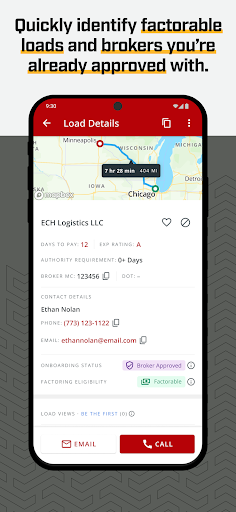
Communication and booking are also built into the described workflow. Click-to-call and click-to-email are meant to make broker contact faster, while Book It Now lets users instantly book with brokers they trust. The app also describes factoring loads from anywhere. Those features make Truckstop Go feel like a working tool rather than a read-only board, though they remain tied to the load-board service and the choices you make.
A Useful Daily Routine
A straightforward routine might begin with checking Live Loads when you have time to review the market, then applying your equipment and work preferences. I would save a small number of realistic candidates in Load Manager rather than trying to preserve every possibility. If a new listing matters, the alert feature can help bring it to your attention without requiring you to repeatedly start the search from scratch.
Before pursuing a load, review the details and use Rate Insights as one reference point. If the broker is a trusted contact and the listing fits, the app offers call, email and Book It Now actions. Afterward, factoring is described as another task you can handle from anywhere. This routine keeps the app focused on decisions and follow-through, rather than turning every idle phone check into a full search.
Keep the Scope in Mind
The biggest limitation is also the app’s defining boundary: Truckstop Go is about loads and related business tasks, not the wider logistics of life on the road. It is not described as providing navigation, roadside stop information, fuel comparisons or a driver discussion forum. If those are the features you need most, this is the wrong tool to cover them, even if its name sounds broad.
Access also depends on the Truckstop Load Board subscription, which means the no-cost app download does not tell the whole cost story. And while alerts, filters and Rate Insights can help organize a search, they do not guarantee a suitable load or settle a negotiation for you. I would view Truckstop Go as a convenient extension of a freight workflow, with the user still responsible for deciding what works.
Truckstop Go makes the most sense as a pocket-sized extension of an existing Truckstop load-board workflow. Its live listings, saved loads, alerts, rate insights and broker contact tools cover useful steps between finding freight and acting on it. I like the practical focus, provided you are looking for a load tool rather than a broader driver companion.
I would recommend it to Truckstop subscribers who want to search and manage freight from a phone. If you need navigation, fuel information or roadside recommendations, look elsewhere for those jobs. The app itself is free and ad-free, but the required load-board subscription is the detail to weigh before making it part of your routine.
Truckstop Go Frequently Asked Questions
What is Truckstop Go used for?
Truckstop Go is a mobile load-board app for finding freight and handling related tasks. Its described tools include live load listings, alerts, filters, saved loads, Rate Insights, broker contact options, Book It Now and factoring. It is aimed at truckers and businesses managing loads, rather than users looking for route planning or roadside stop information.
Can I use Truckstop Go on an iPhone or computer?
Truckstop Go is the Android app described here and is available through Google Play. The material does not establish availability for iPhone or desktop, so check the relevant store or Truckstop’s service information if you need another platform. On Android, device compatibility can vary, and Google Play is the best place to check before installing.
What Android version does Truckstop Go require?
The Android version requirement can vary with the app and your device, so check the Truckstop Go page on Google Play for the current compatibility information. The listed app version is 5.17.1. If your phone cannot install it or you are considering an older device, the store’s compatibility details are the practical place to start.
Is Truckstop Go free, and does it have purchases?
Truckstop Go is free to download and the store details show no ads or in-app purchases. However, its description says it is free with a Truckstop Load Board subscription, so using the load-board service requires that subscription. Subscription terms and any current costs may vary; check Truckstop’s service information or Google Play for details.
Who should use Truckstop Go?
It is best suited to truckers and trucking businesses that use Truckstop’s load board and want mobile access to freight searches, alerts and broker-related actions. It may not suit someone seeking navigation, fuel prices, truck-stop amenities or a driver community. The listed content rating is Everyone, but its business focus is the main suitability consideration.
Pros
- Live load listings and alerts help users keep up with new freight opportunities.
- Filters, saved loads and hide options make repeated searches easier to organize.
- Rate Insights and broker contact tools support decisions beyond simply browsing loads.
- Free to download, with no ads or in-app purchases.
Cons
- Using the load board requires a Truckstop Load Board subscription.
- Its focus is freight work, not navigation or broader roadside travel needs.
- Load information and rate insights still require careful review and personal judgment.
- Category
- Business
- Version
- 5.17.1











