TownSq Community
- 16.18K
- 4.1
- Installs
- 500.00K
- Price
- Free

Screenshots
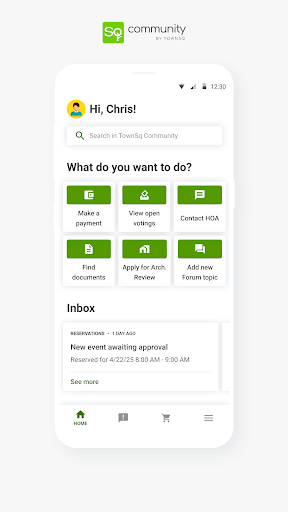
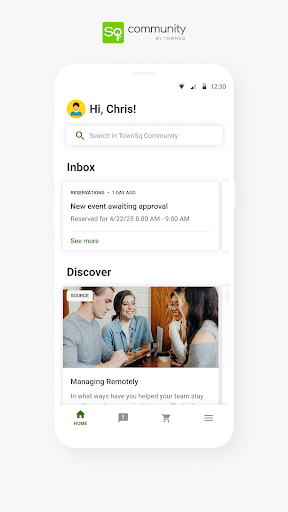
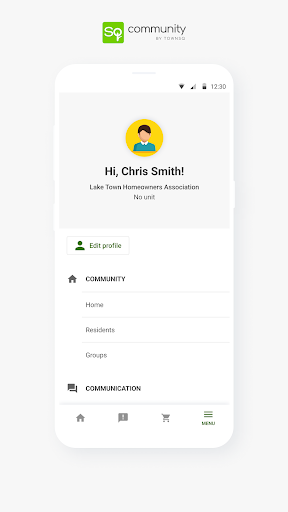
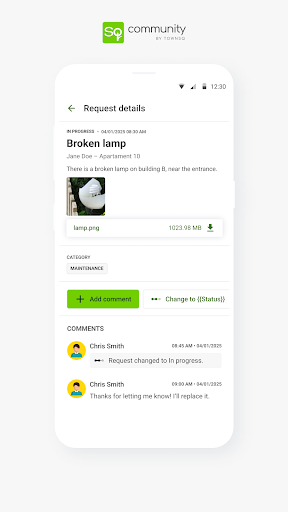
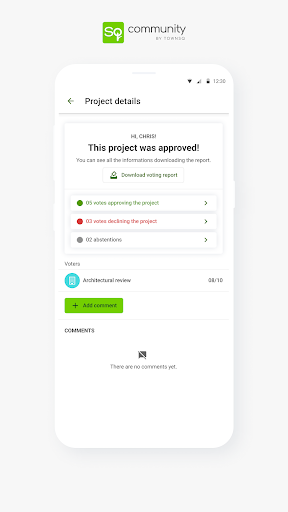
Analysis by Reviewed APKs
TownSq Community is a communication app for people who live in shared residential communities, giving residents, board members and management teams a place to stay connected and informed. I see its appeal most clearly when everyday neighborhood matters are scattered across emails, notices and conversations. It is a focused tool for community life rather than a general social network, and it should be most useful when the people managing your community actively use it.
A Neighborhood Day, In One Place
When I think about the app’s core job, I picture a resident trying to keep up with the practical details of a busy week: a community update arrives, maintenance needs attention, and an event is coming up. TownSq is intended to bring those parts of residential life into one mobile experience. Instead of treating communication and ongoing operations as separate worlds, it gives residents and the people managing the community a shared place to stay informed.
That kind of setup matters most in the small moments. I might want to check what is happening in the community before making plans, or make sure I have not missed an update while away from home. TownSq’s stated focus on connecting, collaborating and keeping residents informed fits that routine. The app’s value depends on the community’s own activity, but the overall idea is practical: make neighborhood information easier to follow as it comes up.
A Community Tool, Not Social Media
TownSq sits in a different lane from a general social network or a messaging app. Its focus is residential life: communication alongside day-to-day operations, maintenance, programs and events. That makes it a more purpose-built option for a community where residents, board members and management teams need to stay connected around shared concerns. The trade-off is that its usefulness is tied to that specific setting, rather than to broad social discovery or conversations with people anywhere.
I would not approach TownSq as a neighborhood marketplace, local news feed or all-purpose household organizer. The provided description centers on community management and staying informed about what is happening where you live. If your goal is simply to chat with friends, find nearby businesses or organize personal tasks, a different app may fit better. TownSq makes more sense when your residential community uses it as part of its own communication and operations.
Make It Part of the Routine
A simple habit is to check TownSq at a natural pause in the day, rather than waiting until a question or issue has become urgent. A quick look when settling in at home can help keep community updates and upcoming programs on your radar. I would also make a point of revisiting it when there is an ongoing maintenance matter or a change in community plans, since the app is designed to support those kinds of residential operations.
The best workflow is likely to treat TownSq as one regular channel, not as a replacement for every other way your community communicates. If a board or management team shares information through the app, checking it consistently should make those updates easier to follow. Residents can also get more out of it by using the same shared space to stay connected with their community. How much it helps will naturally depend on how actively the community uses it.
More From Our News Desk

Zoom Meetings, Google Meet, or Teams: Which Is Easiest to Join?

How I Build a Free Streaming Lineup With Tubi

Why Crunchyroll Is the Default Anime App for So Many Fans

YouTube TV: A Practical Guide to Cutting Cable

Rummikub and the Small Comfort of Phone Games

TeamViewer Remote Control or AnyDesk for Helping Family?
Who Will Find It Useful
I would recommend TownSq to residents in shared communities who want a more direct way to keep up with community communication, maintenance and events. It also makes sense for board members and management teams looking for a mobile experience that supports residential operations as well as resident engagement. If your community has adopted TownSq, having its information in one place may make the ordinary business of keeping up feel less scattered.
It may be less compelling for someone whose building or neighborhood does not use TownSq, because a community-focused app needs an active community around it to be useful. It is also not the right choice if you are looking for a broad social network or a general-purpose organization tool. I would think of it as a shared residential channel: helpful when it fits the way your community communicates, but not something every resident needs independently.
TownSq Community is developed by TownSq and is listed on Google Play in the Communication category. The app has over 500,000 installs and a 4.1-star rating from around 16,000 ratings. It is free to download, and the supplied store facts indicate no in-app purchases and no ads. Its content rating is Teen, so it is worth checking the Google Play page for the current details before installing.
The supplied app facts identify version 11.27.0, a release date of February 3, 2016, and a last update date of October 29, 2026. A minimum Android version was not included in the provided details, so check the Google Play page on your device for compatibility. These practical store details can change over time, particularly as the app receives updates.
How TownSq Fits Community Life
First Look and Setup
When I first considered TownSq, what stood out was its deliberately specific audience. This is not an app trying to serve every kind of social interaction; it is built around shared residential life. That focus gives the experience a clear purpose before you even get into the details: helping residents and community teams connect and keep track of what is happening where they live.
Getting meaningful use from an app like this starts with whether your community is part of the picture. TownSq is described as a shared experience for residents, board members and management teams, so its usefulness is naturally connected to participation by those groups. I would approach it as a community channel to check alongside the ways you already receive updates, then see how well it fits your own neighborhood’s routines.
The Everyday Experience
Day to day, TownSq is meant to bring communication together with the ongoing work of residential life. That can make it easier to think of community updates, maintenance and events as parts of the same shared environment instead of unrelated concerns. The emphasis is on staying informed and connected, which suits people who want community matters to feel accessible without turning every question into a separate search through old messages.
I would expect the app to be most useful in short visits rather than long sessions. A resident may want to catch up on what is happening, while someone involved in community operations may be thinking about ongoing maintenance or programs. The description supports that broad range of use, though the day-to-day value will depend on the community’s activity. A quiet community will naturally give residents fewer reasons to open it.
One Shared Community Space
The most distinctive idea is the attempt to serve several sides of residential life at once. Residents, board members and management teams are all part of the intended audience, and the app aims to help them connect and collaborate. That shared focus is different from a tool designed only for resident-to-resident conversation or only for management operations. TownSq presents community life as a combination of communication and practical coordination.
Its stated scope also includes ongoing maintenance, programs and events, alongside day-to-day operations. That breadth is useful as a way to understand what the app is for, rather than as a promise that every community will use each area in the same way. What surprised me about the concept is how much its usefulness depends on shared adoption: the app is most coherent when the people involved in community life use it together.
A Practical Check-In Habit
One straightforward routine is to check TownSq at a consistent time, perhaps when you have a moment after work or while planning the week ahead. That turns community information into something you can catch up on calmly, rather than something you only look for when a maintenance concern or event is already demanding attention. The app’s emphasis on staying informed makes that kind of regular, low-effort check-in a natural fit.
For a household, it may help to make sure the person who usually tracks community matters knows where to look for updates. If a community is using TownSq for its residential communication and operations, treating it as a regular channel can make those updates easier to remember. I would still use the communication methods your community relies on, but a predictable TownSq check can help keep its shared information in view.
Keep Expectations Grounded
TownSq is not a substitute for an active community. If residents and management teams rarely use it, there may simply be less to follow, and a dedicated app cannot create participation on its own. That is the main limitation I would keep in mind before judging the experience. Its central promise depends on the community making it part of how residents stay connected and informed.
The app is also specialized by design. It focuses on shared residential life, not on every local service or personal task a resident might have. That narrow purpose is a strength when it matches your needs, but it can make TownSq feel unnecessary outside a participating community. I would judge it by whether it helps your own community communicate and coordinate, rather than by expecting it to replace unrelated apps.
TownSq Community makes the most sense as a shared channel for the everyday business of living in a residential community. Its combination of communication, operations, maintenance and events gives it a clear role, especially when residents and management teams use it together. The idea is practical, even if the experience depends heavily on how engaged your own community is.
I would recommend giving TownSq a try if your community uses it and you want a more convenient way to keep up with residential matters. If your community is not active on the platform, or you want a general social or organization app, it is unlikely to become a regular part of your routine.
TownSq Frequently Asked Questions
What is TownSq Community used for?
TownSq Community is intended to help residents, board members and management teams connect and stay informed about residential life. Its stated focus includes day-to-day operations, ongoing maintenance, programs and events. It is best understood as a community communication and coordination app, rather than a general social network or a tool for unrelated personal tasks.
What platforms and devices support TownSq Community?
The supplied facts identify TownSq Community as an Android app available through Google Play. The details provided here do not establish support for other platforms or specify device requirements beyond that. For the current compatibility information for your particular device, check the app’s Google Play page before installing.
What Android version does TownSq Community require?
The minimum Android version is not included in the supplied app facts. Requirements can vary as the app is updated, so check the Google Play page on your device for the latest compatibility information. The provided facts identify version 11.27.0, but that does not by itself establish which Android versions can run it.
Does TownSq Community cost money?
TownSq Community is listed as free, with no in-app purchases and no ads in the supplied facts. Store details may change, so it is sensible to check Google Play for current pricing and purchase information before you download. Its practical value also depends on whether your residential community uses the app.
Is TownSq Community right for every resident?
It may suit residents, board members and management teams in communities that use TownSq to communicate and manage residential matters. Someone looking for a general social network or an app for personal organization may find its focus too specific. The most useful way to judge it is to consider whether your own community uses it actively.
Pros
- Brings community communication and residential operations into one focused mobile experience.
- Designed for residents, board members and management teams to stay connected.
- Covers practical community concerns such as maintenance, programs and events.
- Free to download, with no ads or in-app purchases in the supplied facts.
Cons
- Its usefulness depends on your community actively using the app.
- The residential focus makes it less useful for general social or personal tasks.
- Minimum Android requirements should be checked on Google Play.
- Category
- Communication
- Version
- 11.27.0











