Towbook
- 1.88K
- 3.6
- Installs
- 100.00K
- Price
- Free

Screenshots
Analysis by Reviewed APKs
Towbook is a business app for towing companies that need drivers, dispatchers, and managers to stay connected to the same work. I see its value less in any single feature than in having calls, dispatches, job updates, receipts, and photos available from an Android device. It is aimed at people already using a Towbook company account, not someone looking for a general roadside-assistance app.
A Busy Dispatch Shift
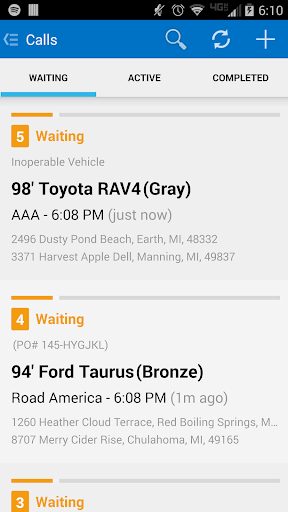
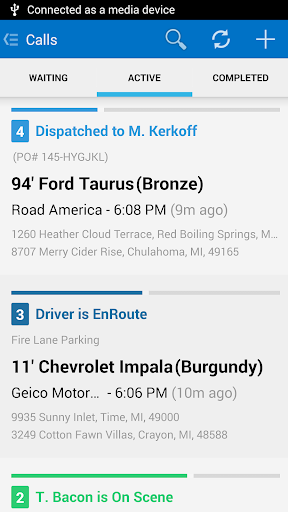
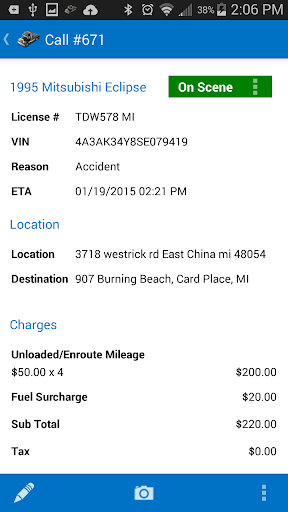
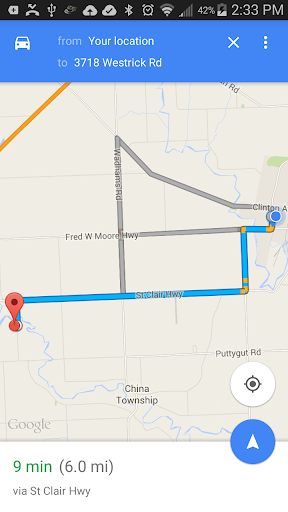
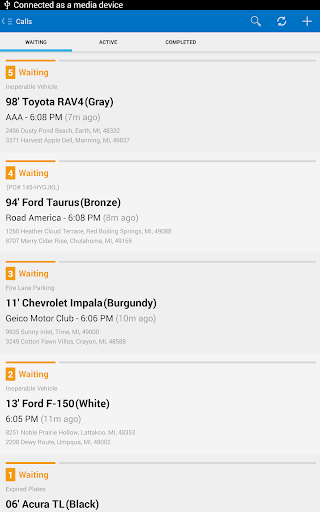
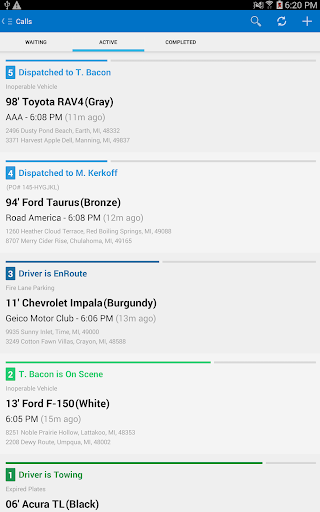
Picture a dispatcher handling a morning rush while drivers are out on separate jobs. With Towbook, the dispatcher can add a call and send it to a driver from a phone or tablet, while drivers can receive dispatches and send job updates back. That shared flow is the app's central purpose: keeping work moving between the office and the road without requiring everyone to sit at a desktop.
I can also see the practical value at the end of a job. A driver can send a receipt, upload photos, or use the app to handle information tied to an impound. Instead of treating the mobile app as a separate personal organizer, the company can use it as a mobile extension of its Towbook account. The usefulness depends on the team already relying on that system.
A Work Tool, Not a Roadside App
Towbook fits best alongside a towing company's existing dispatch and job-management workflow. It brings several work tasks onto Android, including creating calls, dispatching drivers, receiving updates, and sending receipts. For a team already using Towbook, that is a more direct fit than trying to coordinate business jobs through personal messages or a generic notes app.
It is not aimed at drivers who simply need to request a tow, nor is it a general navigation or vehicle-maintenance app. Its description centers on accessing a company's Towbook account, so the account and team context matter. A business that does not use Towbook may have little reason to install it, even if it handles towing work.
Small Habits That Help
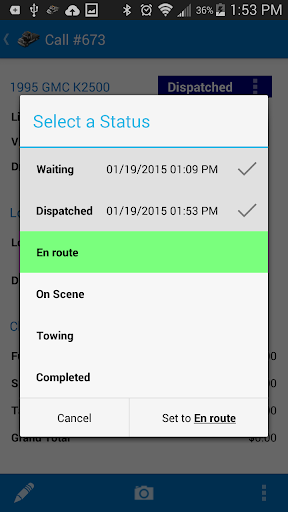
A useful habit would be checking for new dispatches and job updates at natural points in a shift, rather than relying on memory to keep track of every change. Towbook supports push notifications, so those can help bring activity to a driver's attention. The app also allows drivers to send updates, which gives dispatchers a way to follow progress through the same work system.
I would treat receipts and photos as part of closing out a job, not as chores to remember hours later. Sending them from the device while the work is fresh can make the handoff to the office more orderly. Dispatchers, meanwhile, can use the mobile access to add or assign calls when away from a desk. Those routines make the app more useful without adding a separate tracking system.
More From Our News Desk

Zoom Meetings, Google Meet, or Teams: Which Is Easiest to Join?

How I Build a Free Streaming Lineup With Tubi

Why Crunchyroll Is the Default Anime App for So Many Fans

YouTube TV: A Practical Guide to Cutting Cable

Rummikub and the Small Comfort of Phone Games

TeamViewer Remote Control or AnyDesk for Helping Family?
Who May Find It Useful
I would recommend Towbook to towing-company drivers and dispatchers who already work with a Towbook account and need mobile access during a shift. Managers may also find it useful when they want to stay connected to company activity from an Android device. Its mix of dispatch, updates, receipts, photos, and impound management points to a work tool meant for several roles in one operation.
It may not suit someone looking for a consumer app to book roadside help, or a business that has no Towbook account or workflow. The app's job is to connect people to company towing software, rather than explain towing options to the public. Teams considering it should also make sure its supported tools and dispatch connections match the services they actually use.
Towbook is the developer, and the Android app is categorized as Business. Google Play shows over 100,000 installs and a 3.6-star rating from 1,879 ratings. The app is free to install, with no in-app purchases or ads reported in the supplied store facts. Its content rating is Everyone.
The app's listed version varies with device. It was released on June 19, 2013. No minimum Android requirement or latest update date is provided in the available facts, so check Google Play for current device compatibility and release details before installing.
How Towbook Works on the Road
Getting Started
When I first opened the description of Towbook, the clearest thing was that this is not a standalone tool for an individual driver. It gives Android users access to their company's Towbook account. That distinction shapes the first step: the app makes most sense when a company already uses the software and its staff need to reach it away from a computer.
The setup value is therefore tied to a real work situation. A dispatcher might want to handle calls while moving between tasks, while a driver needs to receive assignments and report back from the road. The description does not spell out a setup tutorial, so I would expect the company's existing Towbook process to guide staff on account access and how their team uses the mobile app.
The Daily Job Flow
Towbook's everyday experience revolves around work moving between dispatch and drivers. Dispatchers can add calls and send them to drivers, while drivers can receive digital dispatches and provide job updates. That makes the phone a working point in the company's process, rather than just a place to check a static schedule.
I like that the description connects several stages of a job instead of focusing only on assignment. Receipts can be sent or printed, and photos can be uploaded from the device. Push notifications are also supported. For a driver who spends a shift away from the office, those functions can reduce the need to return to a desktop for routine communication and job follow-through.
Tools Beyond Dispatch
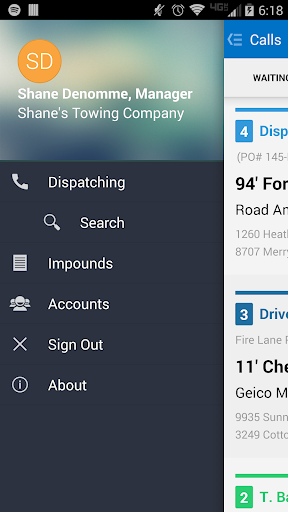
One notable addition is plate-to-VIN technology. The description also includes impound management, giving the app uses beyond ordinary roadside calls. Those are specific work features that help explain why Towbook is built for towing operations rather than simply acting as a message relay between a driver and dispatcher.
Digital dispatches from motor clubs are another part of its scope. The description names services including Agero, Allstate, Geico, Honk, Tesla, and Urgently, among others. For a company working with those providers, being able to accept dispatches within its Towbook mobile workflow may be useful. The exact relevance depends on which services the company works with.
A Practical Shift Routine
A straightforward routine could start with a dispatcher checking new work and assigning calls, then keeping an eye on incoming driver updates during the shift. Drivers can use the mobile app to receive dispatches and send progress information as jobs move along. That keeps the team's attention on the same work rather than splitting updates across unrelated personal tools.
At job completion, sending a receipt and uploading relevant photos can become part of the driver's normal wrap-up. If impound work is involved, the app also includes impound management. I would keep that routine consistent across the team, so information is entered close to the work itself and dispatchers know where to look for updates. The app provides those capabilities; each company still sets its own process.
Things to Keep in Mind
The biggest limitation is also the app's focus: it is built around an existing Towbook company account. A person installing it without that work context may find little to do. Its features are business-oriented, and the app is not presented as a public service for arranging a tow or comparing providers.
The store rating is 3.6 stars from 1,879 ratings, which is worth weighing alongside the app's specific fit for a team. The listed version varies with device, and the available facts do not give a minimum Android version. I would check Google Play for current compatibility and talk through the company's workflow before expecting every listed capability to be relevant to a particular operation.
Towbook makes the most sense as a mobile work companion for a towing company already using the Towbook system. Calls, dispatches, driver updates, receipts, photos, and impound tools give it a practical range for teams whose work continues beyond the office. It is focused, and that focus is a strength for the right users.
I would recommend it to Towbook-based dispatchers, drivers, and managers who need company work available on Android. If you are a consumer looking for roadside help or your business uses another system, this is probably not the app you need. For the intended audience, it brings useful parts of a towing workflow onto the phone.
Towbook Frequently Asked Questions
What is the Towbook app used for?
Towbook gives drivers, dispatchers, and managers mobile access to a company's Towbook account. It supports adding and dispatching calls, receiving job updates, sending or printing receipts, uploading photos, plate-to-VIN technology, and impound management. The description also says dispatchers can accept digital dispatches from several motor clubs.
Which devices can run Towbook?
Towbook is the Android mobile version of the company's software and is available through Google Play. The minimum Android version is not provided in the available facts, and the listed version varies with device. Check Google Play for the current compatibility details for your particular device.
Does Towbook cost anything?
The Android app is free to install, and the supplied facts say it has no in-app purchases or ads. Towbook is intended to provide access to a company's Towbook account, so the app's free download does not by itself describe any separate company service or account arrangements.
What Android version does Towbook require?
The minimum Android requirement is not included in the available facts. Because compatibility can depend on the device and app version, check the Towbook page on Google Play before installing. Its store entry gives the most useful current information for a specific Android phone or tablet.
Is Towbook suitable for individual drivers?
It can suit a towing-company driver who needs mobile access to the company's Towbook account, including receiving dispatches and sending job updates. It is not described as a consumer app for requesting a tow. Drivers who do not work with a company using Towbook may not find it useful.
Pros
- Connects dispatchers and drivers through calls, dispatches, and job updates.
- Supports sending receipts and uploading photos from an Android device.
- Includes impound management and plate-to-VIN technology.
- Accepts digital dispatches from a range of named motor clubs.
Cons
- Its usefulness depends on a company already using a Towbook account.
- The app is not intended for consumers seeking roadside assistance.
- The listed version varies by device, so compatibility should be checked.
- Category
- Business











