Total Commander - file manager
- 212.51K
- 4
- Installs
- 10.00M
- Price
- Free
Screenshots
Analysis by Reviewed APKs
Total Commander - file manager is an Android tool for browsing folders, organizing files, and moving things between locations. I’d recommend it to people who regularly handle downloads, archives, or files on a network, and who want more control than a basic file browser offers. Its two-panel approach and broad set of tools make it capable, though the interface feels more practical than polished at first.
Sorting Out a Busy Download Folder
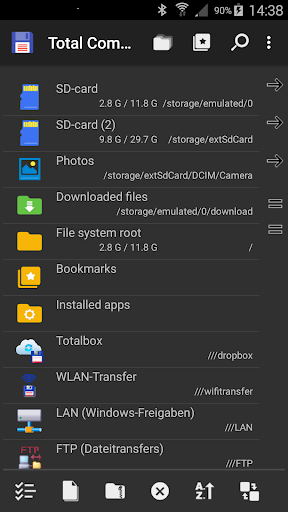
When I first opened Total Commander, I imagined using it after downloading a mix of documents, pictures, and compressed files. The two-panel view gives me a source and destination at once, which is useful when I want to move a folder without repeatedly backing out and finding the other location. I can select files, copy or move them, and keep an eye on both sides of the task.
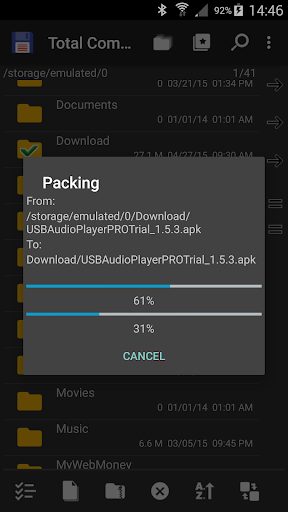
That setup also suits small jobs that otherwise turn into a string of taps: renaming a document, creating a folder for a project, or unpacking an archive where I need it. Total Commander handles ZIP and RAR files, and its search can look for text as well as files. It feels particularly handy when my phone has become a working storage space rather than just a place to save photos.
More Than a Basic File Browser
Compared with a simple file browser, Total Commander is built around doing things to files, not just viewing them. Alongside the usual copy, move, rename, and delete actions, it can create and extract archives, search file contents, and connect to network or cloud locations through plugins. The side-by-side layout is a practical alternative to hopping between folders, especially when moving a batch of items.
It is not a general-purpose phone organizer, photo editor, or cloud storage service. Its job is file management, and some connections require plugins rather than being available as part of the basic experience. If I only need to open an occasional download, a simpler browser may feel easier. If I routinely sort, transfer, or inspect files, Total Commander has more useful depth.
Small Habits That Help
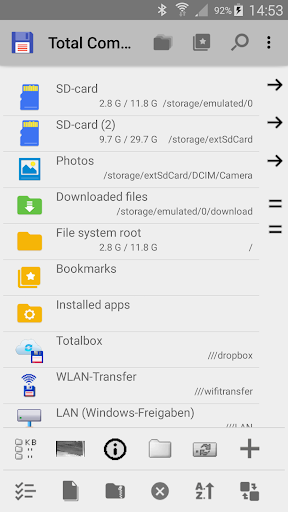
I get more out of the app when I use bookmarks for folders I revisit and directory history to retrace recent browsing. Those small conveniences matter on a phone, where returning to a deeply nested folder can otherwise mean a lot of backtracking. For repeated transfers, keeping the source and destination visible in the two panels makes it easier to check where files are going before I commit.
It also helps to select deliberately before starting a batch operation. Total Commander supports selecting groups, tapping file icons, and selecting a range with a long press, so I can choose the method that fits the job. For a quick one-off, drag and drop is another option: I long-press a file icon and move it to the other panel.
More From Our News Desk

Zoom Meetings, Google Meet, or Teams: Which Is Easiest to Join?

How I Build a Free Streaming Lineup With Tubi

Why Crunchyroll Is the Default Anime App for So Many Fans

YouTube TV: A Practical Guide to Cutting Cable

Rummikub and the Small Comfort of Phone Games

TeamViewer Remote Control or AnyDesk for Helping Family?
Who Will Get the Most From It
I’d recommend Total Commander to Android users who often move files between folders, deal with compressed archives, or want a way to browse network and cloud files from one app. It should appeal to people who value direct control over file operations and don’t mind learning a compact, tool-heavy interface. The built-in text editor, media player, and search add useful extras without changing its main purpose.
It may not suit someone who wants the simplest possible way to browse a few photos or open a download now and then. The range of controls can take a little getting used to, and some connections depend on plugins. I’d also keep in mind that deleting files is permanent within the app, as it has no recycle bin. For cautious file cleanup, that makes checking selections worthwhile.
Total Commander - file manager is developed by C. Ghisler and is available on Google Play for Android. It has over 10 million installs and a 4.0-star rating from about 213,000 ratings. The app is free, with no in-app purchases. Google Play classifies it as containing ads; the developer describes the plugin-download link in the home folder as the reason for that classification.
The app has an Everyone content rating. Its listed version is 3.62, and it was last updated on February 13, 2026. It was released on May 20, 2012. The supplied store information does not give a minimum Android version, so check Google Play for the current device requirement.
A Closer Look at Everyday File Work
A Practical First Look
My first impression is that Total Commander puts function ahead of decoration. Its two-panel layout makes the central idea clear: browse one place, browse another, then work with files between them. That may look denser than a phone’s default file browser, but it also saves some of the back-and-forth that comes with locating a destination after selecting a batch.
I’d start with a familiar folder and try a harmless task, such as creating a directory or copying a document. The app supports long-press selection and drag and drop, so it’s worth trying both ways of handling files. Once those basics feel comfortable, bookmarks and directory history can make regular navigation less repetitive.
The Day-to-Day File Work
For ordinary upkeep, the essentials are all here: copy, move, rename, create directories, and delete. I can work through a folder, select a group of items, and use the second panel to keep the destination visible. That makes the app a good fit for periodic tidying, such as separating work documents from downloads or moving several files into a shared location.
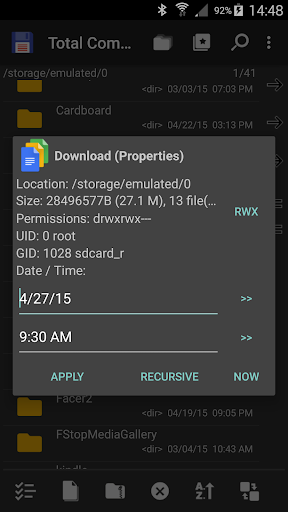
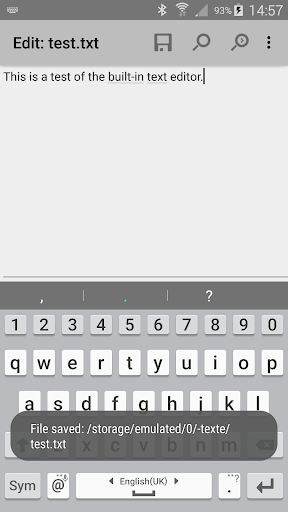
Search is useful when I remember a word in a file but not exactly where I saved it. The app can search text as well as file names, while the properties dialog provides information about an item and can change permissions. The built-in text editor is another practical inclusion for a quick look at or edit to a text file.
Useful Extras Beyond Folders
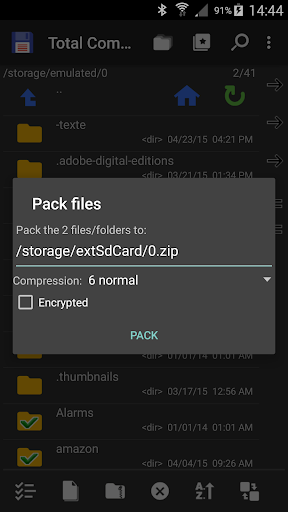
Archives are one of the clearer extras: Total Commander can zip and unzip files and handle RAR extraction. It can show picture thumbnails, send files over Bluetooth using OBEX, and save files received through another app’s share function. A built-in media player can also stream from a LAN, WebDAV, and supported cloud plugins.
Network access covers FTP and SFTP through a plugin, WebDAV through a plugin, and LAN access through a plugin. Cloud-service plugins include Google Drive, Microsoft OneDrive, and Dropbox. These options give the app room to handle more than local folders, but I’d treat the plugin requirement as part of the setup rather than assume every connection is ready immediately.
A Repeatable Sorting Routine
A useful routine is to check a busy downloads folder once a week, select related files together, and move them to a destination kept open in the other panel. I can create a folder for a new project, rename items as needed, and unpack an archive directly where I want its contents. Bookmarks help when that destination is somewhere I visit often.
For a file received from another app, the share function can send it to Total Commander to save. Later, I can use search or directory history rather than starting the hunt from the top level again. This is not a dramatic productivity system; it is a straightforward way to keep common file chores from becoming a long sequence of navigation steps.
Limits to Keep in Mind
The biggest adjustment is the interface. People used to a minimal, touch-first file browser may need a little time to understand the panels, selection gestures, and available operations. The depth is the point, but it does mean I wouldn’t choose Total Commander for someone who only wants the most visually simple route to opening a photo.
There is no recycle bin, so a delete action deserves attention before confirming it. Some network and cloud connections also rely on plugins, adding a step when setting up a particular service. Root support is optional and intended for rooted devices; it allows system-folder operations, so it is a specialized capability rather than something most everyday users need.
Total Commander is a capable Android file manager for people who want to do more than browse. Its two panels, archive tools, search, and plugin-supported connections make regular file chores feel more direct once the layout clicks. I especially like that it combines common operations with a few useful extras, such as a text editor and media player.
I’d try it if I routinely organize folders, transfer batches, or work with network files. If my needs were limited to opening the occasional download, I’d probably prefer a simpler app. The interface takes some practice, and the lack of a recycle bin calls for care, but for hands-on file management Total Commander offers a useful set of tools.
Total Commander Frequently Asked Questions
What is Total Commander - file manager used for?
Total Commander is an Android file manager for browsing and organizing files. It can copy, move, rename, and delete items; create folders; search files and text; and work with ZIP and RAR archives. It also supports network and cloud locations through plugins, and includes a text editor and media player.
Which devices support Total Commander - file manager?
Total Commander is the Android version of the desktop file manager, and the supplied store information describes it as an Android app. For the current device and Android compatibility details, check its Google Play page, since requirements can vary.
What Android version does Total Commander - file manager require?
The minimum Android version can vary by release and device. Check the Google Play page for the current requirement before installing. The app’s listed version is 3.62, and its most recent update in the supplied information was February 13, 2026.
Does Total Commander - file manager cost anything?
Total Commander is free to download and the supplied facts show no in-app purchases. Google Play classifies it as containing ads, while the developer says the plugin-download link in the home folder is treated as an ad by the store. Check Google Play for current details.
Is Total Commander - file manager suitable for beginners?
It can suit beginners who are willing to learn a more tool-focused interface, especially if they need to sort files or unpack archives. Its two-panel layout and selection options may take practice, and deleting files does not use a recycle bin. For occasional browsing, a simpler file manager may feel easier.
Pros
- Two panels make copying and moving files between folders easier to follow.
- Handles common file operations, ZIP and RAR archives, and text search.
- Plugins extend access to network locations and several cloud services.
- Includes bookmarks, directory history, a text editor, and a media player.
Cons
- The tool-dense interface may take time to learn on a phone.
- Deleted files do not go to a recycle bin.
- Some network and cloud connections require installing plugins.
- Category
- Tools
- Version
- 3.62











