Thrift Savings Plan
- 7.69K
- 4.7
- Installs
- 500.00K
- Price
- Free

Screenshots

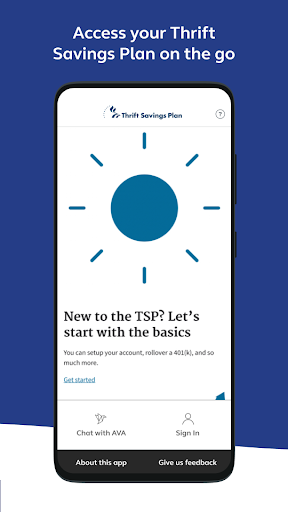
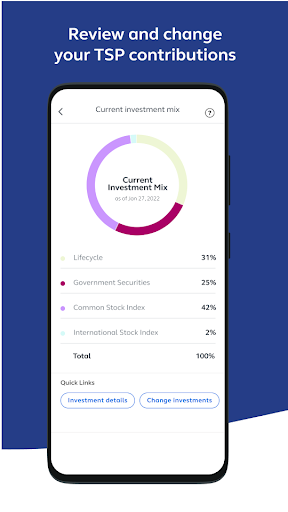
Analysis by Reviewed APKs
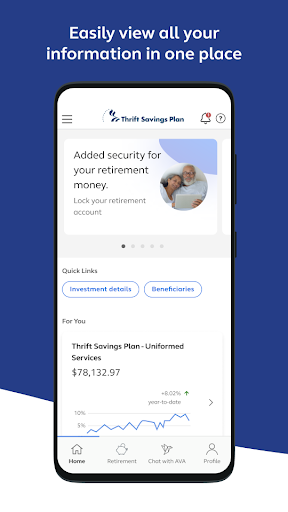
Thrift Savings Plan is a mobile account companion for people who participate in the TSP. It brings account summaries, investment performance, account changes, forms, and rollover check deposits together in one place. When I look at it as an everyday tool, its appeal is straightforward: it can make routine account checks and selected tasks easier to handle from a phone, though some functions require a tsp.gov login.
A quick account check
Imagine checking your TSP account between errands or during a quiet moment at home. I’d open the app to review the account summary, then look at investment performance if I wanted a little more context. That makes the app useful for a focused check-in without needing to sit down at a computer. It is built around access to an existing TSP account, rather than a general-purpose view of someone’s finances.
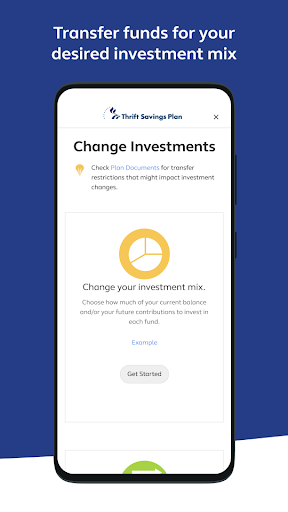
If I decide an account change needs attention, the app also supports changing an investment mix and handling certain paperwork. I like that those tasks sit alongside the basic account overview, since it gives a check-in a practical next step. Some functions require a tsp.gov login, so I would not assume every task is immediately available just because the app is installed. The main job is account access, with selected management tools close at hand.
A TSP companion, not a budget
Compared with opening a browser to reach an account, a mobile app offers a more direct way to check TSP information on a device. Its scope is specific: account summary, investment performance, selected account management, and paperwork. That focus is useful if the TSP is what I came to manage. I would not treat it as a household budget, a broad financial dashboard, or a replacement for services that cover accounts outside the TSP.
It also is not a general retirement-planning course. The described tools center on using a TSP account, including an assistant for navigation and options for submitting documents. I would use it to handle account-related tasks, then turn elsewhere for needs beyond that scope. Keeping that distinction in mind makes the app easier to judge: it is a convenient access point for participants, not an all-in-one personal finance product.
Make check-ins purposeful
I’d get more value from the app by opening it with a specific reason in mind: review the account summary, check performance, or complete a task that is already on my list. That keeps a quick visit from turning into aimless tapping around. The app’s tools cover both viewing information and handling selected account work, so a simple habit of checking what needs attention can make the experience feel more useful.
For paperwork, I would gather the relevant documents before starting, since the app supports electronic signatures, form submissions, and document uploads. If I have a rollover check to deposit, I’d keep that task separate from a routine balance check so I can focus on the deposit process. And when I reach a function that calls for a tsp.gov login, I’d be ready to sign in rather than assume every feature works without one.
More From Our News Desk

Zoom Meetings, Google Meet, or Teams: Which Is Easiest to Join?

How I Build a Free Streaming Lineup With Tubi

Why Crunchyroll Is the Default Anime App for So Many Fans

YouTube TV: A Practical Guide to Cutting Cable

Rummikub and the Small Comfort of Phone Games

TeamViewer Remote Control or AnyDesk for Helping Family?
Who may find it useful
I’d recommend Thrift Savings Plan to TSP participants who want a phone-based way to review their account and access selected management tools. It should suit people who occasionally check investment performance, need to handle forms, or want to use mobile check deposit for rollovers. The value is less about constant activity and more about having account information and particular tasks available on a device when they are needed.
It may be less useful to someone who does not participate in the TSP, or to anyone looking for budgeting, broad investment tracking, or general financial education. I would also keep expectations practical: the app’s described functions are tied to a TSP account, and some require a tsp.gov login. If a user prefers doing account tasks on a computer, the mobile format may not add much to their routine.
Thrift Savings Plan is published by FRTIB. On Google Play, it has over 500,000 installs and a 4.7-star rating from about 7,700 ratings. It is free to download, with no in-app purchases and no ads. Its content rating is Everyone. These figures offer a quick sense of its store presence, while the app’s practical appeal depends on whether someone needs mobile access to a TSP account.
The listed version is 7.2.10002. The app was released on May 20, 2022, and its listed last update is August 27, 2026. An Android minimum version is not included in the available app facts, so anyone checking device compatibility should consult the Google Play store information for their device. A tsp.gov login is required for certain functions within the app.
A closer look at mobile TSP access
Getting started
My first impression is that this app has a clear, specialized purpose: putting TSP account access on a phone. I would start by opening it when I have a specific account task in mind, rather than expecting a broad tour of personal finance features. The description makes the account summary and investment performance central, with additional tools for selected management and paperwork.
A tsp.gov login is required for certain functions, which is worth keeping in mind before planning to complete a task on the go. I’d make sure I can sign in before relying on those functions in a time-sensitive moment. That small bit of preparation matters more here than exploring lots of unrelated settings; the core experience is tied to access to a participant’s account.
Everyday account access
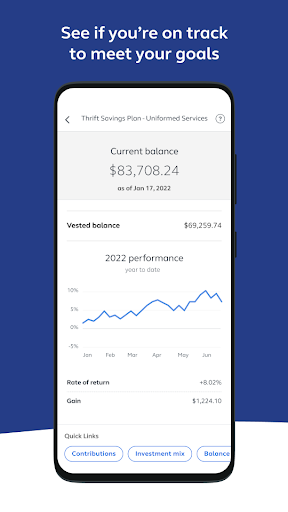
For routine use, the account summary gives the app a natural starting point. If I want a closer look, investment performance is another described part of the experience. Those two purposes make the app suitable for occasional check-ins, whether I’m verifying account information or reviewing how investments have performed. It is a practical kind of mobile access, rather than something I’d expect to use constantly throughout the day.
When a check-in turns into a task, the app can also support changing an investment mix and accessing paperwork tools. That means the experience is not limited to reading information. Still, I would approach account changes deliberately and use the app for the functions it actually provides, rather than assuming it covers every possible account action. The description gives a useful outline, but the specific task matters.
Tools beyond viewing
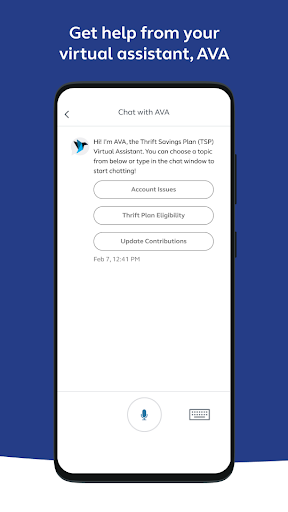
A few features help the app go beyond a simple account snapshot. It includes access to AVA, the TSP virtual assistant, described as a tool with convenient navigation. I see that as potentially handy when I need help finding a way through the app. The available information does not describe every question AVA can answer, so I would treat it as a navigation aid rather than assume it replaces all other support.
Paperwork is another notable part of the package. Users can electronically sign paperwork, submit forms, and upload documents. The app also supports mobile check deposit for rollovers, and it includes options to enroll in and manage a mutual fund window account. These are meaningful additions for participants with those particular needs, though they are not tasks every user will have reason to do regularly.
A practical phone routine
A sensible routine could begin with a brief account check when I already have a reason to review the TSP. I’d look at the summary first, then check investment performance if that is the question I came to answer. If I spot a task that falls within the app’s described functions, I can move on to the relevant account-management or paperwork tools instead of treating every visit as a full account review.
For document work, I’d prepare the material I need before opening the app, then use its signing, submission, or upload capabilities as appropriate. A rollover check deposit is a separate, specific use, so I’d approach it when that is actually on my to-do list. The app also offers mutual fund window account management for participants who need it. This kind of task-based routine keeps the app useful without making it another daily obligation.
Keep the scope in view
The app’s strongest quality is also its main limitation: it is specifically for TSP account access. Someone hoping for a single place to manage a household budget or unrelated accounts will not find that described here. I would install it because I participate in the TSP and want its account tools on a device, not because I expect it to serve as a general finance hub.
There is also a practical login consideration. Certain functions require a tsp.gov login, so not every feature should be assumed to work without signing in. The description identifies several useful tasks, but it does not mean every participant will use every one. If my needs are limited to occasional account checks, the app’s broader paperwork and account tools may simply be features I rarely open.
Thrift Savings Plan makes the most sense as a focused mobile companion for participants who want account information and selected management tasks within reach. I like the combination of account review with forms, document uploads, rollover check deposit, and mutual fund window access. Its value comes from that practical TSP-specific toolkit, not from trying to cover every part of someone’s finances.
I’d recommend giving it a try if you participate in the TSP and want to handle some account tasks on a phone. If you need budgeting or broad financial tracking, look for a different kind of app. Before relying on a particular function, keep the tsp.gov login requirement in mind and check the store for device compatibility.
Thrift Savings Plan Frequently Asked Questions
What is the Thrift Savings Plan app used for?
Thrift Savings Plan lets participants access their TSP account on a mobile device. The described functions include reviewing an account summary and investment performance, changing an investment mix, using AVA for navigation, signing and submitting paperwork, uploading documents, depositing rollover checks, and managing a mutual fund window account. Certain functions require a tsp.gov login.
Which devices can run Thrift Savings Plan?
Thrift Savings Plan is listed on Google Play for Android devices. The minimum Android version is worth checking in the Google Play store, since it can vary with the current app and device information. The app is intended for TSP participants, and some functions require a tsp.gov login.
Does Thrift Savings Plan cost money?
The app is free to download on Google Play. The store facts indicate that it has no in-app purchases and contains no ads. If you want to confirm the current details before installing, check the Google Play store entry, where app information can vary over time.
Does using Thrift Savings Plan require a login?
A tsp.gov login is required for certain functions in Thrift Savings Plan. The app provides access to TSP account information and selected account-management and paperwork tools, but the login requirement applies to some of those functions. Check the app and its Google Play information for current access details.
Who is Thrift Savings Plan best suited for?
It is aimed at TSP participants who want to check account information or use mobile tools for tasks such as paperwork and rollover check deposits. It may not suit someone looking for budgeting or management of unrelated accounts. Whether it fits your device and particular needs is worth checking in the Google Play store.
Pros
- Combines TSP account summaries and investment performance with selected management tools.
- Supports electronic signatures, form submissions, and document uploads.
- Includes mobile check deposit for rollovers and mutual fund window account management.
- Free to download, with no ads or in-app purchases.
Cons
- Focused on TSP participants rather than broader budgeting or account tracking.
- Certain functions require a tsp.gov login.
- Some included tools may be relevant only to specific participant tasks.
- Category
- Business
- Version
- 7.2.10002











