TechSmith Fuse
- 1.51K
- 2.7
- Installs
- 100.00K
- Price
- Free

Screenshots




Analysis by Reviewed APKs
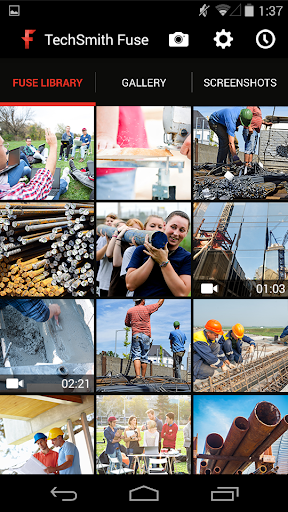
TechSmith Fuse moves photos and videos from an Android device into Snagit, Camtasia, or TechSmith Relay, where they can be shared or worked on further. I see it as a practical companion for people who already use those TechSmith products, especially when they need to capture something away from a computer. It keeps the job focused, though its usefulness depends on having a place to send your media.
Capture Away From Your Desk
When I spot something worth documenting during a workday, I don’t always want to wait until I’m back at my computer to gather the material. Fuse lets me choose a photo or video already on my phone, or capture new media inside the app, then send it to a TechSmith destination. That gives the app a clear role: bridge the gap between a mobile moment and a desktop project or colleague.
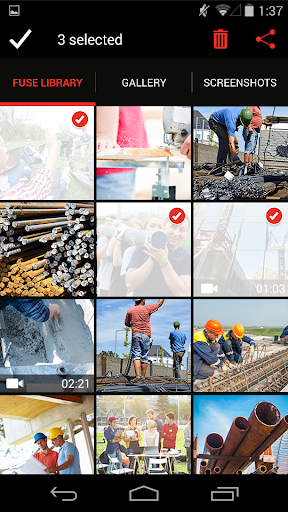
I can picture using it after a quick walkthrough, when I’ve photographed a process or recorded a short demonstration and want the files available in Snagit or Camtasia. Fuse can send multiple images or videos at once, and previews let me check what I’m about to share. For an image that needs context, the built-in freehand drawing tool adds a simple mark-up step before I pass it along.
A Companion, Not An Editor
Fuse makes the most sense beside Snagit, Camtasia, or TechSmith Relay, rather than as a general-purpose photo or video app. Its strength is getting mobile captures into those products and sharing images with colleagues through Relay. If that is already part of my work routine, Fuse can remove a handoff step. If I only want to organize personal photos or make a finished video on my phone, its narrow focus is a poor match.
I would not treat Fuse as a replacement for the editing tools it connects to. The app can capture media, preview it, draw on images, and send content onward, but the description frames Snagit and Camtasia as the places to use their editing capabilities. That division is useful to understand before installing: Fuse handles the mobile transfer, while the broader workflow depends on the TechSmith products you already use.
Make Transfers Deliberate
A small habit that should help is checking the preview before sending a batch. When several images or videos come from a camera roll, a quick review can make it easier to select the material that belongs in a work handoff. Fuse also keeps upload history for recent TechSmith Relay content, so that history can be useful when I want to share something again without starting from scratch.
For repeated transfers, I’d pair the phone with the computers I use through Fuse’s QR-code option, then connect over the local network when that suits the setup. The app supports pairing with multiple computers and says local-network transfers provide a fast, secure connection. I’d still keep the process simple: capture, preview, annotate an image if needed, and send only what belongs in the destination.
More From Our News Desk

Zoom Meetings, Google Meet, or Teams: Which Is Easiest to Join?

How I Build a Free Streaming Lineup With Tubi

Why Crunchyroll Is the Default Anime App for So Many Fans

YouTube TV: A Practical Guide to Cutting Cable

Rummikub and the Small Comfort of Phone Games

TeamViewer Remote Control or AnyDesk for Helping Family?
Who Will Get The Most From It
I’d recommend TechSmith Fuse to people who already work with Snagit, Camtasia, or TechSmith Relay and regularly collect photos or video on an Android phone. It suits a practical, task-focused routine: capture something in the field, send it to a computer or Relay, and continue working there. The ability to transfer multiple files and add a quick drawing to an image makes it more useful than a bare upload button.
It may not suit someone looking for a standalone camera, a full mobile editor, or a broad way to share media with any service. Fuse is built around TechSmith destinations, so its value falls if those aren’t part of your workflow. I’d also consider its Google Play rating of 2.7 from about 1,500 ratings before relying on it for a central process; the focused feature set will not be right for everyone.
TechSmith Fuse is a business app from TechSmith Corporation. On Google Play, it has over 100,000 installs and a 2.7-star rating from about 1,500 ratings. It is free to download, with no in-app purchases and no ads. The content rating is Everyone, making the store’s age category suitable for a general audience.
The current version is 2.1.6. The app was released on November 18, 2013, and was last updated on September 28, 2023. It is an Android app intended to move mobile photos and videos into Snagit, Camtasia, or TechSmith Relay. The available version information does not give a minimum Android requirement, so I’d check Google Play for device compatibility.
A Focused Bridge From Phone To TechSmith
A Clear First Impression
When I first opened the idea of Fuse, what stood out was how specific its job is. This is not trying to be an all-purpose camera or a catch-all cloud drive. It is a route from mobile media to three named TechSmith products, with capture and transfer kept close together. That focus is helpful if I already know where the files need to go.
Getting started involves choosing existing media or capturing something new, then connecting to a TechSmith destination. Fuse can pair with multiple computers using a QR code, which gives the setup a direct, device-to-computer feel. I’d expect that pairing step to matter most for someone who transfers content regularly, rather than a person making a one-off upload.
The Everyday Transfer
The core experience is a short sequence: select or capture photos and videos, preview them, and send them along. Sending multiple items at once is handy after an outing or a series of work snapshots, since it avoids treating every file as a separate task. The app’s camera-roll import also means I can work with media I took earlier, rather than needing to plan every capture inside Fuse.
The local-network option is another practical detail. TechSmith describes it as a way to provide a fast and secure transfer, which fits the app’s role when a phone and computer are on the same network. It keeps the emphasis on moving material into the TechSmith workflow, not on building a new archive inside Fuse.
Small Tools With A Purpose
The built-in camera makes Fuse useful at the moment something happens, while image and video previews offer a chance to check the material before sending it. I like that these are straightforward supporting tools rather than an attempt to turn the app into a complete production suite. For a quick workplace capture, fewer steps between taking a picture and transferring it can be the main benefit.
The drawing tool gives still images a bit more context. I can imagine circling a detail or sketching a simple pointer before sharing an image through TechSmith Relay. Fuse also lets users send captures to Snagit or Camtasia for their editing capabilities. Those destinations are the more natural home for substantial editing, while Fuse handles the mobile capture and handoff.
A Repeatable Work Routine
A realistic routine might start with a phone photo or short video during a site visit or team task. I’d open Fuse, select the relevant material, check the preview, and send a batch to the computer where I use Snagit or Camtasia. If an image needs a quick visual note for colleagues, I’d use the drawing tool and share it through TechSmith Relay instead.
When I’ve shared Relay content recently, the upload history offers a way to return to it directly from the app. That can save a little effort in a repeat handoff, especially if the same material needs to be shared again. I’d keep the history in perspective, though: it supports recent Relay content, not a general-purpose file library.
Keep The Scope In Mind
Fuse’s biggest limitation is also its defining choice: it is centered on TechSmith products. Users who do not use Snagit, Camtasia, or TechSmith Relay may find little reason to add another step to their photo workflow. The app’s described editing is limited to annotating images with freehand drawing; people seeking a broader mobile editing experience should look elsewhere for that part of the job.
I’d also weigh the modest Google Play score against the convenience of the workflow. A 2.7-star rating from around 1,500 ratings is a reason to check recent user feedback and confirm that the app suits your device and setup before depending on it. The listed version is 2.1.6, last updated in September 2023, so it is sensible to verify compatibility in the store.
TechSmith Fuse has a clear, useful purpose: get photos and videos from an Android phone into Snagit, Camtasia, or TechSmith Relay. Batch transfers, previews, QR-code pairing, and quick image annotation support that handoff without pretending to replace a full editor.
I’d try it if TechSmith tools are already part of my work and I often capture material on the go. If I want a general media manager or standalone editing app, I’d pass. Its narrow focus and low Google Play rating make checking compatibility and recent feedback a sensible first step.
TechSmith Fuse Frequently Asked Questions
What is TechSmith Fuse used for?
TechSmith Fuse sends photos and videos from an Android device to Snagit, Camtasia, or TechSmith Relay. You can select existing media or capture new material in the app, preview it, and send multiple items at once. It also includes a freehand drawing tool for annotating images and supports sharing images with colleagues through TechSmith Relay.
Which phones and platforms support TechSmith Fuse?
TechSmith Fuse is an Android app available through Google Play. Its described workflow connects mobile captures with Snagit, Camtasia, and TechSmith Relay, and it can pair with multiple computers using a QR code. Check Google Play for current device compatibility and the Android version required for your phone, since that requirement can vary.
What Android version does TechSmith Fuse require?
The Android version requirement can vary by device and app compatibility. Google Play is the best place to check the requirement that applies to your phone before installing. Fuse is version 2.1.6, and the app’s described role is transferring mobile photos and videos into TechSmith products.
Does TechSmith Fuse cost money or include purchases?
TechSmith Fuse is free to download on Google Play. It has no in-app purchases and contains no ads. The app connects mobile media to Snagit, Camtasia, or TechSmith Relay, so check the Google Play details and the relevant TechSmith product information for any costs that may apply to the rest of your workflow.
Is TechSmith Fuse a good fit for everyone?
It is a better fit for people who already use Snagit, Camtasia, or TechSmith Relay and want to send phone photos and videos into those tools. It may not suit someone looking for a general photo manager or full mobile editor. Google Play shows a 2.7-star rating from about 1,500 ratings, so I’d review recent feedback too.
Pros
- Sends multiple photos and videos to Snagit, Camtasia, or TechSmith Relay.
- Captures new media or imports existing camera-roll photos and videos.
- Previews transfers and supports quick freehand image annotations.
- QR-code pairing and local-network transfer support a direct workflow.
Cons
- Its usefulness depends on having a TechSmith destination in your workflow.
- The drawing tool is for image annotation, not broader mobile editing.
- Its Google Play rating is a modest 2.7 stars.
- Category
- Business
- Version
- 2.1.6











