Taco John's
- 7.31K
- 4.5
- Installs
- 500.00K
- Price
- Free

Screenshots
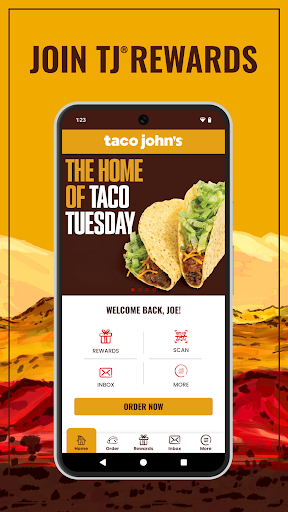
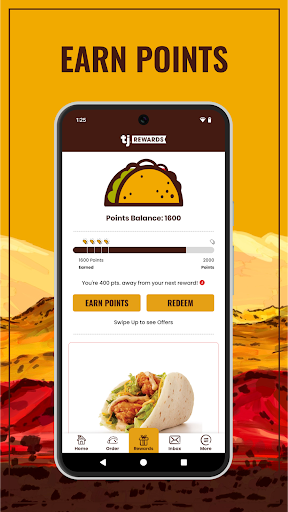
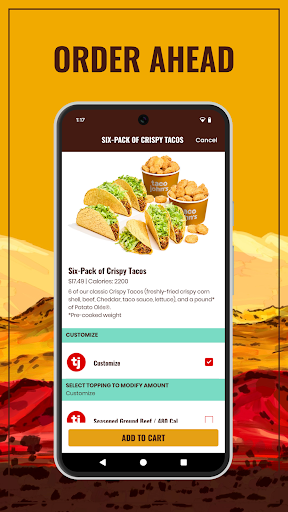
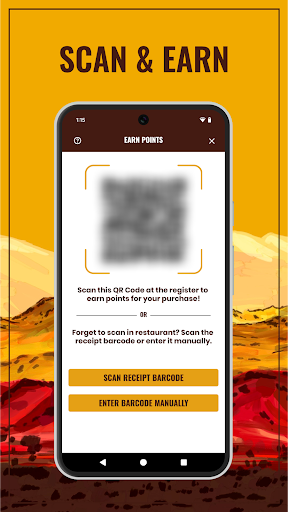
Analysis by Reviewed APKs
Taco John's is a loyalty and ordering app for people who visit the chain and want to keep rewards, offers, and pickup ordering in one place. I see its appeal most clearly when a meal is already on my mind: I can check my points, look for an offer, and place an order without treating the app as a general-purpose food guide. It is practical, focused, and best for regular customers.
A Meal, With Less Waiting
When I first pictured using Taco John's, it was on a busy lunch break: I know what I want, have limited time, and would rather not begin the visit by figuring out how the loyalty program works. The app brings together online ordering and points, so I can check my rewards and place an order before heading to a Taco John's. Its central job is straightforward: make a familiar visit easier to plan.
The useful part is that these tasks belong together. I can look at available offers, keep an eye on points that can be redeemed for food, and order favorites online to skip the wait. If I am away from my usual location, the restaurant finder can help me locate a nearby Taco John's. That makes the app feel relevant both when I have a regular lunch routine and when I am traveling.
A Brand-Specific Shortcut
Compared with a general restaurant finder or a broad delivery service, Taco John's is much narrower. It is built around the chain's own rewards, offers, ordering, and locations rather than helping me compare restaurants or browse lots of cuisines. That focus is a benefit if Taco John's is already part of my routine; I do not have to search through unrelated choices to reach the tools I came for.
It is not a general meal planner, a restaurant review guide, or a way to order from other businesses. I would not install it expecting a wide dining directory or a substitute for every food-ordering app. The strongest reason to keep it around is simply that I visit Taco John's often enough to care about points or online ordering. If I rarely go, its specialized purpose may not earn a place on my home screen.
Small Habits That Help
A simple habit is to check the app before deciding what to order. That gives me a chance to see whether an offer is available and what my points balance looks like, instead of remembering only after the meal. I can also use online ordering when I already know what I want and would like to skip the wait. These are small steps, but they make the app feel more useful than a rewards account I forget to open.
I would also make a point of checking the restaurant finder when I am somewhere unfamiliar, rather than assuming my usual location is the closest one. The app combines that lookup with ordering and rewards, so I can handle the practical details in one place. There is no need to turn it into a complicated routine: a quick check before a visit is enough to connect offers, points, and the meal itself.
More From Our News Desk

Zoom Meetings, Google Meet, or Teams: Which Is Easiest to Join?

How I Build a Free Streaming Lineup With Tubi

Why Crunchyroll Is the Default Anime App for So Many Fans

YouTube TV: A Practical Guide to Cutting Cable

Rummikub and the Small Comfort of Phone Games

TeamViewer Remote Control or AnyDesk for Helping Family?
Who Will Get the Most From It
I would recommend Taco John's to people who visit the chain regularly, especially anyone who likes keeping loyalty points visible and ordering ahead. It also suits customers who occasionally need to find a nearby location or want to check for tailored offers before they order. The appeal is not elaborate; it is the convenience of having a few chain-specific tasks ready when a Taco John's meal is already on the agenda.
It may be less useful for someone who only visits once in a while, or for anyone looking for a broad restaurant discovery tool. The app centers on Taco John's rather than the wider dining scene, so its value depends on whether that single brand fits your habits. If you do not expect to order there or use its rewards, the focused feature set may feel too limited to justify regular attention.
Taco John's is developed by Taco John's International, Inc. On Google Play, it has more than 500,000 installs and a 4.5-star rating from 7,311 ratings. The app is free to download, and the provided store facts say it contains no ads and offers no in-app purchases. Its content rating is Everyone, making its store age category broad rather than restricted to adults.
The listed app version is 4.1. Taco John's was released on May 20, 2016, and its most recent update was August 22, 2025. The Android version requirement is not included in the available app facts, so check Google Play for the requirement that applies to your device. Store information can change over time, so the current listing is the best place to confirm practical details before installing.
A Focused App for Taco John's Visits
First Open and Setup
My first impression is that Taco John's has a clear purpose rather than trying to be an all-purpose food app. The main reasons to open it are easy to understand: rewards, offers, online ordering, and finding a location. The app description invites customers to register, which connects naturally to the loyalty side. I would start by getting that account step out of the way, then check what the app offers before planning a visit.
That first visit is also a good time to see how the rewards and ordering fit my own routine. I would not expect the app to replace a restaurant visit; its role is to help prepare for one. The setup feels most worthwhile if I expect to use the loyalty program or order online again. For an occasional customer, the benefits are still clear, but there is less reason to return frequently.
The Everyday Loop
Day to day, the simplest loop is check, decide, and order. I can look at points and offers before choosing whether to place an online order, then use the location finder if I need help finding a restaurant. That puts the useful details near the moment I need them, rather than leaving me to remember a reward balance or search separately for a nearby branch.
I like that the app's everyday value does not depend on constant browsing. A brief check before lunch or dinner is enough to see whether there is a relevant offer and whether I want to order ahead. The focus is on making a Taco John's visit smoother, not filling spare time with a stream of unrelated content. That restraint suits a utility people may open only when a meal is coming up.
Rewards and Offers
The loyalty feature is the main reason I would keep Taco John's installed. The app lets customers track points and redeem them for food, which gives repeat visits a practical thread. Rather than treating rewards as an afterthought, it puts them alongside ordering. I can check what I have accumulated as part of deciding how to handle the next visit.
Offers add another reason to check in before ordering. The app describes them as tailored to the user, though I would avoid assuming a particular offer will always be available. Online ordering is the other standout: it is designed to let customers skip the wait. Together, those features cover a familiar sequence—see what is available, use the loyalty account, and order a meal.
A Useful Pre-Visit Routine
For a regular lunch stop, I would build a quick pre-visit check into the routine. Before leaving, I can open Taco John's, look at my points and any offers, then place an online order if I already know what I want. If I am in an unfamiliar area, I can use the location finder instead of relying on memory. It is a modest routine, but each step relates directly to the visit.
This approach also keeps expectations sensible. I would not spend time checking the app repeatedly when I have no plan to visit; the payoff comes when a Taco John's meal is already likely. On a rushed day, the order-ahead option is especially relevant, while on a more flexible day I might simply use the app to review rewards. The same set of tools can support different kinds of visits without becoming a project.
Limits to Keep in Mind
The biggest limitation is its narrow scope. Taco John's is designed for one restaurant brand, so it will not help me compare local dining options or manage meals from other chains. That is not a flaw if I am a regular customer, but it does mean the app's usefulness is tied closely to how often I visit. People who rarely eat at Taco John's may find that the features sit idle.
I would also keep the rewards and offers in perspective. The app supports tracking and redemption, but the supplied details do not promise a particular balance, offer, or reward for every customer. I would check what is actually shown in the app before counting on a deal. Online ordering is a convenience for planned visits, not a reason by itself to install a brand-specific app if the chain is not part of my routine.
Taco John's does a focused job: it connects loyalty points and offers with online ordering and a restaurant finder. I find that combination sensible for a regular customer, especially when a quick pre-visit check can help organize lunch or dinner. It is not trying to solve every dining need, and it is better for that honesty of purpose.
I would recommend it if Taco John's is a place you return to and you want its rewards and ordering tools close at hand. If you visit only rarely or want a broad restaurant app, I would skip it. For the right customer, it is a practical companion rather than an app that demands daily attention.
Taco John's Frequently Asked Questions
What is the Taco John's app used for?
Taco John's is used to track and redeem loyalty points, check offers, order favorites online, and find a nearby Taco John's location. It is most useful when a visit is already planned, since its tools are centered on the chain rather than general restaurant discovery. Customers can use it to bring rewards and ordering together before a meal.
Which phones and devices support Taco John's?
The provided platform information is Android, where Taco John's is available through Google Play. The app's description covers ordering and rewards on a mobile device, but the supplied facts do not give a specific Android minimum requirement. Check Google Play for device compatibility and current requirements before installing.
What Android version does Taco John's require?
The Android version requirement can vary as the app is updated, and no minimum version is provided in the app facts used for this review. The most reliable way to check whether Taco John's will run on your phone is to visit its current Google Play store page and compare the requirement with your device.
Does Taco John's cost money or include purchases?
Taco John's is free to download on Google Play. The available facts say it does not contain ads and does not offer in-app purchases. Store details can change, so it is worth checking the current Google Play page if you want to confirm the latest pricing and purchase information before downloading.
Is Taco John's a good fit for occasional customers?
It can still be useful for an occasional Taco John's visit, since it combines offers, point tracking, online ordering, and location finding. Its value is strongest for people who return often enough to use the loyalty program or order ahead. If you rarely visit the chain, its brand-specific tools may not be worth keeping readily available.
Pros
- Combines point tracking, redemption, offers, ordering, and location finding.
- Online ordering is intended to help customers skip the wait.
- Free to download, with no ads or in-app purchases listed.
Cons
- Its features are focused entirely on Taco John's locations and rewards.
- The loyalty and offer benefits matter less to infrequent customers.
- Category
- Lifestyle
- Version
- 4.1











