Stopwatch Timer
- 248.83K
- 4.5
- Installs
- 10.00M
- Price
- Free
Screenshots
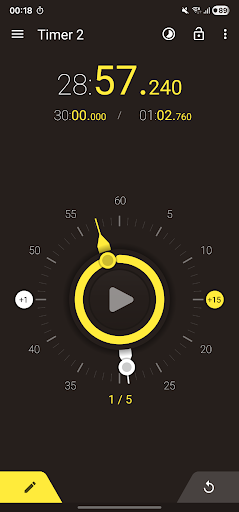
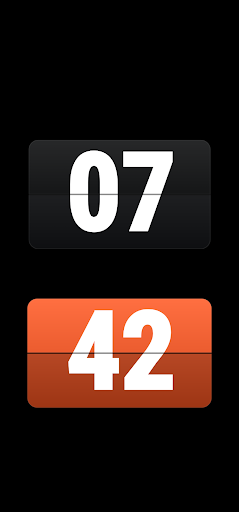
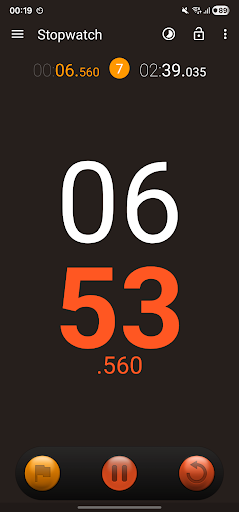
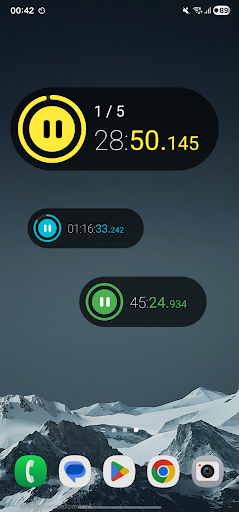
Analysis by Reviewed APKs
Stopwatch Timer brings a stopwatch and several countdown timers together in one Android app, with digital and analog displays and plenty of ways to tailor the controls. I can see it suiting people who time workouts, cooking, study sessions, games, or everyday tasks and want more than a basic clock. Its range is impressive, though the extra options may feel like overkill if all you need is a quick countdown.
Timing a Busy Evening
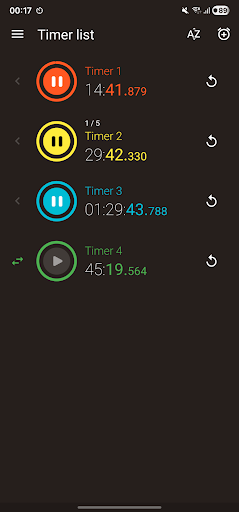
Picture a cooking evening with a few dishes on different schedules. I can set up a named countdown for each one, give them distinct colors, and let them run at the same time. The remaining-time circles make it easier to scan progress than to remember when each timer started. If I step away to check a recipe or message, floating timers can stay visible over another app.
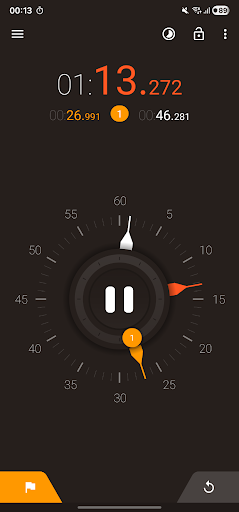
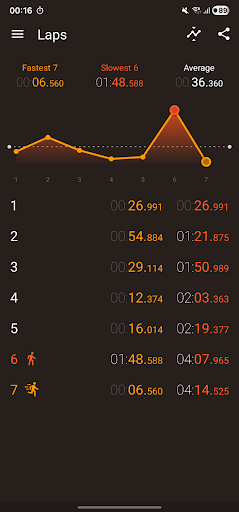
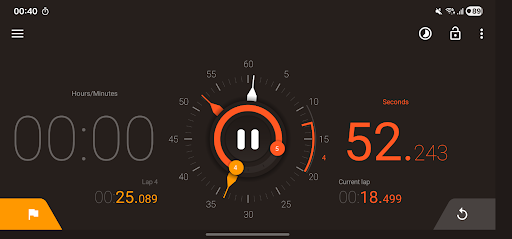
For a workout or a game, I’d switch to the stopwatch, start it with the large central control, and record laps as needed. The app keeps the current lap and overall elapsed time in view, then offers fastest, slowest, and average lap comparisons. That makes it useful for more than simply checking how long something took; there is a record to review afterward.
More Than a Basic Clock
The obvious alternatives are the stopwatch and timer already on a phone, or a dedicated timing device. Stopwatch Timer’s appeal is having multiple countdowns, lap analysis, customizable alarms, widgets, and floating controls in one place. It can serve as a flexible general-purpose timing tool without asking me to switch between separate stopwatch and timer apps for ordinary tasks.
It is still a timing app, not a training plan, recipe manager, or project tracker. The description focuses on measuring elapsed time and setting countdowns, rather than organizing the activity around them. If I only need one simple alarm now and then, the built-in clock may be quicker. The additional displays and settings matter most when I use timing often or need several clocks at once.
Small Habits That Help
For repeated tasks, naming timers and assigning different colors gives me a simple visual cue about what each one is for. Sorting by name, duration, active time, or a custom order can also make a crowded set easier to scan. I’d take a moment to choose alarm behavior for recurring timers, so the alert suits the task rather than treating every countdown the same way.
With the stopwatch, it helps to decide in advance whether I need lap comparisons or just a total time. The app lets me choose millisecond precision and share results as text, CSV, or a chart image, so I can keep the output appropriate to the job. Locking selected controls or using volume-button actions may also help when my hands are occupied.
More From Our News Desk

Zoom Meetings, Google Meet, or Teams: Which Is Easiest to Join?

How I Build a Free Streaming Lineup With Tubi

Why Crunchyroll Is the Default Anime App for So Many Fans

YouTube TV: A Practical Guide to Cutting Cable

Rummikub and the Small Comfort of Phone Games

TeamViewer Remote Control or AnyDesk for Helping Family?
Who Will Get the Most From It
I’d recommend Stopwatch Timer to people who regularly measure intervals and want choices: runners or other fitness-minded users tracking laps, home cooks juggling countdowns, students timing study blocks, and anyone managing several short tasks. The analog face offers a familiar glanceable view, while the digital display and lap statistics suit users who care about exact times. Widgets and floating timers are useful when timing needs to stay close at hand.
It may not suit someone who wants the absolute simplest timer interface, since multiple timer settings, display choices, and alarm controls take more attention than a single countdown. Nor is it a replacement for an app built around planning or recording a broader activity. The free app includes ads and offers in-app purchases, which are worth considering if interruptions or optional spending are a concern.
Stopwatch Timer is a tools app from Appozitive. Google Play shows over 10 million installs and a 4.5-star rating from about 249,000 ratings. It is free to install, contains ads, and offers in-app purchases. The listed price range for in-app products is $9.99 to $18.99 per item. Its content rating is Everyone.
The listed version is 3.3.18. The app was released on March 19, 2011, and its most recent update is dated September 13, 2026. A minimum Android version is not included in the available facts, so check the Google Play entry for compatibility with a particular device.
A Closer Look at Everyday Timing
First Look and Setup
When I first open a timing app, I want to know whether I can start quickly or have to configure everything first. Here, the central stopwatch control is prominent, and the main idea is straightforward: use a stopwatch for elapsed time or create a countdown. The combination of a digital readout and animated analog face gives the basic screen a distinctive, familiar feel.
The range of customization is easier to appreciate after the first glance. Stopwatch Timer offers Modern, Retro, and animated Flip designs, along with choices for display, colors, orientation, and brightness. Those options are useful rather than essential, so I’d start with the default presentation and adjust only what gets in the way during actual use.
Day-to-Day Timing
For everyday use, the app covers both sides of timing: measuring something as it happens and counting down to a finish. The stopwatch can pause and resume, show the current lap alongside elapsed time, and record lap results. A delayed start is available when I need a moment to get ready before timing begins.
Countdown timers have more depth than a one-off alarm. I can run several simultaneously, pause or reset them, duplicate a timer, and choose repeat behavior. Each can have its own name, duration, color, and alarm. The remaining-time display and expected finishing time give me useful context when several timers are active together.
Standout Tools and Controls
Lap analysis is one of the app’s more thoughtful touches. It can compare fastest, slowest, and average laps and show performance in a chart. I can choose the displayed millisecond precision and share results as text, a CSV file, or a chart image. That is a more useful follow-up than a stopwatch that leaves me with only a final number.
I also like the practical flexibility around keeping a timer visible. Floating timers can be adjusted for size, color, and transparency, while home-screen widgets provide regular or compact controls for the stopwatch and selected timers. These options make the app easier to fit into a routine where I’m looking at other things on the phone.
A Routine That Works
A practical way to use it is to prepare a few named timers for tasks that recur, then arrange them in a useful order. For a study session, I could run a countdown and keep it available in a widget; for cooking, I could run several different durations and distinguish them by color. The app also supports finite or continuous repeats, so the timer behavior can match the task.
For lap-based timing, I’d use the stopwatch display that is easiest to read at a glance, record laps during the activity, and review the comparisons afterward. If tapping the screen is inconvenient, volume-button or proximity-sensor gestures can be assigned to actions such as starting, pausing, recording a lap, or resetting. A focus view offers a cleaner display when I want fewer visual distractions.
Limits to Keep in Mind
The same breadth that makes Stopwatch Timer flexible can make it feel busy. There are several display styles, alarm choices, gesture controls, and timer behaviors to consider. Someone who only wants to tap once and get a basic countdown may find the phone’s built-in clock more direct. I’d treat the customization as optional and avoid changing settings until a specific need comes up.
The app contains ads, and in-app purchases are available, so the free download is not the whole story for anyone sensitive to advertising or optional charges. Also, the description emphasizes timing tools rather than a larger system for managing workouts, recipes, or study plans. It can measure those activities, but users looking for broader organization may want a separate app for that job.
Stopwatch Timer is a capable choice when a basic clock app starts to feel limiting. Multiple countdowns, lap comparisons, floating timers, widgets, and adjustable alarms give it real everyday range, while the analog and digital views keep the central task easy to understand. The trade-off is a more involved set of options and ads in the free app.
I’d try it if I often time several things, track laps, or want controls that remain accessible while using other apps. For an occasional single countdown, a simpler tool is likely enough. But for regular timing across cooking, study, exercise, and everyday tasks, Stopwatch Timer brings a useful set of tools together.
Stopwatch Timer Frequently Asked Questions
What is Stopwatch Timer used for?
Stopwatch Timer combines a stopwatch with countdown timers. It can record and compare laps, run multiple countdowns at once, and keep timers available through floating displays or home-screen widgets. It is intended for timing activities such as workouts, cooking, studying, games, and other everyday tasks.
Which devices support Stopwatch Timer?
Stopwatch Timer is an Android app available through Google Play. The minimum Android version is worth checking on its Google Play entry, since device compatibility can vary. The app description also mentions home-screen widgets and floating timers for use while working in other apps.
Is Stopwatch Timer free, and does it include purchases?
The app is free to install and contains ads. It also offers in-app purchases, with listed items priced from $9.99 to $18.99 each. The exact options and prices may vary, so check the Google Play entry for current purchase details.
Can I use Stopwatch Timer for several tasks at once?
Yes. Stopwatch Timer supports multiple countdown timers running at the same time, with separate names, durations, colors, repeat settings, and alarms. It also has stopwatch lap tracking. That makes it suitable for juggling several timed tasks, though it is focused on timing rather than broader task planning.
Who should try Stopwatch Timer?
It may suit people who often track laps, manage several countdowns, or want a timer available through a widget or floating display. Users who only need a single occasional alarm may prefer a simpler clock. The app is rated Everyone, but its ads and optional in-app purchases are worth considering.
Pros
- Runs multiple customizable countdown timers alongside a stopwatch and lap tracking.
- Offers lap comparisons, charts, and several ways to share stopwatch results.
- Floating timers and widgets keep timing controls accessible while using other apps.
- Display styles, alarm options, and hands-free controls offer useful flexibility.
Cons
- The many settings may feel excessive for someone who only needs a basic countdown.
- The free app contains ads and offers in-app purchases.
- It focuses on timing rather than organizing the activities being timed.
- Category
- Tools
- Version
- 3.3.18