stayconnect® remote
- 624
- 1.5
- Installs
- 500.00K
- Price
- Free

Screenshots
Analysis by Reviewed APKs
stayconnect® remote is a hotel-room TV remote for travelers whose hotel supports the service. You pair your phone with the TV using a code from its interactive menu, then use the app to handle power, volume, mute, channels, and the channel lineup. I like the idea most for those little moments when the TV remote is out of reach, though its usefulness depends on the hotel having the system.
A remote within reach
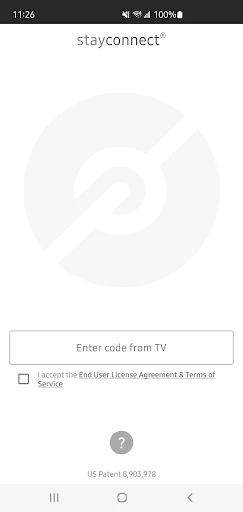
Picture settling into a hotel room after a long day, putting your bag down, and realizing the TV remote is across the room. With stayconnect® remote, the intended routine is to open the TV’s interactive menu, find its pairing code, and connect your phone. Once paired, you can turn the TV on or off, adjust or mute the volume, and switch channels from your device.
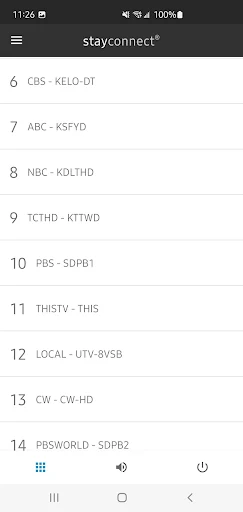
That is a narrow job, but an easy one to understand. I can imagine using it while unpacking, or muting the TV quickly when a call comes in. The channel list is useful in a different way: instead of stepping through channels one by one, you can browse the lineup in the app. The app’s value is practical convenience, not a new way to watch television.
Hotel use, not home control
The closest alternative is the physical remote already in the room. That remote is familiar and does not require pairing, while stayconnect® remote puts basic controls on a phone you may already have in your hand. The app is specifically described for pairing with a hotel-room TV, and it is available at thousands of hotels across North America. That makes it a travel convenience rather than a universal remote for every screen.
It also is not a streaming service or a way to bring hotel channels onto your phone. Its listed role is to control the TV and browse that TV’s channel lineup after connection. If the room’s TV does not offer the interactive menu and code needed for pairing, this particular workflow has no clear use. I would still treat the room’s physical remote as the straightforward fallback.
Make pairing less fussy
A small habit that should help is checking the TV’s interactive menu before settling in, rather than searching for a pairing code after you have already made yourself comfortable. The code is the key step described for connecting the phone. Once the app is paired, keeping it handy on your phone makes sense if you expect to adjust the sound or channel during the evening.
I would also use the channel list when I want to see what is available, then rely on the app for simple changes such as muting or turning the set off. Those are modest routines, but they fit the app’s purpose. There is no reason to build a complicated setup around it: this is a room-by-room convenience for the duration of a hotel stay.
More From Our News Desk

Zoom Meetings, Google Meet, or Teams: Which Is Easiest to Join?

How I Build a Free Streaming Lineup With Tubi

Why Crunchyroll Is the Default Anime App for So Many Fans

YouTube TV: A Practical Guide to Cutting Cable

Rummikub and the Small Comfort of Phone Games

TeamViewer Remote Control or AnyDesk for Helping Family?
Who may find it useful
I would recommend trying stayconnect® remote to travelers who often watch the hotel TV and would rather keep basic controls on their phone. It may be especially handy if the remote is awkward to reach while unpacking, or if browsing a channel lineup sounds easier than flipping through channels. The app has a clear, limited purpose, so it is best suited to someone who wants a small convenience rather than a broad entertainment tool.
It may not suit people who rarely use hotel televisions, or anyone expecting a phone-based remote to work with every TV. The hotel set needs to provide the interactive menu and code used for pairing, and the service is described as available at thousands of hotels across North America. I would not plan a trip around it; I would regard it as a useful extra when the room supports it.
stayconnect® remote is published by SONIFI Solutions Inc. On Google Play, it has over 500,000 installs and a 1.5-star rating from 624 ratings. The app is free to download, with no in-app purchases and no ads. Its content rating is Everyone. Those details make it easy to try without a purchase, though the low rating is worth considering alongside the app’s specific hotel-TV use.
The listed version is 1.2.0. It was released on October 19, 2022, and was last updated on March 30, 2026. The supplied app details do not include a minimum Android version, so check Google Play for current device compatibility before installing. In practical terms, you also need access to a hotel TV with the interactive menu and code used to pair your phone.
A small convenience for hotel TV
First look and setup
When I first considered the setup, the important detail was not an account or a long configuration process; it was whether the room TV showed the interactive menu with a code. The described pairing method starts there, then connects the mobile device to the television. That gives the app a straightforward premise, while making its usefulness dependent on the equipment in the room.
I would approach the first use with the TV on and its menu available, then follow the code-based pairing step. The supplied description does not spell out every screen in that process, so I would keep expectations simple: connect the phone, then use the controls the app provides. If the menu or code is not available, the physical remote remains the practical option.
Basic controls, day to day
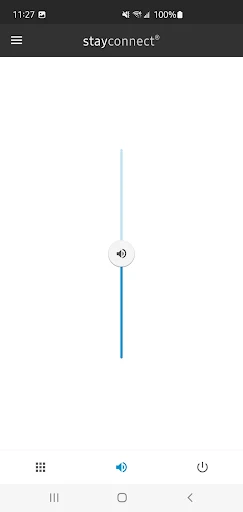
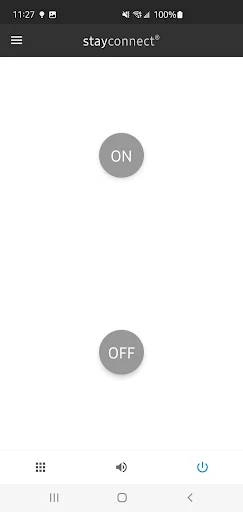
The everyday controls are the sort I would want within easy reach: power, volume, mute, and channel changes. They cover the small interruptions that happen while watching in a room, such as lowering the sound for a phone call or turning the set off before heading out. The app is not trying to replace the TV itself; it gives the phone a remote-control role.
I spent a moment thinking about what makes that worthwhile. It is less about adding new entertainment and more about avoiding a search for the handset or keeping control available while moving around the room. That convenience is real but modest. The app’s core controls are easy to summarize, which is also a useful sign that it has a focused job.
The channel list matters
The included channel list is the feature that goes beyond the most basic remote buttons. It lets you browse the TV lineup, which can be preferable to changing channels at random when you have just checked in and do not know what the room offers. I like that this is tied to the hotel TV rather than presented as a separate catalog of shows.
That distinction keeps expectations grounded. The channel list is for browsing what the paired television offers; the app is not described as streaming those channels to the phone. For a traveler who watches live hotel TV, seeing the lineup on the device can make channel selection less clumsy. For someone who does not use the TV, this feature will not change much.
A simple evening routine
A realistic routine would be to check the TV menu after arriving, pair the phone with the code, and then leave the app ready for the evening. I might browse the channel lineup while unpacking, choose something on the TV, and use the phone to lower the volume when I want a quieter room. Before leaving, I could use the power control to switch the set off.
That routine depends on the hotel supporting the service, so I would not assume it will work in every room. Still, once the code-based connection is made, the described controls fit naturally into an ordinary stay. There is no need to make the app the center of the evening. It is most useful when it fades into the background and saves a small amount of effort.
Keep the limits in mind
The main limitation is compatibility at the hotel level. The app is described for use where the room TV offers the interactive menu and pairing code, and its availability is framed around hotels across North America. That means it cannot be treated as a dependable remote for any television you encounter. The room’s physical remote remains important when the app cannot connect.
Its scope is also deliberately narrow: power, volume, mute, channel changes, and browsing the lineup. That may be exactly enough for a short stay, but it is not a general smart-home controller or a substitute for a streaming app. Google Play shows a 1.5-star rating from 624 ratings, so I would weigh that context and the hotel-specific requirement before deciding whether it is worth keeping installed.
stayconnect® remote makes sense as a focused travel utility: pair a phone with a supported hotel TV, then use it for the basic controls and channel lineup. I appreciate that its purpose is easy to understand, and the free download keeps trying it simple. The catch is equally clear: the room needs to support the pairing method.
I would recommend it to travelers who regularly use hotel TVs and like having controls on their phone. If you rarely watch television on trips, or expect it to work with any set, it is easy to skip. Think of it as a handy backup for participating rooms, not a replacement for every remote.
stayconnect remote Frequently Asked Questions
What is stayconnect® remote used for?
stayconnect® remote is used to control a compatible hotel-room TV after pairing a phone with the code shown in the TV’s interactive menu. Its described controls include power, volume, mute, channel changes, and browsing the TV lineup. It is a remote-control app, not a service for watching hotel channels on your phone.
Which devices and platforms support stayconnect® remote?
The supplied app details describe stayconnect® remote as a mobile app for pairing a mobile device with a hotel TV, and the app is listed on Google Play for Android. The description does not provide a complete device-compatibility list. Check the Google Play store page for current device details and availability.
What Android version does stayconnect® remote require?
The minimum Android version can vary by device and app release, so check the current Google Play store page before installing stayconnect® remote. You will also need a hotel TV that provides the interactive menu and code used for pairing. The app’s listed version is 1.2.0.
Does stayconnect® remote cost money?
stayconnect® remote is free to download on Google Play. The supplied app details say it has no in-app purchases and contains no ads. Store information can change, so it is sensible to check the current Google Play page for the latest cost and availability details before downloading.
Is stayconnect® remote useful for every traveler?
It is most useful for travelers who watch hotel TV and stay somewhere that supports the pairing code shown in the TV’s interactive menu. It may not help someone who rarely watches television or expects the app to work with any TV. The service is described as available at thousands of hotels across North America.
Pros
- Puts TV power, volume, mute, and channel controls on a phone.
- Includes a channel list for browsing the paired hotel TV lineup.
- Free to download, with no in-app purchases or ads.
- Has a clear, focused purpose for supported hotel rooms.
Cons
- Requires a hotel TV with the interactive menu and pairing code.
- Does not replace a physical remote in rooms without the service.
- The 1.5-star Google Play rating may give some users pause.
- Category
- Travel & Local
- Version
- 1.2.0











