Sport Clips Haircuts Check-In
- 6.46K
- 3.2
- Installs
- 1.00M
- Price
- Free

Screenshots
Analysis by Reviewed APKs
Sport Clips Haircuts Check-In helps customers compare wait times at nearby Sport Clips locations, choose a stylist and join a salon lineup before arriving. I found its appeal easy to understand: it can make a routine haircut trip easier to fit around errands or a busy afternoon. It is a focused companion for Sport Clips visits, not a general salon-finder or appointment-booking app.
A Less Idle Haircut Stop
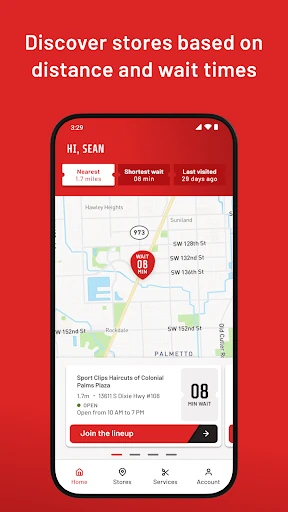
Picture a Saturday when I need a haircut but also have groceries to pick up and a few other stops to make. Instead of driving straight to a Sport Clips and discovering a long wait, I can check nearby stores in the app and compare their wait times. I choose a location, join its lineup, and keep an eye on my place while I finish what I was doing.
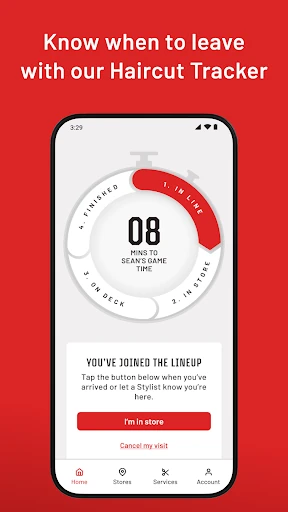
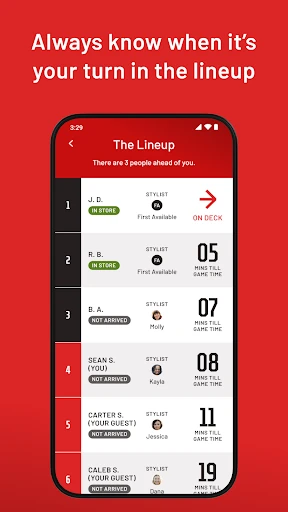
The Haircut Tracker is the useful part of that plan. It shows how many people are ahead of me, an estimated wait and the stylist’s status, so I have more context than a vague guess at the front desk. When the app says my turn is getting close, I can head over. It doesn’t remove every uncertainty from a salon visit, but it makes waiting feel easier to plan around.
Built Around One Salon Chain
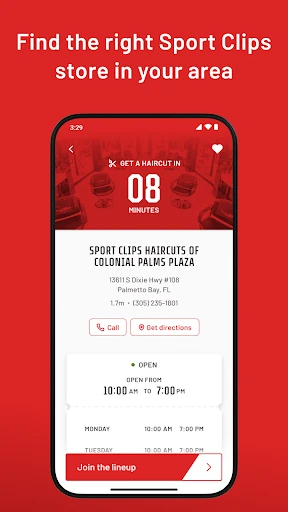
This app makes the most sense if Sport Clips is already where I go for haircuts. Its store list, lineup and stylist choices are all centered on that chain, so I can compare nearby Sport Clips locations and get in line without calling around. For a repeat customer, that focused approach is more useful than a general search tool that does not connect directly to a particular store’s queue.
It is not a broad salon directory, a way to book with independent barbers, or a tool for comparing haircut services across competing businesses. The job here is narrower: help me plan a visit to a Sport Clips and keep track of my place. If I am undecided about which salon to use, I would still need to make that choice outside this app.
A Few Helpful Habits
I would check wait times before leaving, rather than treating the first number I see as a fixed appointment time. The app describes the wait as an estimate and provides ongoing updates, which makes it more useful as a planning aid than a promise about exactly when a haircut will begin. Comparing a couple of nearby stores can also help if I have flexibility about where to go.
For a smoother repeat visit, I can save a favorite store and stylist, then choose them again when I join the lineup. If I’m bringing family or friends, the guest option lets me include up to four guests, or add only guests. I’d also enable location and push notifications if I want to use geofencing check-in and receive updates as the lineup moves.
More From Our News Desk

Zoom Meetings, Google Meet, or Teams: Which Is Easiest to Join?

How I Build a Free Streaming Lineup With Tubi

Why Crunchyroll Is the Default Anime App for So Many Fans

YouTube TV: A Practical Guide to Cutting Cable

Rummikub and the Small Comfort of Phone Games

TeamViewer Remote Control or AnyDesk for Helping Family?
Who Will Find It Useful
I’d recommend Sport Clips Haircuts Check-In to regular Sport Clips customers who would rather spend less time sitting in a lobby. It is especially handy for someone fitting a haircut between errands, checking which nearby store has a shorter wait, or returning to a preferred stylist. The option to add guests also suits a parent or organizer coordinating a visit for more than one person.
It may not be worth installing for someone who rarely visits Sport Clips, prefers another salon, or is looking for a general appointment calendar. The app’s value depends on having a participating Sport Clips location that works for the trip and on being comfortable joining a lineup through a phone. People who prefer to check in face to face can still use the in-store options described by the app.
Sport Clips Haircuts Check-In is a free Lifestyle app from Sport Clips, Inc. On Google Play it has over one million installs and a 3.2-star rating from around 6,500 ratings. It is rated Everyone and is available for Android 9 and later. The app is described as available in the U.S. and Canada, which makes its location-specific lineup features most relevant to customers in those markets.
The Google Play information gives version 2.1.7, released November 24, 2018, with its latest update dated February 3, 2026. The app is free to install, has no in-app purchases and contains no ads. Those details make it straightforward to try if I already visit Sport Clips, though the app’s usefulness still depends on having a convenient store and wanting to manage a haircut lineup from my phone.
A Closer Look at the Check-In Flow
Getting Started
When I first opened an app like this for a haircut errand, the practical first step was clear: sign in or create an account, then allow location access to find stores nearby. The app also lets me choose based on past visits or store wait times, so location permission is useful rather than the only possible way to find a store.
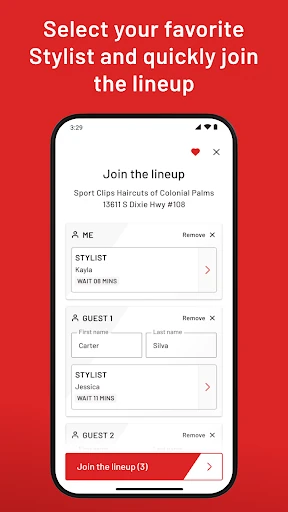
Once I have chosen a location, I can join its lineup and select a stylist. I like that the choice is not forced into one pattern: I can use the first available stylist or pick someone specific if I have a preference. That makes the setup feel suited both to a quick visit and to a regular customer with a familiar routine.
Following the Lineup
The everyday experience revolves around the Haircut Tracker. It shows my position, the number of people ahead and the stylist’s status, with an estimated wait that can help me decide when to start heading over. I can check it while doing something else instead of staying in the lobby just to watch the queue move.
The app says it sends live updates about when to head to the store, when I am up next and changes to the visit. I’d turn on push notifications if I wanted those nudges without repeatedly opening the app. Even so, I would keep an eye on the tracker and leave a little room in my schedule, since an estimate is most useful as guidance.
Details That Stand Out
Stylist selection is a thoughtful feature for anyone who has found a person whose haircuts they like. I can save a favorite stylist and store for later, which cuts down on repeated choices. If I don’t have a preference, selecting the first available stylist keeps the process simple and lets me focus on finding a convenient time and location.
The guest option is another practical touch. I can add myself and up to four guests, or add guests without myself, which is useful when coordinating a family visit. Location-based geofencing can check me in when I arrive, while the app also describes alternatives: tell a stylist I’m there or enter my phone number at the store kiosk.
A Practical Visit Routine
My preferred routine would start before I leave home. I’d compare wait times at nearby Sport Clips, choose one that fits the day and join the lineup with the stylist I want. If someone is coming with me, I’d add the guest details at that point rather than trying to coordinate everything while traveling.
After joining, I’d use the tracker to judge when to set off and leave notifications enabled for changes. On arrival, location services can support geofencing check-in; otherwise, the app says I can tell a stylist or use the kiosk. Saving a favorite location and stylist afterward makes the next visit quicker to set up.
Limits to Keep in Mind
The biggest limitation is also the app’s defining focus: it is for Sport Clips visits, not haircut planning in general. If there is no convenient Sport Clips near me, or I usually use a different salon, the lineup tools have little to offer. It also helps to be comfortable with creating an account and using a phone as part of the check-in process.
A tracker can make a wait more manageable, but it does not turn a walk-in lineup into a fixed appointment. The app presents estimated times and updates, so I would avoid planning another commitment down to the minute. Location and notification settings also matter for the smoothest described experience, though the app gives in-store check-in alternatives if geofencing is not how I want to check in.
Sport Clips Haircuts Check-In does one clear job: it helps customers choose a nearby Sport Clips, join the lineup and follow the wait from elsewhere. I like that it combines wait comparisons with stylist selection, guest entries and a tracker, rather than stopping at a basic store search.
I’d suggest it to regular Sport Clips customers who want a more flexible way to plan a haircut stop. If I rarely visit the chain or prefer to choose a salon from a wider range of businesses, it is too specialized to become a daily tool. For its intended audience, it is a practical convenience.
Sport Clips Haircuts Check-In Frequently Asked Questions
What is Sport Clips Haircuts Check-In used for?
Sport Clips Haircuts Check-In helps customers find nearby Sport Clips stores, compare wait times, choose a store and stylist, and join the lineup. Its Haircut Tracker shows an estimated wait and how many people are ahead. It also supports adding guests, saving favorite stores and stylists, and receiving visit updates.
What devices and locations support Sport Clips Haircuts Check-In?
The app is an Android app and requires Android 9 or later. Its description says it is available in the U.S. and Canada. The store and lineup features are tied to Sport Clips locations, so it is most useful when there is a convenient location for your visit.
How much does Sport Clips Haircuts Check-In cost?
The app is free to install on Google Play. It has no in-app purchases and contains no ads. Store availability and app details can change, so it is worth checking the Google Play page for current information before installing.
Do I need location access for Sport Clips Haircuts Check-In?
The app recommends enabling location settings to find nearby stores and support geofencing check-in when you arrive. It also describes other ways to check in: tell a stylist you have arrived or enter your phone number at the store kiosk. Push notifications are recommended for receiving lineup updates.
Who should use Sport Clips Haircuts Check-In?
It is best suited to people who already visit Sport Clips and want to spend less time waiting in the lobby, especially repeat customers with a favorite store or stylist. It may not suit someone seeking a general salon finder or someone who rarely uses Sport Clips. The Google Play page has current app details.
Pros
- Compare nearby Sport Clips wait times and join a lineup before arriving.
- Track queue position, people ahead and stylist status from elsewhere.
- Save a preferred stylist and store for repeat visits.
- Add up to four guests when coordinating a group haircut visit.
Cons
- Its lineup tools are useful only for Sport Clips locations.
- Wait estimates are planning aids, not fixed appointment times.
- Location and notification settings help deliver the smoothest experience.
- Category
- Lifestyle
- Version
- 2.1.7











