Song Maker - Music Mixer
- 60.28K
- 3.8
- Installs
- 10.00M
- Price
- Free
Screenshots
Analysis by Reviewed APKs
Song Maker - Music Mixer is a beat-making and loop-mixing app for anyone who wants to sketch a tune without setting up studio software. I’d put it in the casual, hands-on category: you can combine sounds on tracks, edit loops, and record your voice over a track. It makes music play feel approachable, though ads and paid extras mean “free” has some limits.
A quick beat-making session
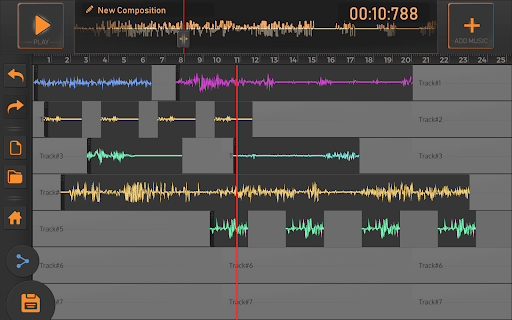
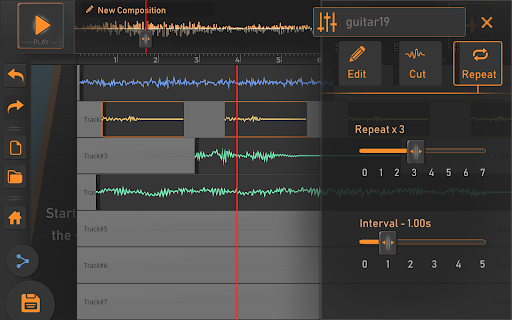
When I first opened Song Maker, I pictured using it during a spare half hour rather than settling in for a full production session. The basic idea is to pick sounds and loops, place them on different tracks, then listen to how they fit together as one melody. A few bass and drum parts can become a rough beat quickly, which is useful when I want to try an idea before it slips away.
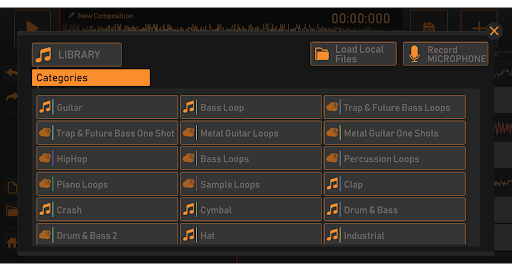
I’d use it on a quiet evening to build a short rhythm, then record a voice over the track to see whether the idea has potential. The library spans styles such as hip hop, trap, metal, bass, and piano, so I can change direction without starting from a blank page. Saving a melody also gives me something I can play back or let friends hear.
A sketchpad, not a studio
Compared with a general music player, Song Maker gives me tools to arrange sounds rather than simply listen to finished tracks. Compared with desktop music software, its appeal is a more casual session built around ready-to-use loops and beats. I can focus on trying combinations instead of approaching the app as a complete recording studio or a place to master a polished release.
That distinction matters if I’m choosing a tool for a specific job. Song Maker suits experimenting with beats, making a rough melody, or adding a voice recording to a mix. It is not presented as a full band-recording setup or a professional production suite. And while the app describes sounds as usable for creative projects, I’d read its terms around library loops before relying on them for a particular use.
Small habits that help
I get more out of a loop-based app when I start with one simple question: what kind of rhythm am I trying to make? Picking a broad sound category first keeps me from hopping between unrelated ideas. Once a beat has a shape, I can add another track and adjust the loops in the editor, rather than piling on sounds just because they are available.
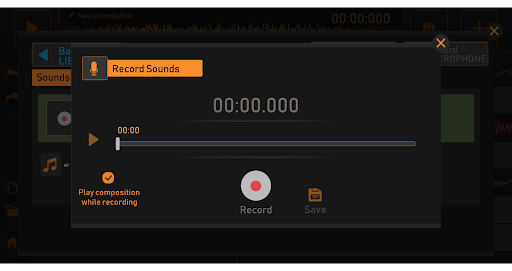
I’d also make a habit of listening back before recording a voice. The app lets me hear the track while recording, so I can check whether the rhythm leaves enough room for what I want to add. Saving a promising melody gives me a useful stopping point; I can share it with friends for a quick listen instead of keeping every experiment open in my head.
More From Our News Desk

Zoom Meetings, Google Meet, or Teams: Which Is Easiest to Join?

How I Build a Free Streaming Lineup With Tubi

Why Crunchyroll Is the Default Anime App for So Many Fans

YouTube TV: A Practical Guide to Cutting Cable

Rummikub and the Small Comfort of Phone Games

TeamViewer Remote Control or AnyDesk for Helping Family?
Who may enjoy making beats
I’d recommend Song Maker to curious beginners, casual beat-makers, and anyone who likes building short ideas from loops. The combination of multiple tracks, a varied sound library, editing controls, and voice recording gives a first-time creator several ways to experiment. It is especially appealing if you want a quick creative activity on your phone rather than a formal course in music production.
It may frustrate people who want a deeply technical studio workflow or expect every sound and project option to be available without ads or payment. The app’s own description says some library access involves rewarded ads and that additional demo samples and unlimited projects require a subscription. If that kind of limit interrupts your creative rhythm, a more open-ended tool may suit you better.
Song Maker - Music Mixer is a Music & Audio app from Brain Vault. On Google Play, it has over 10 million installs and a 3.8-star rating from around 60,000 ratings. It is free to download, contains ads, and offers in-app purchases; the listed in-app product price is $1.99 per item. The content rating is Everyone.
The current version is 3.9. It was released on August 4, 2017, and the recorded last update is October 15, 2026. The supplied app details do not give a minimum Android version, so check Google Play on your device for compatibility. The description says basic features are available without payment, while extra demo samples and unlimited projects require a subscription.
Turning Loops Into a Usable Idea
Opening the mixer
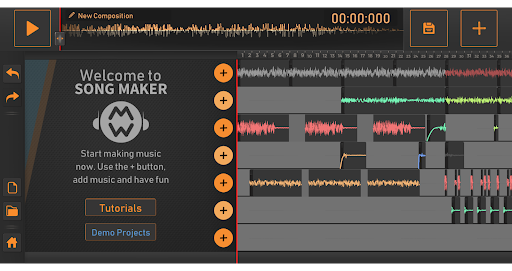
My first impression is that the app’s purpose is easy to grasp: make a melody by combining sounds, beats, and loops. The library offers several starting points, including bass, hip hop, trap and future bass, metal, and drums. That variety helps a new session feel less like staring at an empty timeline and more like choosing a direction for a quick experiment.
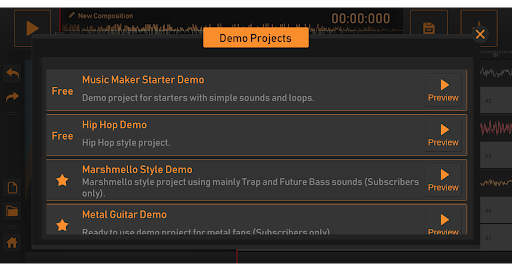
The description also mentions demo projects in styles such as metal, hip hop, trap, and future bass. I’d treat those as examples to explore, not a promise that every option is unlocked at no cost. Since the app uses ads and paid extras, I would take a moment to see how the available choices work before planning a long session around one particular sound.
Building a track day to day
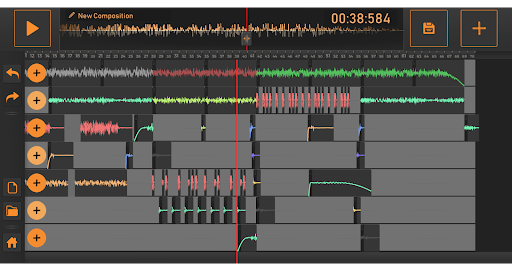
The everyday appeal is the simple loop of selecting sounds, arranging parts on different tracks, and listening to the combined melody. I can imagine opening the app while commuting or relaxing at home and testing a bass line against a drum pattern. The track-based approach makes it easier to think in layers: first a pulse, then a supporting sound, then whatever else the idea needs.
When a loop does not sit right, the editor supports modifying sounds and loops. The description names practical controls such as fading in or out, trimming from the start or end, and repeating a sound. Those are straightforward adjustments, not a substitute for every possible editing tool, but they can help turn a loose collection of samples into a more deliberate arrangement.
Features worth noticing
The broad library is the main draw. The description lists sounds and loop samples across bass, guitar, trap, hip hop, metal, drums, piano, and drum and bass. I like that this mix gives a session more than one obvious route: a user can try a guitar-oriented idea, then move toward a more electronic beat without needing to stick to a single genre.
Voice recording adds a personal layer to the loop mixer. I can listen to the track while recording, which makes it easier to test a vocal phrase against the beat instead of recording in isolation. The app also lets me save a melody and let friends listen. Those features make it more useful as a place to capture and share a sketch than a collection of sounds alone.
A practical creative routine
For a short session, I’d start by choosing one category and building a rhythm with a small number of parts. I’d listen through, edit any loop that feels too long or starts awkwardly, then add another track only if it contributes something. That keeps the mix readable and gives me a clear point to stop and judge whether the original idea is working.
If I wanted to make a quick music bed for a personal video project, I’d first check the app’s terms for the sounds I planned to use. The description discusses using created music and warns against selling the raw loops or restricting others from using library sounds. Once I had a version I liked, I could save it and share it with friends for feedback.
Limits to keep in view
The main practical catch is access. The app is free to download, but its description says users will see ads, and some library sounds can be accessed by watching rewarded ads. Additional demo samples and unlimited projects are described as requiring a subscription. That arrangement may be fine for occasional experiments, but it is worth considering if you expect to make many tracks or want uninterrupted sessions.
I would also keep expectations focused on what the app describes: composing with loops, editing sounds, recording a voice, and saving a melody. The materials do not make this a promise of advanced studio production. Finally, if you have a particular publishing or commercial use in mind, read the terms for the sound library rather than assuming every sample can be used in any way.
Song Maker - Music Mixer makes a decent case for quick, playful music-making. Its combination of ready-made loops, track-based composition, simple editing, and voice recording gives me enough to shape a basic idea and share it. The ads and paid limits are real trade-offs, but they do not erase its usefulness as a casual beat-making tool.
I’d recommend giving it a try if you want to experiment with rhythms on Android and are comfortable with a free app supported by ads and optional purchases. If you need a comprehensive studio workflow or dislike interruptions and access limits, I’d look elsewhere. For a beginner’s musical sketchpad, though, it offers a practical place to start.
Song Maker Frequently Asked Questions
What is Song Maker - Music Mixer used for?
Song Maker - Music Mixer is used to compose music by combining sounds, beats, and loops on different tracks. It includes an editor for modifying loops and sounds, lets you record your voice while listening to a track, and allows you to save a melody and let friends hear it.
Which devices support Song Maker - Music Mixer?
Song Maker - Music Mixer is an Android app available through Google Play. The supplied details do not specify a minimum Android version, so check the Google Play page from your device to see whether it is compatible. The materials describe the app for Android, not a desktop or iOS version.
Does Song Maker - Music Mixer cost money?
The app is free to download and contains ads. It also offers in-app purchases, with listed items at $1.99 each. Its description says basic features are available without payment, while additional demo samples and unlimited projects require a subscription. Check Google Play for current purchase options and terms.
Does Song Maker - Music Mixer need a particular Android version?
The supplied app details do not state a minimum Android version. Compatibility can depend on your device and may vary, so the most useful check is the Google Play page on the phone or tablet where you plan to use it. The current version shown is 3.9.
Is Song Maker - Music Mixer good for beginners?
I think it can suit beginners who want to try making beats from loops without starting with a more involved production setup. It supports arranging sounds on tracks, editing loops, and recording a voice. It may be less suitable if you need an advanced studio workflow or want to avoid ads and paid limits.
Pros
- Combines loops and beats on multiple tracks to make a melody.
- Includes several sound categories, from piano and drums to metal and trap.
- Lets you edit loops, record your voice, and save a melody.
- Free to download, with basic features available without payment.
Cons
- Ads are part of the free experience, and some sounds require rewarded ads.
- Additional demo samples and unlimited projects require a subscription.
- The supplied details do not specify a minimum Android version.
- Category
- Music & Audio
- Version
- 3.9











