Six Flags
- 36.25K
- 4.1
- Installs
- 1.00M
- Price
- Free

Screenshots

Analysis by Reviewed APKs
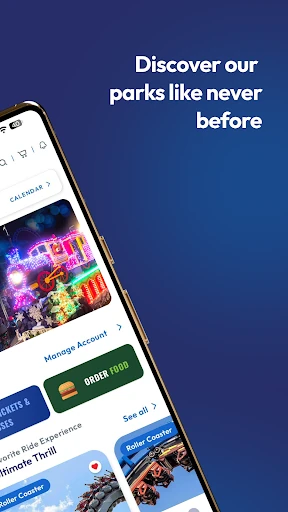
Six Flags is a park companion for planning a visit and keeping the day organized once you arrive. It brings park maps, ride wait times, show schedules, tickets, food ordering and other visit details together. I’d recommend it to people who want fewer separate tasks on a busy park day. Its value is practical rather than magical: it can help you plan, but you’ll still need to decide what kind of day you want.
A Day With Less Backtracking
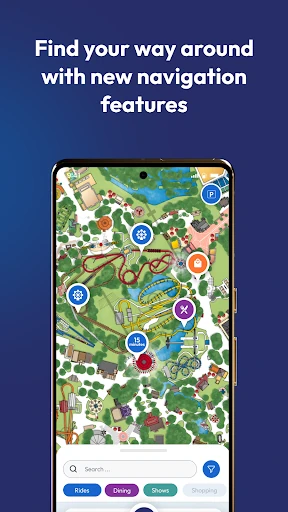
When I picture using Six Flags, I start with the familiar park-day problem: the group has arrived, everyone has a different first ride in mind, and nobody remembers where the show starts. I’d open the interactive map, check wait times for rides I’ve favorited, and use the schedule to see whether there’s a show worth working around. Having those pieces in one place makes it easier to agree on a first stop without wandering in circles.
As the day unfolds, the app can help with the small logistics that otherwise interrupt the fun. I can look up a food option, check whether it meets a dietary requirement, and order food in the app. I can also mark where I parked, a modest feature that feels especially useful when I’m tired at the end of the day. It’s not a substitute for a plan, but it gives me several helpful reference points while I’m on the move.
A Companion, Not a Planner
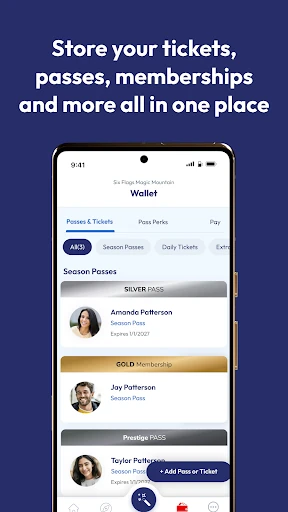
Compared with checking a paper map or relying on memory, Six Flags puts navigation, ride waits and show details in the same app. A Six Flags account can also bring together tickets, passes and memberships, including purchases made with the same email address after the account is created. That makes it more than a map, though the map and timely park information are still the parts I’d expect to use most during an ordinary visit.
I wouldn’t treat it as a general travel guide or a replacement for choosing priorities with my group. Its focus is Six Flags parks and the visit-related services described in the app, not planning every part of a wider trip. Nor does a map decide whether a long wait is worth it. I’d use it to make better-informed choices at the park, while keeping some flexibility for changing plans and preferences.
Small Habits That Help
Before visiting, I’d choose a home park, create an account if I want tickets and passes together, and favorite the rides I’m most interested in. That gives the wait-time view a more personal starting point instead of making me search from scratch. I’d also take a quick look at show times and park hours before setting expectations for the day. A little preparation makes the app feel like a useful companion rather than another screen to explore while everyone waits.
Once inside, I’d check the map when changing areas, mark my parking spot early, and look up food before the group gets hungry and impatient. If I have a photo pass, I’d use the app to access those photos later. Passholders can also check Pass Perks, while visitors at select parks can look for augmented reality games. These are easy additions to a visit, not tasks that need to dominate it.
More From Our News Desk

Zoom Meetings, Google Meet, or Teams: Which Is Easiest to Join?

How I Build a Free Streaming Lineup With Tubi

Why Crunchyroll Is the Default Anime App for So Many Fans

YouTube TV: A Practical Guide to Cutting Cable

Rummikub and the Small Comfort of Phone Games

TeamViewer Remote Control or AnyDesk for Helping Family?
Who Gets the Most From It
I’d recommend Six Flags to visitors who want one practical place for park information and visit-related tasks. It should be especially useful if you like checking ride waits before crossing the park, need to coordinate around show times, or want tickets and passes accessible through an account. Families and groups may appreciate having food information and a parking marker close at hand, even if each person still has their own idea of the perfect itinerary.
It may be less appealing to someone who prefers to put the phone away and explore without checking schedules or maps. The app is also specifically oriented around Six Flags parks, so it won’t serve as a general-purpose trip organizer. Some features, such as augmented reality games and single-use Fast Lane purchases, are limited to select parks or rides. I’d see those as optional extras rather than reasons every visitor needs to use the app.
Six Flags is published by Six Flags Entertainment Corp. on Google Play, where it has over one million installs and a 4.1-star rating from about 36,000 ratings. The app is free to download and is marked as containing no ads or in-app purchases. Its Google Play content rating is Everyone, making the stated rating suitable for a broad audience.
The listed Android requirement is Android 7.1, and the current version is 5.0.4. Six Flags first released the app on May 27, 2015, and its most recent listed update was January 22, 2026. The update includes changes to Pass Perks, show-location information, pass-type support, pass activation, park hours and show schedules, along with performance, stability and bug-fix improvements.
Making the Park Day Easier
Getting Oriented
When I first opened the idea of this app, what stood out was its broad scope: one app covers all 41 parks, rather than presenting itself as a tool for one location only. The practical starting point is choosing where the visit will happen and deciding whether to sign in. That distinction matters. A casual visitor can focus on park information, while an account is useful for keeping eligible tickets, passes and memberships together.
I’d set up the basics before arriving, rather than trying to manage account details while a group is already eager to move. The description says purchases made with the same email address after account creation automatically appear in the app. That sounds convenient for keeping things in one place. I’d still make a habit of checking that the details I expect to use are available before relying on the phone as my only reference.
Using It During the Visit
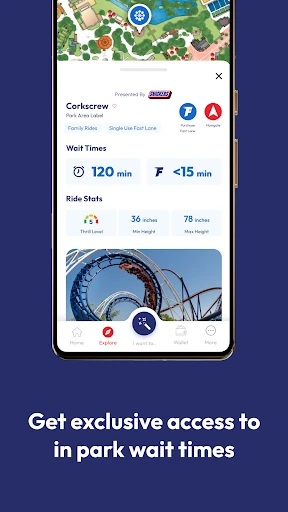
The everyday experience centers on looking up information at the moment it becomes useful. I can check a ride’s wait time, see where it sits on the map, and get navigation help for reaching it. When the group is deciding what to do next, that sequence is more helpful than opening separate pages and trying to remember how each one relates to the park layout.
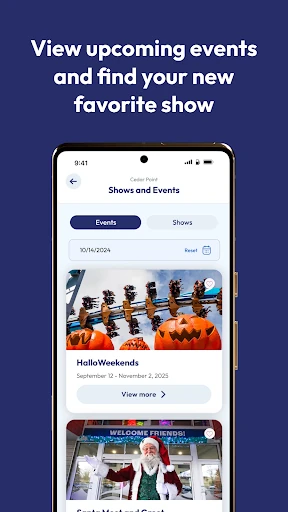
Show schedules add another kind of timing to the day. Rather than treating rides as the only things worth planning around, I can see when a show is happening and check its location. The latest update specifically adds location information to show pages and improves schedules. That makes the app relevant not just when I’m moving between attractions, but also when I’m trying to make a loose plan for a few hours.
Useful Extras in One Place
The account features are a notable part of the package. Tickets, passes and memberships can be accessed through a Six Flags account, and the app says qualifying purchases made with the same email after account creation show up automatically. For passholders, there are also Pass Perks, with a refreshed design included in the latest update. These features give regular visitors a reason to return to the app beyond checking a map on one particular day.
Food ordering and dietary information are practical additions rather than flashy ones. I can look for food that meets different dietary restrictions and place an order through the app. There’s also access to photos taken on a photo pass. For select rides, visitors can purchase a Single Use Fast Lane, and augmented reality games are available at select amusement parks. The limits are clear in the feature descriptions, so I’d think of these as park-dependent options.
A Simple Visit Routine
My low-fuss routine would begin at home: select the park, sign in if I’m using tickets or passes, favorite a few rides, and check the schedule. I wouldn’t build a minute-by-minute itinerary. Instead, I’d choose a couple of priorities and keep the rest open. That gives me a useful starting point without turning a day out into a checklist that has to be completed.
At the park, I’d use the map and wait-time information to make the next decision, then check show details when it’s time to slow down. I’d mark my parking spot before heading in, not after a long day when I’m trying to remember where the car is. If we need food, I’d look at the dietary information and ordering option. These small checks support the outing without requiring constant app use.
Keep Expectations Practical
The app’s usefulness depends on what kind of visitor I am. Someone who wants to browse a map, compare waits and keep tickets nearby has a clear reason to use it. Someone who already knows the park well and prefers to navigate by instinct may open it less often. Either approach is reasonable; the app is a resource, not something that needs to dictate how the visit goes.
Some offerings are explicitly limited: augmented reality games are at select amusement parks, and Single Use Fast Lane applies to select rides while in the park. The account-based ticket convenience also has a condition around using the same email address for purchases after account creation. I’d keep those details in mind and check the park information in the app before planning around a particular feature.
Six Flags earns its place on my phone as a focused park-day helper. Maps, ride waits, show schedules, food tools and parking notes address the kinds of small decisions that can add friction to a visit. The account and pass features give it extra value for regular guests, while occasional visitors can still use it for basic planning.
I’d recommend it to anyone visiting a Six Flags park who wants information and visit tasks gathered in one app. I’d be less enthusiastic about it for someone seeking a general travel tool or hoping the app will plan the day automatically. Used lightly, it can make the practical parts easier and leave more room to enjoy the park.
Six Flags Frequently Asked Questions
What is the Six Flags app used for?
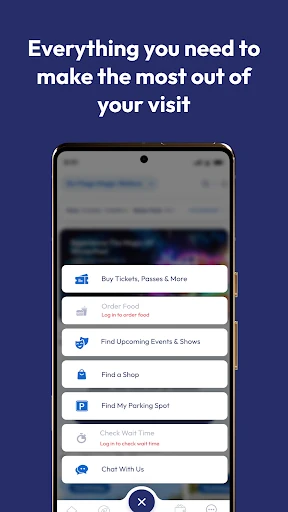
Six Flags helps visitors explore its parks with an interactive map, ride wait times, show schedules and navigation. It also supports tickets, passes, memberships, food ordering, dietary food information, parking-spot marking and photo-pass access. Pass Perks, select Single Use Fast Lane purchases and augmented reality games are additional options, with some features available only at certain parks or rides.
Which devices can run the Six Flags app?
The app is available on Android through Google Play. The stated minimum requirement is Android 7.1. Device compatibility can vary, so it’s worth checking the Google Play store listing on the device you plan to use before downloading.
Is the Six Flags app free?
Six Flags is free to download on Google Play. The store details say it contains no ads and offers no in-app purchases. The app does include options to buy park tickets, passes, memberships, food and select Single Use Fast Lane products, so costs for those purchases depend on what you choose and the relevant park.
Does Six Flags work at every park?
The app describes coverage of all 41 Six Flags parks. Its tools include park maps, waits and show information, while certain extras have narrower availability. For example, augmented reality games are offered at select amusement parks and Single Use Fast Lane is available for select rides. Check the app’s park information for the options relevant to a particular visit.
Is the Six Flags app useful for families?
It can be useful for families who want to check maps, ride waits, show times and food information in one place. The parking marker and account access to tickets or passes may also help with visit logistics. It won’t choose activities for a group, and visitors who prefer not to use a phone while exploring may get less out of it.
Pros
- Combines park maps, ride wait times and show schedules in one app.
- Can keep tickets, passes and memberships accessible through a Six Flags account.
- Includes food ordering, dietary information and a parking-spot marker.
- Covers all 41 parks, with select park-specific extras.
Cons
- Some features, including augmented reality games, are limited to select parks.
- Single Use Fast Lane applies only to select rides while in the park.
- Its focus is Six Flags visits, not general trip planning.
- Category
- Travel & Local
- Version
- 5.0.4











