Shopify: Sell online/in person
- 64.03K
- 4.2
- Installs
- 10.00M
- Price
- Free

Screenshots



Analysis by Reviewed APKs
Shopify: Sell online/in person is a mobile companion for running a Shopify store, from checking orders to updating products and watching sales. I’d recommend it to shop owners who need to handle routine business tasks away from a computer, especially when a quick response matters. It packs a lot into a phone, though I found it works best as a practical control panel rather than a replacement for every desktop task.
A Busy Day Behind the Counter
When I first opened Shopify, I pictured using it between the small interruptions that fill a shopkeeper’s day: a customer asking about stock, a new order arriving while I’m out, or a product detail needing a quick correction. The app is built for that kind of mobile check-in. I could imagine reviewing an order, checking inventory, and catching up on sales without needing to settle in at a desk.
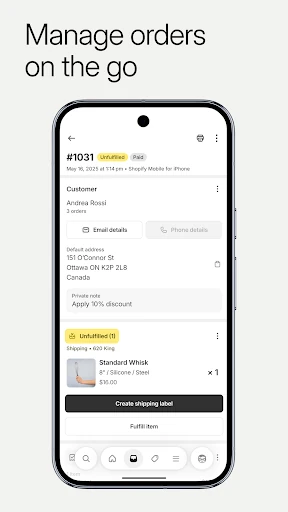
The workflow is especially useful when something needs attention now rather than later. Shopify describes tools for fulfilling, refunding, or archiving orders, and for getting notifications when new orders come in. Product photos, details, pricing, and collections can also be managed from the phone. It feels less like a storefront customers browse and more like a working dashboard for the person responsible for keeping that storefront running.
A Companion, Not a Whole Office
Compared with checking a store only from a desktop, the app’s obvious advantage is being able to handle business tasks while away from the computer. It brings orders, inventory, sales information, customer records, and marketing work into one mobile experience. For a small shop owner moving between home, a market, and a stockroom, that can reduce the number of tasks that have to wait until the next time a laptop is open.
I wouldn’t treat it as a general-purpose business planner or a marketplace for browsing other retailers’ products. Its focus is managing a Shopify business, with tools for products, orders, customers, and selling across channels. A phone is also a cramped place for involved work, so store owners doing extensive setup or detailed review may still prefer a larger screen. The app is most compelling for management on the move.
Small Habits That Help
A useful habit is to check new order notifications at a few natural points in the day, then process the ones that need attention. That keeps order handling from becoming a constant distraction while making it easier to respond promptly. I’d also use quiet moments to scan inventory or review product details, particularly after a sale or whenever I notice that an item’s information needs a correction.
The app’s barcode scanning can make inventory adjustments more convenient when I’m physically near the products. I’d pair that with a quick look at sales and visitor activity, rather than opening analytics only when something seems wrong. For a team, order timeline comments and in-app communication can help keep context attached to the work. These are modest routines, but they make a mobile admin tool feel more useful.
More From Our News Desk

Zoom Meetings, Google Meet, or Teams: Which Is Easiest to Join?

How I Build a Free Streaming Lineup With Tubi

Why Crunchyroll Is the Default Anime App for So Many Fans

YouTube TV: A Practical Guide to Cutting Cable

Rummikub and the Small Comfort of Phone Games

TeamViewer Remote Control or AnyDesk for Helping Family?
Who May Find It Useful
I’d recommend Shopify to people who already run a Shopify store and want to keep common tasks within reach. It should suit solo sellers who need to check orders between other responsibilities, as well as shop teams that benefit from shared communication and order notes. Sellers working both online and in person may particularly value having product, inventory, and order management in the same mobile app.
It may be less appealing to someone who only wants to browse or buy products, or to a new business owner expecting a complete store-building experience to happen effortlessly on a phone. Shopify describes store customization and management tools, but the range of business functions can make the app feel busy if all you need is an occasional order check. Anyone considering it should also make sure their store is on Shopify.
Shopify: Sell online/in person is published by Shopify Inc. and is listed in the Business category on Google Play. The app has over 10 million installs and a 4.2-star rating from about 64,000 ratings. It is free to download, and the provided Google Play facts indicate no in-app purchases and no ads. Its content rating is Everyone.
The listed Android requirement is Android 11 or later. The current version in the supplied app facts is 10.2605.0. The release date is September 29, 2014, and the most recent update date provided is February 10, 2026. Store information can change over time, so it’s sensible to check Google Play for current compatibility and app details.
Running a Store From Your Phone
Getting Started
My first impression is that Shopify is aimed at owners who already have a business to manage, not at casual shoppers. The promise is broad: products, orders, customers, marketing, and sales activity all fit under one app. That range is appealing, but it also means the experience has plenty of business concepts to take in. I’d start with the task I need today rather than trying to explore everything at once.
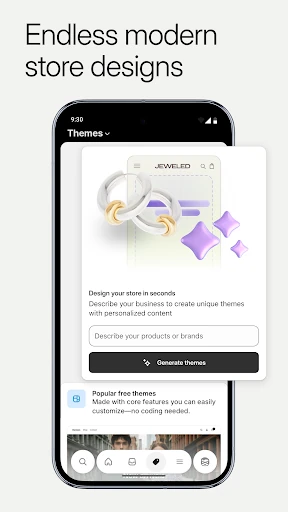
Shopify says its tools can help people build and manage an ecommerce business without coding or design skills, and the app includes ways to adjust a store’s appearance. The phone is a convenient place for small changes, such as updating product details or preparing a promotion. I’d approach bigger store decisions more deliberately, though; a mobile interface is handy, but it cannot make every involved choice feel simple.
Daily Store Checks
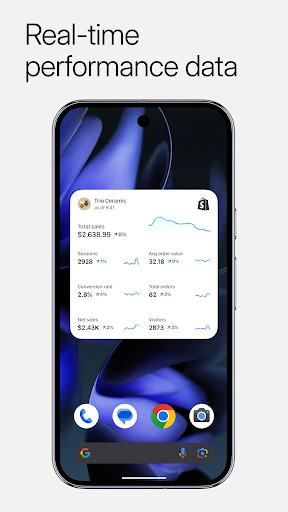
The day-to-day appeal is having operational details close by. I can see why a seller might open the app to check whether an order arrived, review sales, or look at visitor activity during a break. Notifications help surface new orders, while order actions let a user move work along without waiting to return to a computer. That turns brief pauses into useful moments without requiring a full admin session.
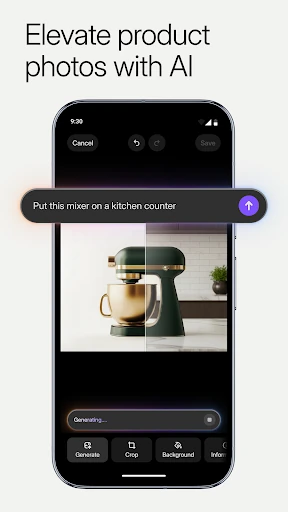
Product and inventory work is another practical part of the routine. Shopify describes adding photos, setting product information and prices, organizing collections, and scanning barcodes to adjust inventory. I like that these tasks connect to the physical side of selling: a seller can be near stock and make an adjustment there. The trade-off is that accuracy still depends on taking care with each edit, especially when working quickly on a small screen.
Tools Beyond Orders
The app’s reach extends beyond order handling. It includes customer segments and editable customer details, along with options to contact customers and add comments to order timelines. For a small team, those details can help preserve context around a customer interaction. I would use them as practical record-keeping aids, not as a substitute for thoughtful communication or a complete customer-service operation.
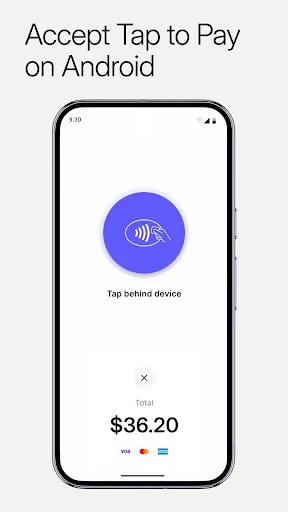
Shopify also describes selling across online and in-person channels, connecting with Instagram, Facebook, and Messenger, and managing multiple store locations. There are marketing tools for creating campaigns and tracking results, plus access to Shopify apps and free themes. Taken together, these features make the app more than an order inbox. They also mean that the experience may feel broader than necessary for someone who only wants to monitor a few orders.
A Simple Weekly Rhythm
A practical routine could begin with a quick morning check of orders and notifications, followed by inventory adjustments for anything that changed overnight. During the day, I’d handle urgent order actions as they arise and leave product organization or store appearance edits for a quieter stretch. That division gives the phone a clear role: quick operational work first, more considered changes when I can focus.
At the end of the week, I’d look over sales and visitor activity, then check whether a promotion or product update is worth preparing. Shopify includes tools for discounts, announcements, blog updates, and marketing campaigns, so those tasks can be handled from the app too. I’d avoid turning every metric into a reason to change something; the value is in having information available when there’s a concrete question to answer.
Keep the Limits in View
The biggest limitation is also a feature of the format: a phone is not the most comfortable place for every store-management task. Quick edits and order checks make sense on mobile, but reviewing lots of information or making several careful changes can take more attention on a small display. Owners who expect one app session to replace all desktop work may find that the mobile format has natural boundaries.
There is also a learning curve in the breadth of the toolkit. Orders, products, inventory, marketing, customer details, themes, and multiple channels serve different needs, and not every seller will use all of them. Shopify is a better fit when those functions support an existing store workflow. If all someone needs is a simple way to keep personal notes or track unrelated business tasks, this app is not designed for that job.
Shopify: Sell online/in person makes the most sense as a mobile operations companion for people already selling through Shopify. Its mix of order handling, product and inventory tools, sales insights, and customer features can be genuinely useful during a busy day. I like the focus on practical tasks, even if the amount of functionality can feel like a lot at first.
I’d try it if I owned a Shopify store and wanted to manage routine work away from a computer. Sellers who prefer a larger screen for involved changes can use the phone for checks and quick actions instead. For people outside the Shopify ecosystem, or anyone looking only for a basic shopping app, this is simply the wrong kind of tool.
Shopify Frequently Asked Questions
What is Shopify: Sell online/in person used for?
Shopify: Sell online/in person is for managing a Shopify business from a mobile device. Its described tools include processing orders, updating products and inventory, reviewing sales and visitor activity, managing customer details, and working on marketing or store appearance. It is designed for sellers, rather than customers who want to browse and purchase items.
Which devices can run Shopify: Sell online/in person?
The supplied app information is for Android, and the listed minimum requirement is Android 11. Shopify describes mobile management of store tasks, including orders and inventory. Compatibility can depend on the device and can change with app updates, so check the Google Play store page for the current requirements before installing.
Does Shopify: Sell online/in person cost money?
The app is free to download on Google Play, and the supplied facts say it has no in-app purchases. That describes the app listing itself; it does not establish the cost of running a Shopify business or any services outside the app. Check the current store listing and Shopify’s own information for details that may vary.
Does Shopify: Sell online/in person include ads?
The supplied Google Play facts say Shopify: Sell online/in person does not contain ads. The app is published by Shopify Inc. and is intended for managing a store, with tools such as order processing, product updates, and sales insights. Store details may change, so the current Google Play page is the best place to recheck.
Who should use Shopify: Sell online/in person?
It is best suited to people who manage a Shopify store and want to handle routine work from a phone. Sellers who need to check orders, adjust inventory, or review activity while away from a computer may find it useful. It may not suit shoppers, or people looking for a general-purpose business organizer unrelated to Shopify.
Pros
- Handles orders, product details, and inventory from a mobile device.
- Includes sales and visitor activity for quick store check-ins.
- Barcode scanning can support on-the-spot inventory adjustments.
- Brings customer, marketing, and store appearance tools together.
Cons
- Its wide range of business tools may feel busy at first.
- A phone screen is less comfortable for involved store-management work.
- It is intended for Shopify sellers, not general business tracking.
- Category
- Business
- Version
- 10.2605.0











