Settings App
- 26.81K
- 3.8
- Installs
- 5.00M
- Price
- Free

Screenshots
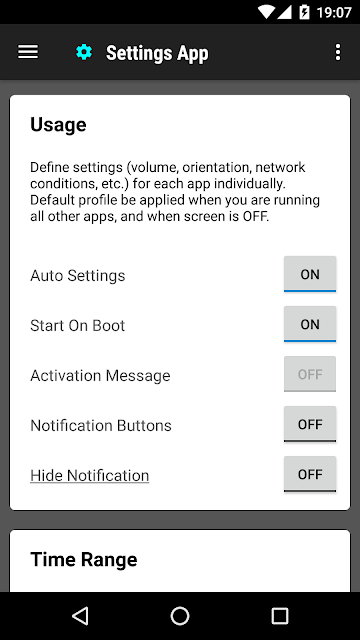
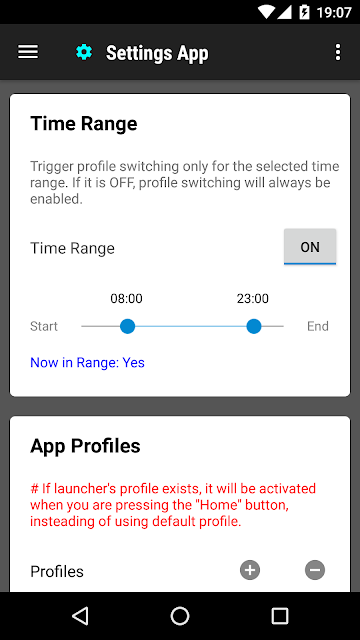
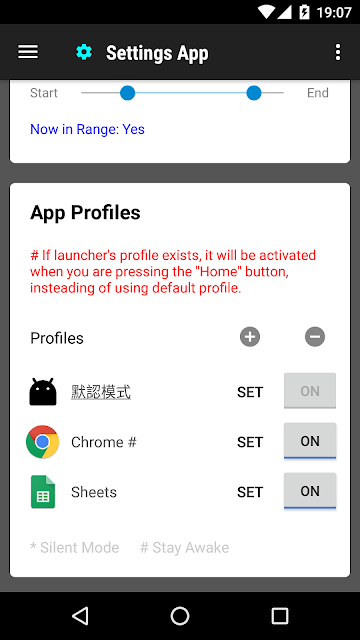
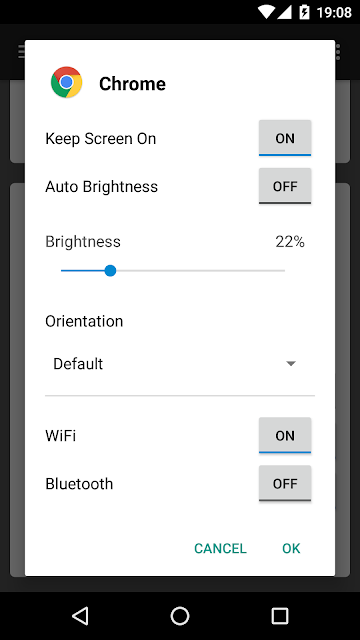
Analysis by Reviewed APKs
Settings App is a profile tool for people who want different phone settings to take effect with different apps. It can apply choices for volume, screen orientation, brightness, network conditions, Bluetooth, and keeping the screen awake when an app starts. I like the practical idea: it can spare you repeated manual adjustments, though it takes some thought to set up profiles that behave the way you expect.
A quieter reading setup
Imagine settling in to read the news before bed. You might prefer a dimmer screen and a particular orientation, but those same choices may not suit the video app you open next. With Settings App, you can create a profile for each app and have its settings applied when that app launches. The appeal is less about changing the phone once and more about avoiding the same small adjustments every time you switch activities.
The app’s settings template can cover volume, orientation, network conditions, Bluetooth connection, screen brightness, and whether to keep the screen awake. A news-reading profile could, for example, use a chosen orientation and keep the display on. When I think through this routine, the useful part is the handoff: launch an app and let its profile set the starting conditions, then adjust things normally if the moment calls for it.
A helper, not system settings
Settings App is best understood as an automation layer for selected device settings, not as a replacement for the phone’s full Settings app. It is aimed at people who notice that different apps call for different conditions and would rather prepare profiles than remember every toggle. If you only change brightness or volume occasionally, making profiles may be more work than doing those adjustments by hand.
It also is not a general app manager or a broad personalization suite. The supplied description focuses on applying settings profiles when an app starts, with a default profile for other apps and when the screen is off. It does not describe themes, wallpaper controls, privacy dashboards, or accessibility tools. One practical caution is explicit: avoid using it alongside other profile tools, since competing automation could cause conflicts.
Build profiles with purpose
A good way to approach the app is to start with a short list of situations where you repeatedly change settings. Reading, watching video, or using an app that benefits from a particular orientation are examples supported by the app’s description. Make a profile only when the adjustment is genuinely recurring; that keeps setup focused and makes it easier to notice whether the automatic change is helping.
The default profile deserves attention, too. It is used for apps without their own profile and when the screen is off, so it provides the baseline behavior between specific app sessions. After setting profiles, try launching the relevant apps and check whether the starting conditions make sense. The profiles are templates applied at launch, not a permanent lock on your settings, so you can still adjust them as usual.
More From Our News Desk

Zoom Meetings, Google Meet, or Teams: Which Is Easiest to Join?

How I Build a Free Streaming Lineup With Tubi

Why Crunchyroll Is the Default Anime App for So Many Fans

YouTube TV: A Practical Guide to Cutting Cable

Rummikub and the Small Comfort of Phone Games

TeamViewer Remote Control or AnyDesk for Helping Family?
Who may find it useful
I’d recommend Settings App to Android users who regularly move between activities with different needs: perhaps a reading app where they want a steady orientation, and a video app where keeping the screen awake matters. It may also suit someone who often forgets to restore brightness or connectivity settings after a particular task. The profiles make most sense when the same adjustments come up often enough to justify setting them once.
It may not suit people who prefer to control every setting manually, or who rarely adjust their phone for individual apps. There is also a little setup and testing involved, and the app warns against pairing it with other profile tools. If you already rely on another app to automate device settings, this is not an obvious companion. The Google Play score is 3.8 from around 26,800 ratings, which gives prospective users a useful snapshot of mixed real-world reception.
Settings App is a free Android tools app from KF Software House. On Google Play it has over 5 million installs and a 3.8-star rating from around 26,800 ratings. The app contains ads, but the supplied store facts say it has no in-app purchases. Its content rating is Everyone, and its current version is 1.0.182.
The app was released on May 19, 2013, and the recorded last update is October 31, 2026. No minimum Android version is included in the supplied facts, so check the Google Play page on your device for compatibility before installing. The price is listed as free; ads are present, and there are no in-app purchases in the supplied store information.
Profiles for the moments between apps
A focused first impression
When I first opened the idea behind Settings App, what stood out was its narrow purpose. It is not trying to reorganize every part of a phone. Instead, it offers a way to associate a set of device conditions with an app, then apply those conditions when that app starts. That distinction matters: people looking for a complete system-control center may expect more than this profile-based approach is meant to provide.
Getting a useful result begins with deciding which apps deserve their own profiles and what settings should change for them. The description also calls for setting up a default profile. I would treat that as part of the initial setup rather than an optional extra, since it covers everything outside the apps with individual profiles, as well as the screen-off state.
The everyday handoff
The core experience is about transitions. Launch an app, and its corresponding profile is applied; leave the special-case thinking behind and the default profile covers other apps. This makes the app most appealing when you switch between a few familiar tasks and want the phone to start each one in a predictable state. It is less compelling for settings you change only once in a while.
After a profile is applied, you can adjust settings as usual. I appreciate that detail because an automatic profile should be a starting point, not a reason to accept an inconvenient setting for the rest of a session. If a particular evening calls for a brighter screen, for example, the profile does not replace the ordinary ability to make an adjustment.
Settings that can stand out
The described controls cover several everyday categories: volume, orientation, network conditions, Bluetooth connection, screen brightness, and keeping the screen awake. That mix gives the profiles a practical role across different kinds of apps. Someone reading for a while might care about orientation and screen timeout; someone watching video might want the display to stay awake.
A useful detail is the timing: the profile is applied when its app starts. The app’s own guidance frames profiles as templates, so they set conditions at launch rather than continuously overriding every later choice. That keeps expectations grounded. You are preparing the phone for an app session, not turning the app into a universal rules engine for every moment.
A small weekly tune-up
A simple routine is to notice repeated adjustments during the week, then create a profile only for the app where they keep happening. For example, if you regularly set a preferred orientation before reading or want the screen to remain on while watching video, those are concrete candidates mentioned in the app’s description. Starting with one or two profiles makes it easier to see whether the automation is worthwhile.
Once the individual profiles are set, revisit the default profile and make sure it represents your ordinary use. It applies to all the other apps and when the screen is off, so a sensible baseline can help avoid forgetting settings that you wanted restored. Then launch the apps in question and see whether their starting behavior matches your routine. Keep adjusting the templates if your habits change.
Keep the scope in mind
Profiles only help when the settings you want are covered and the app fits your routine. The description names a defined group of controls; it does not promise a profile for every device setting. If your main goal is a larger set of phone-management features, this focused tool may not meet that expectation. Its value is in automating recurring, app-specific adjustments rather than replacing the phone’s normal controls.
There is also a compatibility and coordination question to consider. The supplied facts do not give a minimum Android version, so check Google Play for your device’s requirements. And because the app cautions against using other profile tools at the same time, people with existing automation should be careful about overlapping controls. The app contains ads, which may also be a consideration for someone who prefers an ad-free utility.
Settings App has a practical idea at its center: prepare settings for the apps where you repeatedly need them, and let a default profile cover the rest. Its launch-based templates are easy to understand, and the named controls fit familiar routines such as reading and watching video. The tradeoff is that profiles require setup, and the app’s scope is deliberately specific.
I’d try it if you often change brightness, orientation, volume, or related settings when moving between apps. If manual adjustments already feel quick, or another profile tool is part of your routine, it may be unnecessary. Set a thoughtful default, test a small number of app profiles, and decide from there whether the saved effort is worth it.
Settings Frequently Asked Questions
What is Settings App used for?
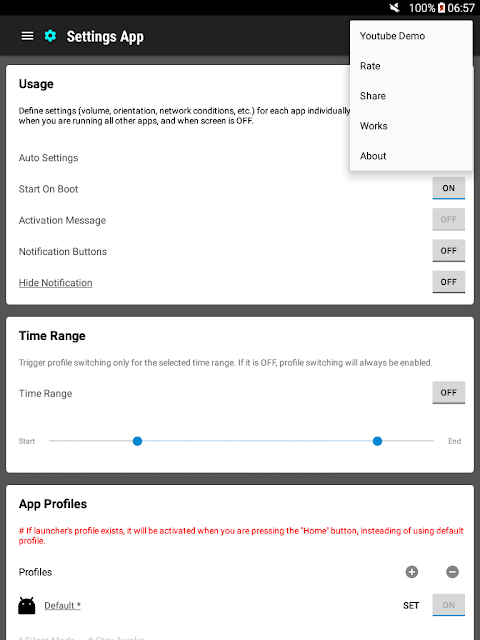
Settings App lets you create a settings profile for an individual app. When that app starts, its profile is applied. The described options include volume, orientation, network conditions, Bluetooth connection, brightness, and keeping the screen awake. A default profile applies to other apps and when the screen is off.
Which phones and devices support Settings App?
Settings App is an Android app and is available through Google Play. Check its store page on your device for compatibility details, since the Android version requirement can vary. The supplied information describes app-specific device profiles rather than a separate desktop or iOS version.
What Android version does Settings App require?
The minimum Android version can vary by release and device. Check the Google Play page for Settings App to see the current compatibility requirement for your phone or tablet before installing. The app’s supplied information does not provide a specific minimum version.
Does Settings App cost money?
Settings App is listed as free and contains ads. The supplied store facts say it does not offer in-app purchases. Store details can change, so the Google Play page is worth checking for the latest pricing and purchase information.
Who should use Settings App?
It may suit Android users who repeatedly adjust settings for particular apps, such as orientation or keeping the screen awake. It may be less useful if you rarely make those changes or prefer to adjust everything manually. The app also advises against using it with other profile tools, so consider any existing automation.
Pros
- Applies app-specific settings profiles when an app starts.
- Covers practical options such as brightness, orientation, volume, and screen timeout.
- A default profile handles other apps and the screen-off state.
- Profiles act as templates while leaving room for normal adjustments.
Cons
- Profiles require setup and may be unnecessary for infrequent adjustments.
- The app warns against running it alongside other profile tools.
- Contains ads, and the supplied facts do not state a minimum Android version.
- Category
- Tools
- Version
- 1.0.182











