Sensi
- 50.50K
- 4.5
- Installs
- 1.00M
- Price
- Free

Screenshots
Analysis by Reviewed APKs
Sensi is a companion app for Sensi Smart Thermostats, letting you adjust home temperature, create schedules, and check usage reports from your phone. It suits people who want more flexible control than a wall thermostat offers, especially when their routine changes or they’re away from home. My overall take is that it focuses on practical comfort controls rather than turning home climate into a complicated project.
A day with Sensi
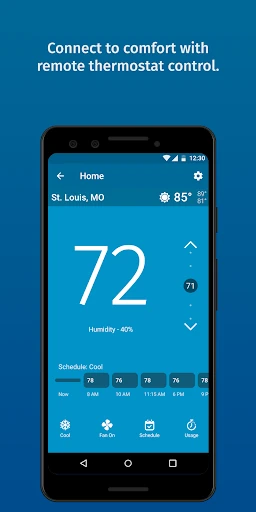
Picture leaving home on a cool morning, then realizing your usual schedule has changed and you’ll be back later than expected. With Sensi connected to a compatible thermostat, you can use the app as a remote control and change the temperature without returning to the wall unit. That basic task is the app’s clearest everyday purpose: making home comfort adjustable from wherever you happen to be.
At home, a seven-day schedule can handle the predictable parts of the week, while remote control gives you a way to respond when the day goes off script. I like that these jobs sit alongside tools such as usage reports and service reminders. Instead of being only a temperature dial on a screen, Sensi can also help you keep an eye on how the thermostat is being used.
A thermostat companion, not a hub
Sensi makes the most sense if you already have, or are considering, a Sensi Smart Thermostat. It adds phone-based control, scheduling, and other thermostat features to that hardware. That’s a different proposition from a general smart-home dashboard: Sensi’s job is home comfort, though it can connect with Amazon Alexa, Google Assistant, and SmartThings for people who use those platforms.
I wouldn’t choose it as a standalone weather app, a broad home-automation manager, or a way to control arbitrary heating equipment. Compatibility depends on the HVAC system and thermostat, and some systems are excluded. It also isn’t a substitute for installing suitable equipment: features such as humidification require additional equipment, and professional installation is recommended for that use.
Small habits that help
A useful starting habit is to set up a schedule around the week you actually live, rather than trying to optimize every hour on day one. Sensi supports flexible seven-day scheduling, so you can account for different days. If plans change, remote temperature control lets you make an adjustment instead of treating the schedule as fixed.
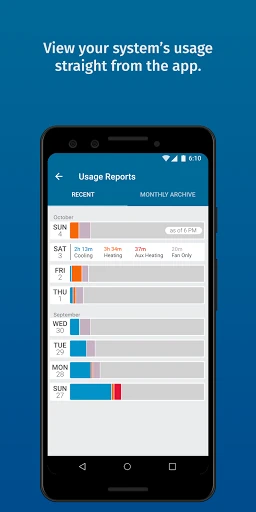
I’d also make occasional use of the supporting tools rather than waiting until something feels wrong. Usage reports can give you a view of thermostat use, while service reminders and smart alerts can help keep relevant information visible. Geofencing, early start, and temperature limits offer further ways to shape how the thermostat behaves, depending on your setup and preferences.
More From Our News Desk

Zoom Meetings, Google Meet, or Teams: Which Is Easiest to Join?

How I Build a Free Streaming Lineup With Tubi

Why Crunchyroll Is the Default Anime App for So Many Fans

YouTube TV: A Practical Guide to Cutting Cable

Rummikub and the Small Comfort of Phone Games

TeamViewer Remote Control or AnyDesk for Helping Family?
Who may find it useful
I’d recommend Sensi to households with a compatible Sensi Smart Thermostat and people who want to change settings from a phone, build a weekly routine, or check usage reports. It may be especially handy when work hours vary or someone is away from home and wants remote control. Those who already use Alexa, Google Assistant, or SmartThings may also appreciate the option to pair their chosen smart-home platform.
It may be a poor fit if you don’t have a Sensi thermostat, your heating or cooling system isn’t compatible, or you’re looking for a general-purpose smart-home app. Check compatibility before making plans: the supported equipment has limits, and wiring requirements differ by system. People who prefer a simple physical thermostat and have no interest in remote access or scheduling may not get much value from adding the app.
Sensi is a Lifestyle app from Copeland LP. On Google Play, it has over one million installs and a 4.5-star rating from around 50,500 ratings. The app is free to download, with no in-app purchases or ads listed in the provided store facts. Its content rating is Everyone.
The current version in the provided facts is 9.8.4. Sensi was released on January 29, 2014, and its last update is dated October 23, 2026. The minimum Android version is not included in the available facts, so check Google Play for device-specific requirements before installing.
Making Home Comfort Easier to Manage
A straightforward start
The first thing to understand about Sensi is that the app works with a Sensi Smart Thermostat. Once the thermostat is installed and connected, the phone becomes a way to set, change, and program home comfort. That hardware connection is central to the experience, so this is not an app that can control a home’s temperature by itself.
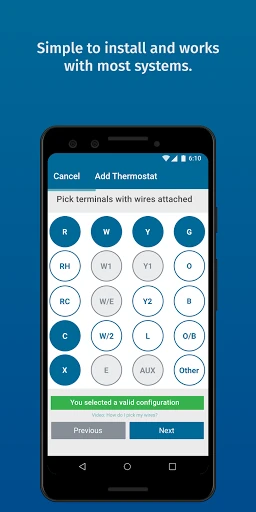
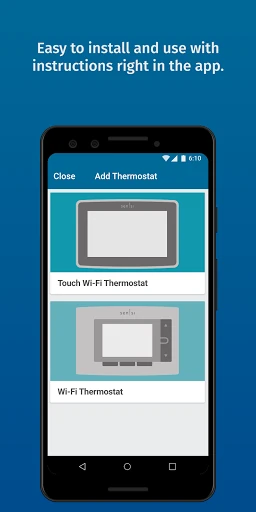
The setup guidance is one useful part of the package. Sensi provides illustrated, in-app instructions intended to walk users through thermostat installation. The manufacturer says most applications don’t require a common wire, but there are exceptions. Heat-only, cool-only, and heat-pump systems require one, and some systems, including baseboard heat, aren’t supported.
Everyday temperature control
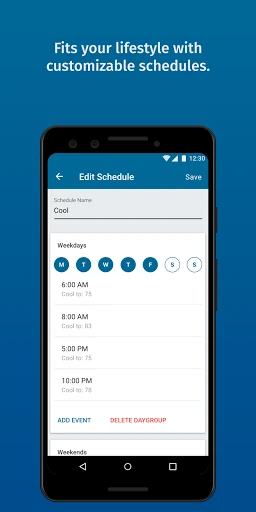
The core experience is deliberately practical: adjust the temperature remotely, set a schedule, and make changes when your plans shift. I can see the appeal of having those controls on a phone when the thermostat is elsewhere in the home or when you’re not there at all. Flexible seven-day scheduling adds a routine without requiring every day to follow the same pattern.
There’s a useful division of labor between schedule and remote control. A schedule handles the regular week, while a quick adjustment can address an unusual day. Sensi also includes geofencing and early start among its features, giving users additional options for how comfort is managed. The best fit will depend on the thermostat and how much automation you want.
More than a remote dial
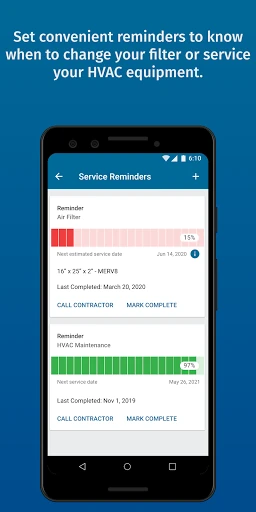
Several supporting controls make Sensi more than a digital temperature button. The app includes usage reports, service reminders, smart alerts, temperature limits, keypad lockout, and local weather. There are also controls for a circulating fan and auto changeover. These features cover a mix of routine monitoring, settings, and practical guardrails around thermostat use.
Humidity control is available with important equipment qualifications. Humidification requires additional equipment, and professional installation is recommended. Dehumidification is supported with air-conditioning and heat-pump systems. Sensi also supports smart-home connections with Amazon Alexa, Google Assistant, and SmartThings, which may help it fit into a home setup that already uses one of those platforms.
A workable weekly routine
A sensible way to approach the app is to start with the week’s regular rhythm. Set up the seven-day schedule around the times people are generally home, then use remote control when a late meeting, changed plan, or day away makes the usual pattern less useful. That keeps the schedule helpful without expecting it to predict every exception.
After the routine is in place, the reports and reminders can serve as occasional check-ins rather than another daily chore. Smart alerts and temperature limits are also worth considering if you want more oversight of thermostat behavior. Features such as geofencing, early start, and fan circulation give you more to explore, but there’s no need to use every option at once.
Compatibility comes first
The biggest limitation is that the app depends on compatible Sensi thermostat hardware and a supported HVAC system. Sensi works with equipment found in many homes, but not every type; baseboard heat and some other systems are excluded. Wiring needs vary, too, so checking compatibility before buying or installing anything is an important first step.
Some capabilities have their own conditions. Humidification requires additional equipment, while dehumidification support is tied to air-conditioning and heat-pump systems. The app’s range of controls may also be more than someone needs if they only want to change a temperature at the wall. Its value is strongest when remote access, programming, or thermostat monitoring will actually be used.
Sensi is a focused companion app with a useful mix of remote temperature control, weekly scheduling, reports, reminders, and smart-home compatibility. Its strongest selling point is convenience: the thermostat can be adjusted from a phone, and a regular schedule can handle much of the week. The main caveat is equally clear: the system must fit your thermostat and HVAC setup.
I’d consider Sensi for a household with compatible equipment that wants more flexible control without relying only on the wall thermostat. If you’re shopping for a thermostat, check system compatibility and wiring needs first. If you already have a compatible Sensi model, the app’s combination of everyday adjustments and optional extras makes it worth trying.
Sensi Frequently Asked Questions
What is the Sensi app used for?
Sensi is a companion app for Sensi Smart Thermostats. It lets you remotely change temperature settings, create flexible seven-day schedules, and access features such as usage reports, service reminders, smart alerts, and geofencing. It is intended for managing home comfort with compatible thermostat hardware, not as a standalone temperature-control tool.
Which devices can run Sensi?
Sensi is an Android app available through Google Play. The minimum Android version is not provided in the available facts, and requirements can vary as the app changes. Check the Google Play store entry for the current device requirements. The app also works with compatible Sensi Smart Thermostat hardware and supported HVAC systems.
Does Sensi cost money or include purchases?
The provided store facts describe Sensi as free, with no in-app purchases and no ads. The app is designed to work with Sensi Smart Thermostats, so using its thermostat controls requires compatible hardware. Hardware costs and availability can vary; check Google Play and the relevant product information for current details.
What Android version does Sensi require?
The minimum Android version is not included in the available app facts. Requirements can change with updates and may depend on the device, so check Sensi’s Google Play store entry for the current requirement before installing. Also confirm that your thermostat and HVAC system are compatible with the controls you want to use.
Is Sensi a good fit for my home?
It may suit you if you have a compatible Sensi Smart Thermostat and want remote temperature control, scheduling, usage reports, or smart-home connections. It may not suit homes with unsupported heating or cooling equipment, including baseboard heat, or people seeking a general smart-home app. Check compatibility first, since wiring requirements vary by system.
Pros
- Remote temperature control makes it easier to adjust home comfort when plans change.
- Seven-day scheduling supports routines that differ across the week.
- Usage reports, service reminders, and smart alerts add practical monitoring tools.
- Works with Alexa, Google Assistant, and SmartThings.
Cons
- Requires compatible Sensi thermostat hardware and a supported HVAC system.
- Some systems require a common wire, and baseboard heat is unsupported.
- Humidity controls depend on additional equipment or specific HVAC systems.
- Category
- Lifestyle
- Version
- 9.8.4











