Seeing
- 26.82K
- 4.3
- Installs
- 500.00K
- Price
- Free

Screenshots
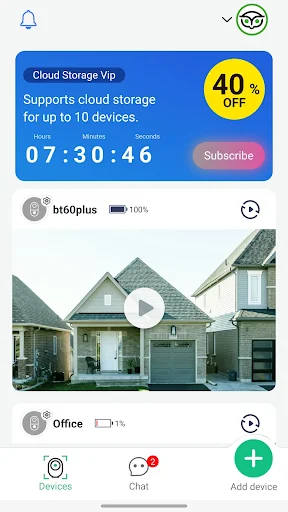
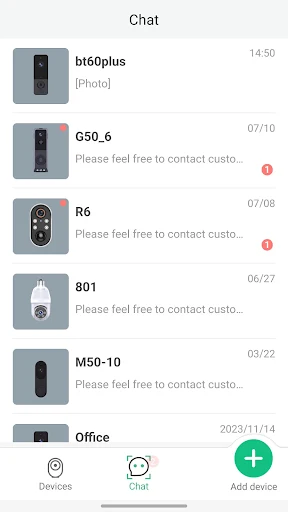
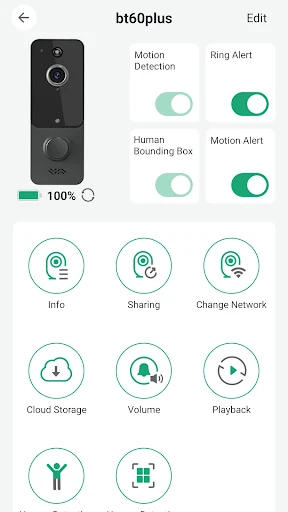
Analysis by Reviewed APKs
Seeing is a smart-home app for checking in on visitors through compatible doorbell and motion-sensor devices. It sends alerts when someone presses the doorbell or a PIR sensor detects movement, then lets me view video and talk with visitors from my phone. I’d consider it for people who want a straightforward way to monitor their front door, rather than a general-purpose home security system.
A Doorbell Check From Anywhere
I picture the useful moment as being halfway through an errand when a visitor presses the doorbell. Instead of wondering who is outside or rushing home, I can use Seeing to receive the alert, look at the video, and speak to the person through my smartphone. That makes the app’s purpose easy to understand: it connects a compatible device at home with the phone I already carry.
Motion alerts add another reason to check in, even when nobody rings. If a PIR sensor is triggered, Seeing can send a message, giving me a prompt to look at what is happening. The app describes video monitoring in high definition and two-way conversation with visitors. Those capabilities make it practical for ordinary arrivals and quick questions, not just for answering the door when I am standing inside.
A Focused Smart-Home Tool
Seeing is best understood as a companion for its doorbell and motion-sensor devices. It is not a general camera editor, a broad smart-home dashboard, or an app for recognizing objects and reading signs. I would choose it when the job is to get an alert from a visitor or sensor and check the home video, rather than expecting a collection of unrelated phone utilities.
The obvious alternative is simply answering the physical doorbell, but that only works when I am home and close enough to hear it. Seeing extends that interaction to a smartphone and lets me talk to a visitor remotely. It still depends on setting up the relevant devices, so it is not a standalone way to monitor a home with no compatible doorbell or PIR sensor.
Make Alerts Useful
A small habit that makes this kind of app more useful is keeping the phone somewhere I will notice it during the day. An alert only helps if I see it in time to decide whether to open the video and respond. I would also take a moment after setup to make sure I understand which events can prompt messages: doorbell presses and PIR motion detection.
I would treat each alert as a cue to check, not as a reason to watch the camera continuously. If a delivery is expected, I can keep my phone nearby and use Seeing when the doorbell rings. On a quieter day, a motion notification can still prompt a quick look. This simple, event-led routine suits the app’s stated role without turning it into a constant background task.
More From Our News Desk

Zoom Meetings, Google Meet, or Teams: Which Is Easiest to Join?

How I Build a Free Streaming Lineup With Tubi

Why Crunchyroll Is the Default Anime App for So Many Fans

YouTube TV: A Practical Guide to Cutting Cable

Rummikub and the Small Comfort of Phone Games

TeamViewer Remote Control or AnyDesk for Helping Family?
Who Might Find It Useful
I’d recommend Seeing to someone who has a compatible doorbell or PIR motion sensor and wants to check visitors from a smartphone. It is especially relevant for everyday situations where I may be away from the door: waiting for a delivery, stepping out briefly, or wanting to speak with someone who has arrived. The combination of an event alert, video, and the ability to talk gives the app a clear, practical purpose.
It may not suit someone looking for a standalone camera app, a general security service, or visual-assistance tools such as object recognition and text reading. Those are different jobs from the visitor monitoring described for Seeing. I would also look elsewhere if I do not have the devices the app is designed to connect with. For people who do, the focused feature set may be more useful than a broader app they do not need.
Seeing is an Android app from Lonsen Electronics Limited. Google Play shows more than 500,000 installs and a 4.3-star rating from about 26,800 ratings. It is free to download, but it contains ads and offers in-app purchases. Google Play lists those purchases at $19.99 to $99.99 per item, so I would check the store for the current purchase details before deciding whether to buy anything.
The app has an Everyone content rating. Its listed version is 2.1.3, with a release date of March 21, 2024, and a last update dated October 21, 2026. I would check the Google Play page for device compatibility and current availability, since Android requirements can vary by release. The practical fit also depends on having the doorbell or PIR sensor devices the app is meant to work with.
How Seeing Handles Visitor Check-Ins
Getting Started
My first impression is that Seeing has a narrow, understandable job: help me connect to devices and check on visitors. Its description emphasizes setting up devices in the app, then receiving messages when the doorbell is pressed or a PIR sensor is triggered. That is a more concrete starting point than an app that promises to manage every part of a home.
I would begin by setting up the relevant device before relying on alerts in my daily routine. The app’s usefulness depends on that connection; without a compatible doorbell or sensor, there is no visitor event for it to report. Once the device is ready, the expected sequence is straightforward: receive a message, open the video, and speak to the visitor if needed.
The Everyday Check-In
Day to day, the app’s core experience revolves around reacting to an event. A doorbell press or motion trigger sends a message to the phone, and I can use the app to monitor the home in high definition video. If someone is at the door, I can also hear and speak to that person. It is a compact interaction, built around answering the question, “Who is there?”
I like that the described routine does not require me to be physically beside the door. If I am in another room or away from home, a phone alert can bring the event to my attention. The app’s value is less about browsing for its own sake and more about having a way to respond when something happens. That focused rhythm should be easy to fit into an ordinary day.
Alerts, Video, Conversation
The combination of doorbell and PIR sensor messages is the feature set that stands out. A doorbell press is a direct request for attention, while a motion sensor can flag movement without someone ringing. Seeing gives me a reason to open the app in either situation, rather than relying only on hearing a chime at home.
High-definition video and two-way communication make the alert more actionable. I can look at the visitor and talk with them from the smartphone, rather than receiving a notification with no way to follow up. That is a useful distinction for a remote doorbell setup: the app is described as supporting both seeing and speaking, not just sending a message that something occurred.
A Simple Daily Routine
For a practical routine, I would keep the phone within reach when I am expecting a delivery or know someone may stop by. If a notification arrives, I can open Seeing, check the video, and decide whether I need to speak with the visitor. The same routine works for a PIR motion alert: use the message as a prompt to check the camera, rather than assuming what triggered it.
When I am not expecting anyone, I would still let the app’s alerts do the prompting instead of checking repeatedly. That keeps the experience tied to actual doorbell presses or sensor activity. It also helps set realistic expectations: Seeing provides a way to monitor and communicate through connected devices, while I remain the one deciding when to look and what to say.
What to Keep in Mind
The clearest limitation is that Seeing is built around compatible doorbell and PIR sensor hardware. It cannot do its main job in isolation, so the app will make most sense to someone already using, or planning to set up, the devices it supports. A person hoping for a general camera viewer or a suite of unrelated home controls may find the scope too specific.
There are also practical details to check before relying on it, including whether the app and a particular device suit the phone and setup at home. Google Play shows ads and offers paid in-app purchases, with listed item prices from $19.99 to $99.99. Those details do not change the core visitor-monitoring idea, but they are worth considering alongside the device setup and the app’s focused purpose.
Seeing makes sense when I want a phone-based way to notice doorbell presses or motion events, check video, and speak with visitors. Its appeal is the direct connection between an alert and a useful response. It is not trying to be an all-purpose home app, and that focus is both its strength and its main limitation.
I’d recommend it to people with compatible doorbell or PIR sensor devices who want remote visitor check-ins. If I needed a standalone app or a broader set of tools, I would look elsewhere. For its intended role, Seeing offers a clear everyday use, with device compatibility and purchase details worth checking before getting started.
Seeing Frequently Asked Questions
What is the Seeing app used for?
Seeing is used with compatible doorbell and PIR motion-sensor devices. It can send messages when someone presses the doorbell or a sensor is triggered, and it lets me monitor home video and see, hear, and speak with visitors from a smartphone. It is focused on remote visitor check-ins rather than general-purpose phone tools.
Which phones and devices work with Seeing?
Seeing is an Android app, and its described use involves setting up compatible doorbell or PIR sensor devices. The exact device and phone compatibility may vary, so I would check the Google Play page and device details before setting up a system. The app’s visitor-monitoring features depend on having the relevant hardware.
What Android version does Seeing require?
The Android requirement can vary by app release and device. I would check the current Google Play store page for the requirement that applies to my phone before installing Seeing. The app is designed for Android, but a specific minimum version should be verified for the version currently available.
Is Seeing free, and does it have purchases?
Seeing is free to download on Google Play, but it contains ads and offers in-app purchases. The listed purchase range is $19.99 to $99.99 per item. Prices and purchase options may vary, so I would check the store page for current details before making a purchase.
Is Seeing right for my home setup?
It may suit someone who wants to receive doorbell or PIR motion alerts, view video, and talk with visitors from a smartphone. It is less suited to someone seeking a standalone camera app or unrelated visual-assistance features. The best fit depends on having compatible devices; check the store and device details for setup compatibility.
Pros
- Combines doorbell and PIR sensor alerts with a way to check video.
- Lets me see, hear, and speak with visitors from a smartphone.
- Has a clear purpose for remote visitor check-ins.
Cons
- Its main features depend on setting up compatible doorbell or sensor devices.
- Contains ads and offers in-app purchases from $19.99 to $99.99 per item.
- The focused visitor-monitoring role may not suit people seeking broader tools.
- Category
- Tools
- Version
- 2.1.3











