Scout: Family Location 360
- 6.75K
- 4.5
- Installs
- —
- Price
- Free

Screenshots

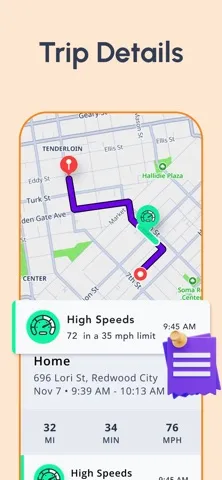
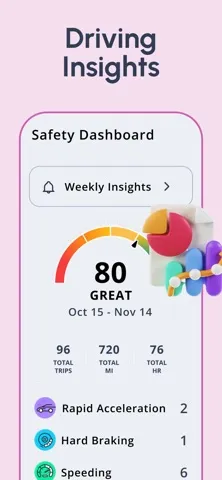

Analysis by Reviewed APKs
Scout: Family Location 360 is an iPhone app for sharing family members’ locations, getting arrival and departure alerts, and reviewing driving activity. It suits households that want a shared view of who is where, especially when kids or teens are travelling independently. I like that it brings location checks and driving reports together, though it makes the most sense for families comfortable with ongoing location sharing.
A quick family check-in
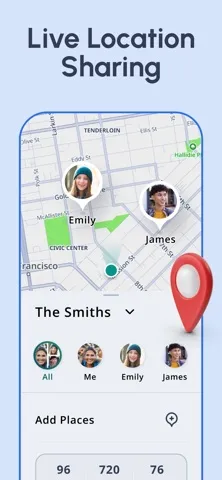
Picture a weekday afternoon when one parent is still at work, a teen is driving home, and someone else is picking up groceries. Instead of sending a string of “Where are you?” texts, a family member can open Scout and check the shared map. The app is designed to show live locations and visual status indicators, so a glance can answer whether someone is at home, at work, or on the move.
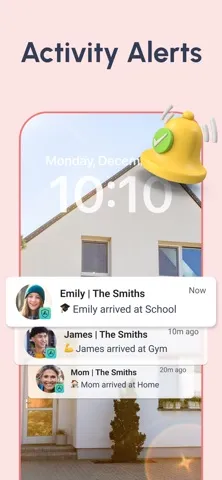
Place alerts make that check-in more useful when nobody is watching the map continuously. A family can set alerts for important places such as home, school, or work, then get notified when someone arrives or leaves. That is a practical way to keep up with a school commute or a late shift without turning every trip into a conversation. Location history also gives families a way to look back at past trips.
A tracker, not a navigator
Scout’s main job is keeping family members’ locations and driving activity visible to one another. It is not simply a map for finding your own way around, and it is not a general-purpose messaging app. The useful comparison is a shared family location service: its live map, place alerts, and trip information are meant to support coordination between people who have chosen to share their whereabouts.
The app also goes beyond a basic location check by including driving insights and weekly reports. That makes it a closer fit for families who want to discuss teen driving patterns than for someone who only needs directions to an unfamiliar address. Scout can start navigation to a family member’s location, but its described purpose is still family coordination, not a broad travel-planning toolkit. Its map and search coverage are for the USA.
Small habits that help
The app is likely to be most useful when the family agrees on a few important places before relying on alerts. Home, school, and work are natural starting points; adding only places that matter can keep notifications relevant. A quick map check is handy when plans shift, while arrival and departure alerts can handle routine trips in the background. Those habits make Scout a shared coordination tool rather than something one person has to constantly monitor.
Weekly driving reports suggest another simple routine: review them together at a calm time, rather than reacting to one trip in isolation. The reports cover trip history, behavior trends, and safety scores, and the app tracks events such as speeding, hard braking, acceleration, and phone use while driving. Families can use that information as a prompt for a conversation and notice changes over time. Background GPS use can reduce battery life, so it is worth keeping in mind.
More From Our News Desk

Zoom Meetings, Google Meet, or Teams: Which Is Easiest to Join?

How I Build a Free Streaming Lineup With Tubi

Why Crunchyroll Is the Default Anime App for So Many Fans

YouTube TV: A Practical Guide to Cutting Cable

Rummikub and the Small Comfort of Phone Games

TeamViewer Remote Control or AnyDesk for Helping Family?
Who may find it useful
I’d recommend Scout to families who want a shared view of everyday travel, particularly parents coordinating school runs, work commutes, or a teen’s driving. Live location, custom place alerts, and the option to navigate to a family member’s location address different parts of that routine. Weekly driving reports may also appeal to households that want to talk about driving patterns with more context than a single worried text.
It may be less appealing if you do not want location sharing to be part of family life, or if you only need a conventional map for your own trips. The app’s value depends on family members participating in the shared setup, and ongoing background GPS use can affect battery life. It is also worth noting that Scout’s map and search coverage are currently limited to the USA, which matters for families travelling elsewhere.
Scout: Family Location 360 is a free Lifestyle app from Telenav, Inc. on the Apple App Store. It is rated 4.5 out of 5 from 6,754 ratings, and has a 4+ age rating. The app was released on January 10, 2012, and its current version is 7.0.1.
The latest update date provided is June 16, 2025. Scout requires iOS 14.0 or later. The listed price is $0.00. Details about any optional in-app purchases or advertising may vary, so check the App Store page for current information before downloading.
How Scout Fits Family Routines
A focused first impression
When I first considered Scout, its purpose came across clearly: see family locations, keep up with important arrivals and departures, and review driving activity. That focus is helpful because location-sharing apps can otherwise feel like a map with no obvious reason to open it. Here, the map is only one part of a family check-in routine, alongside alerts and driving information.
Getting value from it depends on a family using location sharing together and deciding which places deserve alerts. The available description supports custom alerts for places such as home, school, and work, but the important first step is choosing the locations that actually matter to your household. A short, useful setup is likely easier to live with than trying to follow every movement.
The everyday location view
Day to day, the live map is the central reason to open Scout. It is intended to show family members’ current locations, while status icons can indicate whether someone is at home, at work, or driving. That gives the app a quick-check quality: if plans are running late, you can look for an update instead of immediately interrupting someone with a call or text.
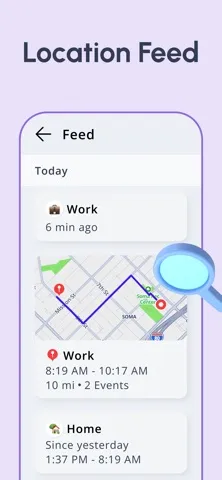
The map works best as a coordination aid, not as a substitute for conversation. A location can tell you where someone appears to be, but it cannot explain why a plan changed. Place alerts help with predictable transitions, and location history lets you review past trips. Together, those tools provide more context than a single live snapshot while keeping the app’s purpose practical and family-focused.
Alerts and driving insights
Custom location alerts are one of Scout’s most useful features for recurring routines. Families can receive notifications when someone arrives at or leaves a chosen place. That can make a school drop-off or return from work easier to follow without repeatedly checking the map. The best use is selective: alerts for a few important places are more likely to be helpful than treating every movement as an event.
Driving insights give Scout a different angle from a straightforward location-sharing tool. It can track speeding, hard braking, acceleration, and phone use behind the wheel, with alerts for critical safety events. Weekly reports summarize trip history, behavior trends, and safety scores. These details can help families discuss driving over time, but they work best as information for a conversation rather than as a verdict on one person or trip.
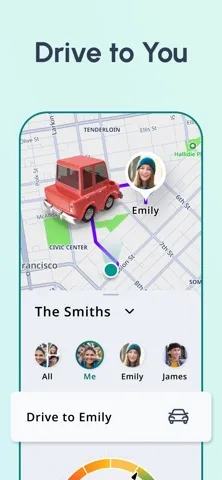
Another handy detail is the ability to start navigation to a family member’s location from within Scout. That is useful when plans change and someone needs to meet another person. The app also includes location history, so families can look back at trips. I appreciate that these features relate directly to the same basic task: coordinating where family members are and how they are travelling.
A low-friction weekly routine
A practical routine might start with setting the family’s key places, then letting alerts cover the predictable arrivals and departures. When a schedule changes, check the live map for a quick update. If someone needs a pickup, the option to navigate to that family member’s location can help turn the check-in into a next step. The idea is to make Scout useful in small moments, not a screen that needs constant attention.
Once a week, a parent and teen could look at the driving report together and talk through the patterns it shows. The report includes trip history, behavior trends, and safety scores, while the app can track several kinds of driving events. Reviewing that information regularly gives the family a chance to recognize improvement or ask questions. A calm, consistent check-in feels more constructive than focusing on a single alert.
Limits to keep in view
The biggest practical trade-off is battery use. Scout notes that continued background GPS use can decrease battery life, which is relevant for anyone who depends on their phone through a long day. Location sharing also works best when the people involved are comfortable with it. Families should think about expectations and boundaries before making a shared map part of their routine.
Coverage is another clear limitation: Scout’s map and search coverage are currently for the USA only. That makes it a poor fit for a family that needs the app to work across other regions. It is also a focused family tool, not an all-purpose navigation or travel app. If your main need is something outside location sharing, place alerts, and driving reports, Scout may not be the right match.
Scout: Family Location 360 brings live location sharing, place alerts, location history, navigation to family members, and driving reports into one family-oriented app. Its strongest case is a household that wants to coordinate everyday trips and follow teen driving patterns without relying on constant check-in messages.
I’d recommend trying it if your family is comfortable sharing locations and is based within its USA map and search coverage. Keep the background GPS battery trade-off in mind, and treat driving reports as a starting point for discussion. If you only want a personal navigation app, Scout’s family focus may be more than you need.
Scout Frequently Asked Questions
What is Scout: Family Location 360 used for?
Scout is used for family location sharing and coordination. Its features include a live map, alerts when family members arrive at or leave selected places, location history, and navigation to a family member’s location. It also offers driving insights and weekly reports covering trip history, behavior trends, and safety scores.
Which devices and platforms support Scout: Family Location 360?
Scout: Family Location 360 is available for iOS through the Apple App Store. It requires iOS 14.0 or later. The app’s map and search coverage are currently for the USA, so check whether that suits your location and travel needs before relying on it.
What iOS version does Scout: Family Location 360 require?
Scout requires iOS 14.0 or later. If you are unsure which iOS version your device can run, check your device settings and the current App Store page for compatibility details. The listed current app version is 7.0.1.
Does Scout: Family Location 360 cost money?
Scout is listed as free, with a price of $0.00. Details about optional in-app purchases or advertising may vary, so check the current App Store page for the latest information. The app’s core described purpose is family location sharing, alerts, and driving insights.
Is Scout: Family Location 360 a good fit for my family?
It may suit families who want to share live locations, set arrival and departure alerts, or review driving reports together. It may not suit people who prefer not to share location data or who need coverage outside the USA. Continued background GPS use can decrease battery life, so consider that trade-off too.
Pros
- Combines live family locations with alerts for arrivals and departures at selected places.
- Weekly driving reports summarize trips, behavior trends, and safety scores.
- Offers location history and navigation to a family member’s location.
- Visual status indicators make common family check-ins easier to scan.
Cons
- Continued background GPS use can decrease battery life.
- Map and search coverage are currently limited to the USA.
- Its usefulness depends on family members being comfortable with location sharing.
- Category
- Lifestyle
- Version
- 7.0.1











