Save Mart Supermarkets
- 4.61K
- 4.4
- Installs
- 100.00K
- Price
- Free

Screenshots
Analysis by Reviewed APKs
Save Mart Supermarkets is a grocery companion for checking weekly deals, clipping digital coupons, organizing a shopping list, and tracking rewards. I found its appeal clearest for people who already shop at Save Mart and want savings tools beside their regular grocery routine. It brings store offers and product scanning together, with online ordering available through Instacart. The main draw is practical convenience rather than a full meal-planning system.
A More Prepared Grocery Run
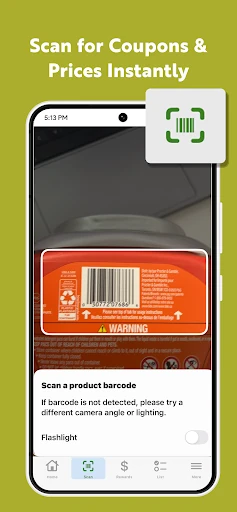
Imagine planning a weekday grocery trip while checking what is already running low at home. I would open the app to browse weekly deals, clip any useful coupons, and add needed items to a shopping list. If I were unsure about an item in the aisle, the product scanner could help me check its price or see whether a coupon is available. That makes the app most useful before and during a Save Mart visit.
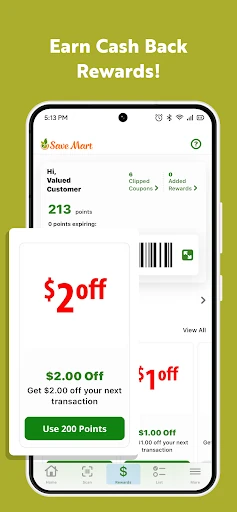
The rewards features give that routine another practical step. Qualifying purchases earn Save Mart Rewards points, which can be redeemed for cash back on groceries or fuel savings at participating Shell stations. The app says 100 points can be exchanged for 10 cents per gallon, subject to a 20-gallon limit per fill-up. I like that grocery shopping and fuel savings connect, though it is worth keeping track of when points expire.
A Store Companion, Not a Universal Grocer
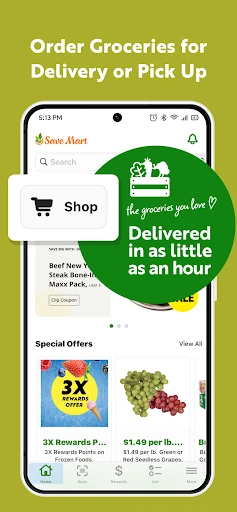
Compared with a general grocery list app, Save Mart Supermarkets is tied to one retailer and its own offers, rewards, and nearby stores. That focus is helpful if Save Mart is already part of my shopping routine: coupons and prices can be checked alongside the list, rather than in a separate store-specific search. Its online ordering option uses Instacart for pickup or delivery, giving shoppers a way to place an order without treating the app as a standalone delivery service.
This is not a broad price-comparison tool for every supermarket, nor is it a recipe library or a general household organizer. Its value depends on shopping at Save Mart and being interested in the store’s rewards. Someone who rotates among unrelated grocery chains may find the store-specific setup less useful. I would treat it as a practical extension of a Save Mart trip, not as a replacement for every grocery app or shopping habit.
Small Habits, Better Savings
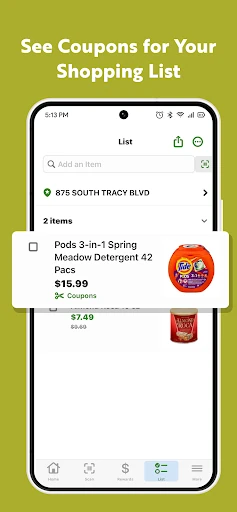
A little preparation makes the savings tools easier to use. I would check weekly deals before making my list, clip relevant coupons, and then add items as I browse the app or scan products. The list can include manually entered items as well, so it can serve as a simple running reminder between trips. Checking the offer details while planning helps keep the list grounded in what I actually need.
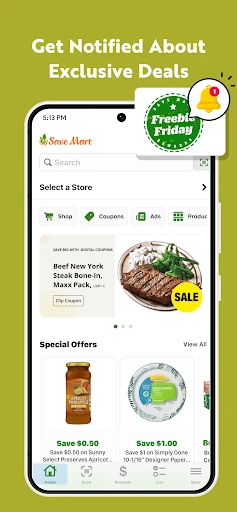
I would also make a habit of checking the rewards balance and expiry timing rather than assuming points last indefinitely. Points expire on the last day of the third month after they are earned. If I use fuel savings, linking Fuel Rewards from Shell may allow additional eligible offers to stack. Notifications can surface new coupons and promotions, but shoppers who prefer fewer alerts can decide whether enabling them fits their routine.
More From Our News Desk

Zoom Meetings, Google Meet, or Teams: Which Is Easiest to Join?

How I Build a Free Streaming Lineup With Tubi

Why Crunchyroll Is the Default Anime App for So Many Fans

YouTube TV: A Practical Guide to Cutting Cable

Rummikub and the Small Comfort of Phone Games

TeamViewer Remote Control or AnyDesk for Helping Family?
Who Gets the Most From It
I would recommend Save Mart Supermarkets to regular Save Mart shoppers who want coupons, weekly deals, a list, and rewards in one place. It is especially relevant if you like checking offers before a trip or want to scan a product in-store to check its price and available coupons. People who also use participating Shell stations may appreciate having fuel savings tied to qualifying grocery purchases.
It may be less compelling for someone who rarely shops at Save Mart, wants a universal grocery comparison service, or does not care about store rewards. The app’s usefulness also depends on whether its offers and ordering options suit your local shopping routine. If you mainly need a basic list, a simpler tool may be enough; if you already shop at Save Mart, the extra savings features give this one a clearer reason to stay installed.
Save Mart Supermarkets is a free Food & Drink app developed by Save Mart Supermarkets. On Google Play it has over 100,000 installs and a 4.4-star rating from about 4,600 ratings. The app is rated Everyone. It is free to download, has no in-app purchases, and contains no ads.
The minimum requirement is Android 5.0. The current version is 5.5.0. Save Mart Supermarkets was released on March 2, 2015, and was last updated on December 19, 2025. These details provide a useful snapshot of the app’s Google Play listing; store information can change as the app is updated.
How It Fits Into a Real Shopping Routine
Opening and Getting Oriented
When I first opened an app like this, I would want to find the useful grocery information quickly, not spend time figuring out a complicated system. Save Mart Supermarkets puts its purpose in familiar terms: deals, coupons, rewards, lists, and store shopping. That combination makes the app easy to understand as a companion to a store visit rather than a separate service that requires a new shopping routine.
The first useful setup is deciding which tools matter to me. I might browse offers and build a list before shopping, then use product scanning in the store. Notifications are available for savings and promotions, but they are optional. For online ordering, the app points to pickup or delivery through Instacart. Those choices let the app support different shopping styles without requiring every feature to be part of every trip.
The Everyday Savings Loop
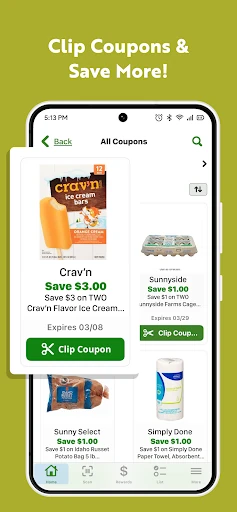
The core experience is a loop: look over current deals, clip coupons, shop with a list, and earn rewards on qualifying purchases. At checkout, clipped digital coupons can be redeemed by entering the registered phone number. That approach connects what I do in the app with the in-store purchase, which is useful when I want to prepare at home and keep checkout steps straightforward.
Rewards extend that loop beyond the grocery cart. Points can be used for cash back on groceries or fuel savings at participating Shell stations. The fuel redemption details are specific: 100 points equal 10 cents per gallon, with savings limited to 20 gallons per fill-up. Points have an expiry window, so a quick balance check now and then is a sensible part of using the program.
Useful Store-Specific Tools
Product scanning is one of the more practical features because it connects a question in the aisle with information in the app. Scanning can show a product’s price or available coupons. I can see this being handy when comparing a planned purchase with an offer, or when I simply want to check a price before putting something in the cart.
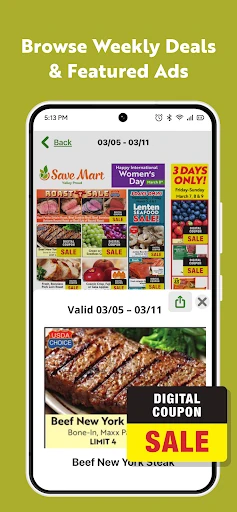
The shopping list can be built in several ways: by entering items manually, browsing within the app, or scanning products. The app also brings together weekly ads, featured deals, and tailored coupon offers. Nearby Save Mart locations and directions add another useful store-related detail. None of these features has to transform grocery shopping; they mainly reduce the small bits of searching and remembering around a normal trip.
A Simple Weekly Routine
For a weekly shop, I would start by checking the current ad and browsing the available offers. I would clip only coupons that match the list, then add any remaining household needs manually. This keeps the list useful rather than turning it into a record of every tempting promotion. Before leaving, I could check whether a nearby Save Mart is convenient and decide whether I want to shop in person or order through Instacart.
In the store, I would use the list as a reminder and scan a product when I wanted to check its price or coupon availability. After a qualifying purchase, the rewards balance becomes relevant for a future grocery or fuel redemption. If I planned to use fuel savings, I would remember the Shell participation requirement and the redemption limit. That small sequence makes the app feel like a routine helper, not another task to manage.
Limits to Keep in Mind
The most important limitation is the store-specific nature of the app. Its deals, coupons, locations, and rewards matter most to people who shop at Save Mart. Fuel savings also depend on participating Shell stations, and the stated redemption is capped at 20 gallons per fill-up. The reward points expire, so earning them without checking their timing could make the program less useful than expected.
Online pickup and delivery are offered through Instacart, so that part of the experience is not simply the same as browsing in-store deals. The app is also not presented as a universal comparison service or a recipe planner. I would judge it by how well its Save Mart tools fit my actual shopping pattern, rather than expecting it to replace every other grocery or planning app.
Save Mart Supermarkets makes the most sense as a practical store companion: it combines coupons, weekly deals, a shopping list, product scanning, and rewards with options for online ordering and finding a nearby store. I especially like the connection between qualifying grocery purchases and possible fuel savings, provided shoppers keep the program’s terms in mind.
If Save Mart is already one of your regular stops, I think the app is worth trying for its convenience and savings tools. If you shop across many chains or only need a bare-bones list, its retailer-specific focus may matter more than its extras. It is a focused helper, and that is both its strength and its main boundary.
Save Mart Supermarkets Frequently Asked Questions
What is Save Mart Supermarkets used for?
Save Mart Supermarkets helps shoppers browse weekly deals, clip digital coupons, create a grocery list, and scan products to check prices or available coupons. It also tracks rewards that can be redeemed for grocery cash back or fuel savings at participating Shell stations. Online ordering for pickup or delivery is available through Instacart.
What devices can run Save Mart Supermarkets?
Save Mart Supermarkets is an Android app. Its minimum requirement is Android 5.0, so a device running that version or a later compatible version meets the stated Android requirement. Check the Google Play store for current compatibility details, since supported devices and requirements can vary over time.
Does Save Mart Supermarkets cost anything?
The app is free to download on Google Play and does not offer in-app purchases. It also contains no ads. Online ordering is described as being handled through Instacart; any costs or terms associated with an order may vary, so check the relevant store and ordering details before placing one.
How do rewards work in Save Mart Supermarkets?
Qualifying purchases earn one Save Mart Rewards point per dollar spent in-store or online. Points can be redeemed for cash back on groceries or fuel savings at participating Shell stations. The stated fuel redemption is 10 cents per gallon for every 100 points, up to 20 gallons per fill-up; points expire after a set period.
Is Save Mart Supermarkets useful if I shop elsewhere?
It is most useful for people who shop at Save Mart and want that store’s coupons, deals, locations, and rewards in one app. It is not described as a general comparison tool for multiple grocery chains. If you shop elsewhere most of the time, its store-specific features may be less relevant.
Pros
- Combines digital coupons, weekly deals, a shopping list, and product scanning for store trips.
- Rewards can be redeemed for grocery cash back or fuel savings at participating Shell stations.
- Offers pickup or delivery ordering through Instacart alongside store-finding tools.
- Free to download, with no in-app purchases or ads.
Cons
- Its savings and shopping tools are focused on Save Mart rather than multiple grocery chains.
- Fuel savings depend on participating Shell stations and are limited to 20 gallons per fill-up.
- Rewards points expire, so shoppers need to keep an eye on their timing.
- Category
- Food & Drink
- Version
- 5.5.0











