Pizza Hut - Delivery & Takeout
- 985.41K
- 3.8
- Installs
- 10.00M
- Price
- Free

Screenshots
Analysis by Reviewed APKs
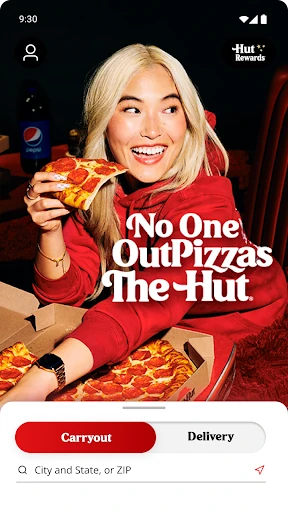
Pizza Hut - Delivery & Takeout is for ordering pizza, sides, and other menu items from Pizza Hut for delivery, takeout, or curbside pickup. I found it most useful when I already knew what the group wanted and needed to get an order in without a phone call. The menu, pizza customization, order tracking, and rewards make it a practical choice for regular Pizza Hut customers, though it is not a general food-delivery app.
A smoother dinner order
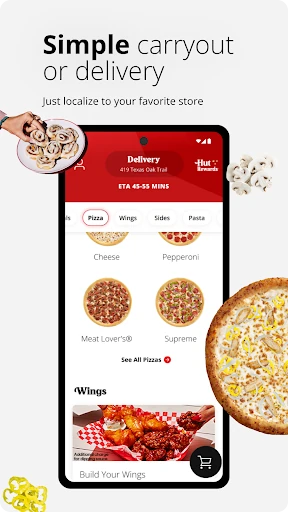
When I first opened Pizza Hut - Delivery & Takeout, I pictured the familiar weeknight problem: people are hungry, nobody wants to debate dinner for long, and someone has to place the order. The app gives that job a straightforward home. I can look through the menu, check local deals, build a pizza, and choose delivery, takeout, or curbside pickup without switching between separate services.
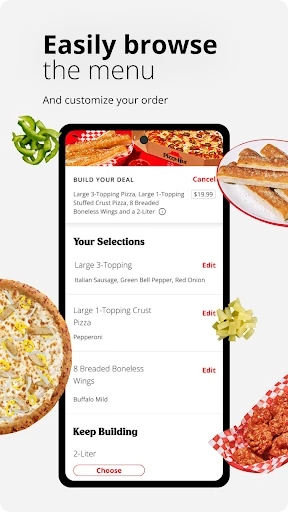
The useful part is how many common ordering decisions fit into that flow. I can adjust a pizza with the Pizza Builder, choose sides or desserts from the menu, and review the order before checking out. If plans are for later, the app supports placing an order up to seven days ahead. For an ordinary family meal or a casual get-together, that makes it easier to settle the details before the hungry moment arrives.
A restaurant-specific tool
Compared with a broad restaurant-delivery app, this one is focused on Pizza Hut. That focus makes sense if I want to browse its menu, see offers from a nearby location, follow a Pizza Hut order, or keep an eye on Hut Rewards points. The app also includes location finding, so it can help when I would rather pick up food than have it delivered.
That same focus is the main boundary. This is not a way to compare restaurants, order from other chains, or shop for groceries; its ordering coverage is Pizza Hut locations in the 50 United States, territories, and possessions, excluding Puerto Rico and the U.S. Virgin Islands. If I am choosing among several kinds of food, a broader service is a better fit. If I have already settled on Pizza Hut, the direct route is more useful.
Small habits that help
I would use the app’s reorder option for the dependable orders I make repeatedly. The description says a saved order can be placed again in three taps, which is handy when the usual pizza-and-sides combination needs no rethinking. Guest checkout is another useful shortcut if I only want to order without setting up an account, while saved orders and rewards suit someone who returns often.
A little planning can also make the app more useful. I can check local deals before choosing items, schedule a future order when a meal has a set time, and use curbside check-in when I have selected that pickup option. For delivery, the tracker gives me a way to follow the order instead of repeatedly wondering about its progress. These are small conveniences, but they fit naturally into a busy evening.
More From Our News Desk

Zoom Meetings, Google Meet, or Teams: Which Is Easiest to Join?

How I Build a Free Streaming Lineup With Tubi

Why Crunchyroll Is the Default Anime App for So Many Fans

YouTube TV: A Practical Guide to Cutting Cable

Rummikub and the Small Comfort of Phone Games

TeamViewer Remote Control or AnyDesk for Helping Family?
Who will get the most from it
I would recommend Pizza Hut - Delivery & Takeout to people who already order from Pizza Hut and want a direct way to browse, customize, and submit an order. It is especially convenient for households with a familiar repeat order, anyone who wants to check Hut Rewards, and people who alternate between delivery and pickup. The option to order as a guest also makes it approachable for an occasional customer who does not want an account first.
It may be less appealing if you rarely eat Pizza Hut, want a single app for many restaurants, or prefer deciding what to eat by comparing a wide range of cuisines. The experience is built around one chain’s menu and ordering options, rather than broader discovery. I would also keep the regional coverage in mind: the app’s stated ordering area excludes Puerto Rico and the U.S. Virgin Islands.
Pizza Hut - Delivery & Takeout is developed by Pizza Hut Inc and is available on Google Play. It is free to download, has no in-app purchases, and contains no ads. Google Play shows more than 10 million installs and a 3.8-star rating from about 985,000 ratings. Its content rating is Everyone, and it requires Android 7.0 or later.
The current version is 6.0.34. The app was released on May 17, 2011, and its most recent update was January 28, 2026. Those details sit alongside a fairly focused purpose: ordering Pizza Hut food for delivery, takeout, or curbside pickup, then using features such as order tracking and Hut Rewards. The menu and ordering coverage are tied to participating Pizza Hut locations in the stated U.S. service area.
A closer look at the ordering flow
Opening the app
My first impression is that the app has a clear job: help me order Pizza Hut food. That focus keeps the experience easy to understand. I can browse the menu, look at nearby locations, and start an order without first sorting through unrelated restaurants. When I am already in the mood for pizza, a direct menu is more useful than a broad catalogue.
The app supports guest checkout, which is a welcome option for an occasional order. Regular customers can also use Hut Rewards and saved orders. I like that these paths serve different habits rather than making every user commit to the same routine. For a first visit, the basic appeal is practical: find the food, make choices, and proceed with the order.
Ordering day to day
The everyday flow revolves around choosing food and deciding how to receive it. I can order delivery, takeout, or curbside pickup, then use the menu to put together a meal. If I am ordering for a group, the pizza customization gives me a way to handle preferences before checkout rather than trying to explain every change later.
For a repeat order, the three-tap reorder option sounds like the kind of shortcut that earns its keep. I would use it for a familiar combination, while checking the menu and local deals when I want something different. The ability to schedule an order up to seven days ahead also helps when I know the meal time in advance, instead of leaving the whole task until the last minute.
Features with a purpose
The Pizza Builder is one of the more distinctive tools because it lets me customize a pizza rather than simply choosing a preset. Alongside that, the app presents the full Pizza Hut menu and local deals. Those features make the browsing stage more useful, whether I am trying to accommodate different preferences or looking for an option that suits the occasion.
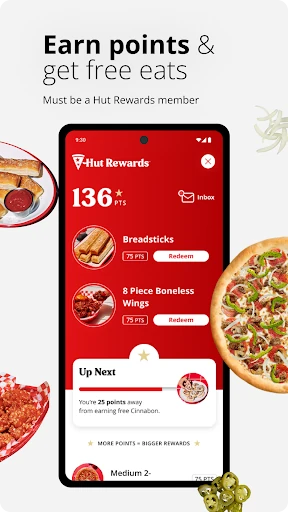
Hut Rewards adds a reason for regular customers to keep using the app. I can check points and redeem rewards such as free pizza or wings, according to the app description. The Delivery Tracker is another practical extra: it helps me follow an order after placing it. None of these features changes what the app is for, but each supports a different part of ordering.
A practical evening routine
For a low-effort dinner, I would open the app while everyone is still deciding, browse the menu, and check the local deals before settling on the order. If the group has different preferences, I can customize a pizza and add other menu items. Once the meal is set, I can choose delivery or one of the pickup options and complete checkout.
If the meal is planned for a particular time, scheduling it in advance can take the pressure off the evening itself. For curbside pickup, the app offers a one-click check-in. For delivery, I can look at the tracker after ordering. This kind of routine is not complicated, but it helps keep the app’s separate conveniences connected to a real task.
Limits to keep in mind
The biggest limitation is its narrow scope. Pizza Hut - Delivery & Takeout is useful when I want Pizza Hut, but it cannot help me compare another chain’s menu or place an order with a different restaurant. Someone who likes browsing lots of local choices will probably prefer a broader service for that kind of decision.
Location also matters. The stated ordering area includes the 50 United States, territories, and possessions, but excludes Puerto Rico and the U.S. Virgin Islands. The app’s usefulness depends on having a Pizza Hut location available for the order I want to place. For customers who do order from the chain, the focused approach is straightforward; for everyone else, it may be an app they open only occasionally.
Pizza Hut - Delivery & Takeout does the basics I want from a restaurant app well: browse the menu, customize a pizza, choose pickup or delivery, and keep track of the order. Rewards, advance ordering, and quick reordering are useful extras for people who come back regularly. Its focus is a strength when Pizza Hut is already the plan, not when I am still choosing a restaurant.
I would recommend it to Pizza Hut customers who want an easier way to order and manage repeat meals. Occasional customers can still use guest checkout, while people seeking many restaurants in one place should look elsewhere for that broader choice. If Pizza Hut is part of your regular dinner rotation, this app is a sensible tool to have ready.
Pizza Hut Frequently Asked Questions
What is Pizza Hut - Delivery & Takeout used for?
Pizza Hut - Delivery & Takeout is used to browse the Pizza Hut menu and order food for delivery, takeout, or curbside pickup. It also supports pizza customization, local deals, order tracking, advance orders, and Hut Rewards points and redemptions. Its ordering area is the 50 United States, territories, and possessions, excluding Puerto Rico and the U.S. Virgin Islands.
Which devices can run Pizza Hut - Delivery & Takeout?
The app is available for Android devices through Google Play and requires Android 7.0 or later. It supports ordering from Pizza Hut locations in its stated service area. Whether a particular location can fulfill an order can depend on where you are, so check the app for nearby locations and available ordering options.
How much does Pizza Hut - Delivery & Takeout cost?
The app is free to download on Google Play and has no in-app purchases. It contains no ads. Food orders are a separate matter from downloading the app; menu items and any applicable order charges may vary by location and order, so check the app before placing an order.
Does Pizza Hut - Delivery & Takeout need Android 7.0?
Yes. The stated minimum requirement is Android 7.0. The current version is 6.0.34, and the app’s Google Play information gives the Android requirement. If you are unsure whether your device can install it, check the store page on that device, since availability can vary with device and software compatibility.
Is Pizza Hut - Delivery & Takeout a good fit for me?
It is a good fit if you order from Pizza Hut and want to customize meals, repeat an order, check rewards, or follow delivery progress. Guest checkout can suit an occasional customer. It is less suitable if you want to compare many restaurants or order from other chains, because the app is centered on Pizza Hut.
Pros
- Offers delivery, takeout, and curbside pickup in one Pizza Hut ordering app.
- Pizza Builder, local deals, and menu browsing make order planning flexible.
- Supports guest checkout, advance orders, and quick repeat ordering.
- Includes Hut Rewards access and a delivery tracker.
Cons
- Focused on Pizza Hut rather than a range of restaurants.
- Ordering coverage excludes Puerto Rico and the U.S. Virgin Islands.
- Its usefulness depends on having a participating location nearby.
- Category
- Food & Drink
- Version
- 6.0.34