McDonald's
- 814.60K
- 3
- Installs
- 100.00M
- Price
- Free

Screenshots
Analysis by Reviewed APKs
McDonald's is a Food & Drink app for checking restaurant offers and finding practical information before a visit. I see it as a handy companion for people who already stop at McDonald's now and then, especially anyone who likes to browse deals or check a menu on the way. It keeps those basics together, though it is more useful as a visit-planning aid than as an all-purpose food app.
A Deal Before Lunch
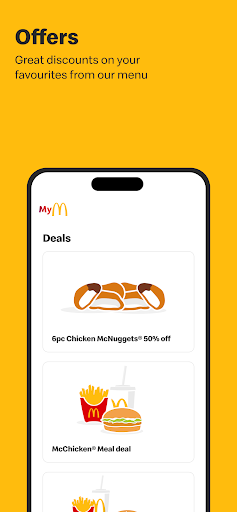
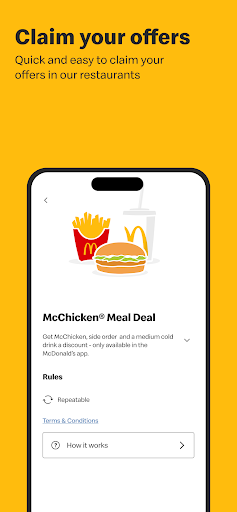
When I first opened McDonald's, I pictured a familiar lunch break: I have a few minutes, I know roughly what I want, and I would rather check for an offer before reaching the counter. The app's central draw is access to offers that can be redeemed at a restaurant cashier using a phone. That makes it useful to glance through deals before joining a queue, rather than trying to remember what was available.
The other practical detail is that the app brings together the menu and a location-based restaurant finder. On an unfamiliar route, I can look for a nearby restaurant, then check what is on the menu and whether there are offers worth using. It is a modest bit of preparation, not a complicated planning session. I would still expect to complete the actual purchase in person based on the features described.
A Visit Companion, Not a Food Guide
Compared with a general restaurant-discovery app, McDonald's has a narrower job: it focuses on this one restaurant brand and the information that helps with a visit. The menu, location finder, new-product information, and offers all point in the same direction. If McDonald's is already part of my routine, that focus is convenient. If I am trying to compare independent places or decide what kind of cuisine to eat, this is not the tool I would reach for.
I would also avoid treating it as a full mobile ordering service. The described offer redemption happens at the cashier, and the app's listed features do not establish ordering or payment functionality. Its nutritional information can help me look up menu details, but it is not a broader nutrition tracker or meal-planning app. Knowing that boundary makes the app easier to judge: it supports a restaurant visit, rather than replacing the rest of my food-related tools.
Small Ways to Use It
A simple habit that makes sense is checking offers before leaving home or work. I can see what is available while I still have a moment to decide, rather than opening the app with a line behind me. Since offers are meant to be redeemed at the cashier with a mobile phone, I would keep the app accessible when I arrive and check the offer details before relying on a particular deal.
I would also use the menu and store finder together when visiting an area I do not know well. Find a nearby restaurant first, then browse menu items or look at nutritional information while deciding whether the stop works for me. If I have children with me, the monthly Happy Meal toy information may be useful to check ahead of time. These are small checks, but they turn the app into a more practical pre-visit reference.
More From Our News Desk

Zoom Meetings, Google Meet, or Teams: Which Is Easiest to Join?

How I Build a Free Streaming Lineup With Tubi

Why Crunchyroll Is the Default Anime App for So Many Fans

YouTube TV: A Practical Guide to Cutting Cable

Rummikub and the Small Comfort of Phone Games

TeamViewer Remote Control or AnyDesk for Helping Family?
Who will find it useful
I would recommend McDonald's to regular or occasional customers who want restaurant offers on their phone and appreciate having menu and location details in one place. It is especially suited to someone who already knows they are likely to visit and wants to check a deal, find a nearby restaurant, or look up a product before ordering at the counter. The app's focused scope is a plus when those are the exact questions I have.
It may not suit someone looking for restaurant comparisons, broad food inspiration, or a complete ordering experience. The stated features center on offers, restaurant information, and related content, so I would not install it expecting every step of a meal to happen in the app. People who rarely visit McDonald's may also find its brand-specific tools less useful than a general map or food-information app they already use.
McDonald's is published by McDonald's Apps and is listed in Google Play's Food & Drink category. It has over 100 million installs and a 3.0-star rating from about 815,000 ratings. The app is free to download, and the provided store facts say it contains ads. Google Play gives it an Everyone content rating.
The listed version is 3.52.0. The app was released on February 26, 2018, and its recorded last update is October 30, 2026. No minimum Android version is included in the available app facts, so check Google Play for compatibility with a particular device. The listed purchase information does not include paid in-app products.
How McDonald's Fits Into a Visit
A Focused First Look
My first impression is that McDonald's has a very clear reason to exist: keep offers and restaurant information close at hand. The feature set is easy to understand even before spending much time with it. I can see why a returning customer would want it installed, while someone unfamiliar with the brand may not find much reason to explore beyond the basics.
I would begin by checking the offers and looking for a restaurant near a place I actually go. That gives the app an immediate, practical test instead of turning setup into a project. The available description does not spell out a detailed onboarding process, so I would keep expectations simple and focus on the tools it explicitly offers.
Useful Between Stops
In day-to-day use, the most natural rhythm is a quick check before a visit. I can browse available offers, look over the menu, and use the store finder when I need to identify a nearby restaurant. Those are short tasks that fit into a commute or a lunch break, rather than something I would sit down to use for a long stretch.
The app is also relevant when I want to know more than what is on the menu board. Nutritional information is included, along with details about new products and new restaurants. I would treat those as reference material for a decision, not as a replacement for careful consideration of my own needs. The experience described is about making restaurant information easier to reach.
More Than Offers
Offers are the obvious reason to open the app, but the supporting information gives it a little more everyday value. The menu and nutritional details can answer basic questions before I order, while a location-based store finder helps when I am away from my usual area. I like that these features serve the same simple purpose: making a possible restaurant stop easier to plan.
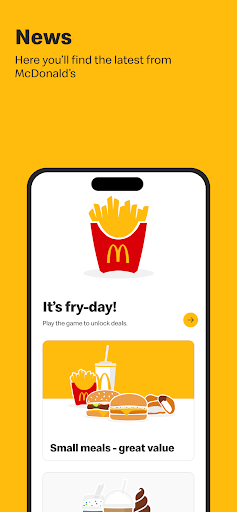
There is also information about new products, new restaurants, and the Happy Meal toys of the month. The app includes games, competitions, and gifts as well, according to its description. Those extras may appeal to families or people who enjoy occasional brand-related diversions. I would not assume they change the core experience, but they give the app more to browse than a list of deals alone.
A Practical Pre-Visit Routine
My most useful routine would start before I leave. I would check the offers, see whether a nearby restaurant is convenient, and browse the menu if I have not decided what to get. That sequence helps me arrive with a clearer idea of what I want. It is particularly useful when I am fitting a stop into a short break and do not want to make every choice at the counter.
If I am visiting with family, I might also check the monthly Happy Meal toy information in advance. For a new area, the location finder can be the first step, followed by the menu and nutritional information. I would keep the phone available for presenting an offer to the cashier. None of that requires a complicated routine; the point is simply to use the app before the moment when time feels tight.
Keep Expectations Grounded
The main limitation is its narrow focus. The tools make sense if I want McDonald's offers or information, but they do not turn the app into a general-purpose restaurant guide. I would not use it to browse competing restaurants or organize meals across different places. Someone who seldom visits the chain may see little value in keeping a dedicated app for these specific tasks.
There is another important boundary: the described offer is redeemed at a restaurant cashier. The feature information does not describe mobile ordering or payment, so I would not count on the app to handle those parts of a visit. Its Google Play rating is 3.0 stars, which is worth bearing in mind alongside the large number of ratings. The app may suit its intended use without being a polished fit for every customer.
McDonald's is a straightforward companion for checking deals, menus, nutritional information, and nearby restaurants. I like its usefulness in the moments just before a visit, when a quick look can help me decide where to go or what to order. The brand-specific focus is also its biggest constraint.
I would recommend it to people who visit McDonald's often enough to use its offers and reference tools. If you want broad restaurant discovery or an app centered on completing an order, this is not the one I would choose. For a simple pre-visit check, it has a clear purpose.
McDonalds Frequently Asked Questions
What is the McDonald's app used for?
McDonald's provides access to restaurant offers that can be redeemed at a cashier using a phone. It also includes a menu, a location-based store finder, nutritional information, details about new products and restaurants, and information about the monthly Happy Meal toys. The app's description also mentions games, competitions, and gifts.
Which devices can run the McDonald's app?
The app is available on Android through Google Play. The minimum Android version is worth checking on the Google Play page, since compatibility can vary by device and app release. The available information describes the Android app and does not establish availability on other platforms.
What Android version does McDonald's require?
The minimum Android version can vary as the app is updated, so check the Google Play page for the requirement that applies to your device. The app's current listed version is 3.52.0, but that version number alone does not determine whether a particular phone is compatible.
Does the McDonald's app cost money?
McDonald's is free to download on Google Play. The provided store facts say it contains ads and do not list paid in-app products. Store details can change, so check Google Play for the latest information about costs or purchase options before installing.
Is the McDonald's app useful for occasional customers?
It can be useful if an occasional visit is enough reason to check an offer, find a nearby restaurant, or browse the menu and nutritional details. Its features are focused on McDonald's, so people who rarely visit the chain may prefer a general restaurant or map app for everyday use.
Pros
- Offers can be checked on a phone and redeemed at the restaurant cashier.
- Menu, nutritional information, and a location-based store finder share one app.
- Includes updates about new products, restaurants, and monthly Happy Meal toys.
- Free to download for customers who want a brand-specific visit companion.
Cons
- Its tools focus on McDonald's rather than broader restaurant discovery.
- The described features do not include mobile ordering or payment.
- A 3.0-star rating suggests the experience may not satisfy every user.
- Category
- Food & Drink
- Version
- 3.52.0