Instacart Market Food Delivery
Listed on Google Play as “Instacart: Get Food Delivery”
- 407.50K
- 4.8
- Installs
- 10.00M
- Price
- Free

Screenshots
Analysis by Reviewed APKs
Instacart: Get Food Delivery is a grocery and food shopping app for people who want to order from nearby stores for delivery or pickup. I found its appeal easy to understand: it brings a local store’s selection and sales onto your phone, then lets you coordinate an order without making a separate shopping trip. It suits busy households and occasional top-up shops, though availability and fees depend on your area and order.
A shop from the sofa
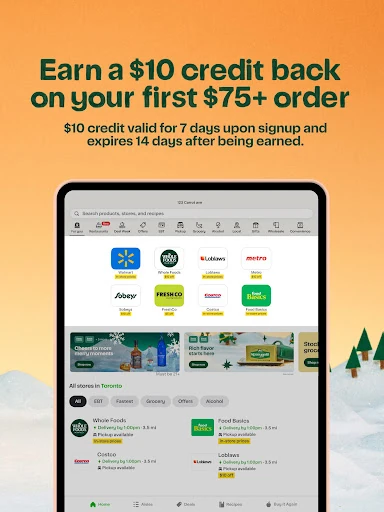
When I first opened Instacart, the basic idea felt familiar: enter a ZIP code, choose a store, and build a cart from its available groceries and other goods. That makes it useful for the ordinary midweek problem of realizing dinner needs one more ingredient while the day is already full. I could browse for produce, drinks, snacks, and household essentials, then choose delivery or pickup when placing an order.
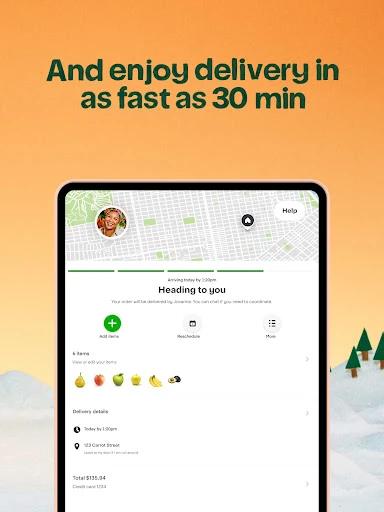
The practical difference shows up when plans change. For a gathering, I can use one shopping session to collect party snacks, beverages, and everyday supplies instead of making a list and visiting several aisles. The app also says shoppers can chat in real time about changes to an order. I like that this gives the process a human point of contact, although it still means keeping an eye on the phone while someone shops.
More than a delivery menu
Instacart sits somewhere between a grocery store’s own ordering service and a restaurant delivery app. It connects shoppers with local grocery and retail stores, so the main job is browsing store inventory and ordering a basket of items. That makes it a better fit for replenishing the fridge or collecting household basics than for choosing a single prepared meal. The description also includes freshly made food and drinks, but the emphasis is broad shopping.
It is not a replacement for walking through a store when I want to inspect every item myself, nor does it promise that every nearby shop will appear. The available stores depend on the ZIP code entered. Pickup is an alternative to delivery if I would rather collect the order, and the app says pickup can skip the delivery fee. I would compare the options and applicable terms before settling on a routine.
Make the order smoother
I would start by setting the ZIP code before browsing, since the app uses it to show nearby stores and their inventory. From there, a simple list helps keep an order focused: dinner ingredients first, then recurring basics such as drinks or household items. Searching a store’s selection can be more convenient than trying to remember everything while standing in a crowded aisle, especially when I am shopping for a specific occasion.
A useful habit is to review the cart before submitting it and stay available for the shopper’s chat in case an item needs a change. I would also look at store sales and coupons while choosing products, since the app describes both as part of the shopping experience. Finally, checking delivery versus pickup before placing the order helps match the choice to the day rather than treating delivery as the only way to use Instacart.
More From Our News Desk

Zoom Meetings, Google Meet, or Teams: Which Is Easiest to Join?

How I Build a Free Streaming Lineup With Tubi

Why Crunchyroll Is the Default Anime App for So Many Fans

YouTube TV: A Practical Guide to Cutting Cable

Rummikub and the Small Comfort of Phone Games

TeamViewer Remote Control or AnyDesk for Helping Family?
Who will appreciate it
I would recommend Instacart to people who regularly buy groceries and would value ordering from home, especially when time, transportation, or a packed schedule makes a store trip inconvenient. It also makes sense for households planning a larger shop or picking up snacks and supplies for guests. The delivery and pickup choices give the same app a role in different kinds of days, from a full restock to a smaller top-up.
It may be less appealing to shoppers who prefer choosing every item in person or who want a dedicated restaurant-ordering experience rather than grocery shopping. Store selection is tied to location, and delivery or other terms can affect whether an order is worthwhile. I would treat the app as a convenient way to shop local inventory, not assume that every product, store, or option will be available wherever I happen to be.
Instacart: Get Food Delivery is published by Instacart and is listed on Google Play in the Food & Drink category. The app is free to download, and the supplied store information says it contains ads. It does not offer in-app purchases according to the supplied facts. Google Play shows a 4.8-star rating from about 407,000 ratings and more than 10 million installs.
The supplied app version is 9.39.2, with a release date of May 1, 2014, and a last update date of November 3, 2026. Its content rating is Everyone. Instacart’s description says delivery is available in as fast as 30 minutes in some cases and that same-day delivery is offered across the US; actual availability depends on the local stores and order. Terms and fees apply.
A closer look at everyday grocery orders
Starting with a location
My first step would be entering a ZIP code, because that determines which local stores and inventory the app can show. It is a practical setup detail rather than a complicated onboarding ritual. Once a store is selected, the basic shopping flow is straightforward: browse, add products to a cart, and place an order. That familiarity is useful for anyone who already shops from a grocery list.
What I appreciate about this arrangement is that it makes the app’s limits visible early. Instacart is built around nearby store availability, so the experience begins with where I am shopping rather than presenting one universal catalog. The range of options can therefore feel different from one location to another. Before investing time in a large cart, I would check which stores are actually available.
The everyday shopping flow
On an ordinary day, I can imagine opening Instacart when I am short on breakfast basics or need ingredients for dinner. I browse a store’s selection, add food and household items, and decide whether delivery or pickup fits better. That sequence keeps the app focused on completing a real shopping task instead of turning grocery browsing into a separate activity.
The shopper chat is a particularly practical part of the flow. If an order needs a change, the description says customers can communicate with their shopper in real time. That can help when the original plan needs adjusting, though it also makes the order feel less like a completely hands-off transaction. I would keep notifications in mind after ordering so I can respond if a question comes up.
Stores, savings, and choice
Instacart’s standout feature is the combination of local store browsing with delivery and pickup. The description names grocery stores as well as retail options and says customers can shop for fresh food, snacks, drinks, electronics, and household essentials. That breadth can make a single app useful for more than just a weekly food shop, provided those items are available from a nearby store.
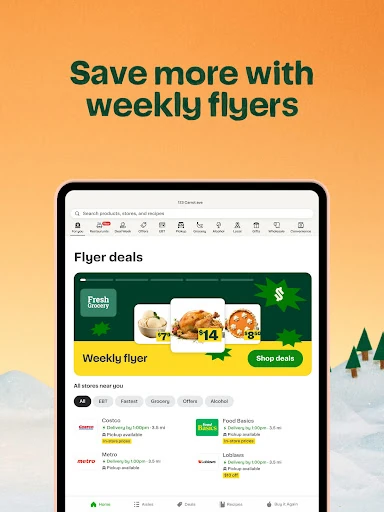
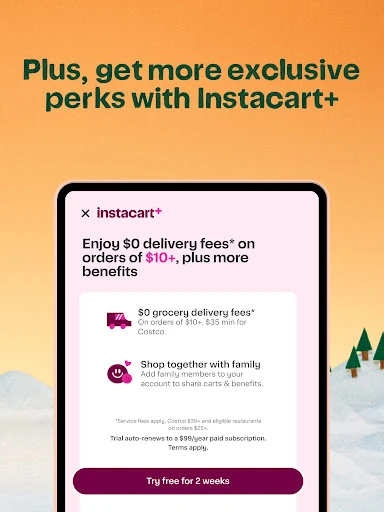
Deals and coupons are another reason to browse before checking out. Instacart describes store sales and app coupons on some products, including groceries and home essentials. I would treat those as useful opportunities rather than assume every item has a discount. The app also mentions Instacart+, but the supplied facts do not establish its price or terms, so I would check the in-app details before considering any membership.
A practical weekly routine
For a weekly shop, I would begin with the meals I expect to make and turn that into a short list before browsing. Then I would add recurring basics and check the store’s sales or coupons as I go. This order keeps the cart anchored to what I need instead of encouraging aimless scrolling through a large catalog. It also gives me a chance to spot essentials before checkout.
On a busy evening, I might use delivery to avoid another trip; on a day when I am already nearby, pickup may make more sense. Instacart presents both as options, with pickup described as a way to skip the delivery fee. I would compare the choices for each order, review the cart, and stay reachable for shopper messages. That small routine makes the service feel more deliberate.
Keep expectations grounded
The most important limitation is that local availability shapes the experience. A store, product, or delivery option shown to one person may not be offered in another ZIP code. The description advertises delivery as fast as 30 minutes, but that is not a universal promise; delivery timing depends on the order and local service. I would check the choices shown in the app rather than plan around the fastest advertised possibility.
Fees and terms also deserve a look before placing an order. The description notes that terms and fees apply, and pickup may be an alternative when delivery is not the right fit. The app can make shopping easier, but it does not remove the need to compare the final order with my budget or schedule. Those are ordinary trade-offs for a service built around local stores and delivery.
Instacart does its best work as a flexible way to shop nearby grocery and retail stores without making a separate browsing trip in person. Delivery, pickup, store deals, and shopper chat give the ordering process useful options, while local availability keeps expectations grounded. I found the idea practical, especially for recurring household shopping and days when time is tight.
I would recommend giving it a try if grocery delivery or pickup would simplify your routine. Before placing a large order, check the stores, products, timing, and fees available for your ZIP code. If you strongly prefer selecting every item yourself, or mainly want restaurant meals, the app may not be the best match.
Instacart Frequently Asked Questions
What is Instacart: Get Food Delivery used for?
Instacart lets customers browse participating nearby grocery and retail stores, order food and household items, and choose delivery or pickup where available. Its description also mentions store sales, coupons, and real-time chat with a shopper about order changes. The stores and products shown depend on the ZIP code entered, so the selection can vary by location.
Which devices can run Instacart?
Instacart: Get Food Delivery is an Android app available through Google Play. The supplied information does not give a minimum Android version, so check the app’s Google Play page on your device for current compatibility details. The app uses a ZIP code to show local stores, and the services available can vary by area.
Is Instacart free, and does it have purchases?
The app is free to download, and the supplied store facts say it contains ads and does not offer in-app purchases. Instacart’s description says terms and fees apply to orders, so downloading the app does not mean delivery or other services are free. Check the details shown for your order and location before checkout.
What Android version does Instacart require?
The minimum Android version is not included in the supplied app details. Requirements can change as the app is updated, so check Instacart’s Google Play page from the Android device you plan to use. The supplied facts identify version 9.39.2, but that version number does not by itself establish which Android releases are supported.
Is Instacart a good fit for my shopping?
It may suit people who want to order groceries or household items from nearby stores for delivery or pickup. It is less suited to someone who prefers selecting every item in person or is looking specifically for a restaurant-focused app. Store availability and order options vary by location, so checking the local selection is a sensible first step.
Pros
- Combines nearby grocery and retail shopping with delivery and pickup options.
- Shopper chat gives customers a way to discuss order changes in real time.
- Store sales and app coupons can help surface savings while browsing.
- Useful for groceries, snacks, drinks, and household essentials in one order.
Cons
- Available stores, products, and delivery choices depend on the ZIP code.
- Order terms and fees mean the final cost needs a careful look.
- Shoppers who prefer choosing every item in person may not enjoy the format.
- Category
- Food & Drink
- Version
- 9.39.2