Roborock
- 324.49K
- 4.6
- Installs
- 5.00M
- Price
- Free

Screenshots
Analysis by Reviewed APKs
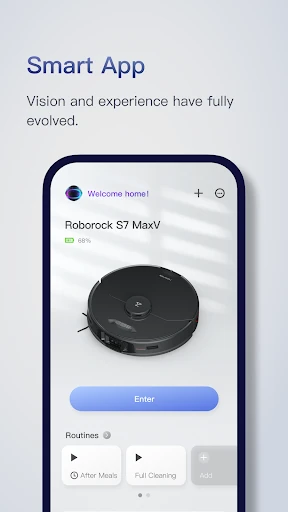
Roborock is the companion app for controlling compatible Roborock robot vacuums and mops. It suits anyone who wants to set cleaning routines, adjust room-by-room preferences where supported, and check a robot’s progress from a phone. I like that it offers more than a start button: mapping and zone controls can make regular upkeep feel more tailored, though the features available depend on the robot model.
A calmer cleaning day
When I first imagine using Roborock in a real routine, it is after breakfast, with crumbs around the kitchen and the rest of the home needing only light attention. I can use the map to choose a zone rather than send the robot through every room, then check its route while I get on with something else. That kind of targeted control is the app’s most practical promise.
The map-based setup also changes how I think about a robot cleaning session. Instead of treating the home as one big job, I can divide attention by room, adjust cleaning preferences where the model supports them, and schedule repeat runs. I would still expect to check the floor and move anything the robot should not encounter, but the app can make ordinary maintenance easier to plan.
More than a remote
Compared with a basic appliance remote, Roborock is designed around a map of the home. It lets users work with rooms, zones, schedules, and cleaning settings, rather than only starting or stopping a run. That makes it a better fit for someone who wants repeatable, customized cleaning than for a person who expects to press one button and never think about the device again.
It is not a general home-control app, and it does not replace the physical robot or its cleaning work. The app’s role is to direct compatible Roborock cleaners and show their progress. I would also avoid assuming every control appears for every device: Roborock notes that feature support varies by product, so the experience is tied to the particular model in the home.
Small setup habits
A useful habit is to look over the map after the robot’s first run and make sure the room divisions suit the way the household actually lives. Once the layout is in place, schedules can be assigned to different rooms or days instead of relying on a single all-home routine. That is especially handy when some areas get dirty faster than others.
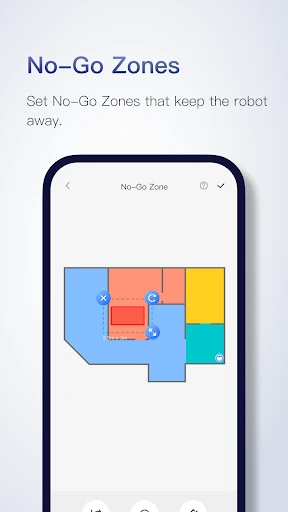
I would also keep zone and no-go choices simple at first, then refine them after seeing how the robot moves. The app supports up to five cleaning zones and up to 10 No-Go Zones and 10 Invisible Walls, according to its feature description. A quick check of the real-time route can help reveal whether a boundary or schedule needs adjusting.
More From Our News Desk

Zoom Meetings, Google Meet, or Teams: Which Is Easiest to Join?

How I Build a Free Streaming Lineup With Tubi

Why Crunchyroll Is the Default Anime App for So Many Fans

YouTube TV: A Practical Guide to Cutting Cable

Rummikub and the Small Comfort of Phone Games

TeamViewer Remote Control or AnyDesk for Helping Family?
Who will get the most from it
I would recommend Roborock to people who own a compatible Roborock robot and want a more hands-on way to organize cleaning. It is particularly useful for households with different floor areas or routines, since maps, schedules, selected zones, and adjustable cleaning preferences can help make runs more deliberate. Those who like checking a device’s progress on their phone may also appreciate the live view.
It may be less appealing if you want an app that works independently of a Roborock cleaner, or if you prefer not to spend time setting up maps and schedules. Some advertised controls are limited to particular models, so I would check compatibility before expecting a specific feature. For a simple occasional clean, the extra customization may not matter much; for recurring jobs, it has more room to earn its place.
Roborock is developed by Roborock and is listed in the Lifestyle category on Google Play. The app has over five million installs and a 4.6-star rating from about 324,000 ratings. It is free to download, with no in-app purchases or ads indicated in the provided store facts. Its content rating is Everyone.
The listed Android requirement is 7.0 or later, and the current version is 4.57.02. Roborock was released on May 23, 2019, and its most recent update in the provided facts was February 6, 2026. The latest change notes mention bug fixes intended to improve stability and the user experience.
Making Robot Cleaning Feel More Personal
Starting with the map
The app’s first important step is connecting its controls to a robot and letting that robot make an initial run around the home. Afterward, the app can present a floor plan and automatically split it into rooms. I like this approach because it gives the rest of the controls a useful frame of reference: a room schedule or a selected zone means something specific on the map.
That first map is worth treating as a starting point rather than a finished plan. A quick look at the room divisions can make later choices easier, especially if the household wants one area cleaned more often than another. The app’s central idea is straightforward: organize the robot around the layout, then tailor its work to the home.
Everyday control
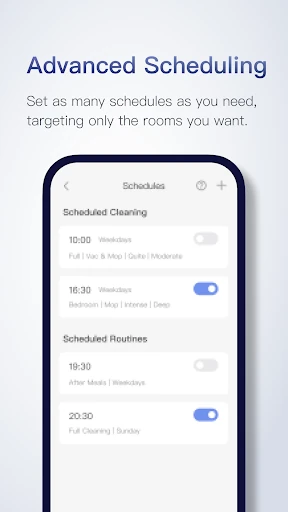
Day to day, the most useful controls are the ones that reduce unnecessary runs. I can picture scheduling the kitchen after breakfast, then choosing a broader clean for a time when the home is empty. Roborock supports schedules from hourly through weekly, with different rooms available for different runs. That flexibility is more practical than repeatedly remembering to launch the same task by hand.
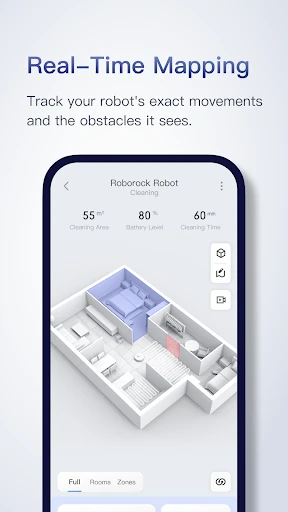
When a clean is underway, the app’s real-time view shows the robot’s route and obstacles it has avoided. I would use that as a quick progress check rather than watch the whole session. It offers a clearer sense of what the robot has covered, while leaving the user free to get on with the rest of the day.
Controls with purpose
Customizable cleaning is a standout because rooms do not always need identical treatment. The description gives examples such as stronger suction in a nursery, more water on a tiled kitchen, or lower suction when quiet matters. These choices make the map useful beyond navigation, although the precise options depend on the model connected to the app.
Zone cleaning is another practical tool. The app can define up to five zones, and a zone can be cleaned up to three times, which suits a patch of stubborn dirt or a small spill without sending the robot everywhere. No-Go Zones and Invisible Walls offer a way to keep it away from selected spots without adding separate hardware.
For homes with more than one floor, the app describes saving up to four maps and having the robot recognize which floor it is on. That feature is model-dependent. Roborock also describes mapping and navigation technologies such as PreciSense, Sensient, OpticEye, ReactiveAI, and VibraRise, but which capabilities are available depends on the cleaner.
A routine that sticks
A sensible weekly routine could start with a scheduled kitchen clean after the busiest meal times, plus a broader run on a day when fewer people are home. I would use room-specific settings only where the connected model offers them, then reserve zone cleaning for the occasional patch that needs another pass. The point is to make routine work predictable without overcomplicating every session.
I would check the route after a new schedule or map change, especially during the first few runs. If the robot repeatedly approaches an area I want it to avoid, a No-Go Zone or Invisible Wall may help. That small review keeps the map and the actual household in sync, rather than assuming the initial setup will suit every change in the home.
Model-dependent limits
The biggest limitation is that Roborock’s feature set is not identical across its robots. The app description explicitly says support varies by product, and it identifies certain functions as limited to particular models. Multi-level mapping, obstacle avoidance, and room-specific cleaning controls may not be available on every device, so it is worth checking the model’s compatibility before building a routine around them.
The app also depends on owning a compatible Roborock cleaner; it is not a standalone way to clean a home. Mapping and customization can take some attention to set up, which may feel like extra work if all you need is an occasional basic run. For users who enjoy fine control, that setup is part of the appeal; for others, it could be more than they need.
Roborock gives compatible robot cleaners a useful layer of planning and control. Maps, schedules, zones, and live progress are practical features, not just decoration, and they can make recurring household cleaning easier to organize. The main caveat is model compatibility: the app’s most appealing controls are not guaranteed to be available across the whole range.
I would recommend it to Roborock owners who want to shape cleaning around rooms and routines rather than simply start a run. If you value a minimal, set-and-forget experience, you may not use its deeper controls often. Check your robot’s supported features, then decide whether the mapping and scheduling options fit the way you keep house.
Roborock Frequently Asked Questions
What is the Roborock app used for?
Roborock is used to control compatible Roborock robot vacuums and mops. It can provide a home map, room and zone cleaning, schedules, cleaning preferences, and a real-time view of the robot’s route. Feature support varies by product, so the controls you can use depend on the connected model.
Which phones and devices support the Roborock app?
The supplied store facts describe Roborock as an Android app requiring Android 7.0 or later. Its controls are for compatible Roborock robot cleaners. If you are checking support for a particular phone or robot model, details may vary, so the Google Play store information and your product documentation are worth checking.
What Android version does Roborock require?
The listed minimum requirement is Android 7.0. The app version in the provided facts is 4.57.02, with a last update date of February 6, 2026. Requirements can change with later releases, so check Google Play for the current requirement before installing.
Does the Roborock app cost money?
The app is listed as free on Google Play, with no in-app purchases or ads indicated in the provided facts. You still need a compatible Roborock robot cleaner to use its cleaning controls. Store details may change over time, so it is worth checking Google Play for current information.
Is the Roborock app suitable for every robot owner?
It is intended for people with compatible Roborock robot cleaners who want to set schedules, manage maps, choose zones, or check cleaning progress. It may not suit someone who does not own a Roborock device or who has no interest in app-based setup. Available features vary by cleaner model.
Pros
- Map-based room and zone controls make targeted cleaning easier to plan.
- Flexible schedules can assign different rooms to different cleaning times.
- Real-time route viewing helps track a run without following the robot.
- No-Go Zones and Invisible Walls provide configurable boundaries.
Cons
- Feature availability varies by Roborock model.
- Initial mapping and routine setup may take more attention than basic controls.
- The app is useful only with a compatible Roborock robot cleaner.
- Category
- Lifestyle
- Version
- 4.57.02











