Remote for Emerson TV
- 199
- 4.3
- Installs
- 10.00K
- Price
- Free
Screenshots
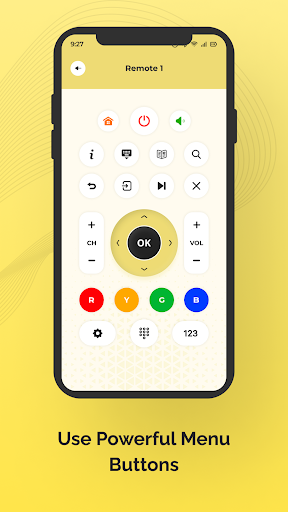
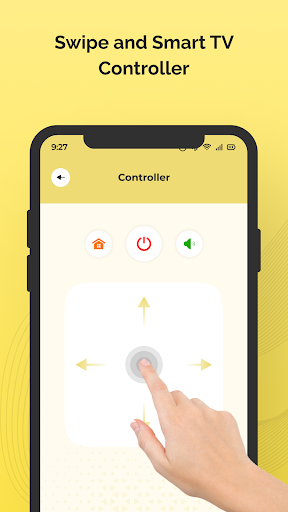
Analysis by Reviewed APKs
Remote for Emerson TV is a phone-based remote for people who want a backup when the physical remote is missing, broken, or just out of reach. I like its straightforward purpose: point a compatible phone at an Emerson TV and press a button. It is a practical, narrow tool rather than a full entertainment hub, and it depends on the phone having an IR blaster.
A couch-side backup
When I first opened Remote for Emerson TV, I thought about the familiar moment when the TV remote has slipped between the cushions and the show is already on. This app is meant to make the phone a stand-in: point it at the television and tap the control you need. Its simple buttons keep the basic idea easy to understand, without asking you to learn a complicated setup.
The important catch is that the phone needs an IR blaster. With that hardware in place, the app sends commands to the TV through the phone, so it is not simply a remote that works with any smartphone over a home network. I would check that requirement before relying on it, then try a basic button while standing where the TV can receive the signal.
A focused remote, not a hub
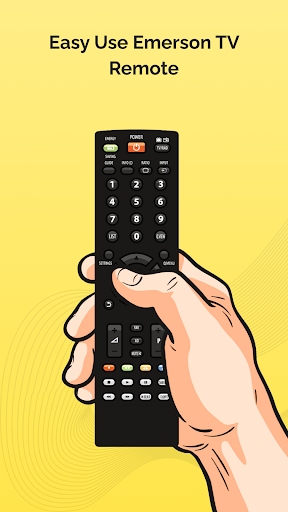
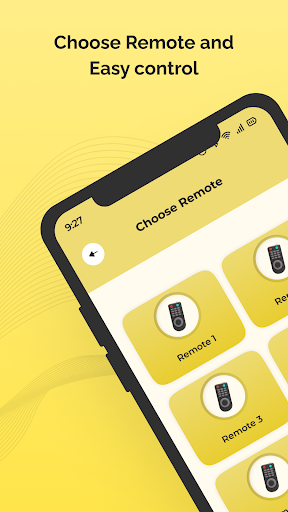
Compared with hunting down the original remote or buying a replacement, this app offers a convenient option if the phone already has the required IR hardware. It is designed specifically for Emerson TVs, and its controls are grouped by function. That makes it a more focused choice than a general-purpose entertainment app, but it also means the value depends on owning a compatible TV and phone.
This is not a streaming service, a way to cast video, or a broad smart-home controller. The supplied description presents it as a TV remote, not as a place to browse shows or manage other devices. I would also avoid assuming that a smartphone without an IR blaster can control the set. The app’s narrow job is useful, but it sets clear boundaries.
Make it easy to reach
A small habit that helps is keeping the app somewhere easy to find before the remote goes missing. I would also test it at a convenient time, rather than waiting until everyone is settled in for a show. Point the phone toward the TV and try a button, then check whether the response is consistent from the usual seat and at the usual angle.
The app includes vibration when a remote button is pressed, which can make each tap feel more definite. I would treat that as feedback from the phone, not proof that the television received the command. Since the buttons are grouped by function, taking a moment to notice where the controls are can save fumbling when all I want is to make a quick adjustment.
More From Our News Desk

Zoom Meetings, Google Meet, or Teams: Which Is Easiest to Join?

How I Build a Free Streaming Lineup With Tubi

Why Crunchyroll Is the Default Anime App for So Many Fans

YouTube TV: A Practical Guide to Cutting Cable

Rummikub and the Small Comfort of Phone Games

TeamViewer Remote Control or AnyDesk for Helping Family?
Who may find it useful
I would recommend Remote for Emerson TV to an Emerson TV owner who has an Android phone with an IR blaster and wants a simple backup control. It is especially appealing if the physical remote is frequently misplaced or no longer works. The uncomplicated design suits someone who wants to point, tap, and get back to watching rather than spend time configuring a more elaborate system.
It may not suit people whose phones lack an IR blaster, or anyone looking for a remote that works across many brands and connected devices. It also is not aimed at users who want streaming shortcuts, voice commands, or a customized control layout; those capabilities are not part of the described feature set. If the original remote works well and is always nearby, this app may not add much to the routine.
Remote for Emerson TV is a Tools app from Technoskip. On Google Play, it has over 10,000 installs and a 4.3-star rating from 199 ratings. The app is free to download, contains ads, and does not offer in-app purchases. Its content rating is Everyone, making the store’s age classification broad.
The supplied app details identify version 1.3.0, with a release date of January 7, 2021, and a last update date of August 26, 2026. A minimum Android version is not included in the details provided, so I would check the Google Play page on the device before installing. The app is not an official Emerson application and is not affiliated with Emerson Electric Co.
A Simple Phone-Based TV Remote
First open and setup
My first impression is that the app does not try to disguise its purpose. It is a remote control for Emerson TVs, with a simple interface and buttons intended to be pressed directly. That is a sensible approach for something I might open while already watching television. There is no reason to expect a long onboarding process from the described function, though the phone’s hardware requirement matters before anything else.
The key setup question is whether the phone has an IR blaster. The app’s instructions say to point the phone at the TV and press a button, so I would begin with a direct test while facing the set. If the phone lacks the required component, the central control method will not be available. Checking that first is more useful than spending time exploring the interface.
Everyday button pressing
In daily use, the appeal is immediacy. A physical remote can wander off during a busy evening, but a phone is often already nearby. The app is intended to cover the necessary TV controls, and its buttons are grouped by function, which should make it easier to find a control without scanning one long, cluttered screen.
I also appreciate that button presses produce vibration. It adds a small tactile cue when tapping the phone, especially when I am looking up at the television rather than down at the screen. The vibration is a phone-side response, though, so I would still watch the TV to confirm the command worked. That distinction keeps expectations realistic.
Useful design details
The strongest design choice is keeping the interface centered on remote controls. Rather than adding unrelated entertainment features, Remote for Emerson TV focuses on buttons and groups them by function. For a quick volume or channel adjustment, that kind of organization can be more useful than a flashy layout that makes common controls harder to locate.
Its stated compatibility covers Emerson TV models, while the actual control method relies on the IR blaster in the phone. Those two points work together: the app is meant for Emerson sets, but the phone still needs the hardware to send infrared commands. I would keep that requirement in mind when deciding whether this can serve as a dependable backup.
A sensible TV routine
For a practical routine, I would install and test the app when the TV is not in the middle of something important. Try a few buttons while standing in the room, then repeat from the seat where the phone is most likely to be used. That quick check can establish whether pointing and positioning are comfortable in the everyday viewing setup.
After that, I would leave the app easy to locate and use it as a backup rather than throwing away the original remote. The physical remote remains handy if the phone is charging or in another room. This is a small convenience, not a reason to change how the whole household watches TV, and that is exactly where a focused tool can fit.
Limits to keep in mind
The biggest limitation is hardware: the app requires an IR blaster in the phone. Many people will want to check their particular device before downloading, because the app’s central function depends on it. It is also designed for Emerson TVs, so it is not a universal remote for a mixed collection of televisions and other home devices.
Remote for Emerson TV contains ads, and it does not offer in-app purchases according to the supplied details. The app is also not official Emerson software, so I would describe it as a third-party remote option rather than an Emerson product. Those limits do not erase its usefulness, but they help set the right expectation: this is a simple, specific backup control.
Remote for Emerson TV has a clear purpose and sticks to it. If an Emerson owner has a phone with an IR blaster, the grouped buttons and vibration feedback make it a plausible backup for the moments when the regular remote is nowhere to be found. The ads and hardware dependency are worth weighing, but neither is a surprise for a tool this focused.
I would try it if I already had a compatible phone and wanted a no-cost alternative to searching for or replacing a misplaced remote. I would skip it if I needed network-based control, broad device support, or extra entertainment features. The recommendation is simple: check the IR requirement first, then judge the app by how reliably it handles the basic TV controls.
Remote for Emerson TV Frequently Asked Questions
What is Remote for Emerson TV used for?
Remote for Emerson TV turns a compatible phone into a control for an Emerson TV. The app is designed around remote buttons, grouped by function, and provides vibration when a button is pressed. It is intended as a replacement-style backup for basic TV control, not as a streaming service or a general entertainment hub.
Which phones and devices work with Remote for Emerson TV?
The app is for Android, and its described control method requires an IR blaster in the phone. It is designed to control Emerson TV models. The minimum Android version is worth checking on the Google Play page for the device you plan to use, since that requirement can vary with app updates and device compatibility.
Does Remote for Emerson TV cost anything?
The app is free to download and the supplied details say it does not offer in-app purchases. It does contain ads. Store information can change, so it is sensible to check the current Google Play page before installing if pricing or purchase options are important to your decision.
What Android version does Remote for Emerson TV require?
The minimum Android version is not included in the app details provided here. Check the Google Play page from the Android phone you intend to use, where the current compatibility requirement may be shown. Also make sure that the phone has an IR blaster, since the app relies on that hardware to control the television.
Is Remote for Emerson TV a good fit for everyone?
It is best suited to someone with an Emerson TV and an Android phone that has an IR blaster, particularly if they want a backup for a missing or broken remote. It may not suit users who need control over other brands, network-based operation, or features beyond TV remote buttons. The app is not an official Emerson application.
Pros
- Simple, focused controls make it easy to understand the app’s purpose.
- Buttons are grouped by function for quicker navigation.
- Vibration provides tactile feedback when pressing remote buttons.
- Free to download, with no in-app purchases.
Cons
- A phone must have an IR blaster for the described control method.
- Designed for Emerson TVs rather than a broad range of devices.
- Contains ads and is not an official Emerson application.
- Category
- Tools
- Version
- 1.3.0











