RCA Signal Finder
- 662
- 2.1
- Installs
- —
- Price
- Free
Screenshots
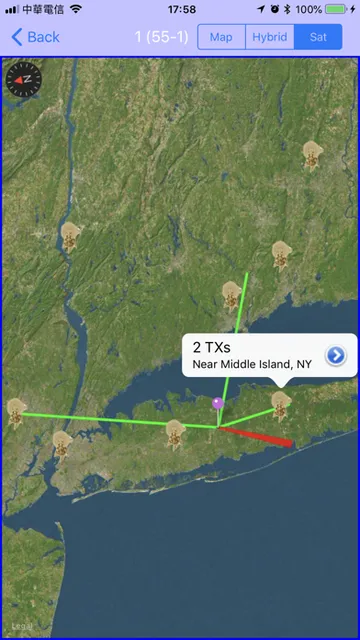
Analysis by Reviewed APKs
RCA Signal Finder is an iOS tool for choosing which way to point a TV antenna toward broadcast towers near you. I can see it being useful when setting up an antenna at home or trying to improve reception after moving it. Its appeal is straightforward: enter a location, choose the stations you want, and use the map as a practical aiming guide.
Aiming an Antenna at Home
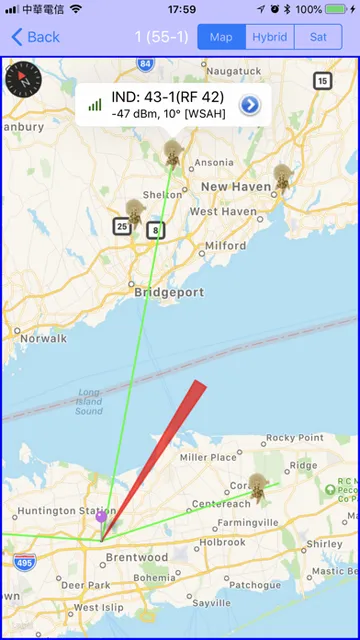
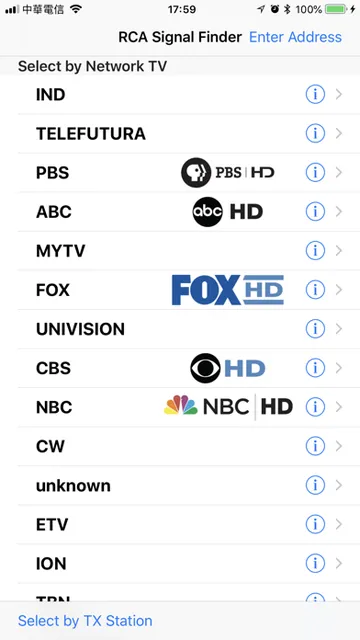
When I first opened RCA Signal Finder, the basic job was easy to understand: provide an address or use the current location, then select the stations I want to receive. The app shows broadcast towers on a map, giving me a direction to try when positioning an antenna. That makes it a useful companion during a setup where I would otherwise be guessing which way to turn the antenna.
I picture using it on a quiet afternoon while setting up a TV in a room where reception is inconsistent. I would check the map, aim the antenna toward the towers for the stations I care about, and then see how reception works on the TV. The app helps with the direction-finding part of the job; the actual antenna adjustment and viewing happen outside the app.
A Map, Not a TV Tuner
The obvious alternatives are trial and error, or relying on general guidance about antenna placement. RCA Signal Finder offers a more local reference by showing broadcast towers for a chosen location and letting me pick stations first. That focus is handy when I have a particular set of channels in mind, rather than wanting a broad tour of television or entertainment options.
It is important to keep its role modest. The description presents it as a way to find a direction for the antenna, not as a way to watch television, measure signal strength in real time, or fix reception problems automatically. I would treat the map as a starting point for positioning, then check the result on the TV itself.
Make Setup More Deliberate
I would start by choosing the stations I actually want rather than trying to optimize for every tower on the map. That keeps the aiming task tied to my viewing priorities. If I am setting up more than one television or revisiting an antenna after moving it, checking the same location and station choices again can make the process feel more systematic than relying on memory.
A useful routine is to open the map before moving the antenna, note the tower direction, and make a measured adjustment rather than repeatedly swinging it around. Then I can check whether the selected stations come in on the TV. The app supplies the geographic reference; small, patient adjustments and a real reception check are still part of the work.
More From Our News Desk

Zoom Meetings, Google Meet, or Teams: Which Is Easiest to Join?

How I Build a Free Streaming Lineup With Tubi

Why Crunchyroll Is the Default Anime App for So Many Fans

YouTube TV: A Practical Guide to Cutting Cable

Rummikub and the Small Comfort of Phone Games

TeamViewer Remote Control or AnyDesk for Helping Family?
Who Might Find It Useful
I would recommend RCA Signal Finder to someone setting up an over-the-air antenna who wants a quick way to see the direction of nearby broadcast towers. It suits a practical, occasional task: checking a location, choosing desired stations, and using a map to guide antenna placement. It may also help when an existing setup is being repositioned and a clearer starting direction would be welcome.
It may not suit someone looking for a full television service, detailed reception diagnostics, or an app that handles antenna adjustment automatically. The experience is centered on a map and tower direction, so users who want more hands-on signal measurement should not assume this app provides it. I would also check the current App Store details for device compatibility before installing.
RCA Signal Finder is made by Voxx international Corp and is available for iOS through the App Store. It is free to download, has a 4+ content rating, and requires iOS 15.6 or later. The current version shown in the supplied store information is 2.2.10.
On the App Store, RCA Signal Finder has a 2.1 out of 5 rating from 662 ratings. It was released on October 11, 2018, and its last recorded update was September 9, 2026. The available details do not give a separate install count.
A Practical Map for Antenna Setup
A Clear First Step
My first impression is that the app has a narrow, understandable purpose. It asks me to enter an address or use my current location, then pick stations I want to receive. From there, the map gives me a direction toward the relevant broadcast towers. I do not have to wonder what the app is meant to help with: it is a guide for aiming an antenna.
That simplicity should be helpful when I am standing near a TV and antenna with a setup still to finish. Instead of beginning with a string of random antenna movements, I can check the map first and get a geographic reference. The location step also makes clear why the app needs an address or current location to show nearby towers.
A Focused Daily Tool
This is not the sort of app I would expect to open every day. Its value is concentrated in moments when I install an antenna, change its position, or want a new starting point for receiving selected stations. That limited role is not necessarily a drawback; a setup utility can be useful precisely because it helps with a specific chore and then gets out of the way.
In use, I would keep the app open long enough to check the map and direction, then move to the TV to see whether the antenna position works. That division of labor matters. The app provides tower guidance, while the television remains where I verify reception. Keeping those jobs separate helps set realistic expectations for what the map can accomplish.
Location and Station Choices
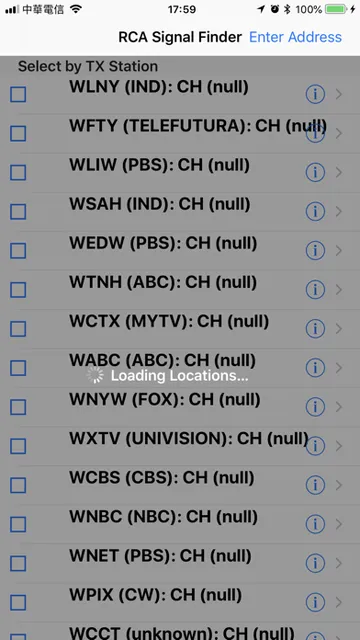
The most useful part of the described workflow is the ability to choose stations before aiming. That lets me focus on the broadcasts I actually hope to receive instead of treating every tower as equally important. For a household that mainly wants a few familiar channels, those choices can make the map more relevant to the real setup.
Using an address or current location gives the tower map a local context. I can see why that matters when an antenna is being installed in a new home or a different spot. The description keeps the feature set focused on finding directions to towers, so I would use the map as an orientation aid rather than expecting a full technical analysis of reception.
A Patient Setup Routine
For a practical setup, I would begin by entering the location, selecting the stations that matter, and checking the tower directions on the map. Then I would point the antenna in the suggested direction and test reception on the TV. If the result is not what I want, I could make a small adjustment and check again rather than making several changes at once.
This measured approach is useful because antenna placement can turn into a frustrating guessing game. The app gives me a more informed place to start, but it does not remove the need to test the actual setup. I would keep the station list focused and work through adjustments patiently, especially if the antenna is in a spot where moving it is awkward.
Keep Expectations Grounded
RCA Signal Finder’s scope is its main limitation. The supplied description covers location entry, station selection, a map, and directions toward broadcast towers. It does not describe live signal-strength readings, automatic antenna tuning, or television playback. I would not install it expecting those functions, and I would use the TV itself to determine whether a particular position is working.
The App Store rating is 2.1 out of 5 from 662 ratings, which is worth weighing alongside the app’s narrow purpose. A low score does not tell me exactly how it will work on a particular device or at a particular address, but it is a reason to keep expectations measured. Compatibility also depends on meeting the iOS 15.6 minimum.
RCA Signal Finder is a focused aid for one common antenna chore: identifying the direction of nearby broadcast towers. I like that the basic process is easy to explain and tied to a concrete setup task. The map can give me a better starting point than guesswork, while leaving the final reception check where it belongs: on the TV.
I would try it if I were choosing or repositioning an antenna and wanted location-based tower directions. I would skip it if I needed detailed signal diagnostics or a way to watch TV in the app. The low App Store rating gives me reason to approach it cautiously, but its narrow map-guidance role may still be useful for the right setup.
RCA Signal Finder Frequently Asked Questions
What is RCA Signal Finder used for?
RCA Signal Finder helps users find a direction for aiming a TV antenna toward broadcast towers near a chosen location. You can enter an address or use your current location, select stations you want to receive, and view tower directions on a map. It is an antenna-positioning guide, not a television viewing service.
Which devices can run RCA Signal Finder?
RCA Signal Finder is an iOS app available through the Apple App Store, and it requires iOS 15.6 or later. Check the App Store page for current device compatibility details, since supported devices and requirements can vary over time.
Does RCA Signal Finder cost money?
The supplied App Store information describes RCA Signal Finder as free to download. For the most current information about any charges or purchase options, check the App Store page, since store details can change.
Can RCA Signal Finder measure TV signal strength?
The described features focus on entering a location, selecting stations, and viewing broadcast tower directions on a map. The app is presented as a guide for aiming an antenna. For reception results, check the TV after adjusting the antenna rather than expecting the app to show a live signal reading.
Who should use RCA Signal Finder?
It may suit someone setting up or repositioning a TV antenna who wants a local map of tower directions. It may not fit people seeking live signal diagnostics, automatic tuning, or TV playback. The App Store rating is 2.1 out of 5 from 662 ratings, so I would consider that alongside the app's focused purpose.
Pros
- Shows broadcast tower directions on a map for a chosen location.
- Lets users select the stations they want to receive.
- Offers a straightforward starting point for antenna positioning.
- Free to download from the Apple App Store.
Cons
- Focused on tower directions rather than detailed reception diagnostics.
- Requires iOS 15.6 or later.
- Its App Store rating is relatively low at 2.1 out of 5.
- Category
- Tools
- Version
- 2.2.10











