Rapchat: Music Maker Studio
- 96.40K
- 4.7
- Installs
- 5.00M
- Price
- Free
Screenshots
Analysis by Reviewed APKs
Rapchat: Music Maker Studio is a phone-based recording app for people who want to build songs around their own vocals, beats, and ideas. I see it fitting beginners, hobbyists, and artists who want to sketch a track without sitting down at a computer. Its mix of multitrack recording, a large beat library, vocal effects, and sharing makes it capable, though the number of creative options may take some exploring.
From Verse to Song
When I picture using Rapchat, it is after a lyric idea shows up during an ordinary day: I open the app, find a beat that suits the mood, and record a rough verse before the lines disappear. The app is built to take that idea further than a quick voice memo. I can record separate verses, hooks, and ad-libs, then arrange and mix the parts into a more complete song.
That makes the workflow appealing for a quiet evening at home or a quick creative session between other plans. I can keep lyrics beside the recording, try vocal effects, and balance the vocals against the beat rather than juggling several separate tools. Rapchat does not make the creative decisions for me, but it puts writing, recording, and shaping a track in one mobile workspace.
A Studio, Not a Memo
Compared with a basic voice recorder, Rapchat is aimed at making songs rather than simply capturing sound. Its beat library, multitrack recording, vocal effects, and mixing tools support a more developed result. The option to import my own audio also gives me a route beyond the built-in selection. For someone who wants to turn a vocal idea into a track, that broader process is the main reason to choose it.
It is also different from a listening app: the central activity is creating and sharing music, not browsing a catalog for passive listening. Rapchat is not presented as a desktop production suite or a substitute for every kind of recording setup. Its appeal is the ability to work on a song from a phone. If I only want to jot down a melody with no beat or editing, a simpler recorder may be enough.
Small Creative Habits
I would get more from Rapchat by treating it as a place to collect song pieces, not only as somewhere to record a polished take. Keeping lyrics close to the session makes it easier to return to a half-finished idea. Recording a verse, hook, and ad-libs as separate parts also gives me room to arrange them later instead of trying to perform everything in one pass.
A useful routine is to choose a beat first, record a rough take, then revisit the vocal effects and balance once the structure feels right. If the built-in beats do not fit the idea, importing audio is another option. Collaboration tools can bring another artist into the process for traded verses. I would save exporting and sharing for when the mix feels ready, rather than treating every rough draft as finished.
More From Our News Desk

Zoom Meetings, Google Meet, or Teams: Which Is Easiest to Join?

How I Build a Free Streaming Lineup With Tubi

Why Crunchyroll Is the Default Anime App for So Many Fans

YouTube TV: A Practical Guide to Cutting Cable

Rummikub and the Small Comfort of Phone Games

TeamViewer Remote Control or AnyDesk for Helping Family?
Who Will Enjoy Rapchat
I would recommend Rapchat to aspiring rappers, singers, and casual songwriters who want to experiment without beginning at a computer. The large beat collection and phone-based recording make it approachable for trying out different styles, while multitrack parts, vocal effects, and mixing give a promising idea room to develop. It can also suit friends who want to trade verses or work together on a song.
It may be less satisfying for someone who wants only a basic recorder, or for a producer looking for a detailed desktop environment. A library with more than 400,000 beats is a lot to browse, so users who prefer a very simple, limited workflow may find the choices distracting. The app makes sense when the goal is to create, refine, and share music from a phone.
Rapchat: Music Maker Studio is developed by Rapchat, Inc and is in the Music & Audio category. On Google Play it has over 5 million installs and a 4.7-star rating from around 96,000 ratings. The app is free to download, with in-app purchases priced from $3.89 to $49.99 per item. It contains no ads.
Google Play gives the app a Teen content rating. Version 9.4 is the current version in the supplied app details. Rapchat was released on August 25, 2016, and its most recent update is dated October 27, 2026. The Android version requirement is not included in the supplied details, so it is worth checking the Google Play page for device compatibility.
Making a Track on Your Phone
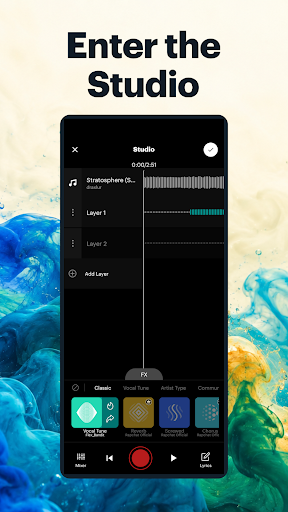
Opening the Studio
My first impression is that Rapchat wants to be a complete song-making space rather than a single-purpose recording button. The basic creative path is easy to understand: find a beat, record vocals, and work toward a mix. That framing helps a new user see what the app is for, even if deciding which beat or effect suits a particular idea takes more time.
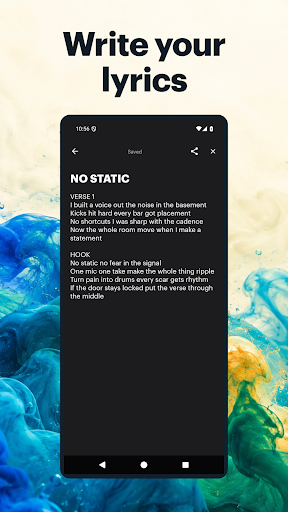
The setup is centered on creative choices rather than a long technical checklist. I can browse beats or bring in my own audio, and the lyrics pad keeps words close to the recording session. That arrangement feels practical when I am starting with a loose idea rather than a finished song. I can begin with a beat and build, or arrive with audio of my own.
The Daily Recording Flow
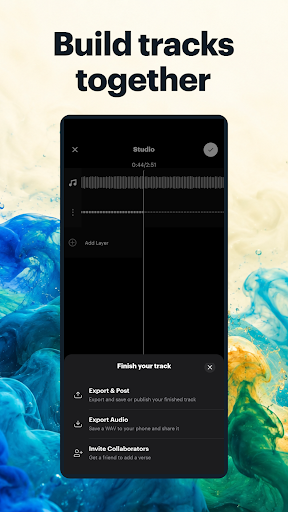
The day-to-day experience revolves around recording in layers. I can capture a verse, add a hook, and record ad-libs as separate parts, then arrange those pieces and mix them with the beat. That is more forgiving than trying to perform a whole song perfectly in one take. It also suits the way ideas often develop: one section comes together first, while the rest needs another pass.
Once the vocals are down, the work shifts to shaping the sound. Rapchat offers Vocal Tune and other studio effects, along with controls for adjusting vocal tracks and balancing them against the beat. I like that this makes the creative process feel connected, from rough performance to a more coherent mix. The app does not remove the need to listen carefully and make choices; it gives me tools for making them.
Beats and Vocal Tools
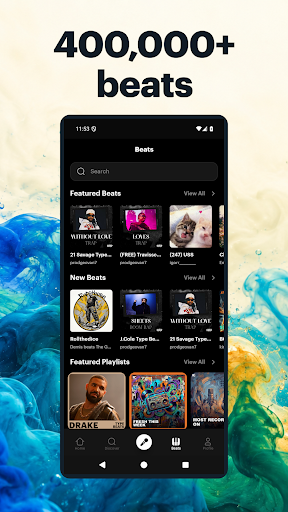
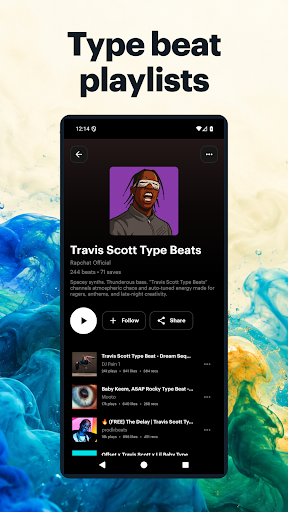
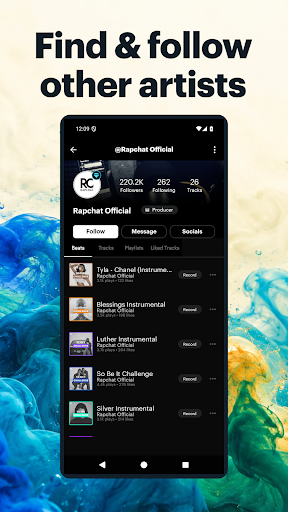
The beat collection is one of Rapchat's clearest draws: it includes more than 400,000 beats and covers styles such as rap, trap, drill, Afrobeats, R&B, pop, and lo-fi. Playlists offer another way to explore instead of starting with a genre search alone. When I have a sound in mind, that breadth gives me plenty of directions to try, though a large library can also mean spending time choosing.
On the vocal side, Vocal Tune and studio effects let me experiment with how a performance sits in the track. I can also adjust vocal tracks and work on their balance with the beat. The lyrics pad is a small but useful companion feature, since it keeps writing connected to recording. These tools support different stages of making a song without requiring me to leave the mobile studio for each step.
A Repeatable Session
For a practical routine, I would start with a short writing session and keep the lyrics in the app's pad. Then I would choose a beat, record the main verse, and add a hook or ad-libs as separate tracks. That order lets me make progress even if I only have time for one section. It also leaves the arrangement flexible while the song is still taking shape.
On a later pass, I would listen back, try vocal effects, and adjust the vocal balance against the beat. If I am working with someone else, collaboration tools can be used to invite another artist and trade verses. When the track feels ready, I can mix, export, and share it. Breaking the process into these small visits makes the app useful for ideas that do not arrive all at once.
Keep Expectations Grounded
Rapchat puts several creative stages on a phone, but the range of tools does not mean every session will feel effortless. Choosing from a large beat library can take patience, and a strong vocal performance still depends on the recording and the choices I make afterward. Effects can shape a sound, but they are options to experiment with, not a replacement for deciding how I want the song to feel.
It is also worth remembering what the app is designed to do: make and share songs on mobile. Someone who wants a straightforward note-taking tool may not need its beat browsing and mixing workflow. Likewise, a person seeking a more extensive desktop production environment may prefer a different kind of setup. Rapchat is most compelling when portability and a connected songwriting-to-sharing process matter more than keeping things minimal.
Rapchat: Music Maker Studio brings the core pieces of a mobile song session together: beats, lyrics, multitrack vocals, effects, mixing, collaboration, and sharing. I like that a rough idea can grow into a more complete track without requiring a separate tool for every step. The large beat library is a real strength, though browsing and refining a song still take creative patience.
I would try Rapchat if I wanted to write and record rap or other vocal-led music from my phone, especially if I planned to experiment with beats or collaborate. It is less suited to people who only need a simple recorder or want a desktop-focused production experience. For mobile-minded creators, it offers a practical place to turn spare moments into song drafts and finished mixes.
Rapchat Frequently Asked Questions
What is Rapchat: Music Maker Studio used for?
Rapchat is used to make songs on a phone. You can choose from more than 400,000 beats or import your own audio, record vocal parts, keep lyrics beside a session, use vocal effects, mix tracks, and share finished music. Its tools are aimed at building a song, rather than just recording a short voice memo.
What devices can run Rapchat: Music Maker Studio?
Rapchat is available on Android through Google Play. The Android version requirement can vary with the app and device, so check the Google Play page for the current compatibility details before installing. The supplied app information describes the mobile recording experience and does not give other platform availability.
What Android version does Rapchat: Music Maker Studio require?
The Android version requirement is not included in the available app details. Requirements can vary as apps are updated and by device, so check the Google Play page for Rapchat: Music Maker Studio to see whether your phone is compatible before downloading.
Is Rapchat: Music Maker Studio free?
Rapchat is free to download on Google Play and offers in-app purchases. The supplied price range for those purchases is $3.89 to $49.99 per item, and the app contains no ads. Purchase options and prices may change, so check the store page for the current details.
Who should use Rapchat: Music Maker Studio?
It should suit people who want to write, record, and shape vocal-led songs on a phone, including beginners and hobbyists who want to try different beats. Its multitrack recording and collaboration tools also support more involved sessions. It may be more than you need if you only want a basic voice recorder.
Pros
- Combines beat browsing, multitrack vocals, effects, mixing, and sharing in one mobile workflow.
- Offers more than 400,000 beats across rap, R&B, pop, and other styles.
- Lyrics pad and collaboration tools help connect writing with recording.
- Importing audio gives creators an alternative to the built-in beat library.
Cons
- Browsing such a large beat library can take time before recording begins.
- Its recording and mixing workflow may feel excessive for simple voice notes.
- The Android version requirement is worth checking on Google Play before installing.
- Category
- Music & Audio
- Version
- 9.4











