Rain Sounds - Sleep & Relax
- 146.28K
- 4.1
- Installs
- 5.00M
- Price
- Free

Screenshots
Analysis by Reviewed APKs
Rain Sounds - Sleep & Relax is an ambient audio app for people who want rain and nature sounds in the background while winding down, resting, or trying to sleep. I like that it focuses on familiar sound choices rather than asking me to build a complicated routine. It feels best suited to anyone who wants a simple, adjustable listening companion, though ads and in-app purchases are part of the picture.
A calmer end to the day
When I first imagine using Rain Sounds - Sleep & Relax, it is at the end of an ordinary evening: the lights are low, tomorrow's tasks are still on my mind, and I want something softer than a playlist with lyrics. I can choose a rain scene, such as rain on a window or a gentle shower, and let it provide a steady background while I get ready for bed.
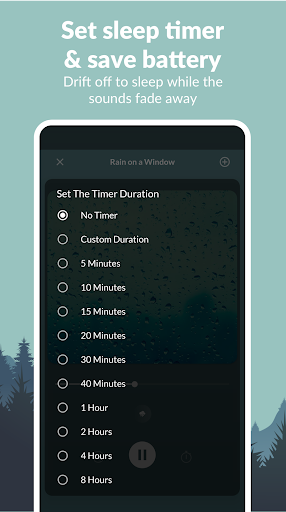
The sleep timer is a practical touch for that routine. I can set the sound to stop automatically rather than having to remember to turn it off after I have settled in. Optional piano tracks offer another layer for evenings when plain rain feels too bare. This is not a promise of better sleep; it is a straightforward way to make a room sound calmer.
Rain audio, not a sleep coach
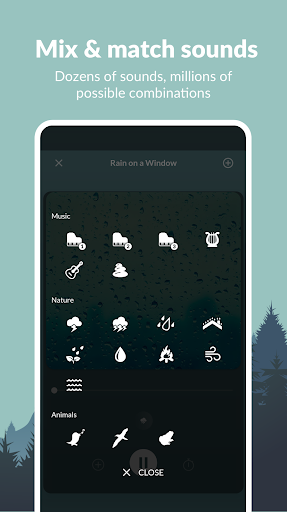
Compared with opening a general music service and searching for a rain recording, this app puts rain and nature scenes at the center. Its choices include rain on a roof, leaves, a sidewalk, and a tent, alongside options such as a thunderstorm, beach, and peaceful water. That focused selection makes it easier to pick a particular mood without sorting through unrelated music.
I would not treat it as a sleep tracker, a guided meditation program, or a substitute for a broad music library. The material describes sound selection, customization, optional piano, and a timer, not sleep reports or coaching. If I want a song, a spoken meditation, or detailed sleep analysis, another kind of app is a better fit. This one is for choosing a soundscape and listening.
Make a small listening habit
A useful way to approach the app is to settle on one or two scenes that work for familiar moments. I might keep gentle rain for reading and try a stronger storm when I want a fuller sound in the background. Since the app includes several rain settings and nature options, a little experimenting can help me avoid spending every evening browsing instead of winding down.
I would also make the timer part of the routine instead of leaving playback to chance. Choosing a duration before getting comfortable means I do not have to reach for the phone later. On a night when I want a slightly different texture, I can try an optional piano track or adjust the sound as the app allows. Small choices keep the experience personal without making it a project.
More From Our News Desk

Zoom Meetings, Google Meet, or Teams: Which Is Easiest to Join?

How I Build a Free Streaming Lineup With Tubi

Why Crunchyroll Is the Default Anime App for So Many Fans

YouTube TV: A Practical Guide to Cutting Cable

Rummikub and the Small Comfort of Phone Games

TeamViewer Remote Control or AnyDesk for Helping Family?
Who may enjoy the sounds
I would recommend Rain Sounds - Sleep & Relax to someone who likes steady ambient audio while reading, resting, or settling down for the night. It has enough variety to move between gentle rain, stormier scenes, and water-inspired choices, while the timer suits people who prefer their background audio to stop automatically. The app's simple premise is appealing if I want sound, not a large collection of sleep tools.
It may be less satisfying for anyone who expects a complete sleep program, tracking, or a highly structured meditation experience. The app is also a less natural choice for listeners who mainly want songs or spoken content. Ads and optional in-app purchases may matter to people who prefer a completely uninterrupted, no-purchase listening experience, so I would check the current store details before deciding.
Rain Sounds - Sleep & Relax is a Music & Audio app from Maple Media. On Google Play it has over 5 million installs and a 4.1-star rating from around 146,000 ratings. It is free to download, contains ads, and offers in-app purchases. The listed in-app purchase prices range from $0.99 to $99.99 per item, so the free download does not mean every purchase option costs nothing.
Google Play gives the app an Everyone content rating. The current version shown is 5.4.1(152). It was released on July 14, 2013, and its most recent update is dated March 31, 2026. The supplied Android requirement is not included in these practical details, so anyone checking compatibility should look at the app's Google Play page for the requirement shown for their device.
How Rain Sounds Fits Into My Routine
A straightforward first impression
When I first open an app built around rain sounds, I want to get to the listening quickly. Rain Sounds - Sleep & Relax presents itself as a simple ambient audio option, with a selection of rain types and a design described as simple and attractive. That basic focus is reassuring: I do not need to learn a complicated system before deciding whether a soft shower or a storm suits my mood.
The app also includes background images, which can give the sound a visual setting while I browse or listen. I would keep the setup modest at first: choose a sound, make any adjustments I want, and see whether it works in the room. The available information does not call for a long onboarding process or a sleep profile, so the appeal is in getting to a soundscape.
Choosing a sound each day
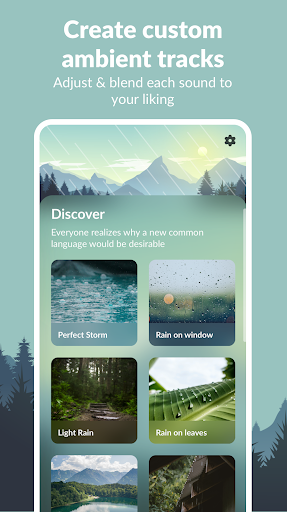
The central day-to-day choice is the kind of rain I want to hear. Rain on a window has a familiar indoor feel; rain on leaves, a roof, or a sidewalk suggests a different setting. For a softer option, there is light rain, while Perfect Storm and thunderstorm provide a more dramatic direction. These names make the selection feel more like choosing a scene than searching through generic noise.
I would use the options according to what I am doing rather than assume one sound is right for every moment. A quieter track can sit behind reading or a slow evening task, while a more forceful one might be my preference when I want a fuller wash of sound. The app's job is not to tell me how to relax; it gives me choices and lets me listen.
Small details that stand out
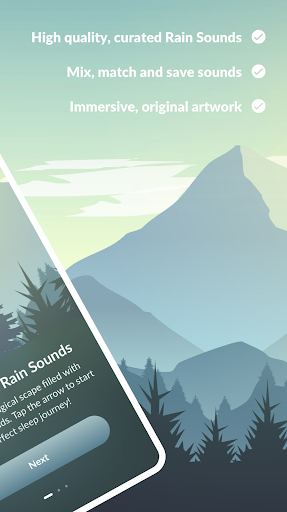
Customization is one of the useful ideas here. The app says listeners can adjust sounds to their liking, so the experience need not be limited to pressing play on a fixed scene. Optional piano tracks add a musical element for anyone who would rather have a gentle melody behind the rain. I appreciate that these are described as options rather than as a required part of every sound.
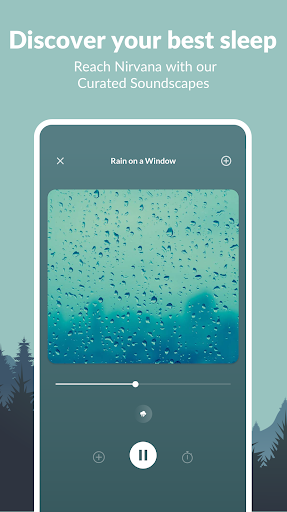
The timer is another feature with a clear everyday purpose: it can stop playback automatically. That matters when I am listening at bedtime and do not want to keep the phone close just to turn the audio off. Background images round out the presentation, while the range of named rain and water scenes gives me a reason to try different choices without changing the app's simple purpose.
A low-effort evening routine
One practical routine would be to choose a familiar sound before I start getting ready for bed. I could begin with light rain or rain on a window, decide whether I want an optional piano track, and set the timer for the listening period I have in mind. Once that is done, I can leave the phone alone instead of repeatedly checking the playback.
On another evening, I might choose a different scene to suit the room or my preference, such as rain on a roof or a calmer water sound. The variety makes that change easy without turning the routine into a search for new content across several services. I would keep expectations realistic: this is background audio for a wind-down habit, not a tool that measures how well the habit works.
Keep expectations grounded
The app's focus is also its main limit. People looking for guided relaxation, sleep tracking, or a large general music catalogue should not expect those things from a rain-sound app. The supplied description centers on ambient sounds, customization, piano, images, and a timer. That is a useful set for listening, but it is not the same as a broader wellness or audio platform.
The business model is worth keeping in mind, too. The app is free to download, but it contains ads and offers in-app purchases with a broad listed price range. That may be perfectly acceptable for someone who wants to try the sound selection, but it could bother listeners who want uninterrupted audio without encountering ads or purchase options. Checking the current Google Play information is sensible before relying on a particular setup.
Rain Sounds - Sleep & Relax makes the most sense as a focused, low-effort source of rain and nature audio. Its variety, optional piano, customization, and automatic timer give me enough ways to shape a simple listening routine without making the app feel like a sleep program.
I would try it if ambient rain is already part of how I unwind, especially if I value having several scenes in one place. I would look elsewhere for tracking, guided sessions, or a broad music library, and I would weigh the ads and in-app purchases before settling on it.
Rain Sounds Frequently Asked Questions
What is Rain Sounds - Sleep & Relax used for?
Rain Sounds - Sleep & Relax is an ambient audio app for listening to rain and nature sounds. It offers different rain scenes and water sounds, customization, optional piano tracks, background images, and a timer that can stop playback automatically. It suits background listening for relaxing or winding down, rather than sleep tracking or guided coaching.
Which phones can run Rain Sounds - Sleep & Relax?
The app is listed on Google Play for Android. The Android version requirement is worth checking on its store page, since compatibility can vary with a device and the current app release. The supplied details do not establish availability on other platforms, so I would use Google Play to check the supported device information.
Does Rain Sounds - Sleep & Relax cost money?
The app is free to download, but it contains ads and offers in-app purchases. The listed purchase prices range from $0.99 to $99.99 per item. What appears as an available purchase can vary, so check Google Play for the current details if pricing or ad-free listening is important to you.
Does Rain Sounds - Sleep & Relax have a timer?
Yes. The app includes a timer that can turn off the sounds automatically, which is handy if you listen while settling down and do not want playback to continue indefinitely. The app also offers several rain and water sound choices, customization, and optional piano tracks for a different background.
Is Rain Sounds - Sleep & Relax right for everyone?
It is a reasonable option for people who enjoy rain or nature audio while resting, reading, or winding down. It may not suit someone looking for sleep analysis, guided meditation, or a general music service. The app contains ads and in-app purchases, so check its current Google Play details if those affect your choice.
Pros
- A range of distinct rain and water scenes makes it easy to pick a preferred background.
- The automatic timer is useful for bedtime listening without a manual stop.
- Optional piano tracks and sound customization offer some control over the listening mood.
- Background images add a visual touch to a focused ambient-audio experience.
Cons
- It is focused on ambient sound, not sleep tracking or guided relaxation sessions.
- Ads and in-app purchases may interrupt the appeal for listeners seeking a simpler free experience.
- Its narrow rain-and-nature focus will not replace a general music library.
- Category
- Music & Audio
- Version
- 5.4.1(152)











