Poweramp Music Player
- 1.38M
- 4.1
- Installs
- 50.00M
- Price
- Free

Screenshots
Analysis by Reviewed APKs
Poweramp Music Player is an Android player for people who keep music files on their device and want more control over how those files sound. It also handles radio streams, playlists, and a deep set of audio adjustments. I see its appeal for listeners who enjoy shaping their setup, rather than just pressing play. Its range is impressive, though its many options make it less of a simple, no-fuss player.
A listening session, your way
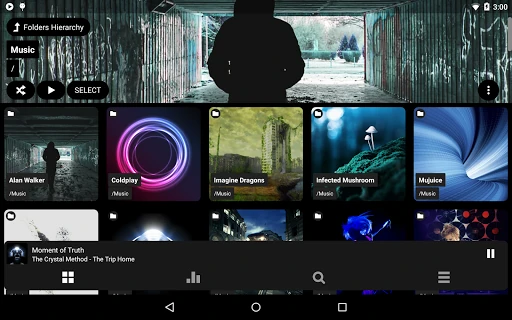
Imagine settling in after work with a folder of albums already stored on your phone. Poweramp can play music from folders as well as from its own library, so you can start with the collection you have instead of building a streaming routine around it. When I think through that everyday use, the draw is straightforward: choose an album, make a few sound adjustments if you want, and let playback carry on.
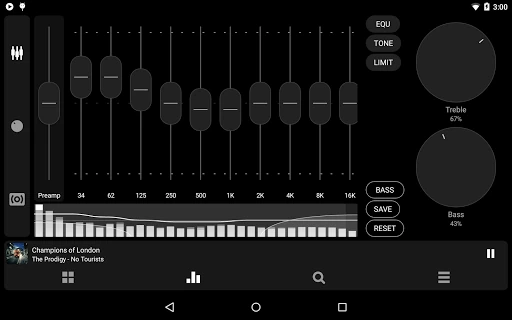
That flexibility becomes useful when one playlist jumps between recordings that sound quite different. Poweramp includes a multiband equalizer, separate bass and treble controls, and built-in or custom presets. Crossfade and gapless playback offer further ways to shape transitions. I would not expect every listener to touch all of these controls, but having them available means the player can suit a quick commute or a more deliberate evening of listening.
A player, not a music service
Poweramp makes most sense beside a collection of local audio files. It also supports radio streams and a wide range of formats, including Hi-Res and formats such as Opus, TAK, and DSD. That gives it a different job from a service centered on browsing a streaming catalog. The experience is about playing and organizing audio you can access, rather than discovering a subscription library inside the app.
I would consider it when a basic phone player feels limiting, especially if equalization, folder playback, playlist handling, or detailed playback options matter. It is not the right pick for someone looking mainly for a music subscription, social listening, or a simple interface with very few choices. The amount of customization is a real strength, but it also means Poweramp asks more attention from users than a bare-bones player does.
Small habits that help
A good starting habit is to leave most audio settings alone, then adjust only one thing at a time. If a track sounds too lean, for example, the bass control or an equalizer preset gives you a focused place to experiment. Poweramp also supports AutoEq presets, and its equalizer can be configured with up to 32 bands. Those options are easier to appreciate when you approach them as choices, not a checklist.
Playlists and queues can make the app easier to live with day to day. Poweramp supports several playlist formats, including M3U and PLS, and can import and export playlists. I would also check whether album art is present in my collection, since the app can download missing covers. Lyrics, widgets, and lock-screen options are additional conveniences to explore once the basic playback routine feels settled.
More From Our News Desk

Zoom Meetings, Google Meet, or Teams: Which Is Easiest to Join?

How I Build a Free Streaming Lineup With Tubi

Why Crunchyroll Is the Default Anime App for So Many Fans

YouTube TV: A Practical Guide to Cutting Cable

Rummikub and the Small Comfort of Phone Games

TeamViewer Remote Control or AnyDesk for Helping Family?
Who may enjoy Poweramp
I would recommend Poweramp to listeners with local music collections who care about sound controls, format support, and flexible playback. It should also suit people who like organizing albums into folders or playlists and want options such as gapless playback, replay gain, or crossfade. There is room to keep things simple at first and explore more settings later, which makes its depth less intimidating than it might seem at a glance.
It may be a poor fit if you want a streaming subscription, dislike adjusting settings, or expect a completely free experience beyond the trial period. The app has a 15-day full-featured trial, with a full version available through a separate unlocker or the Buy option in Poweramp settings. Listeners who only need a basic player may find the extensive audio and interface choices more than they need.
Poweramp Music Player is developed by Poweramp Software Design (Max MP). On Google Play, it has over 50 million installs and a 4.1-star rating from around 1.4 million ratings. The app is free to install and contains no ads. Its content rating is Everyone. The listed version is build-1031-bundle-play, and it first became available on November 1, 2010.
The app offers in-app purchases, with listed items ranging from $0.49 to $8.99. The description says this version provides a 15-day full-featured trial, after which listeners can use the Full Version Unlocker or the Buy option in Poweramp settings. The listed last update is September 15, 2026. Android requirements can depend on the current release, so it is worth checking Google Play for the device-specific details.
Where Poweramp’s depth pays off
First impressions and setup
When I first opened Poweramp, I would start by thinking about what I want to play: a folder of albums, an existing playlist, or a radio stream. The app supports all three kinds of listening, though its focus is on music files and playback rather than a streaming catalog. That distinction helps set expectations early and keeps the initial setup centered on the collection you actually use.
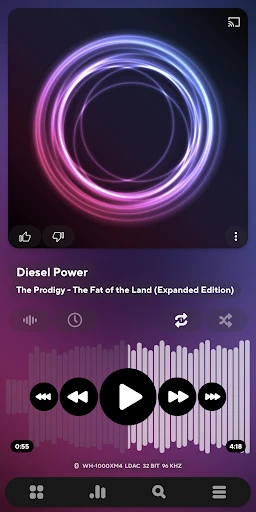
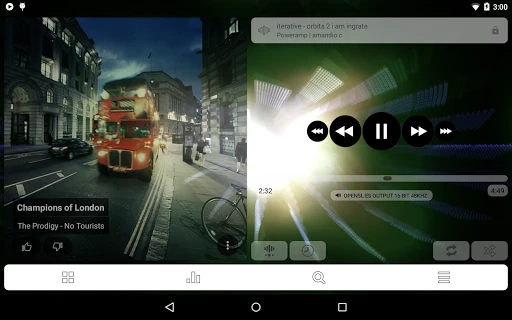
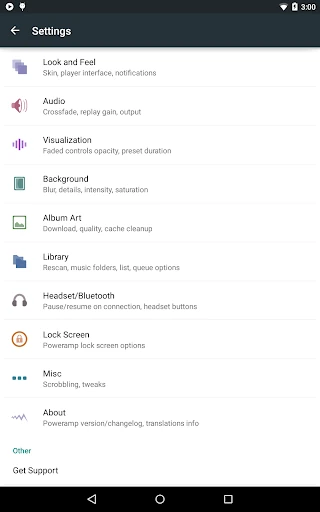
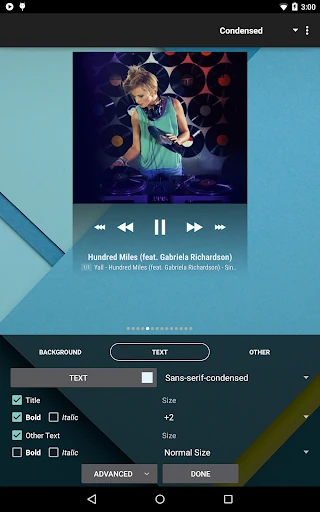
The interface offers Light and Dark skins, with options such as Pro Buttons and a Static Seekbar. There are also third-party skins available. I would resist changing everything on day one; a comfortable appearance and a working library are enough to get started. The deeper settings can wait until a particular listening habit gives you a reason to look for them.
The everyday playback
The core experience is about keeping music playing and giving you control over how it sounds. Poweramp supports gapless playback and crossfade, while a dynamic queue gives you another way to shape what comes next. Replay gain is also included. These are practical details rather than headline novelties: they matter most when you listen regularly and notice how a playlist moves from one track to another.
For a casual session, I would simply choose an album or playlist and leave the processing as it is. On another day, I might adjust equalization for a different set of headphones or a particular recording. Poweramp’s audio engine includes hi-res output support and 64-bit processing, alongside configurable options. The range is useful, but no setting can make every recording or device sound identical.
Tools beyond equalization
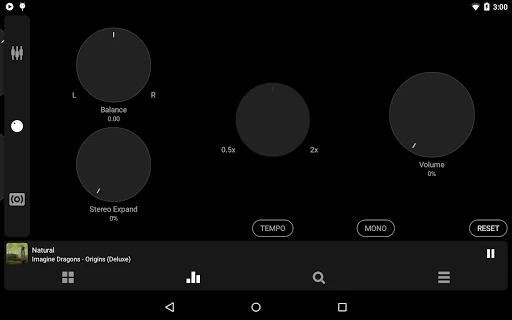
The equalizer is the obvious draw, but it is not the only audio tool. Poweramp includes separate bass and treble controls, stereo expansion, mono mixing, balance, tempo control, and reverb. Its equalizer supports built-in and custom presets, with multiband and parametric modes. That gives curious listeners several ways to adjust playback without forcing a single preset-based approach.
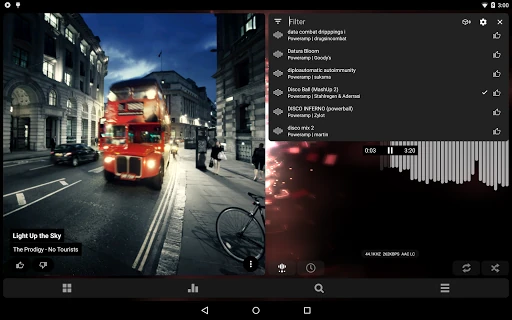
There are useful collection and display features, too. Poweramp can download missing album art and artist images, supports lyrics, and includes a tag editor and detailed audio information. Widgets and lock-screen options add ways to access playback. Milkdrop-compatible visualizations and spectrum displays give the interface something to show while music plays, if visual feedback is part of your listening routine.
Poweramp also supports Android Auto and Chromecast, along with radio streams and multiple playlist formats. These features extend its role beyond playing a single album on a phone. I would treat them as useful extras rather than assume every device or setup will handle every option in the same way; playback and connected-device behavior can depend on the equipment and support available.
A routine for your collection
One practical routine would be to keep albums in folders, use playlists for recurring moods or activities, and let the dynamic queue handle one-off additions. If you already have playlists in M3U, M3U8, PLS, or WPL format, Poweramp supports importing and exporting them. That can make it easier to bring an existing organization into the player without rebuilding every listening list from scratch.
After the collection is in place, I would make one small improvement at a time. Add a missing cover, check the tags on a track that is hard to find, or choose an equalizer preset for a particular listening setup. Lyrics and widgets can be useful once the basics are working. This kind of gradual approach makes a feature-rich player feel like a personal toolkit instead of a long configuration project.
Keep the trade-offs in view
The most obvious limitation is complexity. Poweramp has extensive settings for audio processing, output options, skins, and playback behavior. That is a welcome amount of control for some listeners, but a person who only wants a large play button and a short list of albums may find the extra choices distracting. I would give myself time to learn the parts I actually need rather than treating every setting as essential.
The other practical point is the trial and purchase arrangement. The app provides 15 days of full-featured use, then directs users to the Full Version Unlocker or the Buy option in its settings. The app is free to install, but that should not be confused with an unlimited free full version. I would check the current Google Play details before deciding which purchase route works for me.
Finally, Poweramp is a player for audio you can access, not a substitute for a streaming subscription catalog. Its format and audio controls are most valuable when you have files, playlists, or streams ready to play. Some features also depend on device support or connected equipment. Keeping that scope in mind makes it easier to judge the app on what it is designed to do.
Poweramp Music Player is a capable choice for Android listeners who want to play local files and tune the listening experience. Its broad format support, playlist tools, and deep audio controls give it more range than a basic player. The trade-off is a busier set of options and a full-version purchase after the trial.
I would try it if my music collection lives on my device and I enjoy having control over playback. If I mainly want streaming discovery or the fewest possible settings, I would look elsewhere. For the right listener, Poweramp’s depth is the point, not a hurdle to overlook.
Poweramp Music Player Frequently Asked Questions
What is Poweramp Music Player used for?
Poweramp plays local music files and radio streams in a range of formats. It also supports playlists, equalization, bass and treble controls, lyrics, and features such as gapless playback and crossfade. It is a music player rather than a streaming subscription catalog, so it is best suited to people who already have audio they want to play.
Which devices can run Poweramp Music Player?
Poweramp Music Player is an Android app. It also includes support for Android Auto and Chromecast, though the connected experience can depend on device and setup support. Check the current Google Play page to see which Android devices and versions are supported for the release you plan to install.
What Android version does Poweramp require?
The Android version requirement can vary with the current app release and device. Google Play is the best place to check compatibility for a particular phone or tablet before installing. Poweramp supports a range of audio and playback features, and some options may also depend on what the device itself supports.
Does Poweramp Music Player cost money?
Poweramp is free to install and includes a 15-day full-featured trial. The description says users can then get the Full Version Unlocker or use the Buy option in Poweramp settings. Google Play lists in-app purchases from $0.49 to $8.99 per item; check the store for current purchase details.
Is Poweramp Music Player a good fit for me?
It is a good fit if you play local music, want playlist and folder support, and enjoy adjusting sound or playback options. It may not suit someone looking for a streaming catalog or a very simple player with few settings. The full-featured trial gives you time to see whether its depth fits your routine.
Pros
- Plays local files and radio streams across a wide range of audio formats.
- Offers detailed equalization, bass and treble controls, and custom presets.
- Supports playlists, gapless playback, crossfade, lyrics, and album art downloads.
- Includes Android Auto, Chromecast, widgets, and configurable skins.
Cons
- The broad settings and audio controls may overwhelm listeners who want a basic player.
- Full-featured use is limited to a 15-day trial before a full-version purchase.
- It focuses on playing accessible music, not providing a streaming subscription catalog.
- Category
- Music & Audio
- Version
- build-1031-bundle-play