Police Scanner: Crime Radar
- 28.40K
- 4.6
- Installs
- —
- Price
- Free
Screenshots
Analysis by Reviewed APKs
Police Scanner: Crime Radar is an iPhone app for listening to live public-safety and other radio feeds, with tools for finding nearby channels and catching up on recent audio. I can see it suiting curious local-news followers, scanner listeners, and people who want to keep an ear on activity around home or work. Its strongest idea is pairing live audio with a map and optional transcription, though it is a listening tool, not an authoritative source of emergency information.
A local listening routine
When I picture using Police Scanner: Crime Radar on an ordinary evening, I start with the Near Me option to find feeds around my area, then choose one that fits what I want to follow. It could be a fire and EMS channel while I’m at home, or a weather-related feed when rough conditions are moving through. The point is not to chase every call. It is to make a specific feed easy to open and listen to.
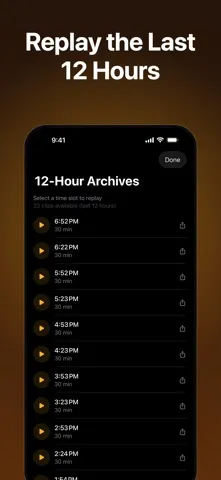
The app’s combination of live audio, a global map, and recent archives gives that routine a little flexibility. If I miss a segment while making dinner, the 12-hour archive is meant to let me revisit audio in 30-minute chunks. And if I want to listen while checking something else on my phone, background play is available. That makes it more practical as an occasional companion than as a screen I need to watch constantly.
Not a breaking-news desk
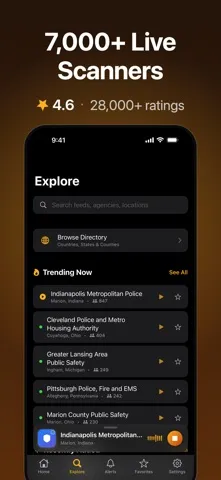
Compared with reading a local news app or checking an official alert, this is a much more direct and audio-first way to follow radio traffic. I can browse feeds across police, fire and EMS, aviation, railroad, marine, and severe weather categories. The map adds a geographic angle, while favorites can keep familiar Home and Work feeds close at hand. Those are useful distinctions if listening itself is what I’m after.
I would not treat the app as a replacement for verified reporting, emergency instructions, or contacting local services. Scanner audio can be fragmented and may take context to understand; listening is not the same as receiving a complete account of an event. It is also not a general-purpose news reader. If I want a concise explanation of what happened, I’d look for reporting rather than expecting a radio feed to supply the whole story.
Make feeds easier to revisit
A small habit that seems worthwhile is saving the feeds I actually use instead of searching from scratch each time. The favorites list supports organizing Home and Work channels, which gives a simple structure to a collection that could otherwise feel sprawling. I’d also use the map when I want to explore by location, then return to favorites for routine listening. That split keeps browsing and everyday access from becoming the same task.
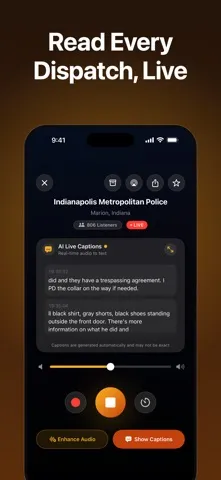
The archive is another feature that rewards a deliberate approach. Rather than leaving audio running and hoping to catch a particular moment, I can use the available 30-minute segments to go back within the stated 12-hour window. Live transcription is a premium feature, so it may be useful to people who prefer reading dispatch audio as it happens. I’d treat captions as a convenience for following along, not as a substitute for listening carefully.
More From Our News Desk

Zoom Meetings, Google Meet, or Teams: Which Is Easiest to Join?

How I Build a Free Streaming Lineup With Tubi

Why Crunchyroll Is the Default Anime App for So Many Fans

YouTube TV: A Practical Guide to Cutting Cable

Rummikub and the Small Comfort of Phone Games

TeamViewer Remote Control or AnyDesk for Helping Family?
Who may enjoy listening
I’d recommend Police Scanner: Crime Radar to people who already enjoy scanner listening, follow local activity out of curiosity, or want to explore public-safety and transportation feeds from different places. The map, nearby-feed option, favorites, and archive give listeners several ways to find and return to audio. It may also interest breaking-news followers who are comfortable with raw dispatch traffic and understand that it is only one piece of a developing story.
It may be a poor fit if you want polished, confirmed news summaries, a quiet app experience, or clear explanations of every transmission. Audio feeds can be difficult to follow without context, and listening may not suit someone who finds emergency communications stressful. I’d also think carefully before relying on it for urgent information. The app is best approached as a way to listen and explore, not as a service that replaces official updates.
Police Scanner: Crime Radar is made by Sepia Software LLC and is available for iPhone through the Apple App Store. The listed minimum requirement is iOS 17.0. Its content rating is 12+. The current version shown is 2.0.25, and the supplied release history dates the original release to January 26, 2016.
On the App Store, it has a 4.6 rating from 28,399 ratings. The app is free to download. Its description also explains that premium access uses an auto-renewing subscription and discusses a free trial when one is offered; subscription charges and trial availability are worth checking in the App Store before subscribing. The supplied last-update date is October 28, 2026.
Listening, Browsing, and Catching Up
First look and setup
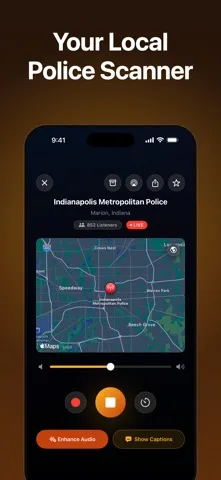
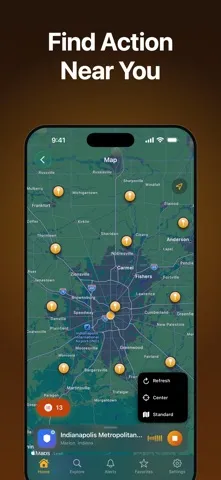
When I first opened an app built around scanner feeds, my main question was simple: could I get to something relevant without sorting through a wall of unfamiliar channels? Police Scanner: Crime Radar addresses that with a global map and a Near Me option for finding feeds in a zip code. That gives a new listener two understandable starting points: explore what is nearby, or browse the broader map.
I’d begin by choosing one or two feeds that make sense for my interests, then save the ones I expect to revisit. The Home and Work organization is a practical touch because it reflects how people actually divide their routines. The app also offers dark mode, which is a sensible option for late listening. I would not expect setup to make every feed immediately self-explanatory; the appeal is access to radio audio, and some familiarity helps.
The everyday listening experience
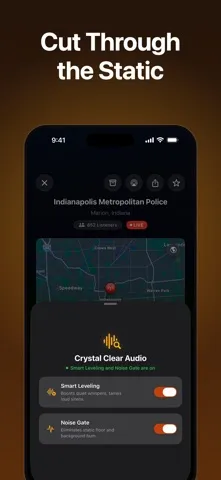
Day to day, the central experience is straightforward: choose a live feed and listen. The described audio processing includes a noise gate intended to reduce static between transmissions and smart leveling to balance quieter speech against louder sounds. Those tools address two familiar annoyances of radio listening. They do not change the nature of the material, though. Dispatch audio can still be brief, busy, or hard to interpret without knowing the local context.
Background play is especially useful for casual listening. I can imagine starting a feed and moving on to another task, or locking the screen without ending the session. The app also includes a favorites list, so a regular listener does not have to treat every session as a fresh search. That combination makes it more suited to dipping in during a routine than to demanding uninterrupted attention.
Map, captions, and archives
The interactive map is one of the more distinctive ways to approach a large set of audio feeds. Its color coding separates fire and EMS pins from police and law-enforcement pins, and the Near Me control is designed to locate feeds around a zip code. I like that this is a different path from scrolling through categories: it lets location guide the search when I’m not sure which channel name to look for.
Live AI transcription is described as a premium feature, turning dispatch audio into text as it happens. That could help when I cannot keep my attention on the speaker, though I would still treat the captions as an aid rather than a definitive record. The 12-hour archive offers another way to follow up, with playback divided into 30-minute segments. Together, captions and replay make the app more than a live-radio dial.
A useful evening workflow
A low-effort routine would be to open the map or use Near Me when I want to see what feeds are available nearby, then save any channels I expect to use again. On a quieter day, I could browse aviation, railroad, or marine traffic instead of focusing only on public-safety audio. That range gives the app a broader listening role for people interested in radio activity beyond police dispatch.
If something catches my attention while I’m away from the screen, background play lets the audio continue while I use other apps. Later, the archive can help me revisit part of the recent stream, within the stated 12-hour window. I’d keep the routine selective: choose a feed with a reason, listen for a while, and stop when it no longer adds anything. Having access to many channels does not mean every channel needs to be on.
Keep expectations grounded
The breadth of feeds is attractive, but breadth can also make the experience uneven for a newcomer. Radio traffic is not edited into a tidy narrative, and a listener may hear fragments that are difficult to place. The map can help locate feeds, while transcription and archives offer ways to follow along, but neither removes the need to interpret what is being heard. This is a niche listening experience, not a frictionless substitute for a news summary.
There are also practical boundaries around the premium transcription feature and subscription. The app description says premium access renews automatically unless renewal is turned off in time, and gives instructions for managing that through iTunes account settings. I’d check the App Store for current subscription terms before starting a trial or paying. More broadly, I would not use scanner listening as my sole source for urgent instructions or confirmed information.
Police Scanner: Crime Radar has a clear purpose: make live scanner feeds easier to find, listen to, and revisit. The map, nearby search, favorites, background playback, and archive support a more considered routine than simply opening a stream at random. Its transcription feature is an appealing extra for people who want text alongside audio, although it is part of premium access.
I’d suggest it to curious listeners who enjoy raw radio traffic and are comfortable with its limitations. If you want verified local reporting or straightforward emergency guidance, another source will serve you better. For an iPhone user who wants to explore scanner feeds, this is a capable, focused option—as long as listening stays a supplement rather than a source of certainty.
Police Scanner Frequently Asked Questions
What is Police Scanner: Crime Radar used for?
Police Scanner: Crime Radar is used to listen to live radio feeds covering areas such as police and public safety, fire and EMS, aviation, railroad, marine, and severe weather. It also offers a map, nearby-feed search, favorites, background playback, and 12-hour audio archives. Live AI transcription is described as a premium feature.
Can I use Police Scanner: Crime Radar on Android?
The supplied platform information is for iPhone through the Apple App Store. The stated minimum requirement is iOS 17.0. I would check the store for current compatibility details for a particular device and operating system, since supported devices and requirements can change over time.
What iOS version does Police Scanner: Crime Radar require?
Police Scanner: Crime Radar requires iOS 17.0 according to its supplied App Store requirements. It is listed for iPhone. Before downloading, check the App Store entry on your device for current compatibility information, especially if you use an older iPhone or an earlier iOS release.
Is Police Scanner: Crime Radar free?
The app is free to download, and its description mentions premium access through an auto-renewing subscription, including a free trial when one is offered. The current subscription price and trial availability may vary, so check the App Store before subscribing. The description says renewal must be turned off in advance to avoid a charge.
Who should try Police Scanner: Crime Radar?
It may suit people who enjoy scanner listening, follow local activity out of curiosity, or want to explore radio feeds by location and category. It may not suit anyone seeking polished, confirmed news or urgent instructions. Dispatch audio can be fragmented, so the app is best treated as a listening and exploration tool rather than a definitive account.
Pros
- Map and nearby search offer more than one way to find relevant live feeds.
- Favorites and background playback make repeat listening easier to fit into a routine.
- Recent archives provide a way to revisit audio within the stated 12-hour window.
- Premium live transcription adds a text option for following dispatch audio.
Cons
- Raw radio traffic can be difficult to interpret without local context.
- Live transcription is a premium feature rather than part of the basic listening description.
- It is not a substitute for verified reporting or official emergency information.
- Category
- News & Magazines
- Version
- 2.0.25