Philips Hue
- 155.53K
- 4.6
- Installs
- 10.00M
- Price
- Free

Screenshots


Analysis by Reviewed APKs
Philips Hue is a companion app for organizing and controlling Hue smart lights and accessories. It suits people who want their lighting to do more than switch on and off, from setting a room’s mood to building routines around the day. My overall take is that it gives Hue owners a lot of useful control in one place, though some features depend on having a Hue Bridge or other compatible equipment.
A More Welcoming Evening
Picture arriving home on a dark evening with groceries in both hands. Instead of reaching for several switches, I can use Philips Hue to control the lights grouped for the entryway or living room. Once the room is organized, a single scene can shift the atmosphere from bright and practical to softer and more relaxed. That makes the app feel most useful in small, repeatable moments, not just when I’m experimenting with color.
The same setup can follow a daily pattern. I might choose a gentle wake-up automation for the morning, then use a brighter scene when I need to focus and a warmer one as the evening winds down. The app also supports controlling lights when I have an internet connection, which is handy if I want to check whether I left them on. It turns lighting into a routine I can adjust rather than a chore I keep remembering.
More Than a Light Switch
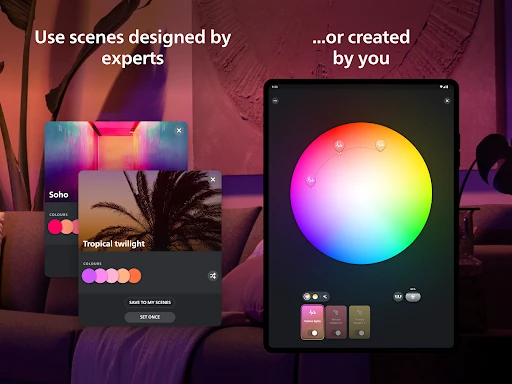
Compared with a basic bulb remote or a simple on-and-off control, Philips Hue is built around organizing lights into Rooms and Zones, choosing scenes, and setting automations. That broader approach is useful if several lights need to work together, or if I want the living room to feel different at different times of day. The scene gallery gives me a starting point, while custom scenes let me work from a photo or favorite colors.
It is still specifically a control app for Philips Hue products, not a general-purpose home control hub or a replacement for buying compatible lighting and accessories. Some features require a Hue Bridge, and options such as syncing with a screen or sound depend on the equipment or services involved. If all I want is a simple switch for an ordinary lamp, this app’s deeper controls may be more than I need.
Small Habits, Better Control
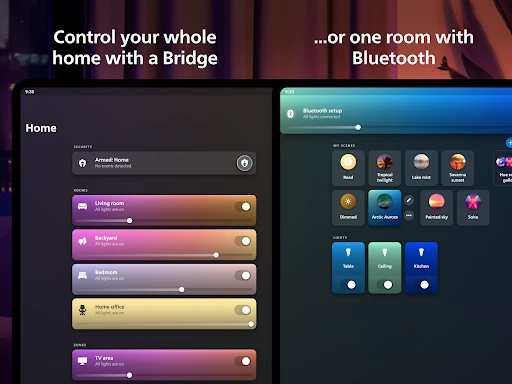
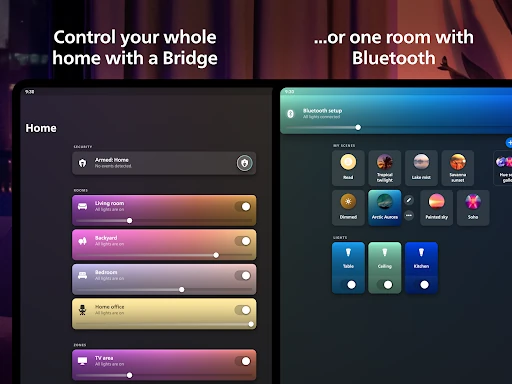
I’d start by making the app’s room layout match the way I actually move through the home. Grouping the right lights into Rooms or broader Zones makes everyday control feel less fussy: I can address the living room together or choose a larger area when that suits the moment. It is worth taking a little time to get those groupings right, because they shape how quickly I can reach the lighting I want.
After that, I’d keep a short set of favorite scenes for common situations instead of treating every evening as a fresh design project. The Natural light scene can change the lighting through the day, while automations can handle moments such as waking up or arriving home. Home-screen widgets offer another shortcut for switching lights, adjusting brightness or temperature, and selecting scenes without opening the app.
More From Our News Desk

Zoom Meetings, Google Meet, or Teams: Which Is Easiest to Join?

How I Build a Free Streaming Lineup With Tubi

Why Crunchyroll Is the Default Anime App for So Many Fans

YouTube TV: A Practical Guide to Cutting Cable

Rummikub and the Small Comfort of Phone Games

TeamViewer Remote Control or AnyDesk for Helping Family?
Who Will Get the Most From It
I’d recommend Philips Hue to people who already use Hue lights and want a convenient place to organize them, set scenes, and build lighting routines. It is especially appealing if several rooms or groups of lights need different treatment throughout the day. People who enjoy adjusting color and atmosphere will have more to explore than someone who only needs a single on-off button.
It may not suit someone looking for an app that controls any brand of light, or someone who wants to avoid setting up compatible smart-light equipment. The depth is useful, but it also means there can be more to configure than with a basic switch. I’d also keep the Bridge requirement in mind for features that need it, and check that the app’s Android requirements fit my device before installing.
Philips Hue is a Lifestyle app from Signify Netherlands B.V. On Google Play, it has over 10 million installs and a 4.6-star rating from about 156,000 ratings. The app is free to download and contains no ads. It offers in-app purchases, with listed items ranging from $0.99 to $129.99.
The app is rated Everyone and requires Android 12 or later. The current version is 5.60.1, and it was last updated on January 31, 2026. Its release date is April 27, 2016. Some features require a Philips Hue Bridge, so the equipment needed can depend on which controls and functions a household wants to use.
How Hue Fits Into Everyday Lighting
A Clear Starting Point
When I first open a smart-lighting app, I want to find the rooms before I get lost in settings. Philips Hue’s central job is to organize lights into Rooms or Zones that reflect the layout of a home. That gives me a practical way to think about control: the living room is a group, and a larger area can be a Zone. It is a sensible foundation for both quick adjustments and more involved routines.
The app’s range becomes more useful as the setup grows. A person with lights in several rooms can organize them by where they are, then choose how each group should feel. I would take a moment to make names and groupings easy to recognize. That small bit of setup helps prevent the daily experience from feeling like a hunt through a list of individual bulbs.
Control That Travels
Day to day, the main appeal is being able to control Hue lights through the app wherever I have an internet connection. At home, that can mean changing the mood without walking around to each switch. Away from home, remote control is useful for checking on lighting or making the house feel welcoming before I return. The app’s value is less about a flashy one-off trick and more about having the same controls available in different situations.
I also like that the controls can be reached in more than one way. Home-screen widgets can turn lights on or off, adjust brightness and temperature, or set a scene without opening the app. Voice control is available through Apple Home, Amazon Alexa, or Google Assistant. Those options make the app part of a broader routine, while the Hue app remains the place to organize and customize the lighting.
Scenes for Different Moments
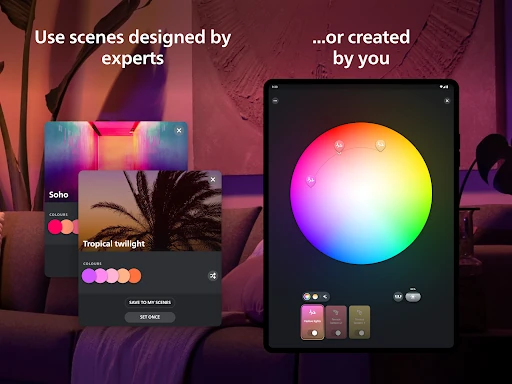
The scene gallery is a good way to avoid starting with a blank slate. Its scenes are created by lighting designers and are intended for different moods and occasions. I can also create a scene using a photo or colors I like, which gives me a more personal route than picking only from existing choices. That blend of ready-made ideas and customization is one of the app’s clearest strengths.
Natural light adds a more time-based option. The scene can adjust the lights through the day, moving from cooler blue tones in the morning toward warmer hues around sunset. That is useful if I want the lighting to change without repeatedly making manual adjustments. I’d think of it as a lighting preference to try and tune to my routine, rather than a feature that needs constant attention.
A Routine That Sticks
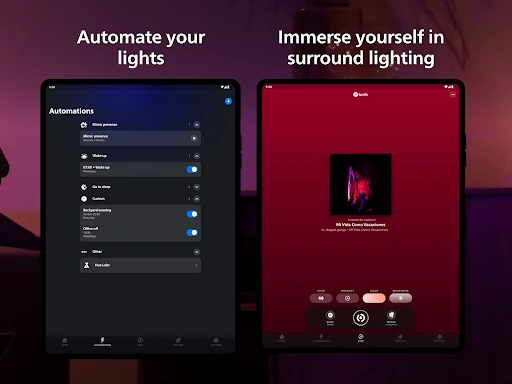
A practical routine might begin with an automation that gently wakes me, followed by a brighter scene when I start the day. Later, the Natural light scene can handle gradual changes, and a favorite evening scene can help me settle in. The point is not to schedule every minute. I’d use automations for the moments that happen reliably and keep manual control for the rest.
There is also a straightforward way to make the routine easier to maintain: put the controls I use most on a home-screen widget. If I often adjust brightness or switch between two scenes, a widget can save me a few taps. Voice commands through a supported assistant offer another hands-free option. Together, these small shortcuts can make a detailed lighting setup feel easier to live with.
Keep the Setup in Mind
Philips Hue’s broad feature set is tied to Hue products, so the app is not a universal controller for household lighting. Some functions require a Hue Bridge, and screen or sound syncing depends on the relevant Hue equipment or services. That means the app’s usefulness is shaped by what a home already has, not just by what appears on the phone.
The app also asks for a little organization before it can feel effortless. Rooms and Zones need to make sense for the household, and custom scenes or automations take some attention to set up. Someone who only wants to tap a switch may find that unnecessary. I’d approach it as a control center for a Hue setup, rather than expecting every advanced option to matter in daily use.
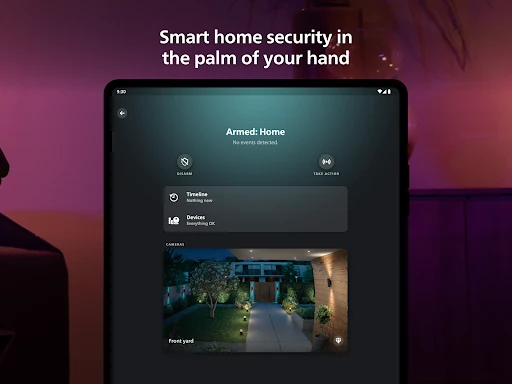
Security features are available for people using Hue Secure cameras and sensors: the Security Center can provide activity alerts, trigger light and sound alarms, and support real-time monitoring. Those options depend on compatible devices, and they are distinct from ordinary lighting controls. I would consider them an added part of a broader Hue setup, not a reason to assume that the lighting app alone provides home monitoring.
After spending time with the idea of Hue as a daily control center, I see the strongest case in its combination of room organization, scenes, widgets, and automations. It can make lighting feel more deliberate without requiring me to adjust every bulb individually. The scene gallery and Natural light option add useful variety, while remote control helps extend the same routine beyond the home.
I’d recommend Philips Hue to Hue owners who want more structure and flexibility from their lights, especially across several rooms. I would not choose it just to control ordinary bulbs or if I wanted the simplest possible switch. Check that the Android requirement and any Bridge or accessory needs fit your setup, then start with a few rooms and routines rather than trying to customize everything at once.
Philips Hue Frequently Asked Questions
What is the Philips Hue app used for?
Philips Hue is used to organize and control Philips Hue smart lights and accessories. You can group lights into Rooms or Zones, select or create scenes, and set automations for routines such as waking up or arriving home. It also supports remote light control with an internet connection, and some features require a Hue Bridge.
Which devices can run the Philips Hue app?
Philips Hue is available as an Android app on Google Play. It requires Android 12 or later. The app controls Hue products, so the lighting and accessory setup matters as well as the phone. For details that can change, including device compatibility, check the current Google Play store listing.
Does Philips Hue cost money?
The Philips Hue app is free to download and contains no ads. It offers in-app purchases, with listed items ranging from $0.99 to $129.99 per item. The app’s controls are for Philips Hue products, and some features require a Hue Bridge. Check Google Play for current purchase details.
Does Philips Hue need a Bridge?
Some Philips Hue app features require a Philips Hue Bridge. The app can organize and control Hue lights, create scenes, and set automations, but the equipment needed depends on which features you want to use. Check the app’s Google Play description and your product details for setup requirements that apply to your system.
Who is the Philips Hue app best for?
It is best suited to people who use Philips Hue lighting and want to group lights, adjust scenes, or create routines. People who prefer a simple switch or need an app for other lighting brands may find it less suitable. The app is rated Everyone on Google Play, and some features depend on compatible Hue equipment.
Pros
- Organizes lights into Rooms and Zones for practical group control.
- Offers a scene gallery, custom scenes, and a Natural light option.
- Supports automations, widgets, remote control, and voice assistants.
- Includes security controls for compatible Hue Secure cameras and sensors.
Cons
- Designed for Philips Hue products rather than lighting from any brand.
- Some features require a Hue Bridge or other compatible equipment.
- Setting up scenes and automations takes more effort than a basic switch.
- Category
- Lifestyle
- Version
- 5.60.1











