Paychex Flex
- 75.42K
- 4.6
- Installs
- 1.00M
- Price
- Free
Screenshots
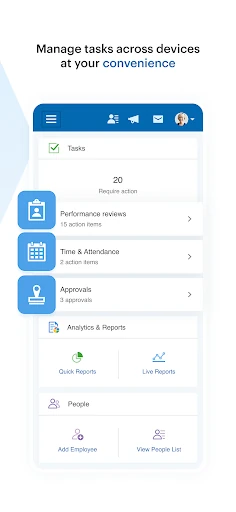
Analysis by Reviewed APKs
Paychex Flex is a business app for people whose employers already use Paychex: employees can check pay, tax, retirement, and benefits information, while employers can manage payroll and review workforce records. I like the practical split between those two jobs, and the chance to handle important details away from a desktop. It is most useful as a companion to an existing company account, not a general payroll tool anyone can pick up.
A quick pay check
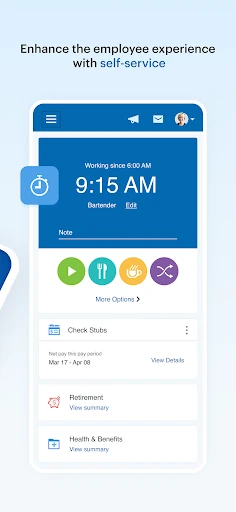
When I imagine using Paychex Flex during an ordinary workweek, the first stop is a pay stub. Maybe I want to confirm a deduction after payday, or find a W-2 while getting paperwork together. The app brings those records together with profile, tax, and time-off information, so I can look up a specific detail without asking someone in the office to retrieve it for me.
The same routine can extend beyond pay. I might check a retirement contribution, look at a balance, or find the contact information for a health benefit. Those are useful moments for a phone app because they tend to come up between other tasks, not when I am sitting down for a long administrative session. What is available depends on the options my company has with Paychex.
A companion, not a payroll service
Paychex Flex makes the most sense alongside a workplace that already uses Paychex Flex. Employees use it to view personal payroll and benefits details; employers can use it to submit payroll, review reports, and access employee information. That makes it different from a budgeting app or a standalone payroll calculator: its job is to connect users to company-specific records and processes.
I would not treat it as a universal HR system that works independently of an employer account. The app is for previously registered Paychex Flex users, and the company’s plan determines which features are available. If I only want to track personal spending or calculate a paycheck, this is not the tool I would reach for. Its value depends on having an existing Paychex relationship.
Make records easier to find
A small habit that could make the app more useful is checking the relevant record when a question comes up, rather than waiting until several details pile up. For example, I can look at a pay stub when reviewing a deduction, or check time-off balances before discussing plans with a manager. Having those details close at hand can make a quick conversation more specific.
I would also keep the app’s different information areas in mind. Pay, taxes, retirement, and insurance are related to work, but they answer different questions. Employers may have reports and payroll tasks to handle, while employees may mainly need personal documents or benefit details. A quick sense of what I am trying to find helps me use the app as a practical reference instead of expecting every account to show every feature.
More From Our News Desk

Zoom Meetings, Google Meet, or Teams: Which Is Easiest to Join?

How I Build a Free Streaming Lineup With Tubi

Why Crunchyroll Is the Default Anime App for So Many Fans

YouTube TV: A Practical Guide to Cutting Cable

Rummikub and the Small Comfort of Phone Games

TeamViewer Remote Control or AnyDesk for Helping Family?
Who gets the most from it
I would recommend Paychex Flex to employees who want convenient access to pay stubs, W-2s, benefit details, retirement information, or time-off balances connected to their employer’s Paychex plan. It also has a clear role for employers who need to submit payroll or review reports while away from a desktop. For those users, having work records available on a phone can save a little time during routine questions.
It may not suit someone who does not already have a registered Paychex Flex account, or anyone looking for a general-purpose money manager, job search app, or independent payroll service. The feature set depends on the company’s plan, so two coworkers may not have identical options. I would think of it as a handy access point for an existing workplace setup, rather than a complete replacement for every HR conversation or desktop task.
Paychex Flex is published by Paychex, Inc. and is listed in Google Play’s Business category. The app is free to download, with no in-app purchases or ads. Google Play shows more than one million installs and a 4.6-star rating from about 75,000 ratings. Its content rating is Everyone, and the listed minimum requirement is Android 10.
The listed version is 7.69.0. Paychex Flex first appeared on June 10, 2012, and its latest listed update was January 9, 2026. These details describe the Android app; the features an individual can use depend on the options in their company’s Paychex plan. The app is intended for people who have already registered for Paychex Flex.
A closer look at workplace tasks
Starting with an account
When I first opened Paychex Flex, the key point was that this is not a browse-first app for anyone curious about payroll software. It is for people who already use Paychex Flex through their employer. That context shapes the whole experience: the app is a doorway to company-linked information and tasks, rather than a place to create a new payroll setup from scratch.
The description says users can use Touch ID and Face ID authentication. That gives people with compatible devices an authentication option suited to checking private workplace records on a phone. Beyond that, what appears to a user depends on the employer’s plan. I would go in expecting a useful account companion, while keeping in mind that my colleague’s available tools may differ from mine.
Everyday access
For employees, the day-to-day appeal is having several kinds of work information in one place. Pay stubs and W-2s cover common payroll questions, while the profile area includes items such as compensation, taxes, deductions, and time-off balances. Rather than trying to remember where each document lives, I can use the app as a reference when a detail comes up.
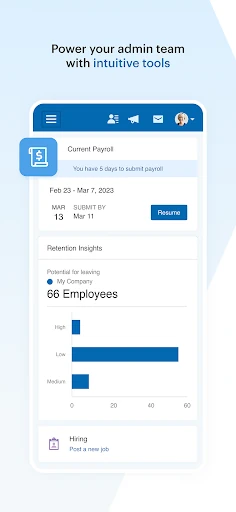
For an employer, the daily job can be more operational. Paychex Flex supports entering, reviewing, and submitting payroll on the go, and employers can resume payrolls started on a tablet or desktop. Reports, including payroll reports and cash requirements, are also among the available information. That makes the app relevant to real business tasks, though it does not mean every employer account will have the same options.
Benefits beyond the paycheck
The breadth of benefits information is one of the more useful parts of the app. Employees can view retirement balances, contributions, returns, and loans, and can update retirement contributions and investments. For health, dental, and life insurance, the app can provide benefit details, deductions, and contact information. These details make it more than a place to check whether a payment arrived.
Flexible spending account information is included too, covering contributions, balances, claim activity, and reimbursements. Employers may have access to retirement-plan balances, participation rates, employee eligibility, and health and benefits enrollment or election information. I appreciate that these are concrete work-related records rather than vague promises of all-purpose HR convenience. The exact selection still comes down to the company’s plan.
A simple weekly routine
One realistic routine would be to open the app after payday, confirm the pay stub, and check any deduction that needs a closer look. If I am planning time away, I can check the available time-off balance before asking a manager about dates. Later, if a benefits question comes up, I can refer to the relevant coverage or contact details rather than searching through old paperwork.
An employer’s routine might center on a payroll deadline. The app supports entering, reviewing, and submitting payroll, and can pick up a payroll started on a tablet or desktop. I would treat that continuity as helpful when a task spans devices, while still reviewing the details carefully before submission. The app’s reports and employee information can also be useful reference points when a payroll-related question needs context.
Keep the limits in view
The biggest limitation is also the most important expectation to set: Paychex Flex only serves previously registered users, and its available features vary with the employer’s plan. A person who opens it hoping to explore a full set of payroll and benefits tools may find that their company’s account offers a narrower selection. That is a matter of the workplace setup, not a reason to assume every user sees the same app.
It is also worth keeping the roles straight. Employees get access to their own records and supported benefit actions, while employer features include payroll submission and broader reports or employee information. The app can bring those tasks onto a mobile device, but I would not assume that every desktop process is available on a phone. Its strongest use is convenient access to the features an account actually provides.
Paychex Flex is a focused, practical app for people whose workplace already runs on Paychex. Its combination of payroll, tax, retirement, and benefits information gives employees a useful reference, while employers get mobile access to selected payroll and reporting tasks. The central caveat is simple: the account and company plan determine what the app can do.
I would recommend it to registered employees and employers who want those work records within reach. If you do not have a Paychex Flex account, or want a general finance or payroll product, it is unlikely to fit. For existing users, it can make routine checks and selected tasks more convenient without pretending to replace the broader workplace system.
Paychex Flex Frequently Asked Questions
What is Paychex Flex used for?
Paychex Flex connects previously registered users to payroll, benefits, and related workplace information. Employees can access items such as pay stubs, W-2s, retirement details, insurance information, and time-off balances. Employers can submit payroll and view available reports and employee information. Features depend on the company’s plan.
Which devices support Paychex Flex?
Paychex Flex is an Android app on Google Play, with Android 10 listed as its minimum requirement. The app description also mentions Touch ID and Face ID authentication. Available features depend on the user’s company plan, and device compatibility details can be checked in the Google Play store.
Does Paychex Flex cost anything?
Paychex Flex is free to download on Google Play, and the app has no in-app purchases or ads. Access is intended for previously registered Paychex Flex users, so downloading it alone does not provide a general payroll service. Account access and available features depend on the employer’s setup.
Can I use Paychex Flex without my employer?
The app is intended for people who have already registered as Paychex Flex users. Its payroll, employee, and benefits features connect to a company’s Paychex plan, so it is not presented as an independent payroll or personal finance app. Check with your employer about account access and enabled features.
Is Paychex Flex useful for employees?
It can be useful for employees who want mobile access to pay stubs, W-2s, retirement information, benefit details, and time-off balances. Some users can also update retirement contributions and investments or view flexible spending account activity. The available tools vary by employer plan, so the app may differ between workplaces.
Pros
- Brings pay, tax, retirement, and benefits information together for registered users.
- Supports employer payroll entry, review, submission, and resuming work started on another device.
- Includes mobile access to W-2s, pay stubs, and selected benefit details.
- Free to download, with no in-app purchases or ads.
Cons
- Requires a previously registered Paychex Flex account tied to a workplace.
- Available features vary depending on the employer’s plan options.
- The app’s role is limited to Paychex workplace tasks, not general personal finance.
- Category
- Business
- Version
- 7.69.0











