Opera GX: Gaming Browser
- 320.23K
- 4.6
- Installs
- 10.00M
- Price
- Free

Screenshots
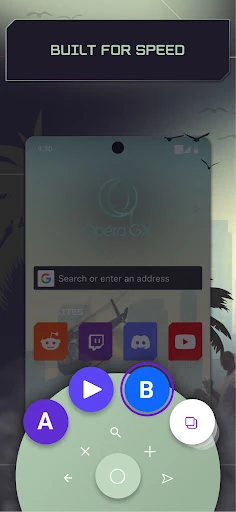
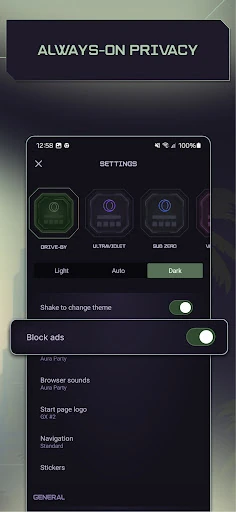
Analysis by Reviewed APKs
Opera GX: Gaming Browser is a mobile web browser with a gaming-inspired look and a few extras aimed at people who follow game news and releases. I found its appeal is less about changing how the web works and more about bringing browsing, gaming updates, and link sharing together. It suits gamers who like a personalized browser, though its gaming focus may feel unnecessary for everyone else.
A browser between game sessions
Picture checking a release date over breakfast, then sending a useful page to your computer before you sit down to play. Opera GX is built for that kind of small, everyday browsing. I could use GX Corner to look through gaming news and upcoming releases, then use Flow to pass a link, video, file, or note between my phone and computer. The browser’s gaming identity is present, but the basic task is still opening and browsing web pages.
When I first considered how it would fit into a routine, the combination felt more useful than a browser that only changes its colors. GX Corner gives game-related browsing a home, while Flow addresses the familiar nuisance of finding the same page on another device. The two work best as conveniences around ordinary web use, rather than as a substitute for playing games or keeping up with every gaming community.
A gaming angle on browsing
Compared with a plain mobile browser, Opera GX puts more emphasis on style and gaming discovery. Its custom themes, GX Corner news and release calendar, and Flow link sharing give it a clearer personality than a browser focused only on getting from one page to another. I’d consider it when I want those extras alongside everyday browsing, not because every phone needs a dedicated gaming browser.
It is not a game launcher, a place to play the games it covers, or a replacement for the games and services I already use. GX Corner can help me notice news, trailers, deals, and releases, but browsing those topics is different from managing a game library. If my priority is a deliberately simple browser with no gaming framing, Opera GX’s visual style and dedicated gaming content may be more than I want.
Small habits that help
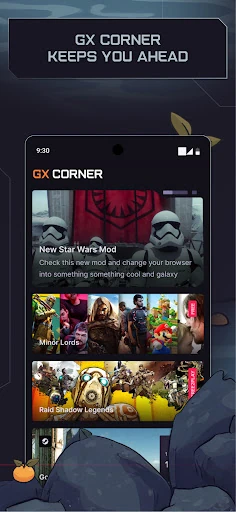
A useful habit is to check GX Corner when I’m already browsing for a game, rather than treating it as another feed I have to follow all day. Its news, upcoming release calendar, trailers, and deals are grouped around gaming interests. That makes it a natural place to browse when I’m curious about what’s coming next, without assuming that every item will matter to me.
Flow makes more sense when I use it intentionally as a handoff between devices. I can send myself a link or note from my phone and pick it up in the browser on my other device after connecting them by scanning a QR code. I’d also choose a theme I enjoy early on, then decide whether the thumb-reachable Fast Action Button or standard navigation feels better in my usual browsing.
More From Our News Desk

Zoom Meetings, Google Meet, or Teams: Which Is Easiest to Join?

How I Build a Free Streaming Lineup With Tubi

Why Crunchyroll Is the Default Anime App for So Many Fans

YouTube TV: A Practical Guide to Cutting Cable

Rummikub and the Small Comfort of Phone Games

TeamViewer Remote Control or AnyDesk for Helping Family?
Who may enjoy Opera GX
I’d recommend Opera GX to people who game and also browse for release news, trailers, and deals on their phones. It is especially appealing if a themed interface sounds fun and the idea of sending links, videos, files, or notes between phone and computer would be useful. The built-in ad blocker and cookie dialog blocker may also appeal to people who want those browsing features included.
It may be a weaker fit for someone who wants a very restrained browser and has little interest in gaming news or customization. The gaming look is a central part of its identity, not a hidden extra, and GX Corner is most relevant to people who follow games. I’d also keep expectations grounded: this is a mobile browser with gaming-focused conveniences, not a tool for improving game performance or replacing other gaming apps.
Opera GX: Gaming Browser is developed by Opera and is available for Android. Google Play shows over 10 million installs and a 4.6-star rating from about 320,000 ratings. Its content rating is Everyone. The current version shown is 3.1.2, and the app was released on June 14, 2021.
The app is free to download, and the supplied store details show no in-app purchases. It contains ads. Android 10 is the stated minimum requirement. The latest update date provided is December 18, 2025; that update includes bug fixes and improvements.
How the gaming extras fit into browsing
A distinctive first look
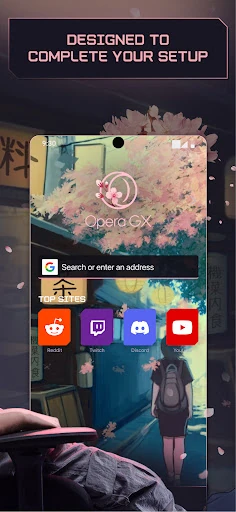
Opera GX makes its intended audience clear from the start: this is a browser styled around gaming rather than a generic utility with a gaming label added later. I like that the customization is concrete. Themes include GX Classic, Ultra Violet, Purple Haze, and White Wolf, so I can choose a look that suits me instead of being stuck with one presentation.
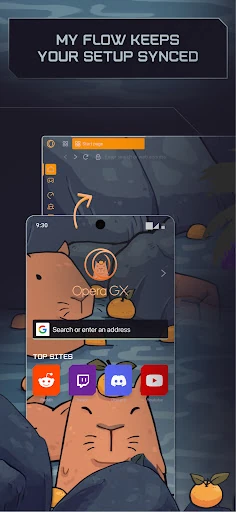
Getting connected to a computer is also straightforward in concept. Flow uses a QR code to connect the phone and computer, without requiring a login, password, or account. That matters if my first goal is simply to send something across devices. I’d set up that connection when I have both devices nearby, rather than waiting until I’m already in a hurry to move a page.
Everyday browsing with GX
Once I’m using it as a browser, the familiar job remains central: open pages and follow what I need to read. The gaming elements are there to make that routine feel more tailored, not to turn every web search into a gaming task. I can use it for general browsing and dip into GX Corner when the subject is a game or the broader gaming calendar.
Navigation offers a choice between the Fast Action Button and standard navigation. The Fast Action Button is designed to stay within thumb reach and uses vibrations when I interact with it, which could be handy when I’m browsing one-handed on the move. I’d try both approaches in ordinary use; a feature meant to help navigation is only helpful if its placement feels natural to me.
Useful gaming extras
GX Corner is the most focused addition. It brings together gaming news, a calendar of upcoming releases, trailers, and gaming deals. I can see myself opening it when I’m deciding what to read about after hearing a game mentioned, or when I want a quick look at what’s ahead. Its value depends on how much I care about staying current with gaming topics.
Flow is useful in a different, quieter way. It lets me send links, videos, files, and notes to myself and access them in the browser on connected devices. I like the idea of passing a long article from phone to computer, or saving a short note while an idea is fresh. The QR-code connection makes it a practical bridge rather than another feature that only decorates the interface.
The built-in ad blocker and cookie dialog blocker are part of the browsing package, along with cryptojacking protection. These are presented as security and page-loading features. I’d treat them as useful browser tools, while still being sensible about what I choose to open and share online; their presence does not make every browsing situation risk-free.
A practical daily routine
One routine I’d use is checking GX Corner during a spare moment, perhaps while waiting for a download or taking a break from a game. I can skim gaming news, look at upcoming releases, and open a trailer or deal that catches my attention. That keeps the gaming material close to regular browsing instead of requiring a separate search each time I’m curious.
Later, if I find a page I’d rather read on a larger screen, I can send it through Flow after connecting my devices. The same approach works for a video, file, or note I want to retrieve elsewhere. It’s a small handoff, but small conveniences are often the ones I actually keep using when they fit into an existing routine.
I’d make the browser feel comfortable before relying on it all day: choose a theme, try the navigation style, and see whether the Fast Action Button’s thumb reach suits my grip. None of those choices changes what a page contains, but they can make the browser feel more personal and easier to use in the situations where I usually reach for my phone.
Keep expectations grounded
The main limitation is also the product’s defining choice: Opera GX is deliberately aimed at gamers. If I don’t care about game news, release calendars, or gaming-themed customization, some of its most distinctive touches may not earn their space in my routine. A standard browser may feel like a more natural choice when I simply want web access without a strong visual identity.
The mobile description supports themes, GX Corner, Flow, navigation choices, and browser protections; it does not make this a game-performance control panel. I would not install it expecting tools to limit a phone’s CPU or RAM, or integrations with particular gaming services based on claims from elsewhere. Its practical strengths are the features Opera describes for this mobile browser.
Ads are part of the store details, even though the app is free and has no in-app purchases in the supplied facts. That is worth considering if I prefer an experience without ads. I’d also check the current Google Play information before installing, since requirements and store details can change over time.
Opera GX makes the most sense when I want a mobile browser that feels built around gaming interests. GX Corner gives me a convenient place for gaming news and release information, while Flow offers a practical way to move things between phone and computer. Themes and navigation choices add personality without changing the basic job of browsing.
I’d recommend it to gamers who will actually use those extras and enjoy a distinctive interface. If I wanted the plainest possible browser, or had no use for gaming content, I’d look elsewhere. For the right person, Opera GX is a capable everyday browser with a few thoughtful gaming-focused conveniences.
Opera GX Frequently Asked Questions
What is Opera GX: Gaming Browser used for?
Opera GX: Gaming Browser is a mobile web browser with gaming-focused extras. It includes GX Corner for gaming news, upcoming releases, trailers, and deals, plus Flow for sharing links, videos, files, and notes between a phone and computer. It also offers custom themes and built-in browsing features such as an ad blocker and cookie dialog blocker.
Which devices can run Opera GX: Gaming Browser?
Opera GX: Gaming Browser is available for Android. Its Flow feature can connect a phone and computer by scanning a QR code, and shared items can be accessed in the browser on connected devices. For current device availability and compatibility details, check the Google Play store information for the app.
What Android version does Opera GX: Gaming Browser require?
The stated minimum requirement for Opera GX: Gaming Browser is Android 10. If you are unsure whether your device or a particular system version is supported, check the current Google Play store information before installing, since requirements can vary as app versions change.
Does Opera GX: Gaming Browser cost money?
Opera GX: Gaming Browser is free to download, and the supplied store details show no in-app purchases. The app contains ads. Store terms or details may change, so it is worth checking the Google Play page for the latest information before downloading.
Is Opera GX: Gaming Browser right for non-gamers?
It can still be used for general web browsing, and features such as Flow and custom themes may be useful outside gaming. However, GX Corner and the overall gaming-inspired design are central parts of the app. If you have little interest in games or prefer a more understated browser, its main extras may not suit you.
Pros
- GX Corner groups gaming news, upcoming releases, trailers, and deals in one browser.
- Flow can pass links, videos, files, and notes between connected devices.
- Custom themes and two navigation approaches let users tailor the browsing feel.
- Built-in ad and cookie dialog blockers add practical browsing tools.
Cons
- Its gaming-focused look and content may not appeal to people who do not game.
- The app contains ads, despite being free to download.
- It is a browser with gaming extras, not a game launcher or performance tool.
- Category
- Communication
- Version
- 3.1.2











