Notepad for Android
- 8.61K
- 4.2
- Installs
- 1.00M
- Price
- Free
Screenshots
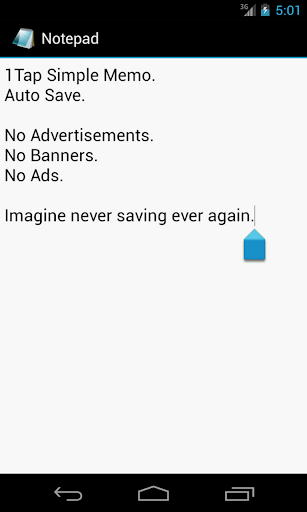
Analysis by Reviewed APKs
Notepad for Android is a straightforward memo app built around one useful idea: open it, type a note, and let it save automatically. I see it suiting people who want a quick place for a reminder or passing thought without a more elaborate note-taking setup. After looking at what it offers, my take is that its appeal is simplicity, though that also means it is best for basic text notes.
Catch a Thought Quickly
Picture a familiar moment: I am halfway through making dinner when I remember something I need to pick up tomorrow. With a simple memo app, I can open Notepad for Android, type the reminder, and move on without making a project of it. The app’s stated one-tap memo approach and automatic saving fit that kind of interruption particularly well. I would not want a long setup routine between remembering a detail and writing it down.
The same basic use works for a quick idea, a short to-do list, or a detail I want to keep nearby for later. The practical benefit is not a sprawling system for managing information; it is having a place to put a thought before it slips away. Automatic saving is central to that experience. I can concentrate on getting the words down instead of stopping to look for a separate save step.
A Memo, Not A System
Compared with a feature-rich notebook or a task manager, Notepad for Android makes a smaller promise. Its description centers on a simple memo and automatic saving, rather than a broad collection of organization or collaboration tools. That can be a welcome contrast if I only need to write something down. There is less to learn before starting, and the app’s main job is easy to understand from the outset.
That simplicity also defines what I would not choose it for. If I need to organize a large research archive, share notes with a team, or manage deadlines through a dedicated planning workflow, the stated feature set does not make this app an obvious fit. It is better considered a basic writing spot than a complete productivity suite. People who rely on specialized features should check the app’s store details before making it their main tool.
Make Small Notes Useful
I get the most from a basic memo app by keeping each note focused. One short note for a shopping reminder, another for a thought I want to revisit, and a brief list for an errand are easier to use than one running page filled with unrelated details. That is a personal workflow suggestion, not a claim about special organization features: the app’s described strength is getting a memo written and saved with little fuss.
It also helps to write notes so they make sense when I return to them. A few specific words can be more useful than a vague fragment, especially if I will not look at the note until later in the day. Since the app highlights automatic saving, I can focus on capturing the information rather than managing a save action. For anything important, I would still make a habit of reopening the note and checking that it says what I intended.
More From Our News Desk

Zoom Meetings, Google Meet, or Teams: Which Is Easiest to Join?

How I Build a Free Streaming Lineup With Tubi

Why Crunchyroll Is the Default Anime App for So Many Fans

YouTube TV: A Practical Guide to Cutting Cable

Rummikub and the Small Comfort of Phone Games

TeamViewer Remote Control or AnyDesk for Helping Family?
Who May Appreciate It
I would recommend Notepad for Android to someone who wants a simple place for short written reminders and everyday thoughts. Its core appeal is easy to explain: write a memo, and the app saves it automatically. That can suit a person who finds larger note-taking apps distracting or simply does not need a lot of structure. The no-advertising claim in the app’s description is another practical point for people who prefer a quieter basic tool.
It may not suit someone who expects a full-featured organizer or needs a particular advanced workflow. The supplied description does not establish things like rich formatting, cloud synchronization, or dedicated task management, so I would not choose it on the assumption that those are included. If my notes needed a more elaborate system, I would compare alternatives carefully. For uncomplicated memos, though, the app’s restrained purpose can be the point rather than a drawback.
Notepad for Android is a Tools app from AsianProGamer. On Google Play, it has over one million installs and a 4.2-star rating from around 8,600 ratings. The app is free, and its provided store facts say it has no in-app purchases and contains no ads. Its content rating is Everyone, which gives a useful snapshot of its store classification.
The recorded version is 3. The app was released on January 25, 2012, and its last recorded update was August 29, 2023. A minimum Android version was not included in the available facts, so anyone checking device compatibility should consult the Google Play details for the current requirement. These figures describe the supplied store information and may change as the app is updated.
A Closer Look At Simple Memo Writing
A Direct First Impression
When I first opened the idea of this app, what stood out was how little ceremony the product promises. It is described as a one-tap simple memo, with automatic saving as the key convenience. That gives a newcomer a clear expectation: this is meant to help capture text quickly, not ask me to configure a complicated note-taking setup before I can begin.
The description does not spell out a sequence of setup screens or a collection of options, so I would keep expectations focused on the basic writing task. For a quick reminder, that focus makes sense. I can judge the app by whether it lets me get a short note down and rely on the save behavior it advertises, rather than by features outside its stated purpose.
The Everyday Writing Loop
The day-to-day experience suggested by the app is a short loop: open the memo tool, type the thought, and leave it to save automatically. That is a modest workflow, but it addresses a common source of friction. When I am in a hurry, remembering to save a note can be one more small task competing for attention. Automatic saving is meant to take that step out of the way.
This is most compelling for notes I expect to read soon, such as a reminder or a brief idea. It is not a reason to turn every thought into an elaborate document. I would keep the writing compact and concrete, then return to it when needed. The app’s stated simplicity works best when I treat it as a quick memo pad rather than expecting it to manage the rest of my day.
Automatic Saving Takes Center
Automatic saving is the clearest standout feature in the supplied description. It addresses a small but real annoyance: finishing a note, getting interrupted, and wondering whether I remembered to save it. By making saving part of the basic experience, Notepad for Android aims to let the writing itself remain the focus. For casual notes, that is a practical choice rather than a flashy one.
The other clear point is the app’s no-advertising description. A quieter writing experience matters when I am trying to capture a thought without extra distractions. I would keep the feature discussion there, rather than assume the app also has formatting, search, folders, or synchronization. Those details are not part of the product description provided, and the simple memo-and-save concept is enough to explain its intended appeal.
A Practical Daily Habit
A useful routine would be to reach for the app when a short note comes up, then make the wording specific enough to be useful later. If I am jotting down an errand, I would write the item and the context rather than a cryptic word that might not make sense in a few hours. The app’s role is to capture that information; a little clarity in the note makes the capture more valuable.
I would also avoid treating a quick memo as a permanent filing system. If a note becomes something I need to refer to often, I can decide whether a basic memo remains adequate for that purpose. This keeps expectations in line with the app’s stated job. Automatic saving helps with the immediate writing moment, while thoughtful wording helps when I come back to read what I wrote.
Keep Expectations Grounded
The main limitation is also the app’s defining choice: its description is very brief and centers on simple memos and automatic saving. That does not establish a wider set of tools for organizing, searching, sharing, or syncing notes. Anyone who depends on those capabilities should check the current Google Play information or compare apps that explicitly describe the features they need.
There is also a practical difference between a quick note and a dependable system for every kind of information. A basic memo can be useful without being the right home for long documents or complex plans. I would try Notepad for Android for short text and see whether its simplicity fits my habits. If my routine demands more structure, I would choose a tool designed around that requirement instead.
Notepad for Android has a clear, narrow appeal: it is a simple memo app that emphasizes automatic saving and a no-advertising experience. I like that its core job is easy to understand, especially for brief reminders and thoughts that need capturing in the moment. Its usefulness depends on wanting that basic job rather than expecting a larger productivity toolkit.
I would suggest giving it a look if quick text notes are all you need and you value a straightforward approach. I would not make it my first pick for complex organization or specialized note workflows without checking that those needs are covered. For an uncomplicated memo pad, its stated focus is sensible and easy to appreciate.
Notepad for Android Frequently Asked Questions
What is Notepad for Android used for?
Notepad for Android is for writing simple memos. Its description emphasizes a one-tap memo approach and automatic saving, making it suited to short reminders or thoughts that I want to capture without a separate save step. It is best understood as a basic note-taking tool, rather than a full organizer with a broad set of functions.
What devices can run Notepad for Android?
The app is for Android, and its store figures are from Google Play. The minimum Android version was not included in the supplied facts, so compatibility can vary by device and software version. I would check the Google Play details for the current Android requirement before installing it on a particular phone or tablet.
Does Notepad for Android cost money?
The supplied facts describe Notepad for Android as free, with no in-app purchases and no ads. Store details can change over time, so it is sensible to check Google Play for the current information. Its description presents the app as a simple memo tool with automatic saving, rather than a paid service.
Does Notepad for Android save notes automatically?
Yes. Automatic saving is a central part of the app’s description, which presents it as a simple memo tool that saves without requiring a separate manual save action. That should suit quick notes when I want to focus on typing. For current behavior and details, the Google Play information is worth checking.
Who should try Notepad for Android?
I would consider it for someone who wants to jot down short text memos without a more involved note-taking setup. It may be less suitable for people who need a particular advanced feature or a complex organization system. The supplied description focuses on simple memos and auto-save, so check Google Play if your needs go beyond that.
Pros
- Automatic saving keeps the focus on writing instead of remembering a separate save step.
- A simple memo purpose is easy to understand and suited to quick reminders.
- The app’s description says it contains no ads.
- Free to use, with no in-app purchases in the supplied store facts.
Cons
- The stated feature set is narrow compared with a full-featured note-taking system.
- The supplied description does not establish advanced ways to organize or manage notes.
- The minimum Android requirement should be checked in Google Play.
- Category
- Tools
- Version
- 3











