mySolarEdge
- 194.06K
- 3.9
- Installs
- 1.00M
- Price
- Free
Screenshots
Analysis by Reviewed APKs
mySolarEdge is a companion app for people with a SolarEdge solar system who want to check energy production and use from a phone. It also brings some compatible smart-home and EV charging controls into the same place. After spending time with its stated features, my take is that it is most useful as a practical system dashboard, rather than a general-purpose energy or home-control app.
A quick solar check
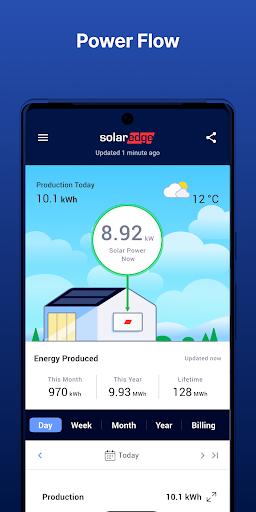
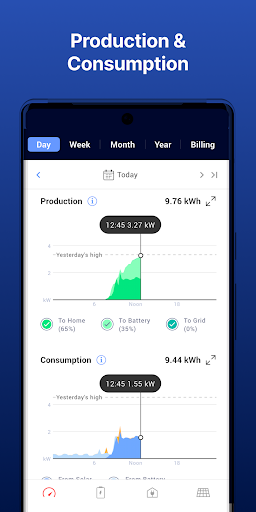
Picture checking the system while making breakfast, then taking another look after getting home. mySolarEdge is built for those small check-ins: it lets SolarEdge system owners track energy production and use in real time, so the app can help answer the everyday question of what the system is doing right now. I like that the central job is easy to grasp. It is a place to look, not a project that demands a long session.
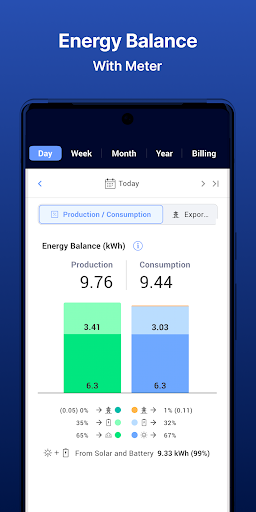
The usefulness depends on what equipment and permissions are in place. Monitoring access needs to be arranged with the installer, and viewing energy consumption requires a consumption meter. With those pieces available, I can see this fitting naturally into a routine: glance at production when the sun is out, check usage when household demand changes, and keep moving. If the app does not show the data you expect, those requirements are worth checking before assuming the system is misbehaving.
A system companion, not a utility
Compared with checking a bill or using a general smart-home app, mySolarEdge has a narrower purpose. It focuses on a SolarEdge energy setup, including production and usage monitoring, compatible smart-home controls, and remote management of SolarEdge EV charging. That makes it a useful companion for an owner who wants several system-related tasks together, but it is not a substitute for an electricity provider’s account tools or a universal controller for every device at home.
I would also separate monitoring from deeper troubleshooting. The app can show inverter status and provide step-by-step troubleshooting instructions for SetApp-enabled inverters, and it can help set up inverter communication and network settings for those inverters. That is practical, but it does not turn the phone into an installer’s complete service toolkit. Its scope is the SolarEdge system and supported features, so it makes most sense when that is already part of daily life.
Make the check-in useful
A small habit can make a monitoring app more useful than an occasional curiosity. I would check production at a consistent time, then compare it with another point in the day rather than reading too much into one moment. The app’s real-time view is meant to make those checks convenient. Over time, noticing ordinary patterns can help a household understand when its system is producing and when its energy use is higher.
I would keep the setup requirements in mind before building a routine around consumption figures. A consumption meter is required for energy usage monitoring, while installer-granted permissions are needed to monitor the site. If those are in place, the app also offers ways to identify opportunities to be more energy efficient. Owners with a Wear OS device such as a Pixel Watch can monitor and control their site there as well, which may suit quick checks away from the phone.
More From Our News Desk

Zoom Meetings, Google Meet, or Teams: Which Is Easiest to Join?

How I Build a Free Streaming Lineup With Tubi

Why Crunchyroll Is the Default Anime App for So Many Fans

YouTube TV: A Practical Guide to Cutting Cable

Rummikub and the Small Comfort of Phone Games

TeamViewer Remote Control or AnyDesk for Helping Family?
Who will get the most from it
I would recommend mySolarEdge to people who already have a SolarEdge system and want a straightforward mobile view of production, with usage monitoring when their setup supports it. It may be especially handy for owners who also use compatible SolarEdge smart-home features or manage SolarEdge EV charging remotely. The appeal is practical: check the system, understand its activity, and access certain controls without treating every question as a service visit.
It may be a poor fit if you do not have a SolarEdge system, expect a single app to manage every brand of home device, or mainly want to review utility billing. Some monitoring depends on permissions from the installer, and consumption data needs a meter. I would also not choose it expecting detailed inverter troubleshooting on every installation, since the described status and setup tools apply to SetApp-enabled inverters.
mySolarEdge is a free Tools app from SolarEdge Technologies. Google Play shows over 1 million installs and a 3.9-star rating from around 194,000 ratings. The app is rated Everyone. Its store details give version 3.6.1.3060102, a release date of November 10, 2019, and a last update date of October 21, 2026.
There is no purchase price, and the app does not contain ads or offer in-app purchases. The Android version requirement is worth checking on Google Play for the device you plan to use. Compatibility can matter with an energy system’s equipment and features, so I would also confirm the relevant SolarEdge setup and monitoring access before relying on a particular view or control.
A closer look at the solar dashboard
First look and setup
When I first opened the idea of mySolarEdge, what stood out was its clear assignment: it is for managing and monitoring SolarEdge smart energy devices. That focus should be welcome if you already own the system and simply want a phone-friendly way to see what it is doing. Rather than trying to be a broad home-energy encyclopedia, the app centers the relationship between your system, production, and everyday use.
The important setup detail is access. Monitoring permissions have to come from the installer, so having the app alone does not necessarily put site data in view. I would treat that as part of getting started, not as a surprise after a week of expecting figures to appear. Consumption monitoring has a separate hardware requirement: a consumption meter. Knowing these prerequisites early helps set realistic expectations for the first session.
Everyday monitoring
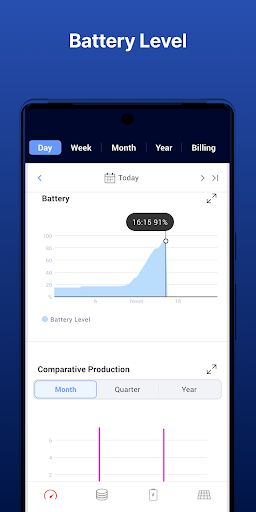
The core experience is checking energy production and use in real time through a mobile-optimized interface. In everyday terms, that means a quick visit when you are curious about current output, or a more deliberate comparison when household energy habits shift. I can see the value in having production and usage in one SolarEdge-focused place, particularly for owners who like to understand how their system fits into the rhythm of the day.
The app also points toward energy-efficiency opportunities, giving the monitoring a purpose beyond watching numbers move. I would use that information as a prompt to notice patterns and ask practical questions about usage, not as a promise of a particular result. Energy consumption data depends on a meter, so the experience can differ by setup. That hardware distinction matters if production appears while household use does not.
Controls beyond production
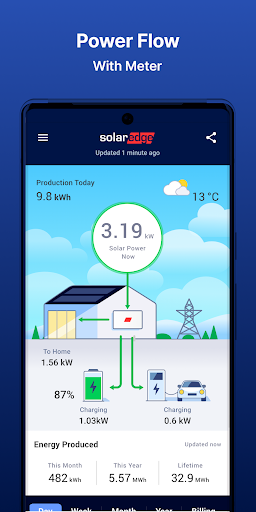
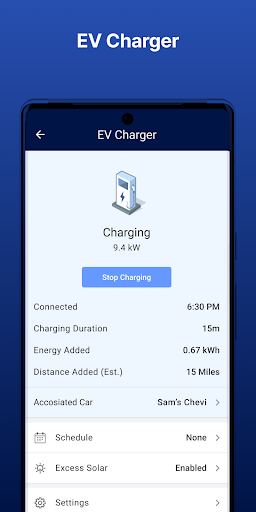
mySolarEdge reaches beyond a read-only dashboard for users with supported equipment. It can control smart-home devices and manage SolarEdge EV charging remotely. Those functions give the app a more active role in a connected energy setup: instead of only checking how the system is performing, an owner can also reach certain related controls from away from home.
There are also inverter tools, but their scope is specific. For SetApp-enabled inverters, the app can show inverter status for quick troubleshooting with step-by-step instructions and readable menus. It can also help set up inverter communication and network settings on those inverters. I appreciate that these are practical additions, while the compatibility boundary keeps expectations grounded.
A simple household routine
A sensible routine might be a quick morning check of production, followed by a later look when you know household demand has changed. I would focus on broad patterns across ordinary days rather than treating every real-time fluctuation as a problem. The app’s monitoring is designed to make those checks mobile-friendly, so this kind of brief look feels like its natural use rather than an elaborate analysis session.
If the household has compatible SolarEdge EV charging or smart-home devices, those controls can become part of the same routine. For example, an owner could check system activity and manage supported charging remotely without switching away from the SolarEdge app. Wear OS support adds another option for monitoring and controlling a site from devices such as Pixel Watch. These uses depend on having the corresponding system and access.
Limits to keep in mind
The biggest limitation is that the app’s value depends on a SolarEdge system and the right permissions. It is not a general solar monitor for unrelated equipment, and monitoring access requires contacting the installer. Some owners may open the app expecting a complete picture of household consumption, only to find that a consumption meter is necessary. Those dependencies are not complicated, but they shape what the app can show.
The inverter troubleshooting and communication setup tools are limited to SetApp-enabled inverters, so they should not be assumed to apply across every installation. Likewise, smart-home and charging controls are relevant when those SolarEdge devices are part of the setup. I see mySolarEdge as a focused companion, not an all-purpose maintenance service or universal control center. That narrower role is useful when it matches your equipment and less compelling when it does not.
mySolarEdge makes the most sense as a convenient window into a SolarEdge system: check production and usage, explore energy-efficiency opportunities, and reach supported controls in one app. Its strongest points are tied to practical day-to-day monitoring, while permissions, a consumption meter, and SetApp compatibility define what is available.
If you own a SolarEdge setup and want mobile access to its activity, I would give it a try. If you are looking for a brand-neutral energy dashboard or broad device controller, this is not the right fit. Check your installer access and system compatibility before expecting every feature to appear.
mySolarEdge Frequently Asked Questions
What is mySolarEdge used for?
mySolarEdge is used to manage and monitor SolarEdge smart energy devices. It can show real-time energy production and, when a consumption meter is in place, energy use. It also supports certain smart-home and SolarEdge EV charging controls, plus specific inverter status and setup tools for SetApp-enabled inverters.
Which phones and devices support mySolarEdge?
mySolarEdge is an Android app available through Google Play. The description also says site monitoring and control are available on Google Wear OS devices such as Pixel Watch. The Android version requirement can vary by release or device, so check the Google Play store details for the phone or watch you plan to use.
What Android version does mySolarEdge require?
The Android version requirement may vary with the app release and your device. Check mySolarEdge’s Google Play store page for the current compatibility details before installing. You will also need an appropriate SolarEdge setup and monitoring permissions from your installer to access site monitoring.
Does mySolarEdge cost money or include purchases?
mySolarEdge is free to download on Google Play. It has no in-app purchases and does not contain ads. System access and feature availability depend on your SolarEdge installation, permissions, and equipment, so those practical requirements are separate from the app’s download price.
Is mySolarEdge suitable for every solar owner?
It is aimed at people with a SolarEdge system, rather than owners of any solar brand. Monitoring access must be arranged with the installer, consumption monitoring requires a consumption meter, and some inverter tools are for SetApp-enabled models. If you do not have a SolarEdge setup, its main features may not suit your needs.
Pros
- Real-time production and usage monitoring brings system checks to a phone.
- Remote controls cover compatible smart-home devices and SolarEdge EV charging.
- SetApp-enabled inverter status and setup tools offer practical support.
- Wear OS support enables site monitoring and control on compatible devices.
Cons
- Monitoring permissions must be arranged with the installer.
- A consumption meter is required to monitor energy usage.
- Some inverter tools only apply to SetApp-enabled inverters.
- Category
- Tools
- Version
- 3.6.1.3060102











