myColorado
- 11.24K
- 4.4
- Installs
- 500.00K
- Price
- Free

Screenshots
Analysis by Reviewed APKs
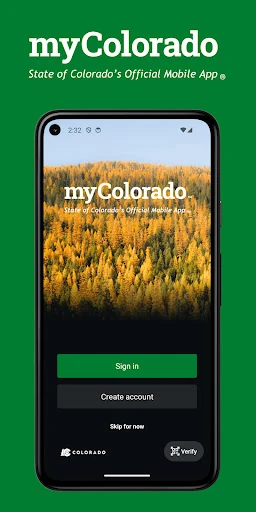
myColorado is Colorado’s state-services app, bringing a digital Colorado ID and several useful state resources together on an Android phone. I can see it fitting best into the routines of Colorado residents who want vehicle documents, a fishing license, or state information close at hand. Its focus is practical rather than broad: it won’t replace every government website, but it can make a handful of everyday tasks easier to reach.
A Useful Errand-Day Companion
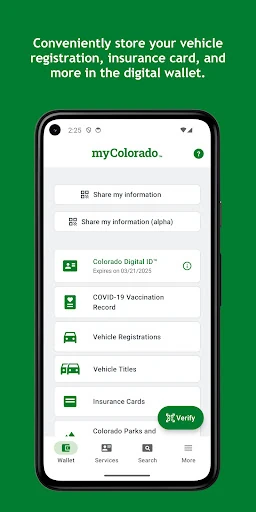
Picture a morning when I’m heading out to fish, then need to stop for an errand on the way home. With myColorado, I can bring up the digital version of my Colorado Parks and Wildlife fishing license and keep vehicle registration and auto insurance information in the app’s digital wallet. That puts several relevant items in one place instead of having to remember which pocket, glove box, or folder holds each one.
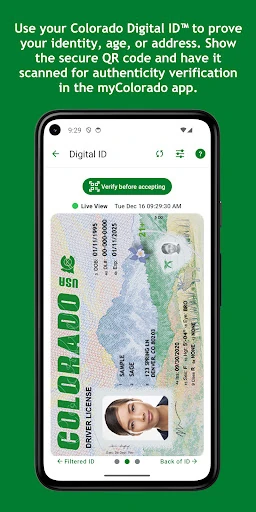
The app’s usefulness is especially clear when I want a quick state-related lookup rather than a long browsing session. I can check sales tax rates for a specific location, browse Colorado state job listings, or connect to other online state services. The digital Colorado ID is another central feature, though an account requires a Colorado driver license or state-issued ID. I’d still keep my physical ID with me: the digital ID is described as a complement for in-state use.
A State App, Not Everything
Compared with opening separate state webpages or keeping document images scattered across my phone, myColorado gives several Colorado-specific resources a shared home. Its strongest appeal is that mix of digital ID, vehicle documents, fishing license access, and state information. It is not a general-purpose wallet for every card or document, and the described features are focused on Colorado rather than services for residents of other states.
I also wouldn’t treat it as a replacement for every in-person interaction or every state service. The app offers ways to connect to online services, but the available description doesn’t say that every task can be completed inside it. Nor is it presented as a general tax-filing, benefits-application, or vehicle-renewal tool. I’d use it as a convenient front door to selected state resources, then follow the relevant service’s process when a task needs more.
Small Habits That Help
The most useful habit is to set up the app before I’m standing somewhere that calls for a document. Since creating an account requires a Colorado driver license or state-issued ID, I’d have that physical card ready during setup rather than waiting until I need the digital ID. I’d also take a moment to add the documents I actually use, such as vehicle registration and insurance, instead of treating the wallet as a place to collect everything.
I’d make a quick check of the relevant item before leaving home, especially for a fishing trip or another outing where a license matters. For information tasks, I’d use the app when I need a Colorado-specific resource, such as a local sales tax rate or state job listing, rather than expecting a stream of personalized updates. The app’s recent changes also make account access more flexible: verification codes can be sent to the account email when the phone is unavailable.
More From Our News Desk

Zoom Meetings, Google Meet, or Teams: Which Is Easiest to Join?

How I Build a Free Streaming Lineup With Tubi

Why Crunchyroll Is the Default Anime App for So Many Fans

YouTube TV: A Practical Guide to Cutting Cable

Rummikub and the Small Comfort of Phone Games

TeamViewer Remote Control or AnyDesk for Helping Family?
Who Will Get the Most From It
I’d recommend myColorado to Colorado residents who want a digital ID alongside their physical card and would use at least one of its other practical tools. Drivers who like having registration and insurance information together, people with a Colorado fishing license, and residents who occasionally look up state services have clear reasons to try it. It has a focused job, and the app makes most sense when those Colorado-specific needs come up in ordinary life.
It may be less compelling if I rarely use state services, prefer paper documents, or expect one app to handle every government transaction. The digital ID account also depends on having a Colorado driver license or state-issued ID, so it is not a universal identity app. I’d keep realistic expectations about what can be completed inside the app: it connects users with state services, but that does not mean every service is fully available there.
myColorado is published by State of Colorado - Governor's Office of IT. On Google Play, it has more than 500,000 installs and a 4.4-star rating from 11,245 ratings. The app is free to download, with no in-app purchases and no ads. Google Play gives it an Everyone content rating, so the store’s age category is broad.
The Google Play version is 12.3, and it requires Android 12 or later. The app was released on January 2, 2019, and its most recent update was January 27, 2026. Recent changes include email delivery of account verification codes when a phone is unavailable, improved navigation in some external-keyboard flows, and crash reductions for uncommon navigation behavior.
A Closer Look at Colorado’s Pocket Toolkit
Getting Started
When I first open a state-services app, I want to know quickly whether it is built for my needs or just a directory of links. myColorado makes its Colorado focus clear: it brings together a digital ID, selected documents, and access to state information. That narrow purpose helps set expectations. I’m not looking for a universal wallet here; I’m looking for a convenient place to reach a few Colorado-specific items.
The digital ID has an important setup condition: users need a Colorado driver license or state-issued ID to create an account. I’d plan for that step before relying on the app for an outing, rather than leaving setup until the last minute. The app’s recent account update is a thoughtful practical detail, too: verification codes can be sent to the account email when the phone is unavailable.
Everyday Use
Day to day, the app’s value comes from having relevant information ready when a small need pops up. I might want my vehicle registration or auto insurance card while dealing with a car-related task, or want the digital fishing license before heading out. Keeping those items in one app is more straightforward than trying to remember where I stored a photo or which website to open.
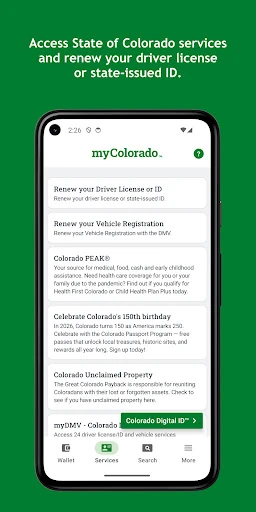
The state-service side is useful in a different way. I can look up Colorado sales tax rates for specific locations, browse state job listings, and connect to other online state services. Those are occasional tasks, not necessarily things I’d check every day. I like that the app combines them with document access, though its appeal will depend on whether those particular tools match my routine.
Features With a Clear Purpose
The digital Colorado ID is the headline feature, but it is described as complementing a physical ID card for in-state use. That distinction matters. I’d appreciate having the digital option available, while still carrying my physical card rather than assuming the phone version replaces it in every situation. Account creation also has a clear eligibility requirement: a Colorado driver license or state-issued ID.
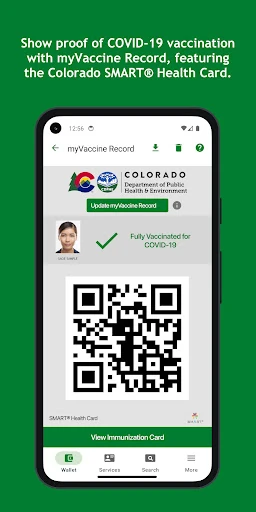
The wallet can hold a digital version of a Colorado Parks and Wildlife fishing license, vehicle registration, auto insurance, and other important documents. The app also includes myVaccine Record for showing proof of vaccination wherever required, plus COVID-19 updates and helpful resources. These features serve different situations, so the app feels like a practical collection of state tools rather than a single-purpose ID viewer.
Beyond documents, the app provides access to state job listings, location-specific sales tax rates, and other online state services. I find that mix more useful than a simple document folder because it gives me a reason to open the app even when I don’t need to present a card. The features are still specifically tied to Colorado, which keeps the app’s role clear.
A Simple Routine
A sensible routine would be to set up my account at home, add the relevant documents, and check that the items I expect to use are there before heading out. For a fishing day, that means checking the digital license; for ordinary driving errands, it means knowing where the vehicle registration and insurance card are. A few minutes of preparation can make the app more useful when I’m away from home.
I’d also treat myColorado as a starting point for state information rather than a reason to stop checking details. If I’m looking up a tax rate or exploring a state service, I can use the app to get to the relevant resource. The same approach works for job listings. It keeps my expectations practical: use the app to find the state tool or document, then handle the task it supports.
Limits to Keep in Mind
The app’s usefulness depends on being a Colorado resident with documents or services that match its features. Someone without a Colorado driver license or state-issued ID cannot create an account for the digital ID, and people outside Colorado are unlikely to get much from the state-specific tools. That focused scope is sensible, but it also means myColorado isn’t a good fit for everyone who wants a digital wallet.
I’d avoid assuming that a digital document will be accepted in every setting, since the digital ID is described as a complement for in-state use and the fishing license as a digital version. Keeping physical documents available is a sensible backup. The app also requires Android 12 or later, which rules out older Android versions. And while it connects to online state services, it doesn’t claim to cover every possible state transaction.
myColorado is a focused, practical app for Colorado residents who want a digital ID option, selected documents, and state resources in one place. I like its mix of everyday items and occasional lookups, especially the vehicle documents and fishing license. It isn’t a substitute for every physical card or government service, but it can make a few recurring errands easier.
I’d recommend giving it a try if you have a Colorado ID and expect to use even one or two of its tools. Before depending on it for a particular situation, I’d keep the physical document handy and check what that setting accepts. For residents outside Colorado or people who rarely use these services, the app’s narrow focus may not justify adding another tool.
myColorado Frequently Asked Questions
What is myColorado used for?
myColorado brings together selected Colorado state resources and documents. It can provide a digital Colorado ID, a digital version of a Colorado Parks and Wildlife fishing license, and a digital wallet for vehicle registration, auto insurance, and other documents. It also offers state job listings, local sales tax rate lookups, COVID-19 resources, and connections to other online state services.
Can I use myColorado on an iPhone or a computer?
The app is made available for Android devices through Google Play. The information provided describes it as an Android app, so I would check the relevant store for current device availability if I use a different platform. For Android, the app requires Android 12 or later.
What Android version does myColorado require?
myColorado requires Android 12 or later. If your phone runs an older Android version, check the Google Play page for current compatibility details before trying to install it. The app’s listed version is 12.3, and it was last updated on January 27, 2026.
Does myColorado cost money?
The app is free to download on Google Play. It has no in-app purchases and contains no ads. Store details can change over time, so I’d check the Google Play page for the latest information before downloading.
Who can use the myColorado digital ID?
Creating an account for the digital ID requires a Colorado driver license or state-issued ID. The digital ID is described as a complement to the physical card for in-state use, so I would keep the physical card available and check what a particular situation accepts. The app is most useful to Colorado residents who will use its state-specific tools.
Pros
- Combines a digital Colorado ID with useful vehicle and fishing documents.
- Includes state resources such as job listings and location-based tax rate lookups.
- Free to download, with no in-app purchases or ads.
- Recent update adds email verification codes when a phone is unavailable.
Cons
- Digital ID account creation requires a Colorado driver license or state-issued ID.
- Requires Android 12 or later, limiting use on older Android devices.
- Focused on Colorado services and does not replace every physical document or state transaction.
- Category
- Business
- Version
- 12.3











