MyChoice Benefits
- 9.10K
- 4.8
- Installs
- 1.00M
- Price
- Free
Screenshots
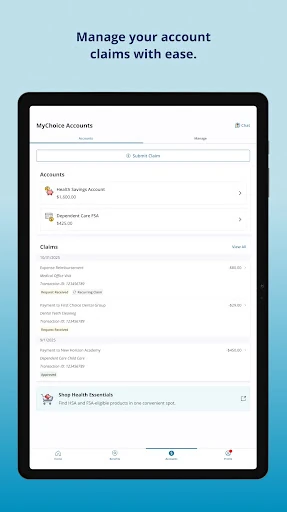
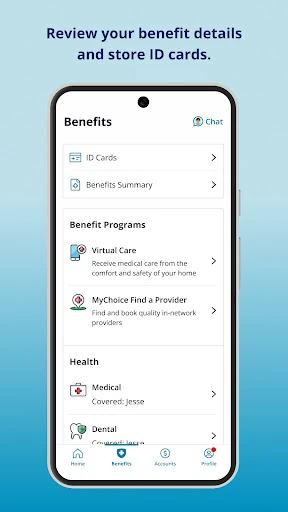
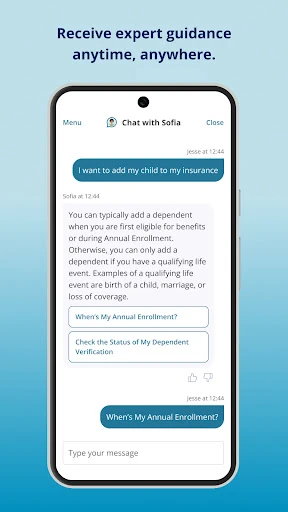
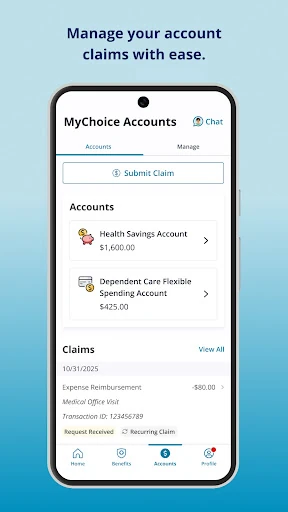
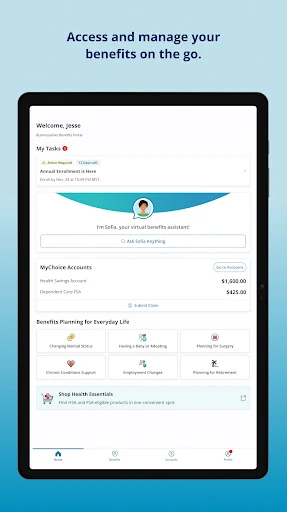
Analysis by Reviewed APKs
MyChoice Benefits is a mobile companion for eligible users who need to check workplace benefit details, act on enrollment tasks, or pull up a carrier ID card while away from home. I see its value in those practical, occasional moments rather than as an app to browse every day. It brings several useful benefits tasks together, though access depends on having the right benefits portal credentials or access code.
Benefits On The Go
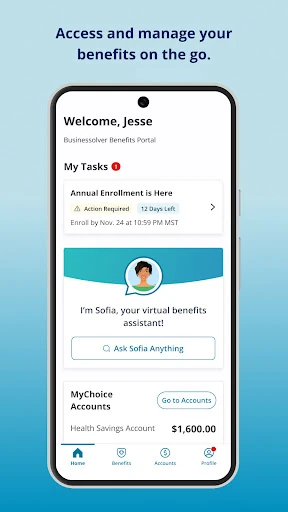
Picture getting a reminder that you need to review a benefit choice while you’re between errands. Instead of waiting until you’re back at a computer, MyChoice Benefits is designed to let eligible users review plan information and start an enrollment or make a change from a phone. That makes the app most useful when a benefits question comes up at an inconvenient time and you want to check the details before deciding what to do next.
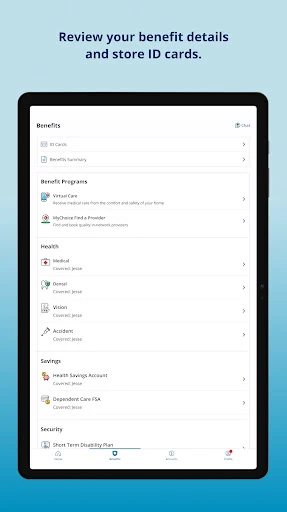
I’d also keep it in mind for the less predictable moment when you’re heading to a doctor’s appointment and realize your carrier ID card is buried in an email or drawer. The app can store carrier ID cards for quick access, and it offers phone or chat help for benefit questions. Those are focused conveniences: the point is to make benefit information easier to retrieve, not to turn a routine visit into a full benefits-planning session.
A Benefits Tool, Not A Bank
The natural comparison is with an employer benefits portal on a desktop. MyChoice Benefits covers some of the same practical ground—plan details, enrollment actions, reminders and help—but puts those tasks on a mobile screen. That can suit a quick check during a busy day. It is still tied to eligible users and their benefits portal, so it is not a general-purpose directory of plans for anyone to browse.
It also isn’t a personal finance or payment app. The job here is to help you access health benefit information, handle available benefit actions and keep carrier cards handy. I wouldn’t choose it for bill payments, spending tracking or unrelated account management. If you only need to make one complicated benefits decision, a phone screen may not replace the fuller view you prefer on a computer; the app’s strength is convenient access, not a promise to make every choice effortless.
Small Habits That Help
A useful habit is to check the app when a benefits reminder arrives instead of leaving it for later. Important notifications and emails are part of the experience, and reminders can point out when action is needed. I’d use that prompt to review the relevant plan information, then decide whether an enrollment action or a question for support makes sense. That keeps the app attached to real tasks rather than adding another screen to check without a reason.
After logging in, it’s worth making sure the carrier ID cards you rely on are available in the app before you’re rushing out the door. I’d also keep the benefits portal login details close at hand: if you don’t already have a username and password, the app’s instructions direct you to retrieve an access code through the benefits portal. For questions that remain, the phone and chat help options give you a route to assistance.
More From Our News Desk

Zoom Meetings, Google Meet, or Teams: Which Is Easiest to Join?

How I Build a Free Streaming Lineup With Tubi

Why Crunchyroll Is the Default Anime App for So Many Fans

YouTube TV: A Practical Guide to Cutting Cable

Rummikub and the Small Comfort of Phone Games

TeamViewer Remote Control or AnyDesk for Helping Family?
Who Gets The Most From It
I’d recommend MyChoice Benefits to eligible employees who want a mobile way to check benefit information, respond to an enrollment task or keep carrier ID cards easy to find. It is especially relevant if you occasionally need to look something up away from a computer. The combination of plan details, action reminders and support options gives it a clear purpose, even for someone who only opens a benefits app a few times a year.
It may be less useful if you aren’t eligible for the benefits portal it serves, or if you expect a broad personal finance app rather than a workplace benefits companion. It also may not suit someone who prefers to handle every benefits decision on a larger screen. I’d treat it as a convenient mobile access point, with the understanding that you need portal credentials or an access code to get started.
MyChoice Benefits is developed by Businessolver and is available on Google Play for Android. The app has more than 1 million installs and a 4.8-star rating from 9,096 ratings. Its Google Play content rating is Everyone. These figures give a sense of its reach and user response, though ratings are only one part of deciding whether a benefits app fits your own employer’s setup.
The app is free to download, with no in-app purchases or ads. The supplied version is 3.5.7. It was released on February 17, 2017, and its most recent update is dated October 8, 2026. The minimum Android version is not stated in the available details, so check the Google Play page on your device for current compatibility information.
A Closer Look At Everyday Benefits Tasks
Getting Started
My first impression is that MyChoice Benefits has a narrow, useful brief: make benefit information and actions easier to reach from a phone. The description emphasizes straightforward navigation, important notifications and emails, rather than a long list of unrelated tools. That focus is welcome in an app you may open only when a reminder arrives or a practical question comes up.
The setup detail that matters most is access. You can try your username and password from the benefits portal; if you don’t have those credentials, the app’s guidance says to retrieve an access code by logging into the portal and finding the MyChoice Mobile App logo. That extra step can interrupt a quick first visit, so I’d sort out portal access before you need the app in a hurry.
The Day-To-Day Job
Once you’re in, the everyday value is having plan details and benefit information available when you need to check them. I can see myself opening it to answer a small question before taking a next step, rather than trying to remember what a plan covers from a conversation weeks ago. The app is aimed at eligible users, so the information and actions relate to the benefits available through their portal.
The mobile format makes particular sense for short visits. You can review benefit details, look for an important reminder or access a stored carrier ID card without waiting until you’re at a desk. I wouldn’t expect every task to become a daily routine. Benefits needs tend to come in bursts, and the app’s usefulness is in being available during those moments rather than demanding constant attention.
Useful Features In One Place
The feature set joins several related tasks: reviewing plan information, starting an enrollment or changing benefits, and keeping carrier ID cards accessible. That range makes the app more than a static place to read about coverage. When an action is available, the app is meant to offer a direct route to it, while reminders can flag when it is time to pay attention.
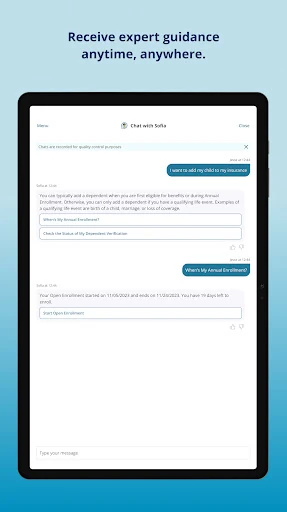
I also like that help is part of the stated experience. MyChoice Benefits offers phone or chat support for benefit questions, which is a practical complement to checking details on your own. Important notifications and emails add another way to stay aware of action items. These features are most compelling together: find the relevant information, notice what needs attention and seek help if something still isn’t clear.
A Practical Check-In
A sensible routine would be to open MyChoice Benefits when a benefits notification arrives, read the reminder and look up the related plan details. If the reminder calls for action, you can use the app to start an enrollment or change benefits where that option applies. If you need clarification, phone or chat support is available for benefit questions. That sequence gives each part of the app a concrete job.
I’d also check that the carrier ID cards I might need are stored before an appointment, rather than trying to find them while getting ready to leave. Once that is done, the app can stay out of the way until a new question or reminder appears. For a benefits tool, that’s a reasonable rhythm: get the essentials ready, then return when there’s a specific reason.
Limits To Keep In Mind
The biggest practical limit is eligibility and access. This isn’t an open benefits browser; it is for eligible users, and using it requires a username and password from the benefits portal or an access code retrieved there. If you don’t have portal access ready, the app may not help much in the moment you first need it. I’d confirm your login route in advance.
The app’s focus is also deliberately specific. It helps with benefit details, enrollment actions, reminders, ID cards and benefit questions; it is not described as a tool for broader financial tasks. And while mobile access is handy for a quick check, some people will still prefer a larger screen when reviewing a decision carefully. I’d use it as a companion to your benefits portal, not assume it replaces every way you manage benefits.
MyChoice Benefits has a clear role: give eligible users a phone-friendly way to review benefits, act on available enrollment tasks, keep carrier cards close and find help. I like that the features connect to real, occasional needs instead of trying to make benefits management feel like a daily hobby. Getting access sorted out first is the main bit of preparation.
I’d recommend it if your benefits are supported and you want quick mobile access to the essentials. If you prefer to handle everything on a desktop, or don’t have access to the relevant benefits portal, it may offer less value. For the intended audience, it is a practical companion worth keeping available when a benefits question crops up.
MyChoice Benefits Frequently Asked Questions
What is MyChoice Benefits used for?
MyChoice Benefits is for eligible users who want to review benefit details and plan information, start an enrollment or change benefits, notice important reminders, store carrier ID cards, and find phone or chat help with benefit questions. It is a workplace benefits companion rather than a general-purpose finance app. The exact actions available depend on the benefits access provided through your portal.
Which devices can run MyChoice Benefits?
MyChoice Benefits is available on Android through Google Play. The minimum Android version can vary with app updates and device compatibility, so check the Google Play page from the device you plan to use. Access also depends on having eligible benefits and the login details or access code associated with your benefits portal.
Does MyChoice Benefits cost anything?
The app is free to download on Google Play. The supplied app details say it has no in-app purchases and contains no ads. Your access to benefits themselves is tied to eligibility and your benefits portal, so downloading the app does not by itself establish what benefits are available to you.
How do I log into MyChoice Benefits?
Try the username and password used for your benefits portal. If you don’t have those credentials, the app’s instructions say to log into the benefits portal and find the MyChoice Mobile App logo to retrieve an access code. If you run into trouble, the app description provides an email contact for help.
Is MyChoice Benefits right for me?
It may suit you if you are an eligible user who wants to check benefit details, act on enrollment tasks, keep carrier ID cards handy or find help from a phone. It may be less useful if you don’t have access to the relevant benefits portal or want an app for unrelated financial tasks. Eligibility is the key consideration.
Pros
- Combines plan details, enrollment actions, reminders and carrier ID cards for eligible users.
- Offers phone or chat help for benefit questions.
- Useful mobile access for quick checks away from a computer.
- Free to download, with no ads or in-app purchases.
Cons
- Requires eligibility and access through a benefits portal.
- New users may need to retrieve an access code before logging in.
- Its focused benefits role may not replace a larger-screen review.
- Category
- Business
- Version
- 3.5.7











