My Red Lobster Rewards
Listed on Google Play as “Red Lobster Dining Rewards App”
- 17.35K
- 4
- Installs
- 1.00M
- Price
- Free
Screenshots
Analysis by Reviewed APKs
Red Lobster Dining Rewards App is a companion for people who eat at Red Lobster and want to keep their loyalty points, offers, and rewards together. It also helps with practical visit planning, including finding locations and checking hours. I like that the rewards can be saved until I choose to use them, though the app’s usefulness is naturally tied to dining at this one restaurant.
A Visit That Adds Up
Imagine I’m meeting family for dinner and know we’ll be ordering enough to make a future reward worthwhile. Before leaving, I can open the app to check my rewards and look for a nearby Red Lobster. The location information and hours help with the simple logistics, while the rewards section gives me a reason to keep the app around after the meal rather than deleting it between visits.
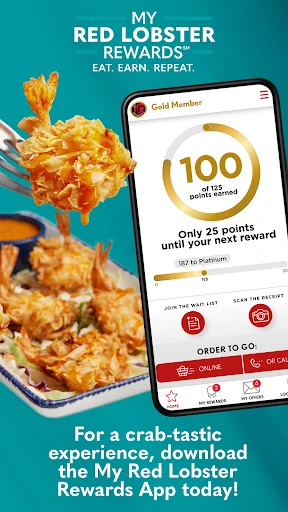
After paying, I can scan a photo of the receipt in the app if I forgot to check in, or link my account so qualifying food and beverage purchases count toward points. The stated earning rate is one point per dollar. That turns a small, often-forgotten after-dinner task into a way to keep my balance moving without relying on memory.
A Restaurant-Specific Companion
This is more focused than a general dining or restaurant-discovery app. Its main job is to support Red Lobster visits: track points, keep earned rewards and offers handy, and help locate a restaurant or make a reservation. If I already know where I want to eat, the app can make the loyalty side of that routine easier to manage.
It is not a broad restaurant guide, and its rewards do not apply to other chains. The program is described as valid at participating Red Lobster locations in the U.S., so its value depends on having access to those restaurants and choosing to dine there. For someone comparing many places to eat or tracking several unrelated loyalty programs, this app is only one narrow piece of the picture.
Make Points a Habit
The easiest workflow is to check the app before a visit, then make sure the purchase is connected to the account. Linking an account or scanning the receipt gives me a backup when I miss a check-in. I’d also take a quick look at the rewards balance after the visit, while the receipt is still easy to find, rather than leaving it for some vague later.
It helps to think about redemption before the bill arrives. The app lets members convert points at 100, 150, or 200 points into $10, $15, or $20 off, respectively. Since I can choose when to redeem, I can save toward a larger reward or use one sooner. Keeping earned rewards and offers in the app wallet makes that decision easier at the restaurant or when ordering online.
More From Our News Desk

Zoom Meetings, Google Meet, or Teams: Which Is Easiest to Join?

How I Build a Free Streaming Lineup With Tubi

Why Crunchyroll Is the Default Anime App for So Many Fans

YouTube TV: A Practical Guide to Cutting Cable

Rummikub and the Small Comfort of Phone Games

TeamViewer Remote Control or AnyDesk for Helping Family?
Who Will Get the Most From It
I’d recommend Red Lobster Dining Rewards App to regular or occasional Red Lobster diners who want a straightforward place to follow points and keep rewards available. It is especially handy if I sometimes forget to check in, since receipt scanning offers another way to claim qualifying purchases. Location details, hours, and reservations also make it more useful than a points counter alone when I’m planning a visit.
It may not be worth keeping for someone who rarely visits Red Lobster, prefers one general-purpose app for every restaurant, or has no interest in loyalty rewards. The app is centered on a single chain, and its earning and redemption benefits depend on qualifying purchases and program terms. I’d treat it as a useful companion to a dining habit, not as a reason by itself to choose where to eat.
Red Lobster Dining Rewards App is a free Food & Drink app from My Red Lobster Rewards. Google Play shows over one million installs and a 4.0-star rating from around 17,000 ratings. The app is rated Everyone. Those figures give a quick sense of its reach, but the practical appeal will depend more on how often someone visits participating Red Lobster locations.
The supplied app details identify version 2.0.1, with an original release date of September 1, 2016, and a last update date of October 3, 2026. The app is free, with no in-app purchases or ads indicated in the provided facts. The minimum Android version is not included in those facts, so it is best to check Google Play for device compatibility.
How the Rewards Fit Into a Visit
A Clear First Impression
When I first opened the app, the purpose felt easy to understand: it is there to connect Red Lobster visits with points and rewards. I wouldn’t expect to spend much time learning a complicated system. The central idea is practical—earn points on qualifying purchases, keep track of them, and decide when a reward is useful.
The setup matters most if I want purchases to count reliably. The app describes linking an account as one way to connect visits, and scanning a receipt as another. I like having that fallback, because it covers the familiar situation where dinner is over and I realize I never checked in. The exact steps may depend on how I use my account, but the two routes are clearly explained.
The Everyday Rewards Loop
Day to day, the core experience is a small loop: visit, earn points, check the balance, and redeem when ready. The app says each dollar spent earns a point on qualifying food and beverage purchases. That makes progress relatively easy to understand, even if I only look at the balance occasionally rather than monitoring it after every meal.
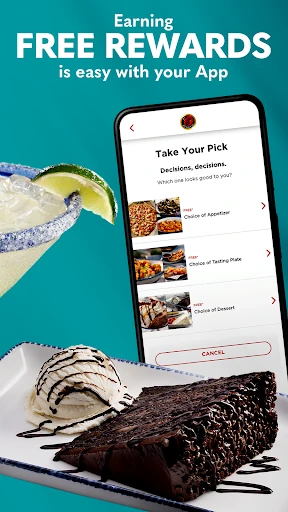
I appreciate that points do not have to be turned into a reward at the first opportunity. The listed milestones are 100 points for $10 off, 150 for $15 off, and 200 for $20 off. I can choose a timing that suits the next meal, instead of treating the first available redemption as an automatic decision.
A Wallet With Useful Extras
The wallet is the part I’d expect to revisit most. Earned rewards and exclusive offers are gathered in one place, and the app describes an Apply action that brings up a code to present at a restaurant or enter online. It also says multiple earned rewards can be used on a single check, as long as their total does not exceed the subtotal.
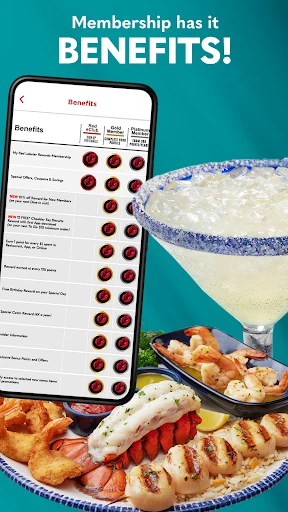
There are a few welcome and birthday perks as well. New members are offered 20% off an order of $30 or more, with a maximum discount of $30 and restrictions applying. Members who sign up at least 10 days before their birthday and include their birth date can receive a birthday reward for a free appetizer or dessert. The terms are worth reviewing before counting on either offer.
A Simple Before-and-After Routine
For a planned dinner, I’d use the app before heading out to find a Red Lobster, check its hours, or make a reservation. Once I’m there, I’d keep the account connection in mind while ordering. That takes the app from an occasional rewards checker to a modest part of planning the meal, without requiring me to keep it open throughout dinner.
After paying, I’d scan the receipt promptly if the visit has not already been connected. Later, I could check the wallet and decide whether to save points or apply a reward to a future check. For pickup or delivery, the description says those visits can count too, so the same habit can cover meals that do not involve sitting down in the restaurant.
Keep the Scope in Mind
The main limitation is also the app’s defining focus: this is a Red Lobster loyalty app, not a general food planner or multi-chain rewards hub. If I visit the restaurant only once in a while, the points and offers may not give me much reason to check in often. Its usefulness rises naturally with the number of qualifying visits.
Program details also have boundaries. Rewards are described as valid at participating U.S. locations, points apply to qualifying food and beverage purchases, and offers can have restrictions. I would read the terms for a particular promotion instead of assuming every item, visit, or location qualifies. That is a sensible caveat for any loyalty program, and it keeps expectations grounded.
Red Lobster Dining Rewards App does a focused job: it helps diners earn and manage rewards while adding location, hours, and reservation tools for planning a visit. I found the receipt-scanning option and choice of redemption timing especially practical. It is not an essential download for everyone, but it makes sense if Red Lobster is already part of my routine.
I’d try it if I visit the chain often enough to make points and offers worthwhile, and I’d check the terms before relying on a specific perk. If I rarely eat there or want one app for many restaurants, I’d skip it. For its intended audience, it is a convenient loyalty companion rather than a complete dining guide.
Red Lobster Rewards Frequently Asked Questions
What is Red Lobster Dining Rewards App used for?
Red Lobster Dining Rewards App helps members earn points on qualifying food and beverage purchases, track their balance, and keep rewards and offers together. It can also scan receipts, find Red Lobster locations, check hours, and make reservations. Points can be converted into rewards at stated milestones, and the app can show a code to use at a restaurant or online.
What devices can I use Red Lobster Dining Rewards App on?
The supplied information describes an Android app available through Google Play. It does not give a minimum Android version, so compatibility can depend on the device and may change over time. I’d check the Google Play store entry from the device I plan to use for current requirements and availability.
Does Red Lobster Dining Rewards App cost anything?
The app is free to download, and the supplied facts indicate no in-app purchases and no ads. Its rewards are part of the restaurant loyalty program, with qualifying purchase requirements and offer restrictions. Specific terms can vary by reward or promotion, so I’d check the app or Google Play details before making plans around an offer.
How does earning and redeeming work in Red Lobster Dining Rewards App?
The app describes earning one point per dollar on qualifying food and beverage purchases, whether dining in, picking up, or getting delivery. Members can link an account or scan a receipt. The stated redemption options are 100 points for $10 off, 150 for $15 off, and 200 for $20 off. Program terms and participation can affect eligibility.
Who should use Red Lobster Dining Rewards App?
It is best suited to people who visit Red Lobster and want an easy way to follow points, use offers, and plan a restaurant visit. Someone who rarely eats there or wants a rewards app for multiple chains may get less value from it. Rewards are described for participating U.S. locations, and individual offers may have restrictions.
Pros
- Receipt scanning offers a backup for visits I forgot to check in for.
- Flexible redemption lets members choose when to use their points.
- Rewards, offers, location details, hours, and reservations sit in one restaurant-focused app.
- Pickup and delivery purchases can count alongside dining in.
Cons
- Its loyalty benefits are limited to qualifying Red Lobster purchases.
- Offers and rewards have participation rules and restrictions to keep in mind.
- The minimum Android requirement is worth checking before installing.
- Category
- Food & Drink
- Version
- 2.0.1











